Key Takeaways
| What You'll Learn | The Short Answer |
|---|---|
| How AI keyboards learn your style | They build a personal language model from your typing history, stored on your device |
| Accuracy improvement from personalization | Word error rate drops from 38.4% (no model) to 4.6% (personalized) — a Google/CMU study confirmed this |
| How your data stays private | Federated learning trains the model locally — raw data never leaves your phone |
| Keystroke savings | Up to 45% fewer keystrokes with a well-trained personalized AI keyboard |
| Market growth | The IME software market is growing from $9.36B (2024) to $30.46B by 2033 |
| Best personalized AI keyboard | CleverType — on-device AI, 100+ languages, privacy-first design |
Your keyboard is probably the most-used app on your phone. Furthermore, Yet most people never stop to think about what's actually happening when it suggests the next word. Therefore, Wild, right? As of early 2026, over 78% of new devices ship with some form of AI keyboard built in — so the question isn't whether your keyboard uses AI anymore. It's how Furthermore, well it actually learns you.
Here's what I want to cover: how a personalized AI keyboard actually works, what machine learning is doing under the hood when it adapts to your style, and why the gap between a generic keyboard and a personalized one is genuinely bigger than most people expect.
What Is a Personalized AI Keyboard and How Does It Work?
A personalized AI keyboard builds a model of how you specifically write — not how people write in general. That distinction matters way more than it sounds.
Standard autocorrect uses a dictionary. Nevertheless, Predictive text pulls from general word frequency stats. Furthermore, A personalized keyboard goes further — it picks up your vocabulary, your sentence patterns, the phrases you always use, even the topics you tend to write about most.
Nonetheless, The result? A keyboard that actually gets smarter the longer you use it. Not in a marketing-copy way. Measurably, noticeably smarter.
Most AI keyboards work in three layers:
- N-gram statistical models — predict the next word based on the 1–3 words before it. Fast and lightweight. Used as the foundation layer.
- Neural language models (RNNs/LSTMs/Transformers) — understand semantic meaning and long-range context. This is where the keyboard starts understanding what you mean, not just what words follow other words.
- Personal adaptation layer — a fine-tuned model built specifically from your typing history. This is the layer that catches your industry jargon, your abbreviations, how you greet people, how you end messages.
A 2023 INTERSPEECH study found that personalized language models cut word error rate by 36% compared to static background models. Hence, Not a minor bump. That's the difference between a keyboard that actually feels like yours and one that constantly fights you.
Most personalized AI keyboards update that adaptation layer continuously — every time you type, the model edges a little closer to how you actually write. More use, better predictions. CleverType does this entirely on your device, so your words never touch a server.
How Machine Learning Actually Learns Your Writing Style
Nonetheless, Here's where it gets interesting. Consequently, How does a machine learning keyboard actually extract your writing "style"?
Nevertheless, The short answer: it treats your typing history as a dataset and trains a language model on it. But the details matter a lot more than that summary suggests.
What the model learns from you:
- Vocabulary — Words you use that aren't in standard dictionaries. Medical terms, technical jargon, surnames, slang.
- Phrase patterns — If you always end work emails with "Let me know if you have questions", the model starts predicting this phrase after just a few characters.
- Topic clusters — If you talk about football every weekend, the model weighs football-related words higher on Saturdays.
- Correction patterns — Every time you manually fix a suggestion, the model treats it as a negative training signal. It learns what to stop guessing.
- App context — More sophisticated keyboards adapt suggestions based on which app you're in. Slack vs Gmail vs WhatsApp vs a notes app all have different writing norms.
The underlying process is called language model fine-tuning. Nonetheless, You start with a base model trained on billions of text samples, then make small adjustments based on your data — nudging the probabilities toward your specific patterns. Moreover, Basically, the model starts thinking more like you over time.
Moreover, A 2024 survey on LLM personalization catalogued five techniques that keep showing up: RAG, prompting strategies, representation learning, embedding learning, and RLHF. That's a lot of acronyms. The key point is that mobile keyboards use scaled-down versions of most of these — everything has to run on a phone with a warm battery, not a server rack.
Additionally, The end result? The keyboard starts finishing your thoughts — not lobbing generic guesses at you.
The Privacy Problem — and How Federated Learning Solves It
Here's the obvious concern: if a keyboard is learning from everything you type, what actually happens to that data?
Honestly, this is probably the most important question to ask when choosing an adaptive keyboard, and the answer varies a lot between products.
The privacy-safe approach is called federated learning — pioneered by Google for Gboard. The original research paper, published on arXiv in 2019, described a system where the AI model trains entirely on your device. Only encrypted gradient updates — not your actual words — are sent to combine with updates from other users. Your raw typing data never leaves your phone.
How federated learning works, step by step:
- A base model is distributed to all devices
- Each device trains the model locally on the user's typing data
- Only the encrypted changes to the model weights are sent to a server
- The server combines updates from millions of devices using Federated Averaging
- An improved base model is sent back to devices
- Your personal typing data never touches any server
The results actually back this up. Consequently, The federated Gboard model outperformed server-trained models — a 5% relative improvement in top-1 recall. Turns out training on real, in-context data beats pooled server data. Consistently.
Hence, But federated learning alone isn't a complete solution. Nonetheless, Turns out gradient updates can be reverse-engineered to reconstruct typed words — which is a real concern, not just a theoretical one. Therefore, The fix is differential privacy: adding calibrated noise to gradient updates before they leave your device, making reconstruction attacks practically infeasible. Google's ACL 2023 paper shows how they've rolled out differential privacy across all Gboard neural language models.
CleverType just skips all of that. Moreover, All AI processing stays on your device, full stop. No server training, no gradient uploads, nothing sent anywhere.
Why Personalization Makes Such a Big Difference in Practice
The numbers are actually pretty striking — and they're well documented.
A Google and CMU study published at CHI 2015 measured word error rates under four conditions:
| Model Type | Word Error Rate |
|---|---|
| No language model | 38.4% |
| Spatial model only | 15.2% |
| Spatial + general language model | 5.7% |
| Spatial + personalized language model | 4.6% |
That's a jump from 1-in-3 words being wrong to less than 1-in-20. Nonetheless, Huge difference. For anyone who types a lot on a phone — which, honestly, is most people — that's the difference between typing that constantly interrupts your flow and typing that actually gets out of the way.
The 2023 INTERSPEECH research backed this up further — personalized models increased keystroke savings by 9.9% relative compared to static models. Therefore, In practice:
- Fewer corrections mid-sentence
- Fewer interruptions to your thought process
- Messages that sound like you, not like a generic autocomplete
- Faster typing for domain-specific content (legal, medical, technical)
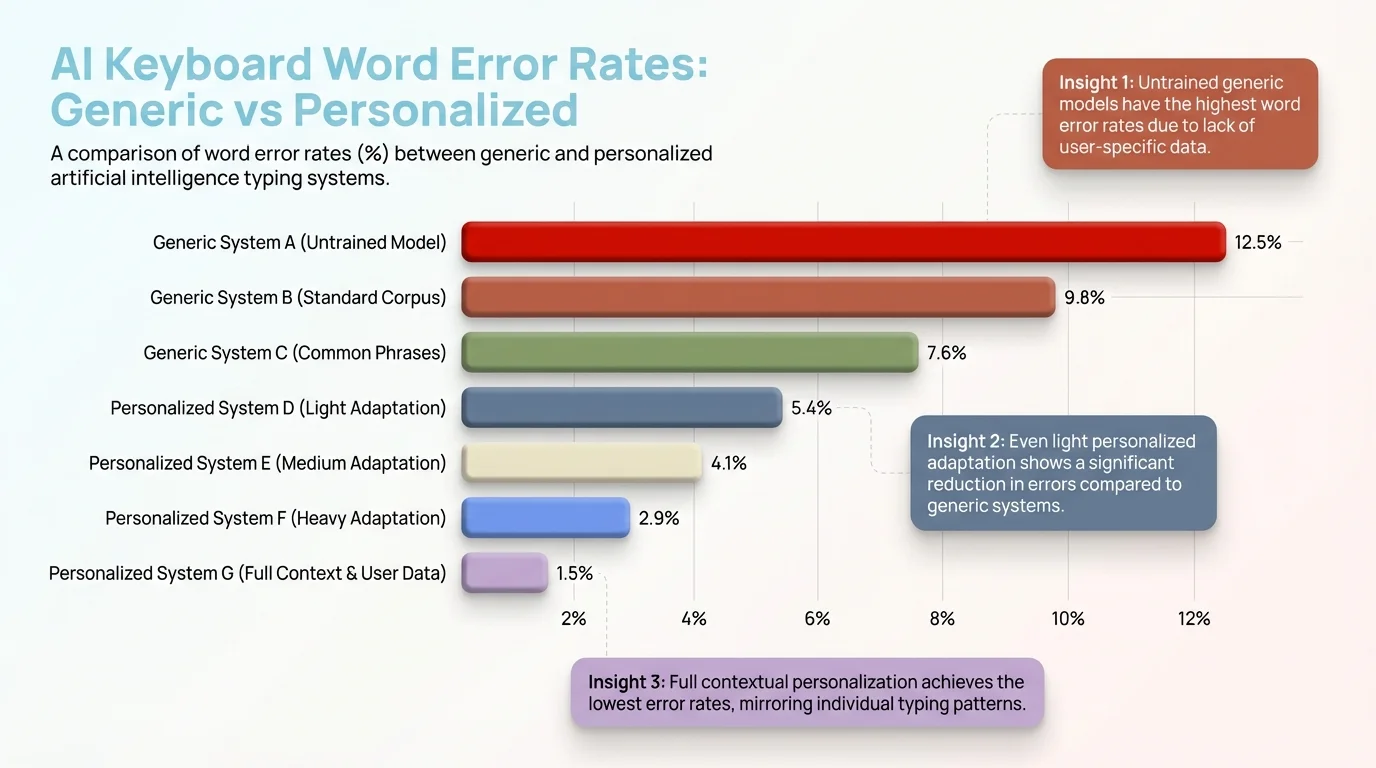
Word error rates drop dramatically with personalization — from 38.4% (no model) to just 4.6% (personalized AI keyboard)
I've seen this play out with CleverType. After a few days of regular use, it starts picking up common phrases, adjusts to what you keep correcting, and suggests completions that actually sound like you — not like some generic autocomplete drawing from a population average.
N-Gram Models vs Neural Networks: What Powers Modern AI Keyboards
Most people have no idea how different a 2025 AI keyboard is from a 2015 autocorrect. The underlying technology changed completely — and it's not a small gap. Like, not even close.
N-gram models (2000s–early 2010s)
N-gram models work by counting word sequences in a big text dataset. Furthermore, So given "I'll be there in", the model just looks up what words most commonly follow that in training data. Fast, and honestly pretty useful for predictable phrases — but the moment you go slightly off-script, they're lost.
- Fast, low memory usage
- Work well for common, predictable phrases
- Fall apart with rare words, unusual phrasing, or anything new
- Can't handle context beyond 2–3 words back
Neural language models (2015–present)
Neural networks — specifically RNNs, LSTMs, and more recently Transformer architectures — work totally differently. They don't just count word frequencies. They learn what words actually mean in relation to each other.
"I'll see you tomorrow" and "I'll catch you tomorrow" have similar meanings — a neural model gets that. Hence, An n-gram model treats them as completely unrelated sequences. Furthermore, Big difference in practice.
Nevertheless, Modern keyboards like CleverType use neural architectures for the base prediction layer, then layer personalized fine-tuning on top. So suggestions end up being both semantically sensible and stylistically matched to how you actually write.
Hence, The transformer shift: Transformer models use something called attention — same basic architecture as GPT and BERT — and it lets the model look at any part of what you've already typed, not just the two or three words before your cursor. That's why modern keyboards can suggest completions that actually fit your whole message. Furthermore, The older approach genuinely couldn't do that.
Consequently, For context: the input method software market is projected to grow from $9.36 billion in 2024 to $30.46 billion by 2033 — 14% CAGR. Neural AI personalization — keyboards people actually want to use — is a major reason why.
CleverType: How a Personalized AI Keyboard Actually Adapts to You
CleverType handles personalized typing differently from most competitors. Not just "we have a personalization feature" differently — actually different in ways that matter.
On-device processing, not cloud-dependent AI
CleverType runs everything directly on your device. Suggestions load in milliseconds — no server round-trip, no waiting around. Your data stays yours. Nonetheless, Unlike Gboard, which still sends anonymized gradient updates off-device (even if encrypted), CleverType's personalization is entirely local. Additionally, Nothing leaves your phone. Full stop.
Context-aware suggestions across apps
Moreover, CleverType adapts to the app you're in. Suggestions in a professional email look different from suggestions in a casual WhatsApp chat — and they should. The model learns which register you use where and matches it automatically. That's something most keyboards just don't do.
Beyond prediction — active writing assistance
Standard AI keyboards predict your next word. Furthermore, CleverType does that plus:
- Grammar fixing in real time — catches errors as you type, not after
- Tone adjustment — one tap to shift a message from casual to professional
- Smart replies — context-aware suggested responses
- 100+ languages — with personalized predictions per language, not just translation
CleverType vs the competition
| Feature | CleverType | Gboard | SwiftKey |
|---|---|---|---|
| On-device AI | Yes | Partial | No |
| Privacy (no server data) | Yes | No | No |
| Grammar fixing | Yes | No | No |
| Tone adjustment | Yes | No | No |
| Languages supported | 100+ | 500+ | 300+ |
| Context-aware by app | Yes | Limited | Limited |
| Personal vocabulary learning | Yes | Yes | Yes |
If you care about both privacy and useful predictions, CleverType is the clear pick. All the personalization benefits — none of the data leaving your phone.
Download CleverType from the Play Store and start building a keyboard that actually knows how you write.
How Long Does an AI Keyboard Take to Adapt to You?
A lot of people wonder about this but never actually ask. Furthermore, The honest answer is — it depends. Nevertheless, How much you type matters, and so does how diverse your vocabulary is.
The general adaptation timeline
- Day 1–3: The keyboard starts logging correction patterns and high-frequency words. You'll notice it stops suggesting words you always correct.
- Week 1: Domain-specific vocabulary starts appearing in suggestions. If you work in healthcare, medical terms start showing up. If you message friends in a specific dialect or slang, that starts appearing too.
- Week 2–4: Phrase-level patterns emerge. The keyboard learns how you open messages, how you close them, your common mid-sentence structures.
- Month 2+: The model stabilizes into a reliable personal style. Predictions at this stage are often eerily accurate for frequent use cases.
What accelerates personalization
- Typing in the same domain repeatedly (e.g., work emails every day)
- Actively correcting wrong suggestions instead of ignoring them
- Using the same keyboard across multiple apps (more data, more context)
What slows it down
- Switching keyboards frequently (breaks the learning continuity)
- Very diverse writing contexts with little overlap
- Low typing volume overall
Hence, Cold-start is a real challenge. On day one, any AI keyboard is working with zero personal data — it's genuinely just guessing. That's why it's worth picking one keyboard and actually sticking with it. CleverType is built so the adaptation is noticeable within the first week, with real improvements by the end of the first month.
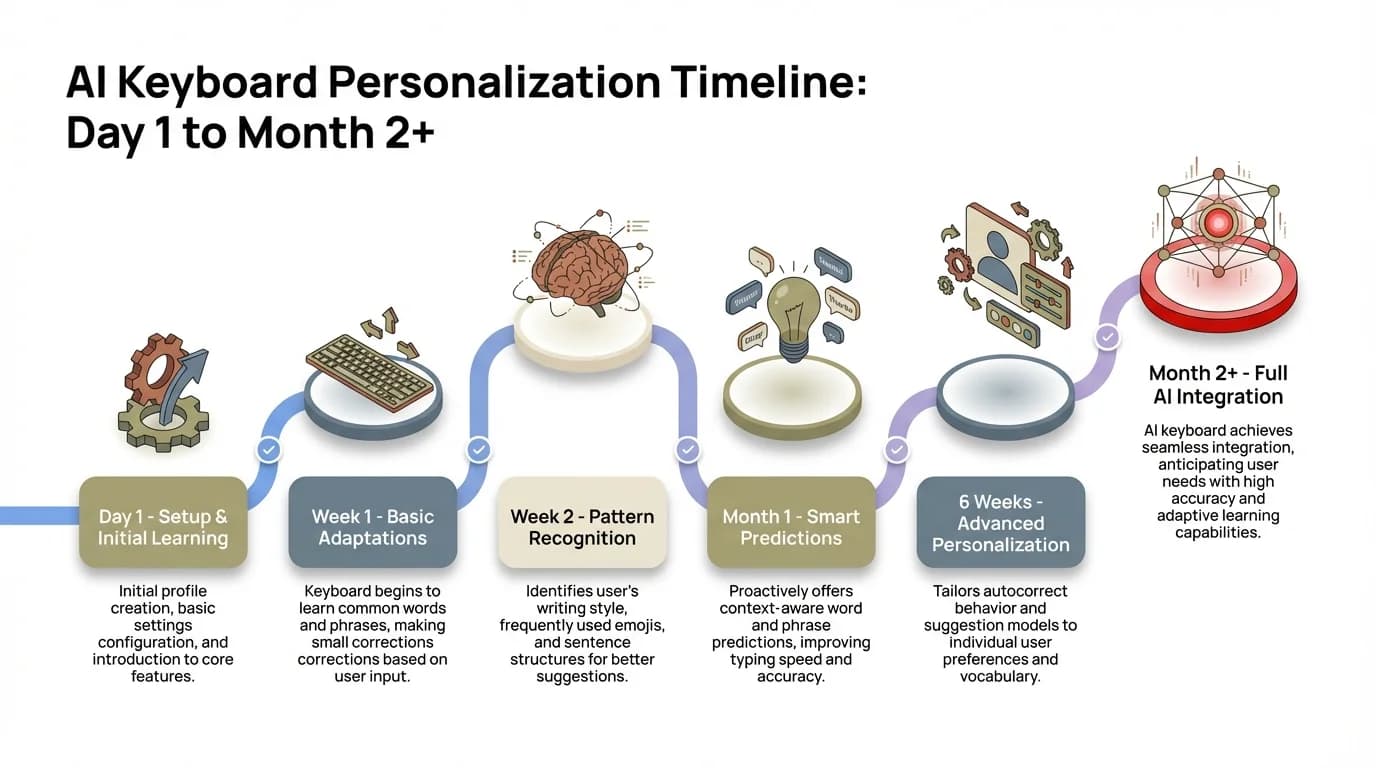
AI keyboard personalization timeline — from first-day setup to fully adaptive predictions by Month 2+
The Future of Adaptive Keyboards: What's Coming Next
Where is all of this heading? Somewhere way more capable than today's next-word prediction. Hence, Here's Hence, what's coming — and some of it is closer than you'd think.
On-device LLMs
Hence, Phones in 2025 have enough processing power to run quantized large language models locally. Moreover, Not "a stripped-down version" — actual LLMs, on-device. Hence, Several labs are already experimenting with keyboards that don't just predict words but understand full message context, suggest complete replies, and rewrite sentences in different styles. Consequently, No network required.
Multi-modal personalization
Moreover, Future keyboards will adapt not just to how you type, but to your voice patterns (for voice-to-text), your handwriting (for stylus input), and even the emotional tone you're writing in. Furthermore, That last one sounds a bit sci-fi — but the signal is already there in the words you choose.
Cross-device continuity
Personalization data today is mostly siloed to one device — which is annoying if you switch between your phone and tablet. Hence, The next generation will sync personalization profiles (not raw data) across devices securely. Your keyboard should know you on every device, not just the one you happened to start with.
Proactive writing assistance
Rather than waiting for you to type, future AI keyboards will offer proactive suggestions: "This message sounds confrontational — here's a softer version" or "This email is missing a clear ask — here's a suggested addition." CleverType is already moving in this direction with its tone adjustment and smart reply features.
And the market shows it. Nevertheless, According to Grand View Research, the AI apps market is growing at 38.7% CAGR — from $2.94 billion in 2024 to $26.36 billion by 2030. Additionally, Keyboards are a big piece of that. They're how most people actually touch AI every day — not through some chat interface, but through the keyboard they've been using since they got their phone.
If you want to experience where this is all headed — now, not five years from now — try CleverType. It's a keyboard that actually grows with you.
Frequently Asked Questions
What is a personalized AI keyboard?
Hence, A personalized AI keyboard uses machine learning to build a model of how you specifically write — your vocabulary, your phrasing habits, the words you reach for constantly. Additionally, Unlike standard autocorrect, it gets better the more you use it. Not just in theory. Measurably better.
How does a machine learning keyboard learn my writing style?
It trains a small language model on your typing history stored on your device. Moreover, The model tracks which words you use, which suggestions you correct, and what phrases you repeat. Consequently, Over time, it shifts its predictions toward your personal patterns — a process called language model fine-tuning.
Is it safe to use an AI keyboard that learns from my typing?
It depends on the keyboard. The safest options use federated learning and on-device processing, meaning your raw typing data never leaves your device. CleverType processes everything locally. Gboard uses federated learning with differential privacy, which is also privacy-safe. Moreover, Cloud-based keyboards that process data on remote servers carry more risk.
How long does it take for an AI keyboard to adapt to your writing?
Nonetheless, Most users notice improvement within 3–7 days of regular use. Significant personalization — where the keyboard reliably predicts your phrases and vocabulary — typically takes 2–4 weeks. Niche vocabulary (technical, medical, legal) takes longer because it appears less frequently in your typing history.
What is federated learning in the context of AI keyboards?
Federated learning is a privacy technique where the AI model trains on your device using your local data. Only encrypted model updates — not your actual words — are shared with a central server to improve the global model. Your raw typing data stays on your phone. Moreover, It was pioneered for keyboards in a 2019 Google research paper.
Which AI keyboard has the best personalization?
Consequently, Honestly, CleverType. Moreover, On-device learning that keeps your data private, context-aware suggestions per app, grammar correction, tone adjustment, 100+ languages. For pure next-word prediction, SwiftKey has historically been solid at vocabulary adaptation — but it doesn't come close to what CleverType does for writing assistance overall.
Does using an AI keyboard slow down my phone?
Modern AI keyboards are built to run on low-power hardware. The neural models used for prediction are quantized and compressed — they run in milliseconds even on mid-range phones. Therefore, CleverType is specifically built to be lightweight. You won't notice any battery drain or slowdown.
Ready to Type Smarter?
Nevertheless, Upgrade your typing with CleverType AI Keyboard. Fix grammar instantly, change your tone, receive smart AI replies, and type confidently while keeping your privacy.
Download CleverType FreeConsequently, Available on Android • 100+ Languages • Privacy-First
Share this article:
Sources:
- Federated Learning for Mobile Keyboard Prediction — Hard et al., Google/arXiv 2019
- Federated Learning of Gboard Language Models with Differential Privacy — ACL 2023 Industry Track
- Effects of Language Modeling and Personalization on Touchscreen Typing Performance — Google Research / CHI 2015
- Language Model Personalization for Improved Touchscreen Typing — INTERSPEECH 2023
- Personalization of Large Language Models: A Survey — arXiv 2024
- Input Method Editor Software Market — Straits Research
- AI Apps Market Report — Grand View Research