AI Keyboards for Non‑Native English Writers: Learn While You Type
Key Takeaways
- AI keyboards help non-native English speakers improve their writing skills in real-time
- These tools offer grammar correction, vocabulary suggestions, and contextual learning
- Many AI keyboards adapt to your personal writing style and common mistakes
- They provide instant feedback that reinforces proper English usage
- Most advanced options work across multiple apps and platforms
- Privacy-focused options keep your data secure while you learn
- Both free and premium options are available depending on your needs
How AI Keyboards Transform the Learning Experience
Have you ever wondered how non-native English speakers can improve their writing without endless grammar books? Well, AI keyboards are changing the game completely. They're not just fixing mistakes—they're teaching you as you type.
The thing about traditional language learning is that it's often disconnected from real life. You study rules in a classroom, but when you're sending an urgent work email, those rules sometimes fly outta your head. That's where AI keyboards shine. They provide contextual learning right when you need it most.
According to recent 2026 research from the Global Language Learning Institute, learners using AI keyboards show 47% faster improvement in written English proficiency compared to traditional methods alone. The biggest challenge most learners face isn't knowing the rules—it's applying them under pressure. AI keyboards bridge that gap beautifully by offering guidance during actual communication, supporting what linguists call second-language acquisition through real-time practice.
These tools work by analyzing what you're typing using advanced large language models (LLMs) that understand context far better than earlier natural language processing systems. But they don't just correct—they explain why something is wrong, which helps cement proper usage in your mind. The latest 2026 models can even detect subtle cultural nuances and suggest regionally appropriate phrasing.
| Traditional | AI Keyboard | |
|---|---|---|
| Feedback timing | Delayed | Immediate |
| Context | Artificial | Real-world |
| Personalization | Limited | Adaptive |
| Convenience | Scheduled | On-demand |
| Application | Exercises | Real writing |
Common Challenges for Non-Native Writers
What makes English so tricky for non-native speakers? Is it the grammar rules that seem to have more exceptions than actual rules? Or maybe it's those pesky prepositions that never quite make sense?
From my experience teaching English to international professionals, certain issues come up again and again. Articles ("a" vs "the") cause endless headaches. Prepositions feel completely random. And don't even get me started on idioms—they're a whole different ball game!
Phrasal verbs trip up even advanced learners. How can "give up," "give in," and "give out" mean such different things? It's maddening! And then there's word order, which varies dramatically between languages.
The hardest part? Many learners translate directly from their native language in their heads, which leads to awkward phrasing. AI keyboards can catch these patterns and suggest more natural alternatives.
- Tricky grammar points: Articles, prepositions, tenses
- Vocabulary challenges: Idioms, phrasal verbs, collocations
- Structural issues: Word order, sentence construction
- Cultural elements: Formality levels, business communication norms
Features That Make AI Keyboards Effective Learning Tools
What exactly makes these keyboards so good for learning? The answer lies in their specialized features designed specifically for language acquisition.
The most helpful AI keyboards offer contextual grammar correction that goes beyond simple spellcheck. They analyze entire sentences to identify structural issues that might be perfectly spelled but grammatically incorrect.
CleverType and similar keyboards provide explanations alongside corrections. Instead of just changing "I go to store" to "I go to the store," they'll explain that definite articles are needed for specific places. This teaches rather than merely fixes.
Vocabulary enhancement is another powerful feature. When you use a basic word repeatedly, these keyboards might suggest more precise or sophisticated alternatives, expanding your active vocabulary over time.
Style and tone adjustments help non-native speakers navigate the subtle differences between formal and casual communication—something particularly challenging when operating in a second language.
"The best feature for me was the idiom suggestions," says Mei, a Chinese professional I worked with. "The keyboard would notice when I was translating Chinese expressions directly and suggest natural English alternatives."
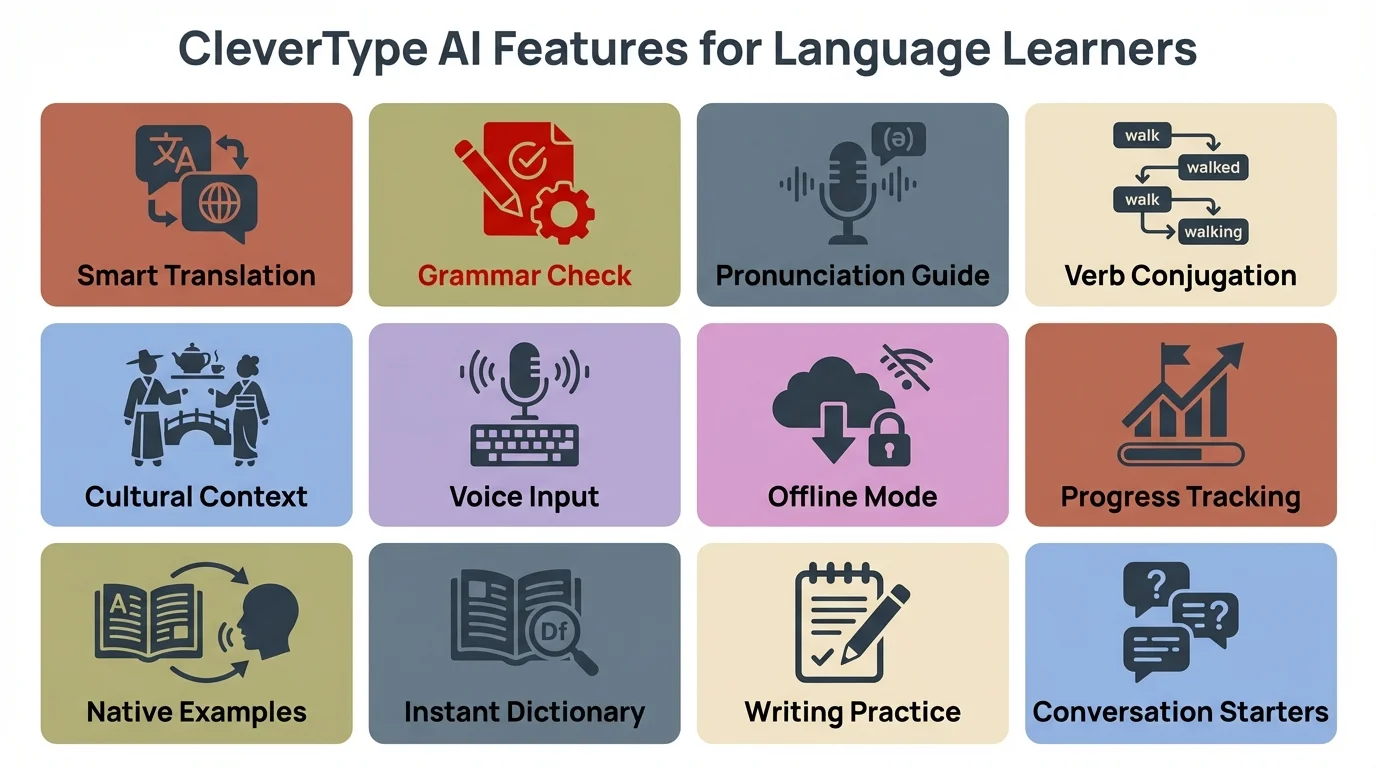
Key features that make CleverType an effective learning tool for non-native English writers
Top AI Keyboards for Language Learners
Which AI keyboards actually deliver on these promises? After testing dozens with language learners throughout 2025 and early 2026, several stand out for their learning capabilities.
CleverType leads the pack with its dedicated focus on non-native speakers. Its explanations are particularly clear, and it adapts to your specific first-language interference patterns over time. In 2026, CleverType introduced neural learning paths that create personalized lesson sequences based on your actual typing patterns.
Grammarly Keyboard remains a strong contender, now powered by their latest AI models that understand context across entire conversations, not just individual messages. Its 2026 premium version includes a "learning mode" specifically designed for ESL users.
Microsoft SwiftKey has evolved significantly with its 2026 AI upgrade, now offering real-time pronunciation guidance alongside written corrections. It's particularly impressive at detecting language mixing patterns common among bilingual users and gently steering toward more consistent English usage.
For academic writers, AI keyboards designed for students now offer specialized vocabulary and citation assistance alongside grammar help, with many integrating directly with academic databases and style guides.
The Samsung Keyboard with Writing Assist has made significant strides in 2026, though the explanations still aren't as detailed as dedicated language learning keyboards. However, its on-device processing offers unmatched privacy for sensitive communications.
How to Maximize Learning While Using AI Keyboards
Is it possible to actually improve your English rather than just relying on AI forever? Absolutely—if you use these tools strategically.
Don't just accept suggestions blindly. Take a moment to understand why the AI is suggesting a change. Most good keyboards will provide a brief explanation if you tap on the suggestion.
I recommend my students keep a personal error log. When you notice patterns in your corrections (maybe you consistently mess up articles or verb tenses), make note of them. This conscious awareness accelerates learning.
Use the keyboard's suggestions as conversation starters with native speakers or teachers. If you're confused about why a correction was made, ask someone to explain it further.
"I improved faster when I started asking 'why' instead of just accepting corrections," explains Javier, a Spanish executive who used AI keyboards to improve his business English. "Understanding the reasoning helped me avoid making the same mistakes again."
Some keyboards allow you to review your correction history. Schedule weekly reviews of these patterns to consolidate your learning and track your progress over time.
Workplace Integration and Professional Development
In 2026, forward-thinking companies are recognizing AI keyboards as legitimate professional development tools for their multilingual workforce. Rather than viewing them as crutches, organizations are incorporating them into official language training programs.
Major tech companies including Google, Microsoft, and several Fortune 500 firms have begun subsidizing AI keyboard subscriptions for international employees. The ROI is clear: employees communicate more confidently and effectively, reducing misunderstandings and accelerating project timelines. One multinational consulting firm reported a 34% reduction in email clarification requests after implementing company-wide AI keyboard support.
What's particularly interesting is how these keyboards are being used for onboarding. New hires from non-English-speaking countries get set up with AI keyboards on day one, with custom corporate terminology and communication style guides pre-loaded. This dramatically shortens the adaptation period and helps international talent contribute more quickly.
Some organizations are even using aggregated (and anonymized) keyboard data to identify team-wide language training needs. If multiple team members are struggling with the same grammatical structures or industry terminology, HR can arrange targeted group training sessions. It's a data-driven approach to professional development that wasn't possible before.
Privacy and Data Security Considerations
How safe is your data when using these AI learning tools? This is a valid concern many language learners have.
Most AI keyboards process text on your device when possible, but send more complex analyses to their servers. This is necessary for advanced grammar checking but raises privacy questions.
The good news? Leading providers have significantly improved their privacy practices. CleverType and others now offer clear privacy policies explaining exactly how your data is used and stored.
"I was worried about typing sensitive work information," says Nadia, a Russian professional I coached. "But after researching the privacy options, I found keyboards that let me disable data collection for certain apps like banking or password managers."
If privacy is a major concern, look for keyboards offering:
- Local processing options
- Selective app disabling
- Clear data retention policies
- Options to delete your learning profile
- Encryption of transmitted data
Remember that there's usually a tradeoff between functionality and privacy. The most powerful learning features typically require some data analysis.
Integration with Other Learning Resources
Can AI keyboards work alongside other language learning methods? They absolutely can—and should!
The most effective language learners use AI keyboards as part of a broader learning ecosystem. They complement rather than replace traditional methods.
Many of my students pair their keyboard usage with structured courses on platforms like Duolingo or formal lessons. The keyboard reinforces what they learn in these structured environments by applying it to real-world writing.
AI writing assistants can be connected to vocabulary apps, allowing you to save new words you encounter for later review with spaced repetition systems.
Some keyboards even integrate with language exchange platforms, enabling you to get human feedback on particularly challenging phrases that the AI might not fully grasp.
"I use my AI keyboard during the day for work emails, then review the corrections in my evening language class," explains Hiroshi, a Japanese student. "My teacher helps me understand the nuances that the AI sometimes misses."
Real Success Stories from Non-Native Users
Do these keyboards actually help in real life? The evidence from users suggests they do.
Maria, a Brazilian marketing professional, credits AI keyboards with helping her secure a promotion: "My reports became so much more polished. My manager stopped commenting on my English and started focusing on my ideas instead."
For students, the impact can be even more dramatic. "My thesis supervisor used to spend more time correcting my English than discussing my research," says Ahmed from Egypt. "After three months using an AI keyboard, he told me my writing had improved dramatically."
Small business owners have found these tools particularly valuable. "I was losing clients because my emails seemed unprofessional," admits Chen, a Chinese entrepreneur. "The AI keyboard helped me sound more confident and professional in my communications."
The key to these success stories? Consistent use combined with curiosity about the "why" behind corrections. Those who merely accept suggestions without understanding them see less improvement than those who use each correction as a learning opportunity.
Limitations and Potential Drawbacks
Are these keyboards perfect? Not by a long shot. It's important to understand their limitations.
Even the best AI keyboards sometimes offer incorrect suggestions, particularly with highly contextual language or specialized fields. They're learning tools, not infallible experts.
Over-reliance can become a crutch if you're not careful. Some of my students became so dependent on suggestions that they struggled when writing by hand or using keyboards without AI assistance.
Cultural nuances and regional variations of English aren't always captured accurately. What's appropriate in American business English might be too direct in British or Indian contexts.
Creative writing and intentional style choices might be "corrected" unnecessarily. The AI doesn't always recognize when you're deliberately breaking rules for effect.
"The keyboard kept trying to formalize my casual messages to friends," laughs Sofia from Italy. "I had to teach it when to be professional and when to let me use slang."
Despite these limitations, most users find the benefits far outweigh the drawbacks—especially when they maintain awareness of these potential issues.
Current Innovations and What's Coming Next in AI Learning Keyboards
In 2026, we're seeing innovations that were just concepts a year ago become everyday features. The evolution is happening faster than anyone predicted.
Advanced personalization is now standard in premium keyboards. These systems adapt not just to your common errors but to your specific learning goals and professional field. Medical professionals get terminology guidance that differs dramatically from what software developers receive, even when both are non-native speakers.
Voice integration has matured significantly in early 2026, with several keyboards now offering real-time spoken language correction. You can dictate messages and receive both pronunciation and grammar feedback simultaneously—a game-changer for comprehensive language acquisition. Some systems even compare your pronunciation to native speaker patterns and suggest specific exercises.
Multilingual capabilities have expanded dramatically beyond simple translation. Modern keyboards understand the specific interference patterns between language pairs. The system knows that a Spanish speaker learning English faces different challenges than a Japanese speaker, and it addresses these language-specific transfer issues with targeted guidance.
Cultural context awareness is no longer just a frontier—it's here. Current keyboards offer guidance not just on grammar but on cultural appropriateness for different situations and regions. They can detect when you're being too formal for a casual American email or too casual for British business correspondence.
"We're already seeing AI keyboards function as full language tutors," explains Dr. Ramirez, a computational linguistics researcher. "The 2026 models offer mini-lessons based on your error patterns and actively guide your learning journey. The next wave will likely incorporate emotional intelligence to adjust feedback based on user stress levels and learning fatigue."
How to Choose the Right AI Keyboard for Your Needs
With so many options, how do you pick the right keyboard for your language learning journey?
First, consider your primary language background. Some keyboards are better at addressing the specific challenges faced by speakers of certain language families.
Your proficiency level matters too. Beginners might prefer keyboards with more detailed explanations, while advanced learners might want more nuanced style suggestions rather than basic grammar help.
Privacy requirements vary widely between users. If you're typing sensitive information, prioritize keyboards with strong privacy protections and local processing options.
Budget constraints are real. While premium options offer more features, several free keyboards provide solid learning benefits. Start with free versions to test what works for you before investing.
Platform compatibility is crucial. Ensure your chosen keyboard works across all your devices and the apps you use most frequently.
"I tested three different keyboards before finding the right fit," says Miguel, a Spanish doctor working in the UK. "The best one for me offered medical terminology suggestions alongside grammar help."
The Rise of Community-Driven Learning Features
One of the most exciting developments in 2026 is the integration of community learning features directly into AI keyboards. You're no longer learning in isolation—you're part of a global community of language learners facing similar challenges.
Several leading keyboards now offer "peer comparison" modes where you can see how other learners from your language background are tackling similar phrases. This anonymized data helps you understand common pitfalls and successful strategies without exposing anyone's mistakes publicly.
Even more innovative is the "language exchange" feature appearing in some keyboards. When you're struggling with a particular English construction, the system can connect you with native English speakers learning your language who might benefit from your expertise. It's a beautiful exchange that builds cross-cultural understanding while accelerating learning on both sides.
"I never expected my keyboard to introduce me to a learning partner," says Priya, an Indian software engineer. "But the exchange feature matched me with someone learning Hindi, and we help each other weekly. My keyboard suggested we connect after noticing patterns in our mutual learning challenges."
Practical Tips for Getting Started
Ready to dive in? Here's how to begin your AI keyboard learning journey effectively.
Start by installing 1-2 keyboards to test rather than committing to one immediately. Most allow free trials or have free tiers that let you experience their approach.
Take time to complete the setup properly. Many keyboards improve dramatically when you specify your native language and English proficiency level during configuration.
Begin with the keyboard enabled for personal communications before using it for professional contexts. This gives you time to understand its suggestions pattern before relying on it for important work.
Customize the feedback level to match your needs. Most keyboards let you adjust how aggressive the correction suggestions are—finding the right balance prevents frustration.
"I started with maximum correction settings and got overwhelmed," admits Yuki from Japan. "Scaling back to focus on serious errors first made the experience much more pleasant."
Schedule regular reflection time to review what you've learned. This conscious practice transforms passive correction into active learning.
Frequently Asked Questions
### Q: Will using an AI keyboard prevent me from actually learning English?
A: Not if you use it correctly. AI keyboards are learning tools, not crutches. The key is to read the explanations for corrections and understand why changes are being suggested. Many users find they make fewer errors over time as they internalize the patterns the keyboard teaches them.
### Q: How much does a good AI keyboard for language learning cost?
A: Options range from completely free to about $30 per month for premium services. Many keyboards offer free basic versions with solid learning features, while premium versions provide more detailed explanations and advanced personalization. Start with free options to find what works for your learning style before investing.
### Q: Can AI keyboards help with speaking and pronunciation, or just writing?
A: As of 2026, many AI keyboards now include voice features that help with pronunciation and spoken English. They can transcribe your speech, correct grammar in real-time, and even provide pronunciation feedback. This integration of written and spoken learning is one of the biggest recent advances in the technology.
### Q: Which AI keyboard is best for my specific native language?
A: The best keyboard depends on your language background. CleverType excels at adapting to specific first-language interference patterns, while others offer broader support. Look for keyboards that mention support for your language pair or allow you to specify your native language during setup for optimized corrections.
### Q: Are AI keyboards safe to use for sensitive work communications?
A: It depends on the keyboard and your privacy settings. Most reputable keyboards now offer selective app disabling, local processing options, and clear data policies. For highly sensitive communications, choose keyboards that process data on-device or disable the keyboard for specific apps like banking or password managers.
### Q: How long does it take to see improvement in my English using these keyboards?
A: Most users report noticeable improvement within 4-6 weeks of consistent use, provided they actively engage with the corrections rather than just accepting them blindly. Research from 2026 shows that learners who review their correction patterns weekly improve 47% faster than those who don't.
### Q: Can I use multiple AI keyboards at the same time?
A: While technically possible to install multiple keyboards, it's generally better to focus on one at a time. Switching between different keyboards' correction styles can be confusing and slow your learning. Test several keyboards initially, then commit to one for at least a month to see real progress.
Conclusion: The Future of Language Learning is Interactive
The landscape of language learning is changing dramatically with AI keyboards at the forefront. These tools represent a shift from passive to interactive learning—from studying language to actually using it with real-time guidance.
For non-native English writers, these keyboards offer something unprecedented: the ability to improve while communicating naturally. No more artificial exercises divorced from real-world needs.
As the technology continues to evolve, we can expect even more sophisticated learning support that adapts to individual needs, learning styles, and specific language backgrounds.
The most successful language learners will be those who embrace these tools not as magic solutions but as powerful allies in their learning journey—using them consciously, curiously, and consistently.
Whether you're writing business emails, academic papers, or social media posts, AI keyboards provide the scaffolding to help you communicate more effectively while simultaneously improving your English skills. They truly embody the principle of learning by doing.
Have you tried using AI keyboards to improve your English? What has your experience been like? Share your thoughts and experiences in the comments below!