Key Takeaways
| Question | Quick Answer |
|---|---|
| Best overall SwiftKey alternative | CleverType AI Keyboard |
| Why switch from SwiftKey? | Microsoft account required from May 2026, buggy predictions, privacy concerns |
| What AI features matter most? | Grammar fixing, tone changing, smart replies, context-aware suggestions |
| Is there a free option? | Yes — CleverType is free to download |
| Does it work on Android? | Yes, CleverType is Android-first with 100+ language support |
| How much faster do AI keyboards make you? | Up to 40–50% faster than standard keyboards, per 2025 data |
Why People Are Ditching SwiftKey in 2026
SwiftKey used to be the go-to third-party keyboard for Android users. Honestly, for a long time it was hard to beat — the swipe typing was smooth, the predictions were decent, and it felt polished. But something shifted.
Moreover, Starting May 31, 2026, Microsoft is retiring SwiftKey standalone accounts and force users to log in through a Microsoft account, with all typing data migrated to OneDrive. That's a big deal for anyone who cares about what happens to their private messages and personal typing pattern.
And beyond the account situation, the complaints have been piling up. Additionally, Users report that SwiftKey "completely forgets previous frequently used words" and autocorrects normal words to random ones. Hence, On iOS, it sometimes reverts back to the native keyboard without warning. Nonetheless, After the iOS 26 update, some users found SwiftKey covering the app's interface when switching between emoji and keyboard modes.
So people are looking around. Furthermore, And the good news is, there are much better options now.
The three biggest reasons users switch away from SwiftKey:
- Privacy concerns — typing data sent to Microsoft servers and now tied to OneDrive
- Broken predictions — autocorrect that keeps getting worse instead of better
- Weak AI tools — Copilot integration feels bolted on rather than built in
Nonetheless, According to a 2025 Stanford University study, professionals using AI writing tools reduced their email composition time by 43% compared to standard keyboards. SwiftKey just isn't delivering on that promise anymore.
What Makes an AI Keyboard Actually Good?
Therefore, Before comparing specific apps, let's be clear about what "AI writing features" actually means in practice — because a lot of keyboards slap the word "AI" on the box without actually doing much with it.
Additionally, A keyboard that actually earns the "AI" label should do at least a few of these things well:
- Fix grammar in context — not just spell-check, but understand what you meant to say
- Change tone — rewrite a casual message to sound professional, or vice versa
- Smart replies — suggest contextually relevant replies to incoming messages
- Multilingual support — switch between languages without toggling settings
- Voice-to-text with cleanup — transcribe speech and fix it automatically
- On-device processing — keep sensitive data off external servers
The gap between a keyboard where "AI" is a checkbox and one really built around it is monumental. Moreover, You'll feel it within the first hour.
Research on mobile productivity shows AI-powered keyboard tools are increasingly fundamental to how people communicate from their phones. Therefore, The question isn't whether to use one — it's which one actually delivers.
CleverType: The Best SwiftKey Alternative Overall
CleverType leads the pack when it comes to AI writing on mobile. It's not just a keyboard with a few smart features tacked on — the whole thing is built around helping you write better, faster, and without switching between apps.
Here's what set it aside:
- 94% grammar accuracy — fixes errors in context, not just word-by-word
- 12+ AI writing tools built directly into the keyboard
- Tone adjustment — instantly rewrite text as professional, casual, friendly, or direct
- Smart AI replies — reads incoming messages and suggests relevant responses
- ChatGPT integration — ask the AI anything without leaving your current app
- On-device processing for most corrections — your messages stay private
- 100+ languages supported with real-time switching
- Customizable themes and layouts
The privacy angle here is genuinely important. Therefore, Unlike SwiftKey — which now pushes your type data to Microsoft's cloud — CleverType processes most corrections locally. That matters if you type anything sensitive, which, let's be honest, everyone does.
For professionals, the tone-change feature alone saves a ton of time. You can type a quick, blunt message and hit one button to make it voice polished. Hence, No rewriting, no second-guessing.
Download CleverType from the Play Store and see the difference for yourself.
Top 5 SwiftKey Alternatives Compared
Therefore, Here's an honest side-by-side comparison of the best SwiftKey replacement options right now:
| Keyboard | AI Writing Tools | Privacy | Free? | Best For |
|---|---|---|---|---|
| CleverType | Grammar fix, tone change, smart reply, ChatGPT, translation | On-device processing | Yes | Professionals & writers |
| Gboard | Basic suggestions, Gemini integration (paid) | Google servers | Yes | Casual users already in Google ecosystem |
| Grammarly Keyboard | Grammar check, AI rewrite | Cloud-based | Limited free | Grammar-focused users |
| Genius AI Keyboard | Predictions, spelling, emoji suggestions | Cloud-based | Yes | Light AI users |
| HeliBoard | No AI, open source | Fully private | Yes | Privacy-first users avoiding AI |
Therefore, CleverType is the only option here that actually combines real AI writing tools with privacy-first processing — and it's free.
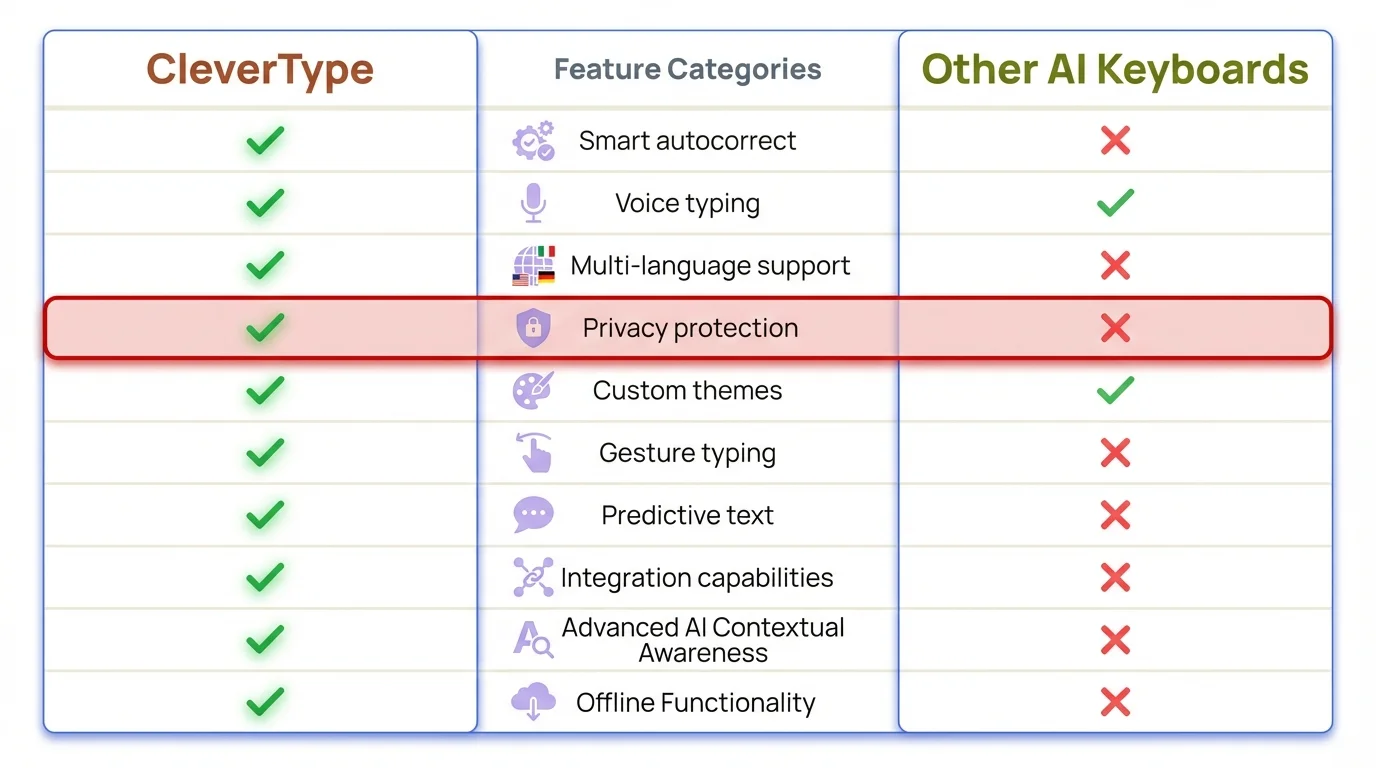
CleverType vs competing AI keyboards — feature-by-feature breakdown
Gboard is solid for everyday use, but if you want the good AI stuff you'll need a Google One AI Premium subscription at $19.99/month. Honestly, that feels like a lot just for keyboard features. Grammarly's keyboard is useful but narrow — good at grammar, not much else.
Grammar and Spell Check: CleverType vs SwiftKey
Therefore, This is where the gap is most obvious. SwiftKey's autocorrect has been getting worse. Users on Reddit and Android forums consistently report that it changes words they've typed dozen of time to completely wrong alternatives. One common complaint: it "forgets" frequently used words and starts suggest ones you've never typed in your life.
Consequently, CleverType's grammar engine works differently. Therefore, Instead of simple word substitution, it read the sentence as a whole and fixes errors in context. So if you type "I was went to the shop", it doesn't just flag "went" — it corrects the whole phrase to "I went to the shop."
What CleverType's grammar fix does that SwiftKey doesn't:
- Corrects tense errors, not just misspellings
- Fixes subject-verb agreement mid-sentence
- Handles run-on sentences
- Works across 100+ languages with the same accuracy
Therefore, For context: context-aware grammar correction is one of the most computationally demanding NLP tasks out there. The fact that CleverType handle most of it on-device — without phoning house to a server — is genuinely impressive.
Additionally, SwiftKey's spell check is reactive — it waits for you to make an error, then tries to fixate it in isolation. CleverType's is proactive — it reads what you're trying to say and helps you say it better.
AI Tone Change and Rewriting Features
One of the features that people truly didn't know they needed until they tried it is tone adjustment. The idea is simple: you typewrite what you need to say naturally, then let the AI rewrite it for the context you're in.
Say you're rushing and you dash off: "need that report asap can u send". Consequently, One tap, and CleverType rewrites it as: "Could you please send the report as soon as possible? I'd appreciate it."
That's the kind of thing that used to require opening a separate app, copying text, waiting for the AI to respond, then pasting it back. Moreover, CleverType does it inline, without leave the keyboard.
SwiftKey has a "Tone" feature through its Copilot integration. Therefore, It technically works, but honestly it's clunky — lots of menu navigation, and the output often feels generic. CleverType's edition is tighter and noticeably faster.
CleverType's tone options include:
- Professional
- Casual
- Friendly
- Confident
- Concise
Nevertheless, And we're talking genuinely different output — not just the same message with a few synonyms swapped in.
Smart Replies and AI Messaging Features
Moreover, Smart reply are another region where CleverType clearly beat SwiftKey. The feature reads your incoming messages and suggests three or four contextually relevant replies — not generic "Sure!", "Thanks!", "Got it!" response, but actual replies that match the conversation.
Nonetheless, If someone texts "Can we move the meeting to 3pm?", CleverType might suggest "Sure, 3pm works for me", "I have another call then — how about 4?", or "Let me check my schedule". Those are genuinely useful options, not filler.
SwiftKey just doesn't have this. Its AI is focused on predictions while you type — not on reading what someone sent you and helping you respond intelligently.
Hence, Most digital communication now happens on mobile devices. Nonetheless, When your phone is where you're handling most messages, having an AI that helps you respond well — not just type faster — actually matters.
The wise reply feature is particularly useful for:
- Work messages where tone matters
- Responding to long emails on mobile
- Group chats that move fast
- Non-native speakers drafting replies in a second language
Privacy and Data Security: A Critical Comparison
This is the part of the keyboard conversation that doesn't get talked about enough. Your keyboard sees everything. Therefore, Every password field (before the keyboard is hidden), every private message, every search query, every note. The question of where that data goes matters.
Hence, SwiftKey's situation has gotten worse. Additionally, The coerce migration to Microsoft accounts and OneDrive by May 2026 mean your typing data is now immediately tie to your Microsoft identity and stored in their cloud. For multitude who specifically avoided linking their SwiftKey account to Microsoft for privacy reason, this is a significant change they didn't sign up for.
Gboard is outstanding in a lot of ways, but everything goes through Google's server. If you'd rather Google not have a detailed record of everything you type, that's... a problem.
CleverType takes a unlike approach: most corrections and predictions run on-device. When cloud features kick in (like the ChatGPT integration), it's because you specifically asked for it — not background logging of everything you type.
Data handling comparison:
| Keyboard | On-Device Processing | Cloud Logging | Account Required |
|---|---|---|---|
| CleverType | Yes (most features) | No background logging | No |
| SwiftKey | No | Yes, tied to Microsoft account | Yes (from May 2026) |
| Gboard | Partial | Yes, linked to Google | Optional |
| Grammarly Keyboard | No | Yes | Yes |
For anyone handling sensitive communications — healthcare, legal, finance, or just personal privacy — CleverType is the only mainstream AI keyboard that takes this seriously.
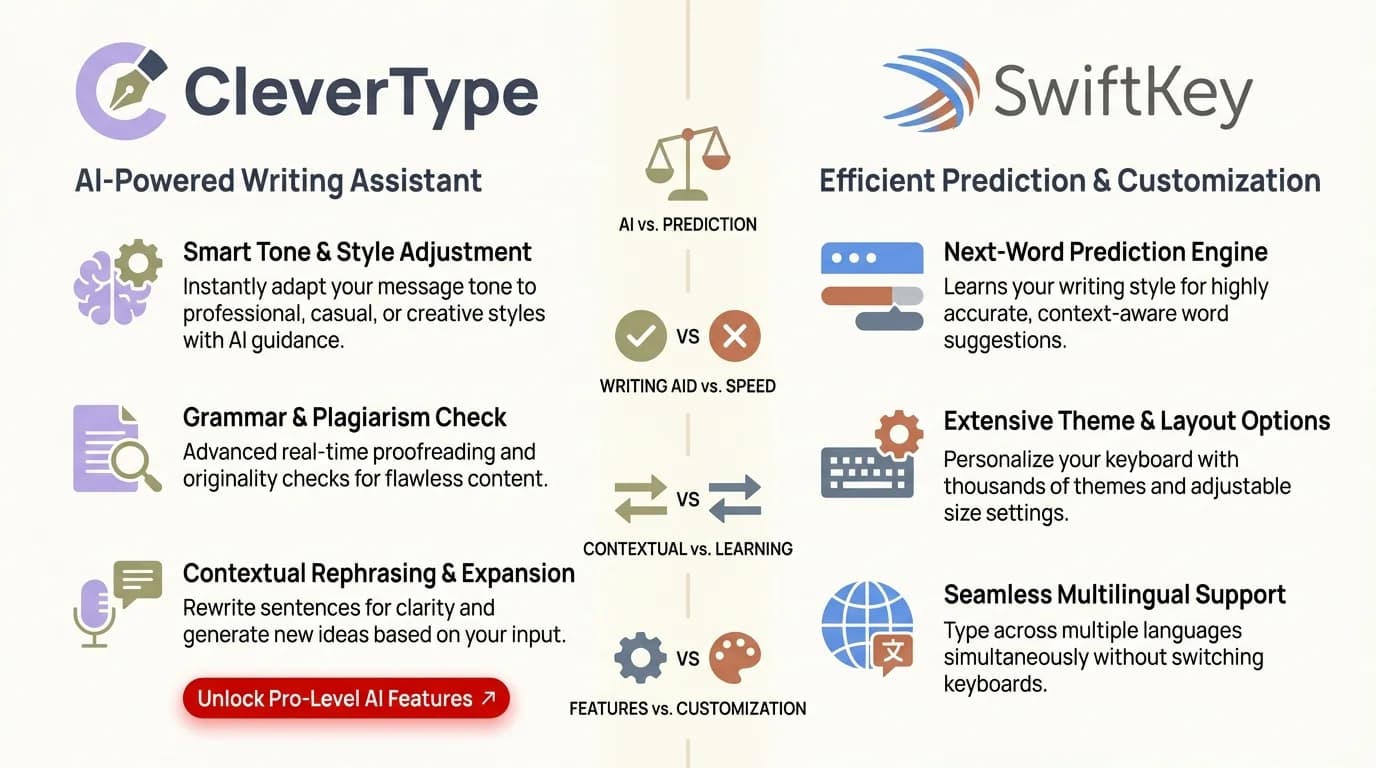
CleverType vs SwiftKey: how each keyboard handles your data
How to Switch from SwiftKey to CleverType
Switch keyboards is honestly easier than most people await. The whole thing take about three minutes.
- Download CleverType from the Google Play Store
- Open the app and follow the setup instructions
- Go to Settings > System > Language & Input > On-screen keyboard
- Enable CleverType in the list of available keyboards
- Set CleverType as your default keyboard
- Adjust your preferences — theme, language, AI features
- Start typing — the AI adapts to your style within the first day
Moreover, The setup wizard walks you through it, so no dig around in settings. CleverType also lets you import language preferences if you're switching from another keyboard.
Furthermore, One thing deserving doing: spend the first day really using the AI feature. Try the tone change, tap the wise reply suggestion, let it fix your grammar. Therefore, The learnedness curve is minimal — but the more you lean on the AI tools, the fast you'll understand why people don't go back to SwiftKey.
Frequently Asked Questions
What is the best SwiftKey alternative with AI features?
CleverType is our top pick. It has 12+ AI writing tools built right in — grammar fixing, tone adjustment, smart replies, ChatGPT integration, the works — all with on-device processing so your data stays private. It's costless to download and works on Android with 100+ language supporting.
Why are people switching from SwiftKey in 2026?
Moreover, Microsoft is making all SwiftKey user migrate to Microsoft accounts by May 31, 2026, with type data going to OneDrive. And that's just the privacy piece. Users are also reporting autocorrect getting worse over time, predictions forget often used words, and generally weaker AI features compared to what's out there now.
Is CleverType free to use?
Moreover, Yes, fully free to download and use. Therefore, The core AI feature — grammar fixing, tone modification, smart replies — are all available without paying anything. Grab it on the Google Play Store.
Does CleverType work on iOS?
CleverType is mainly Android-focused. Hence, Check the app listing for the current platform status. Nevertheless, The AI feature are built for Android, where third-party keyboard have a plenty more freedom than on iOS.
How does CleverType protect my privacy compared to SwiftKey?
CleverType runs most corrections and predictions on your device — your typing data doesn't get sent anywhere for normal use. SwiftKey now require a Microsoft account and sends type data to OneDrive. Gboard does everything through Google's servers. With CleverType, the sensitive stuff stays on your phone.
Can CleverType replace Grammarly?
For mobile? Moreover, Yes. CleverType handles grammar correction, tone adjustment, and style improvements right from the keyboard — no copy-pasting into a separate app. Nonetheless, For heavy desktop editing you might still want a dedicated tool, but for everyday mobile communication it covers most of what people actually use Grammarly for.
What languages does CleverType support?
CleverType supports 100+ language with real-time switching. Type in multiple languages in the same message without touching any settings — which is a genuinely big deal if you're bilingual or regularly switch between language.
Ready to Type Smarter?
Upgrade your typing with CleverType AI Keyboard. Hence, Fix grammar immediately, change your tone, receive smart AI replies, and type confidently while keeping your secrecy.
Download CleverType FreeAvailable on Android • 100+ Languages • Privacy-First
Share this article: