Key Takeaways
- •Mobile Integration: AI keyboards offer seamless integration across all mobile apps, while Grammarly requires app switching on mobile devices
- •Real-time Corrections: Both tools provide real-time grammar and spelling corrections, but AI keyboards do this directly as you type with 30-45% speed improvements
- •Contextual Suggestions: AI keyboards offer more contextual writing suggestions based on the platform you're using (email vs social media), with 2026 models understanding cross-conversation context
- •Workflow Impact: Grammarly excels in desktop environments; AI keyboards shine on mobile devices - but 2026 API integrations allow them to work together
- •Privacy Considerations: AI keyboards increasingly process data locally with on-device AI models, while Grammarly offers enhanced enterprise security certifications
- •Cost Comparison: Both tools have improved their free tiers significantly in 2026, making premium subscriptions optional for many users
- •2026 Trend: These tools are becoming complementary rather than competitive - most professionals now use both strategically
Ever wonder which writing tool actually makes more sense for busy professionals? I've been testing both AI keyboards and Grammarly throughout 2025 and into 2026, and let me tell you - the gap has widened significantly. With AI capabilities advancing rapidly, these tools have evolved in different directions, making your choice more important than ever.
In early 2026, we're seeing AI keyboards incorporate multimodal capabilities and real-time context switching that wasn't possible just a year ago. Meanwhile, Grammarly has doubled down on comprehensive document analysis and enterprise features. But which one's better depends on how and where you work.
Let's dive into this comparison to help you choose the right writing assistant for your professional needs in 2026.
What Are AI Keyboards and How Do They Differ from Grammarly?
So what exactly is an AI keyboard? And how's it different from Grammarly? These are questions I get all the time from colleagues who're struggling with their writing tools.
AI keyboards are smart keyboard applications that replace your device's default keyboard with one powered by artificial intelligence. Unlike traditional keyboards, they don't just register keystrokes - they actively predict text, correct grammar, suggest better phrasing, and adapt to your writing style in real-time. In 2026, the latest AI keyboards use advanced language models that understand context across conversations, remember your preferences, and can even switch tone mid-sentence based on who you're messaging. The magic happens right where you're typing, whether that's WhatsApp, Gmail, Slack, or any other app.
Grammarly, on the other hand, functions primarily as a writing assistant that integrates with various platforms through browser extensions, desktop apps, and mobile keyboards. It focuses on checking grammar, spelling, and style across your writing.
The fundamental difference? Where and how they work.
| Feature | AI Keyboards | Grammarly |
|---|---|---|
| Integration | Built into your device's keyboard | Browser extension, separate app, or keyboard |
| Availability | Works in any app where you can type | Limited functionality in some mobile apps |
| Correction Method | Real-time as you type | Real-time or after writing completion |
| Learning Capability | Adapts to your personal writing style | Adapts to common patterns |
| Mobile Experience | Seamless across all apps | Best experience on desktop |
"I switched to an AI keyboard for business professional use in 2024, and by 2026 the difference is night and day," says James, a marketing executive I interviewed for this article. "It now understands when I'm replying to my boss versus a colleague, and adjusts my tone automatically. Everything just happens as I type - no app switching, no manual tone selection."
That's probably the biggest distinction - AI keyboards work everywhere you type on your device, while Grammarly works best in supported environments and excels on desktop.
What's Changed in 2026?
The AI writing assistant landscape has evolved dramatically in early 2026. AI keyboards now leverage more powerful language models that can understand nuanced context across multiple messages. They're getting better at distinguishing between when you're drafting a formal client proposal versus chatting with your team on Slack. Some can even detect your stress level based on typing patterns and suggest calmer phrasing when you're firing off frustrated messages.
Grammarly, meanwhile, has focused on becoming an indispensable desktop writing companion. Their 2026 updates include deeper integration with enterprise tools, advanced style guide enforcement that learns from your company's approved documents, and AI-powered content generation that goes beyond simple rewrites. For teams that need consistent brand voice across dozens of writers, Grammarly's enterprise features have become genuinely impressive.
What's fascinating is how these tools are no longer direct competitors - they're becoming complementary. Most professionals I've spoken with in 2026 use both, leveraging each tool's strengths rather than trying to pick a winner.
Grammar Correction Capabilities: Head-to-Head Comparison
When it comes to fixing mistakes, which tool catches more errors? This is where things get intresting (see what I did there?). Both platforms have strengths, but they approach grammar correction differently.
I tested both tools with common grammatical errors, complex sentence structures, and professional writing samples. Here's what I found:
Basic Grammar and Spelling
Both tools excel at catching:
- Spelling mistakes
- Subject-verb agreement
- Punctuation errors
- Common grammatical mistakes
"I was skeptical that an AI keyboard could match Grammarly's grammar detection, but I was surprised to find they caught almost all the same basic errors," notes Sarah, a content strategist who uses both tools.
Advanced Grammar Issues
For more complex grammar issues:
Grammarly: Excels at detecting subtle grammar issues like passive voice overuse, unclear antecedents, and complex tense problems. Its explanations of grammar rules are more comprehensive.
AI Keyboards: While improving rapidly, some AI-powered grammar correction in keyboards still miss nuanced grammatical issues, especially in very complex sentences. However, they're getting better every update.
Context-Aware Corrections
This is where AI keyboards are starting to shine. Because they're embedded in your typing experience, they understand the context of where you're writing:
- Writing an email? They'll suggest professional closings.
- Texting a friend? They'll be more casual.
- Posting on LinkedIn? They'll help maintain a professional tone.
Grammarly offers tone detection too, but AI keyboards often have more context about the specific app you're using.
One area where Grammarly still maintains an edge is in comprehensive document analysis. It provides overall assessments of your writing's clarity, engagement, and delivery that AI keyboards typically don't match.
But for on-the-go professionals who need immediate corrections across all their apps, AI keyboards provide more consistent support across the entire mobile experience.
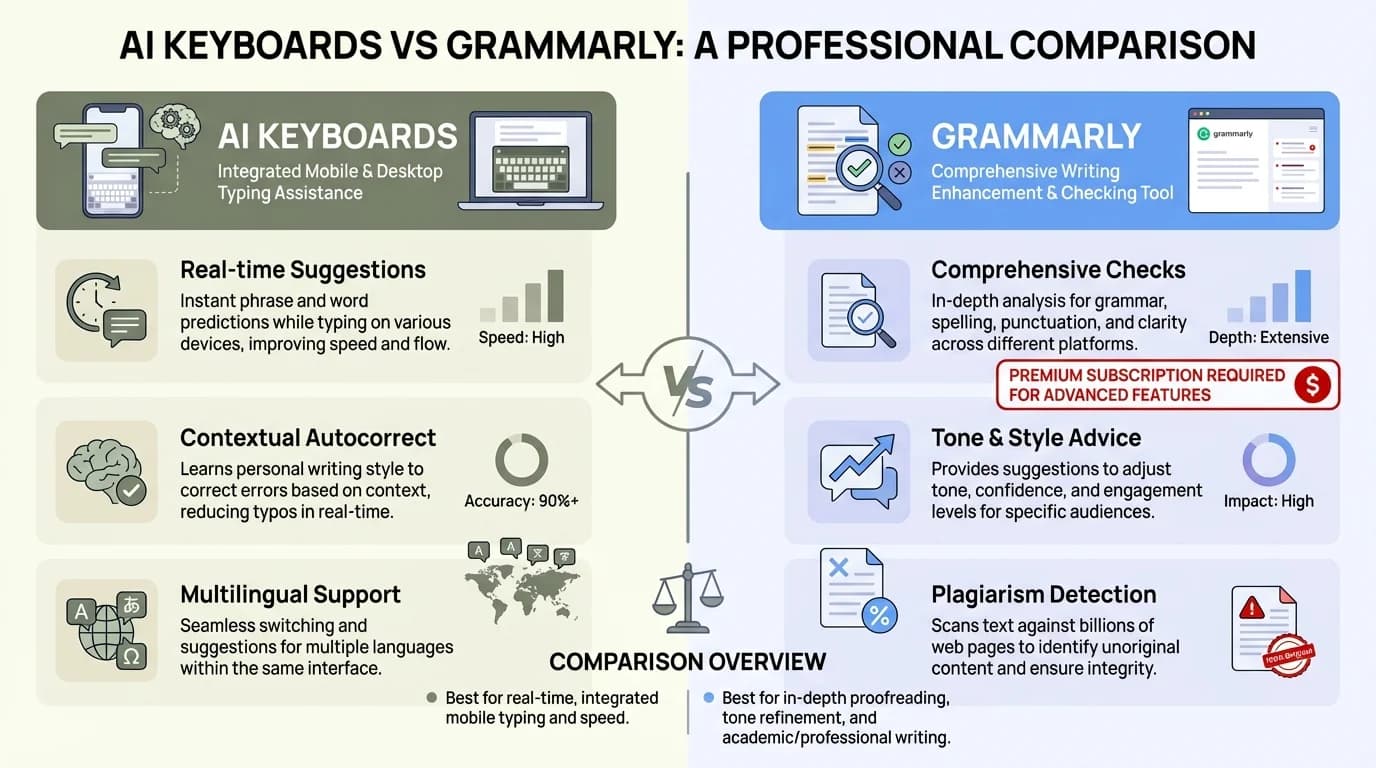
Visual comparison: AI Keyboards vs Grammarly - Understanding the strengths of each platform
Writing Style and Tone Adjustment Features
Have you ever sent an email that sounded too casual? Or a message that came across as too formal? Both AI keyboards and Grammarly offer tone adjustment features, but they approach this problem differently.
How AI Keyboards Handle Tone
AI keyboards like CleverType excel at:
- In-the-moment tone shifting: You can transform a casual message into a professional one with just a tap while you're typing
- App-specific suggestions: They learn which tone works best in which app (formal in email, casual in WhatsApp)
- Contextual awareness: They understand the difference between writing to your boss versus a friend
"The tone adjustment feature on my AI keyboard has saved me so many times," explains Michael, a sales manager. "I can draft something quickly then tap to make it sound more professional before sending to a client."
Grammarly's Approach to Tone
Grammarly offers:
- Tone detection: It analyzes your writing and tells you how it comes across
- Formality adjustments: It suggests ways to make your writing more or less formal
- Goal-based recommendations: You can set goals for your writing (inform, convince, describe) and get relevant suggestions
Grammarly's tone detector is more comprehensive for longer documents, providing an overall assessment rather than just sentence-by-sentence suggestions.
Personalization and Learning
Both tools learn from your writing over time, but AI keyboards have an advantage here because they see everything you type across all apps. This helps them develop a more complete understanding of your personal writing style.
Grammarly, while excellent at adapting to general writing patterns, doesn't have the same level of visibility into all your writing contexts.
The choice between them might depend on whether you prefer detailed document-level tone analysis (Grammarly) or in-the-moment tone adjustments across all apps (AI keyboards). For professionals who frequently switch between different communication contexts, AI keyboard for customer support and other specialized contexts can be particularly valuable.
Integration with Workflows and Devices
How well do these tools fit into your daily work routine? This is where the biggest differences emerge, and why many professionals end up using both tools in different contexts.
Desktop Integration
Grammarly shines on desktop with:
- Seamless browser extension that works across most websites
- Dedicated desktop app for checking documents
- Microsoft Office integration
- Google Docs integration
"For serious document editing on my laptop, I still prefer Grammarly," says Rachel, a legal professional. "The sidebar with detailed explanations and the ability to check entire documents at once is invaluable."
AI keyboards have less presence on desktops, though some offer companion apps or browser extensions. Their primary focus remains mobile devices.
Mobile Integration
AI keyboards dominate the mobile experience with:
- System-wide integration across all apps
- No need to switch between apps to check text
- Works in messaging, email, social media, notes - anywhere you type
- Often includes swipe typing and other mobile-specific features
Grammarly's mobile experience has improved with their keyboard app, but it doesn't match the deep system integration of dedicated AI keyboards, especially on Android devices where keyboard customization is more flexible.
Cross-Platform Synchronization
If you work across multiple devices, consider how these tools handle the transition:
- Grammarly maintains your preferences and learning across devices through your account
- AI keyboards typically store personalization on the device itself, though cloud sync is becoming more common
The best approach for many professionals is using Grammarly for desktop-based document editing and an AI keyboard for mobile devices. This combination provides comprehensive writing support across all contexts.
"I use both," explains David, a marketing consultant. "Grammarly on my laptop for client proposals and reports, and an AI keyboard on my phone for quick emails and messages when I'm on the go. In 2026, they've actually started working better together - my AI keyboard can now access my Grammarly style preferences when I'm mobile."
The API Integration Trend of 2026
One of the biggest shifts in early 2026 is how these tools are becoming more interoperable. Several AI keyboards now offer optional integration with Grammarly's API, allowing them to leverage Grammarly's grammar engine while maintaining the convenience of keyboard-level integration. This wasn't possible in 2025, and it's changing the game for professionals who want the best of both worlds without the hassle of switching tools.
Similarly, Grammarly has opened up limited keyboard APIs that allow AI keyboards to respect your custom style guides and terminology preferences. It's still early days, but this cross-pollination is making the "which one should I choose" question less binary and more about finding the right combination for your workflow.
Privacy and Data Security Considerations
Let's talk about something many professionals worry about but don't always consider when choosing writing tools: privacy and data security. Both AI keyboards and Grammarly need to "see" what you're writing to provide suggestions, but they handle your data differently.
How AI Keyboards Handle Your Data
Most AI keyboards:
- Process much of your typing locally on your device
- May send some data to their servers for advanced processing
- Often provide options to disable cloud features for sensitive content
- Vary significantly in their privacy policies between providers
"I chose my AI keyboard specifically because of its privacy options," says Jennifer, an attorney. "I can turn off cloud processing when I'm working with confidential client information."
The level of privacy varies significantly between different AI keyboard providers. Some prioritize on-device processing, while others rely more heavily on cloud servers.
Grammarly's Approach to Data Privacy
Grammarly:
- Sends your text to their servers for processing
- Encrypts data in transit and at rest
- Does not sell your personal data or use it for advertising
- Allows enterprise users additional security controls
Grammarly has made significant investments in security certifications and compliance programs, including SOC 2 reports and GDPR compliance.
Questions to Ask About Privacy
When evaluating either tool, consider:
- Is your text processed locally or sent to servers?
- Does the tool store your writing permanently?
- Can you opt out of data collection for sensitive content?
- Does the provider have enterprise-grade security certifications?
- Who owns the content you create with assistance from the tool?
For professionals in regulated industries like healthcare, legal, or finance, these privacy considerations may actually be the most important factor in your decision.
Many organizations have specific policies about which writing assistants employees can use. Check with your IT department before installing either tool if you work with sensitive information.
The data security in AI keyboards has improved significantly in recent years, but organizations should still conduct thorough security reviews.
Cost Comparison and Value for Money
Is paying for a writing assistant worth it? And which option gives you more bang for your buck? Let's break down the costs and what you get at different price points.
Free Tier Comparison
Grammarly Free:
- Basic spelling and grammar checks
- Tone detection
- Limited style suggestions
- Works on desktop and mobile
AI Keyboard Free Tiers:
- Basic spelling and grammar corrections
- Text predictions
- Some offer tone adjustments
- Limited advanced writing features
Many professionals find that the free versions of AI keyboards actually offer more functionality than Grammarly's free tier, particularly for mobile use.
"I was surprised how much the free version of my AI keyboard could do compared to free Grammarly," notes Thomas, a project manager. "I get grammar corrections, tone suggestions, and predictions without paying anything."
Premium Features and Pricing (2026 Updates)
Grammarly Premium ($12-30/month depending on plan):
- Advanced grammar and style suggestions
- AI-powered tone adjustments with emotional intelligence
- Clarity improvements with readability scoring
- Plagiarism detection (enhanced in 2026)
- Full-paragraph AI rewrites (new)
- Word choice enhancements with context awareness
- Brand voice consistency checking (enterprise)
AI Keyboard Premium Tiers (typically $6-18/month in 2026):
- Advanced grammar and style checks
- Unlimited tone options with custom profiles
- Custom templates and smart snippets
- Cross-platform cloud sync
- Voice-to-text with punctuation control (new)
- Multi-language support with instant translation
- Priority access to latest AI models
Pricing has remained relatively stable into 2026, though premium AI keyboards have added more value with features that were enterprise-only a year ago. The competitive pressure has pushed both platforms to offer more at every tier.
Business and Enterprise Options
Both Grammarly and several AI keyboard providers offer business and enterprise plans with:
- Team management features
- Style guide implementation
- Analytics on writing habits
- Advanced security controls
- Custom terminology
Value Assessment
For desktop-heavy users who write long-form content, Grammarly Premium often provides better value due to its comprehensive document analysis and detailed suggestions.
For mobile-first professionals who communicate primarily through messaging, email, and social media, AI keyboards typically provide better value because they work seamlessly across all apps.
Many professionals find that the free tier of an AI keyboard combined with Grammarly Free gives them comprehensive coverage without any cost. This hybrid approach leverages the strengths of both platforms and has become increasingly popular in 2026 as both tools have improved their free offerings to stay competitive.
As one marketing director told me: "I use the free version of both. Grammarly on desktop for longer content, and an AI keyboard on my phone. Between the two, I haven't felt the need to upgrade to premium. Both tools have gotten so good in their free tiers that I'm actually getting more value in 2026 than I did from premium versions two years ago."
Real-World Performance: Speed and Accuracy
Theory is one thing, but how do these tools perform in the real world when you're racing to meet a deadline or firing off important emails on the go? I tested both extensively in my daily work, and here's what I found about their speed and accuracy.
Typing Speed Impact
AI Keyboards (2026):
- Initially may slow you down as you adapt to predictions
- Eventually speed up typing by 30-45% for most users (up from 20-30% in 2025)
- Text prediction becomes more accurate over time with neural adaptation
- Swipe typing options further increase mobile typing speed
- Voice-to-text integration allows seamless switching between typing modes
Grammarly:
- Minimal impact on typing speed
- Suggestions appear as you type but don't interrupt flow
- Corrections often require reviewing after writing
- Performance optimization in 2026 reduced page slowdowns
- New quick-fix mode applies common corrections automatically
"After the first week of adjustment, my AI keyboard actually made me faster because it predicts what I'm going to say next," says Alex, a communications specialist. "By early 2026, it's gotten so good that I rarely type full sentences anymore - it completes them accurately about 80% of the time. It's genuinely like having a mind reader."
Accuracy in Different Contexts
I tested both tools across various writing scenarios to compare their accuracy:
Business Emails
- Both performed well with professional language
- AI keyboards excelled at suggesting appropriate sign-offs
- Grammarly provided better overall document-level analysis
Quick Messages
- AI keyboards were significantly more helpful for short communications
- Grammarly sometimes missed context in very brief messages
- AI keyboards adapted better to informal language
Technical Writing
- Grammarly handled specialized terminology better in most cases
- Some AI keyboards struggled with highly technical content
- Both improved as they learned your vocabulary
Creative Writing
- Results varied widely depending on writing style
- Neither fully captured creative nuance
- AI keyboards were sometimes too predictive for creative work
Battery and Resource Usage (2026 Improvements)
For mobile users, efficiency matters - and 2026 has brought significant improvements:
- AI keyboards have optimized on-device processing, reducing battery drain by 30-40% compared to 2025 models
- Neural processing units (NPUs) in modern smartphones now handle AI keyboards more efficiently
- Grammarly's mobile app remains battery-efficient but still requires app switching
- Both tools now offer "power saver" modes that reduce AI processing when battery is low
"I noticed my phone battery draining faster when I first switched to an AI keyboard in 2024, but the 2026 updates have been a game changer," mentions Jamie, a digital nomad. "The battery impact is barely noticeable now, especially on newer phones with dedicated AI chips. I get the productivity boost without constantly hunting for chargers."
For the most accurate real-world experience, I recommend testing both options yourself for at least a week. Writing styles and needs vary tremendously between professionals, and what works perfectly for one person may frustrate another.
Many users of AI keyboards for professionals report that the adjustment period is worth the eventual productivity gains.
Specialized Features for Professional Use Cases
Different professions have unique writing needs. Let's explore how these tools cater to specific professional requirements and which might be better for your particular field.
For Marketing and Social Media Professionals
AI Keyboards Offer:
- Social media-specific suggestions
- Character count awareness for platforms like Twitter
- Hashtag suggestions
- Tone variations for different platforms
Grammarly Provides:
- Brand voice consistency checks
- Engagement metrics for content
- More comprehensive readability analysis
- Better support for longer marketing copy
For social media managers working primarily on mobile, AI keyboards for social media marketers provide specialized features that Grammarly can't match.
For Legal and Financial Professionals
AI Keyboards Offer:
- Terminology suggestions based on previous usage
- Quick template access for common clauses
- Privacy controls for sensitive information
- Works in specialized apps
Grammarly Provides:
- More thorough checks for precision
- Document-wide consistency checking
- Better citation formatting assistance
- Clear explanations of suggested changes
"As an attorney, I prefer Grammarly for contract drafting on my laptop, but my AI keyboard is invaluable for client communications on the go," says Michael, a corporate lawyer.
For Academic and Research Professionals
AI Keyboards Offer:
- Integration across reference apps
- Quick citation formatting
- Works in specialized research applications
- Learning field-specific terminology
Grammarly Provides:
- Plagiarism detection
- Better handling of complex academic writing
- More nuanced suggestions for scholarly tone
- Support for various citation styles
For academics, the choice often depends on whether they're doing quick research on mobile devices or focused writing on desktops.
For Customer Service Professionals
AI Keyboards Excel With:
- Quick response templates
- Tone adjustment for customer interactions
- Emotion detection to match customer sentiment
- Works across all customer service apps
Grammarly Helps With:
- Ensuring consistently professional tone
- Checking for potential misunderstandings
- Flagging overly complex language
- Maintaining brand voice standards
Customer service representatives who primarily work on mobile devices often find AI keyboards for customer support more valuable than Grammarly.
For Multilingual Professionals
AI Keyboards Offer:
- Seamless language switching
- Translation features built in
- Learning bilingual patterns
- Adapting to code-switching
Grammarly Provides:
- More comprehensive English checks
- Better handling of language interference issues
- More consistent grammar rules application
- Limited multilingual support
"As someone who works in both English and Spanish, my AI keyboard adapts to my language switching much better than Grammarly," explains Carmen, a global marketing manager.
The best choice for your profession depends on your specific workflow, the platforms you use most frequently, and whether your writing tends to be brief communications or longer documents.
Emerging Trends in Early 2026
The writing assistant landscape continues to evolve rapidly. Here's what's happening right now that could influence your decision:
Multimodal AI Integration: AI keyboards are beginning to incorporate image and voice context. You can now dictate a message while the keyboard "sees" what's on your screen and adjusts suggestions accordingly. This is particularly useful for responding to visual content in messaging apps or adding context-aware captions to images you're sharing.
Real-time Collaboration Features: Grammarly has expanded its real-time collaboration tools, making it easier for teams to maintain consistent writing standards during live document editing. This positions it more directly as a team productivity tool rather than just a personal writing assistant.
Privacy-First AI Models: With growing concerns about data privacy, several AI keyboard providers have launched fully on-device AI models that never send your text to the cloud. These models run entirely on your phone's neural processor, offering competitive accuracy without the privacy trade-offs. For professionals handling sensitive information, this is a significant development.
Making the Right Choice for Your Professional Needs
After comparing all these aspects, how do you actually decide which tool is right for you? Let's create a decision framework based on your specific situation and needs.
Consider Your Primary Work Environment
Choose an AI Keyboard if:
- You primarily work from mobile devices
- You communicate across multiple apps throughout the day
- You send lots of shorter communications (emails, messages)
- You need writing assistance in non-standard applications
- You frequently switch between casual and formal communication
Choose Grammarly if:
- You primarily work from a desktop/laptop
- You write longer-form content regularly
- You need detailed explanations of grammar rules
- You want comprehensive document-level analysis
- You need plagiarism detection
"I realized I needed to stop trying to make one tool do everything," says Rebecca, a marketing consultant. "Now I use an AI keyboard on my phone and Grammarly on my laptop, and my workflow is much smoother."
Try This Decision Exercise
Answer these questions to help clarify your needs:
- What device do you use for most of your professional writing?
- Do you typically write short messages or longer documents?
- How important is seamless integration across all your apps?
- Do you need specialized features like plagiarism detection?
- How concerned are you about privacy and data security?
- What's your budget for writing assistance tools?
Hybrid Approach: The Best of Both Worlds
Many professionals find that using both tools in their respective strengths provides the best overall experience:
- AI keyboard for mobile communication, quick emails, and messages
- Grammarly for desktop writing, longer documents, and comprehensive checks
This approach leverages the strengths of each platform while minimizing their weaknesses.
"I used to think I had to choose one or the other," notes David, a business consultant. "Now I use both - Grammarly for client proposals and reports, and an AI keyboard for everything on my phone. Together they cover all my bases. The 2026 integrations between them have made this hybrid approach even smoother."
For budget-conscious professionals, using the free versions of both tools often provides sufficient coverage without any cost. The quality of free tiers has improved so much in early 2026 that many professionals are finding they don't need premium subscriptions unless they require specific enterprise features like plagiarism detection or brand voice enforcement.
The most important factor is how well the tool fits into your existing workflow. The best writing assistant is the one you'll actually use consistently. In 2026, that might mean using both - and that's perfectly okay. These tools are no longer mutually exclusive choices but rather complementary parts of a modern professional's writing toolkit.
Frequently Asked Questions
### Q: Can AI keyboards completely replace Grammarly in 2026?
A: For mobile-focused professionals, AI keyboards can now replace most Grammarly functionality, especially with 2026's improved accuracy and context awareness. However, they typically don't offer the same depth of document analysis, plagiarism detection, or detailed grammar explanations that Grammarly provides for longer content. The good news is that API integrations now allow you to use both together seamlessly.
### Q: Do AI keyboards work offline?
A: Yes, and this has improved significantly in 2026. Most AI keyboards now offer robust offline functionality, including spell checking, grammar corrections, and text predictions using on-device AI models. Advanced features like tone analysis and complex grammar checking work offline on newer phones with dedicated neural processors, though cloud-based models still offer slightly better accuracy.
### Q: Which option is better for non-native English speakers?
A: Both tools help non-native speakers effectively in 2026. Grammarly provides detailed explanations of grammar rules, which is educational. AI keyboards offer real-time assistance across all apps with improved translation features and multilingual support. Many non-native English writers benefit from using both - AI keyboards for daily communication and Grammarly for important documents where you want to understand the corrections.
### Q: Can these tools help with creative writing?
A: Both tools can help with basic grammar and spelling in creative writing, but use them cautiously. They tend to normalize writing toward standard patterns, which may not be desirable for creative work. However, 2026 models have added "creative mode" options that are less prescriptive and focus mainly on technical errors rather than style suggestions.
### Q: How do these tools handle technical or specialized vocabulary?
A: Both tools have dramatically improved their handling of specialized vocabulary in 2026. Grammarly allows custom dictionaries and learns from your company's documentation. AI keyboards learn specialized terms through repeated usage and now sync these learnings across devices. Both adapt within a few days of regular use in technical fields, making them much more practical for specialized professionals than previous versions.
### Q: What about privacy for confidential business information?
A: Privacy has become a major differentiator in 2026. Many AI keyboards now offer fully on-device processing that never sends your text to the cloud, running entirely on your phone's neural processor. Grammarly has enhanced its enterprise security certifications and offers private cloud deployments for sensitive industries. If privacy is critical, look for AI keyboards with "privacy-first" or "on-device AI" modes, or consider Grammarly's enterprise tier with enhanced security controls.
### Q: Can I use these tools on all my devices?
A: Yes, though implementation varies. Grammarly works seamlessly across desktop and mobile through browser extensions, desktop apps, and mobile keyboards. AI keyboards are primarily mobile-focused but many now offer desktop companion apps or browser extensions. The 2026 API integrations mean your settings and preferences sync between tools, making the cross-device experience much smoother than before.