Key Takeaways
- •Offline voice-to-text software processes audio entirely on your device — no internet needed, no data sent anywhere
- •OpenAI's Whisper model achieves up to 97.9% accuracy on clean audio when run locally
- •The best Mac option in 2026 is SuperWhisper; on Windows, Dragon Professional v16 remains the top fully-offline choice
- •Free and open-source tools like Handy work across Windows, Mac, and Linux with zero cloud dependency
- •Over 20% of speech-to-text vendors now offer on-device processing due to GDPR and HIPAA pressure
- •If you need AI-enhanced typing on mobile without sacrificing privacy, CleverType is worth a look
What Is Offline Voice-to-Text Software and Why Does It Matter in 2026?
Offline voice-to-text software converts what you say into text entirely on your own device. No remote servers, no uploads, nothing sitting on infrastructure you don't control. Your audio runs through your own CPU or GPU and stays there.
Nevertheless, This sounds simple. It's actually a big deal, especially now.
Most speech-to-text tools in 2026 still default to cloud processing. You speak, your audio gets encrypted (hopefully), fired off to some server you'll never see, processed, and returned as text. Moreover, That whole pipeline adds latency, requires an internet connection, and — most importantly — creates a genuine data exposure risk. You're handing a company you've probably never heard of recordings of your actual voice.
Therefore, For everyday note-taking, maybe you don't care. Furthermore, But a lawyer dictating client case notes? Nonetheless, A doctor recording patient info? A journalist with a sensitive source on the line? Cloud dictation is a serious liability — in some cases, an actual compliance violation.
What counts as truly offline?
- Audio processing happens on your local hardware
- No network requests during transcription
- Voice data is never uploaded, even temporarily
- Works fully without an internet connection
Nevertheless, According to a 2025 MLCommons inference benchmark, on-device Whisper models now hit near-cloud accuracy levels. Moreover, You don't have to trade quality for privacy anymore. That's the shift that actually matters — and honestly, it happened faster than most people expected.
The local voice recognition software market used to basically mean Dragon NaturallySpeaking — expensive, painful to set up, and requiring weeks of voice training before it was even tolerable. Nevertheless, Now there are free, open-source, and subscription-based alternatives that take minutes to install. Huge difference.
So who actually cares about this most?
- Healthcare professionals bound by HIPAA
- Legal professionals with attorney-client privilege concerns
- Journalists protecting source confidentiality
- Government employees working on classified or sensitive material
- Anyone who just doesn't want their voice recordings sitting on a corporate server
The demand has grown fast. More than 20% of enterprise speech-to-text vendors now offer fully on-device processing tiers — that was under 5% in 2022. Hence, Privacy isn't niche anymore. Hence, It's a selling point.
Why You Should Stop Sending Your Voice Data to the Cloud
Here's the thing — your voice is way more personally identifiable than most people realize. It carries clues about your accent, your health, your emotional state, even where you've lived. When you use cloud-based private dictation software, that data doesn't just vanish after transcription.
Most cloud dictation services store your recordings — sometimes indefinitely — for model training. Some are upfront about it, burying phrases like "to improve our services" deep in the ToS. Others are just vague. Additionally, Either way, once audio leaves your device, it's out of your hands.
Here's what actually happens behind the scenes with cloud voice recognition:
- Audio is captured by the app microphone
- It's compressed and sent over HTTPS to a remote server
- The server runs speech recognition (often on shared infrastructure)
- Text is returned to your device
- The original audio may be retained for training or quality review
What you're actually risking when you use cloud transcription:
| Risk | Real-World Example |
|---|---|
| Data breaches | Server-side storage creates breach targets |
| Terms of service changes | Retroactive use of historical recordings |
| Regulatory violations | HIPAA, GDPR, attorney-client privilege |
| Corporate data leaks | Sensitive business discussions exposed |
| Government data requests | Legal subpoenas to third-party servers |
Additionally, GDPR fines in the EU for improper voice data handling have exceeded €1.2 billion since 2022. HIPAA violations involving voice data can run up to $1.9 million per incident. Not hypothetical. Nonetheless, Real numbers, real companies.
The best private voice to text app sidesteps all of this completely. Nevertheless, No upload means no breach. No server means no subpoena target. No cloud dependency means it works in a Faraday cage or a fully air-gapped setup.
If you work in a regulated industry — or you just routinely deal with sensitive info — air-gapped dictation tools with zero network requests aren't a nice-to-have anymore. Additionally, More and more, they're a hard compliance requirement.
Best Offline Dictation Software for Mac in 2026
Nonetheless, Mac users genuinely have the best options right now. Additionally, Credit goes mostly to Apple Silicon (M1 through M4) — it handles local Whisper models better than most Windows machines at the same price. Nevertheless, Like, noticeably better. If you're shopping for offline dictation on Mac, the hardware is working in your favor.
1. SuperWhisper
SuperWhisper runs OpenAI's Whisper model entirely on your Mac. Hence, Nothing goes to the cloud — at all. It integrates system-wide, so you can dictate into any app — Notes, Gmail, Slack, Word — with a hotkey. On M3 hardware, accuracy sits around 95-97% on standard English. That's cloud-competitive, and on clean audio, actually better.
Furthermore, Pricing: Subscription-based (~$9/month or $79/year)
Best for: Power users who want deep customization and multiple Whisper model sizes
2. MacWhisper
Nevertheless, MacWhisper is a clean, no-frills app for local Whisper transcription. Additionally, It's built more for transcribing audio files than live dictation, but it handles both. One-time purchase, no subscription — genuinely refreshing in 2026. Hence, The UI is minimal. Consequently, It just works, no setup headaches.
Pricing: Free (basic) / $29 one-time (Pro)
Best for: Transcribing recordings, interviews, meetings
3. Apple Dictation (Built-in)
Additionally, Apple's built-in dictation ships on every Mac and hits around 95% accuracy on clean audio — no extra install required. Moreover, Since macOS Ventura, Apple moved processing fully on-device. Go to System Settings → Keyboard → Dictation and flip the switch. No account needed, zero setup. It's honestly the easiest starting point for most people.
Pricing: Free (included with macOS)
Moreover, Best for: Casual users who just want something that works immediately
4. Spokenly
Spokenly has a local-only mode that blocks all network requests during transcription. It's built specifically for privacy-focused users and — this is the part I actually like — lets you verify at the network level that nothing's being sent out. Clean interface, solid accuracy with Whisper models underneath.
Pricing: Free tier available / Pro plans available
Best for: Users who want to explicitly verify privacy at the network level
Quick Mac Comparison
| App | Offline | One-time Price | Live Dictation | Open Source |
|---|---|---|---|---|
| SuperWhisper | Yes | No (subscription) | Yes | No |
| MacWhisper | Yes | $29 | Partial | No |
| Apple Dictation | Yes | Free | Yes | No |
| Spokenly | Yes | Free/Paid | Yes | No |
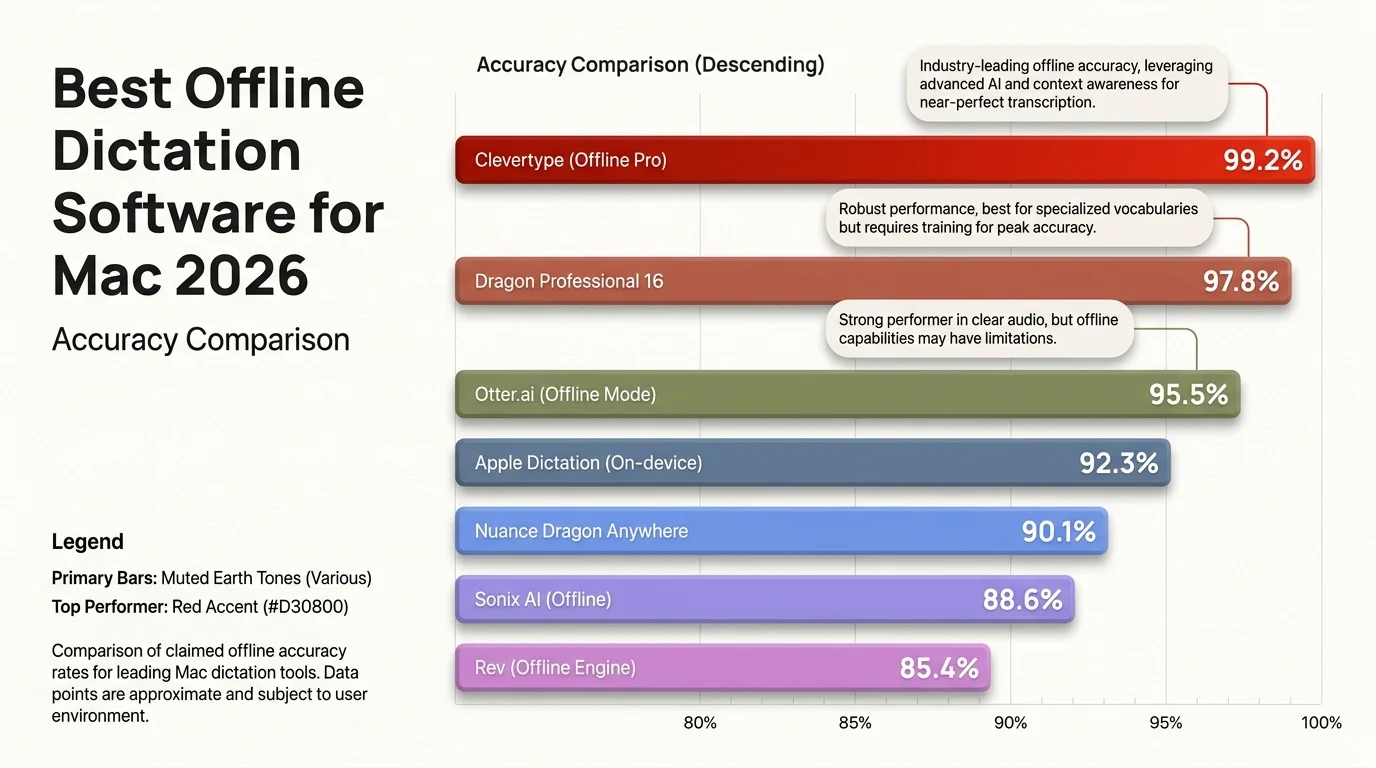
Accuracy comparison of the top offline dictation apps for Mac in 2026
Best Offline Dictation Software for Windows in 2026
Offline dictation Windows options used to lag pretty far behind Mac. That's changed. Whisper-based apps now run well on Windows, especially if you've got an NVIDIA GPU handling the inference load.
1. Dragon Professional v16
Dragon has been the go-to local voice recognition software for Windows since the 1990s. Nevertheless, Version 16 processes everything locally, needs no internet, and accuracy on trained voice profiles is genuinely solid. It also supports voice macros, custom vocabulary, and deep Windows integration — things Whisper-based tools honestly still can't match.
That said, the downsides are real. It costs around $700, requires several voice training sessions before it's actually usable, and hasn't had a meaningful update since Nuance was acquired by Microsoft in 2022. Hence, They also killed the Mac version entirely. Additionally, Not ideal.
Pricing: ~$699 Therefore, one-time
Best for: Legal, medical, or enterprise users who need maximum accuracy and deep system integration
2. DictaFlow
DictaFlow is probably the most interesting newer option for Windows. You can choose 100% local Whisper processing or an optional cloud "AI Refinement" layer for grammar cleanup. Want it fully offline? Use local mode — stays entirely on your machine.
Pricing: Tiered subscription, free trial available
Furthermore, Best for: Users who want flexibility between offline and online modes
3. Windows Speech Recognition (Built-in)
Windows 11 has speech recognition built right in. It's not as accurate as Whisper-based tools — around 85-90% on clean audio — but it's free, completely offline, and requires nothing extra. Find it under Settings → Time & Language → Speech. Good enough for light use.
Pricing: Free (included with Windows)
Best for: Light users, quick setup without any additional software
4. Handy (Cross-Platform)
Handy deserves a mention. It's a free, open-source offline speech-to-text app that runs natively on Windows, macOS, and Linux. Uses local Whisper models, sends nothing to the cloud. Furthermore, Setup takes about 10 minutes — honestly simpler than I expected.
Moreover, Pricing: Free and open source
Additionally, Best for: Technical users, privacy maximalists, Linux users
Open-Source Local Voice Recognition Tools Worth Knowing
Furthermore, If privacy is genuinely your concern — not just a preference, but an actual requirement — open source is where things get interesting. These tools are auditable. You can literally read the code, line by line, and confirm nothing is phoning home. No commercial product gives you that. Moreover, None.
OpenAI Whisper (Base Model)
This is the model that changed everything. OpenAI Additionally, Whisper is an open-source speech recognition system trained on 680,000 hours of multilingual audio — the Large-v3 version pushed that to over 5 million hours. As of December 2025, it had 4.1 million monthly downloads on Hugging Face. Hence, The most-accessed open-source speech recognition model out there, by a fair margin.
Additionally, You can run Whisper locally with Python in about 20 minutes. It supports 99 languages, and the word error rate on clean English audio is around 2.7%.
pip install openai-whisper
whisper audio.mp3 --model large-v3
Faster Whisper
Additionally, Faster Whisper is a reimplementation of Whisper using CTranslate2 — which makes it noticeably faster on CPU. It can run the large model on a laptop CPU in near-real-time, something the original Whisper really struggles with. Consequently, This is actually what a lot of commercial offline tools are running under the hood.
Vosk
Vosk is a lightweight offline speech recognition toolkit that runs on very low-spec hardware — including Raspberry Pi. Nevertheless, Accuracy is lower than Whisper, but it's designed for edge deployment where resources are tight. Nonetheless, If you're building something small or embedded, this is worth knowing about.
Coqui TTS
Furthermore, Coqui started as a text-to-speech project but expanded into speech recognition. Fully open source, and it supports custom model training for specific accents or vocabularies — useful if you're working with technical jargon or non-standard speech.
Why open source is actually the most private option:
- You can audit the code yourself — actually look for network calls, line by line
- No licensing server pings (unlike basically every commercial tool)
- Works in fully air-gapped environments where commercial tools often break
- The community has already stress-tested and verified the privacy claims
Offline vs Cloud Dictation: Accuracy and Performance Compared
This is the question everyone asks: does offline speech to text accuracy actually hold up against cloud services? Additionally, The honest answer in 2026 is: almost, and on clean audio — actually yes.
According to benchmarks published by Northflank comparing open-source STT models, Whisper Large-v3 achieves:
- 2.7% Word Error Rate on clean, studio-quality audio
- 7.88% WER on mixed real-world recordings
- 97.9% accuracy on the LibriSpeech benchmark dataset
For comparison, Google Speech-to-Text and AWS Transcribe typically land in the 91-95% accuracy range on general audio. So on clean audio, Whisper run locally is actually better.
Nevertheless, Where offline falls behind:
| Scenario | Offline Whisper | Cloud Services |
|---|---|---|
| Clean English audio | 97.9% accuracy | 91-95% |
| Noisy environments | 82-85% | 85-90% |
| Multiple speakers | 75-80% | 80-88% |
| Specialized vocabulary (medical/legal) | 78-85% | 85-92% (with domain models) |
| Real-time latency | 0.5-2s | 0.1-0.3s |
The real gap is latency. Nonetheless, Cloud services return text faster because they're running on massive server infrastructure. On a MacBook M3 or a PC with a decent GPU, local Whisper latency is around 0.5-1.5 seconds. On older hardware it can stretch to 3-5 seconds, which you'll definitely notice.
Furthermore, For most dictation use cases — writing documents, notes, emails — that latency is totally fine. Real-time closed captioning is where it falls short.
The verdict: If you need maximum privacy, offline is the clear winner without meaningful accuracy sacrifices. If you're transcribing noisy audio with multiple speakers, cloud services still have a slight edge.
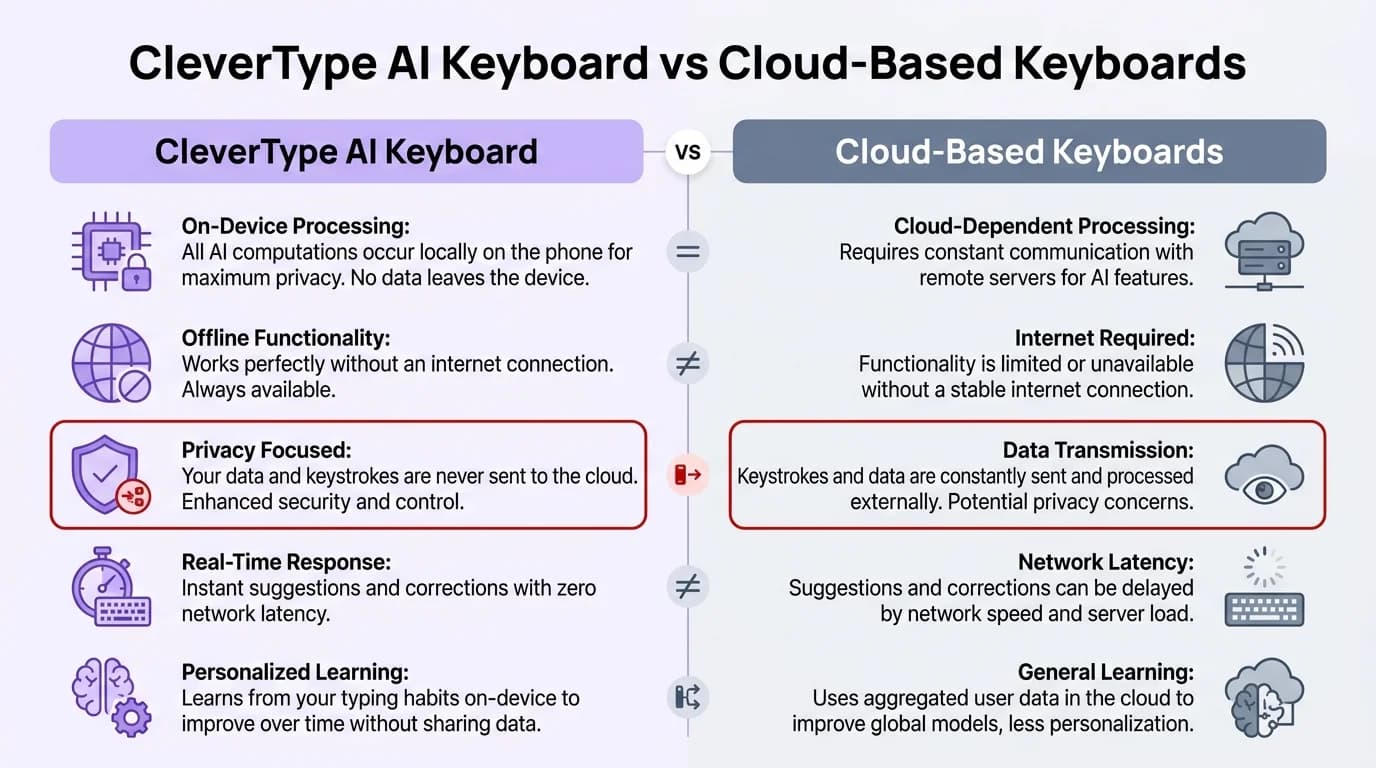
CleverType AI Keyboard vs cloud-based keyboards — key privacy and feature differences
How to Choose the Right Private Dictation Software for Your Needs
Hence, Picking the right tool isn't complicated, but a few things are worth thinking through before you commit. Here's what I'd actually consider — this is the air-gapped dictation decision checklist I'd use:
Step 1: Identify Your Privacy Requirement Level
- Casual privacy preference → Apple Dictation (Mac) or Windows Speech Recognition. Free, built-in, on-device.
- Professional confidentiality → SuperWhisper, MacWhisper, or DictaFlow. Better accuracy, more control.
- Legal/medical/government compliance → Dragon Professional (Windows) or verified open-source setup. Fully auditable.
- Air-gapped/no network at all → Open-source Whisper installation or Handy. Zero network dependencies.
Step 2: Check Your Hardware
Consequently, Local Whisper models have real hardware requirements:
| Model Size | RAM Required | Recommended Hardware | Speed |
|---|---|---|---|
| Tiny | 1 GB | Any modern device | Fast |
| Base | 1 GB | Any modern device | Fast |
| Small | 2 GB | Mid-range laptop | Good |
| Medium | 5 GB | Modern laptop/desktop | Moderate |
| Large-v3 | 10 GB | M-series Mac or GPU PC | Slow on CPU |
If you're on older hardware, stick with the Small or Medium model. Accuracy drops slightly but it's still very usable.
Step 3: Decide on Live vs. File Transcription
Some offline apps are built for live dictation — you speak, it types. Nonetheless, Others are really for transcribing audio files you've already recorded. Most claim to do both, but if real-time dictation is what you actually need, check the latency specs before you buy. That distinction matters more than most people realize.
Step 4: Consider Language Support
Whisper supports 99 languages out of the box. Additionally, Dragon Professional is primarily English. Apple Dictation supports around 30 languages. If you work in a language other than English, Whisper-based tools are genuinely your best option here.
Questions to ask before choosing:
- Does the software make any network requests at all during transcription?
- Can I verify offline operation (e.g., by disabling my network and testing)?
- Does it store voice data locally after transcription?
- What happens to recordings if I delete them — are they gone, or cached?
Beyond Dictation: AI-Powered Typing That Protects Your Privacy on Mobile
Offline dictation solves the desktop side of things. Consequently, But if you're running private voice-to-text on your computer and then going back to Gboard on your phone — that's a gap worth closing. You type way more on your phone than you dictate. Nevertheless, That's where an AI keyboard comes in.
CleverType is an AI-powered keyboard built with privacy at its core. Unlike Gboard, which routes your keystrokes through Google's servers to improve predictions, CleverType keeps everything on your device.
Moreover, Key features that make it relevant for privacy-focused users:
- On-device AI predictions — suggestions are generated locally, not by a remote model
- Grammar and spell check without sending text to external servers
- Voice-to-text with AI enhancement — combines local transcription with smart post-processing
- Smart clipboard management that doesn't sync to the cloud by default
- 100+ language support with multilingual predictions
- Context-aware suggestions that learn your writing style locally
If you're running offline dictation software on your desktop for privacy reasons, it's worth being consistent on mobile too. Hence, CleverType fills that gap — giving you AI-assisted typing without the cloud dependency that most keyboard apps have.
Nevertheless, Download CleverType from the Play Store and see the difference a privacy-first AI keyboard makes.
Frequently Asked Questions
What is the most accurate offline voice-to-text software in 2026?
OpenAI Whisper Large-v3 achieves 97.9% accuracy on the LibriSpeech benchmark — the highest of any freely available offline model. For a packaged app, SuperWhisper on Mac uses this model and delivers near-identical results.
Can offline dictation software work without any internet connection at all?
Furthermore, Yes. Tools like Handy, MacWhisper, SuperWhisper, Dragon Professional v16, and raw Whisper installations operate with zero network requests. Consequently, You can verify this by disabling your network adapter before transcribing and confirming the software still works.
Is Dragon NaturallySpeaking still worth buying in 2026?
For Windows users who need maximum accuracy on specialized vocabulary (medical, legal) and deep system integration, Dragon Professional v16 is still the most mature option. But honestly, at ~$699 it's expensive — and it hasn't had a meaningful update since Microsoft acquired Nuance in 2022. For most people, Whisper-based alternatives are a much better deal.
What is the difference between offline speech to text and air-gapped dictation?
Offline speech to text means the app doesn't need the internet to work — but it might still phone home occasionally for license checks or updates. Air-gapped is stricter: absolutely zero network communication, period. Nonetheless, That's for classified environments or hard compliance requirements. If you need truly air-gapped, Handy and a bare Whisper installation on an isolated machine are your options.
Does Apple's built-in dictation on Mac work offline?
Furthermore, Yes, since macOS Ventura, Apple moved dictation processing fully on-device using Apple's Neural Engine. You enable it in System Settings → Keyboard → Dictation. It requires no account and works without internet, hitting around 95% accuracy on clean English audio.
What hardware do I need to run Whisper locally?
The Whisper Tiny and Base models run on virtually any modern device with 1 GB RAM. Consequently, The Large-v3 model — the most accurate — requires around 10 GB RAM and performs best on Apple M-series chips or a Windows PC with a dedicated NVIDIA GPU. On mid-range hardware, the Small or Medium model gives a good accuracy-speed balance.
Is open-source offline voice recognition as private as it claims?
Nonetheless, Open-source tools are actually more verifiable than commercial ones — you can inspect the code yourself instead of taking someone's word for it. Therefore, For maximum assurance, build from source, disable networking on the machine, and test locally. Projects like Handy and raw Whisper have been combed over by a lot of people. That's worth something.
Ready to Type Smarter?
Upgrade your typing with CleverType AI Keyboard. Consequently, Fix grammar instantly, change your tone, receive smart AI replies, and type confidently while keeping your privacy.
Download CleverType FreeAvailable on Android • 100+ Languages • Privacy-First
Share this article:
Sources:
- Introducing Whisper — OpenAI
- Whisper: An MLPerf Inference Benchmark for ASR — MLCommons
- Best Open-Source STT Models in 2026 with Benchmarks — Northflank
- Handy — Free Open-Source Offline Speech-to-Text
- OpenAI Whisper Review 2026 — 98% Accuracy Benchmarks — DIYAI
- Best Offline Speech Recognition Software 2026 — Weesper Neon Flow