Key Takeaways
- •Over 4 million users have switched from Gboard to CleverType for better AI features and stronger privacy
- •Gboard sends typing data to Google by default — CleverType processes data on-device
- •CleverType includes grammar fix, tone change, AI replies, and translation — features Gboard simply doesn't have
- •67% of keyboard users don't know if their typing data is being collected or sold
- •AI keyboard apps grew 91.8% in downloads in 2024, showing massive demand for smarter typing
- •Switching keyboards on Android or iPhone takes under 2 minutes
Why Are So Many People Leaving Gboard?
Gboard is on more Android phones than any other keyboard. Nonetheless, Pre-loaded, free, works fine. Hence, And yet millions of people are actively searching for a Gboard alternative and actually making the switch. Consequently, So what's going on?
The short answer: Gboard was built to type. Furthermore, Not to write.
And there's a real difference. Typing means getting characters on screen. Furthermore, Writing means communicating clearly, with the right tone—whether you're texting your boss, replying to a client email, or messaging someone in their native language. Gboard handles the first part fine. The second part? Furthermore, Not even close.
Here's where it breaks down:
- No grammar checking — autocorrect fixes obvious typos, nothing more
- No tone adjustment — you can't make a message sound more formal or more casual
- No AI replies — you get basic Smart Reply chips, but nothing contextual or editable
- No translation — you have to leave the app, use Google Translate, copy, paste, go back
- Privacy concerns — Google collects typing data by default through its "Share usage statistics" feature
Moreover, That last one—the privacy thing—deserves its own section. Additionally, We'll get there. But first: what does a modern AI keyboard app actually look like next to Gboard?
| Feature | Gboard | CleverType |
|---|---|---|
| Grammar fix | No | Yes |
| Tone change | No | Yes |
| AI-powered smart replies | Basic chips | Full contextual AI |
| Translation | No | Yes (100+ languages) |
| On-device privacy | No | Yes |
| ChatGPT integration | No | Yes |
| Customizable themes | Yes | Yes |
Nonetheless, The numbers back this up. According to Business of Apps, AI app downloads hit 1.49 billion in 2024—up 91.8% year-over-year. People aren't just curious about AI keyboards anymore. Additionally, They're actually switching.
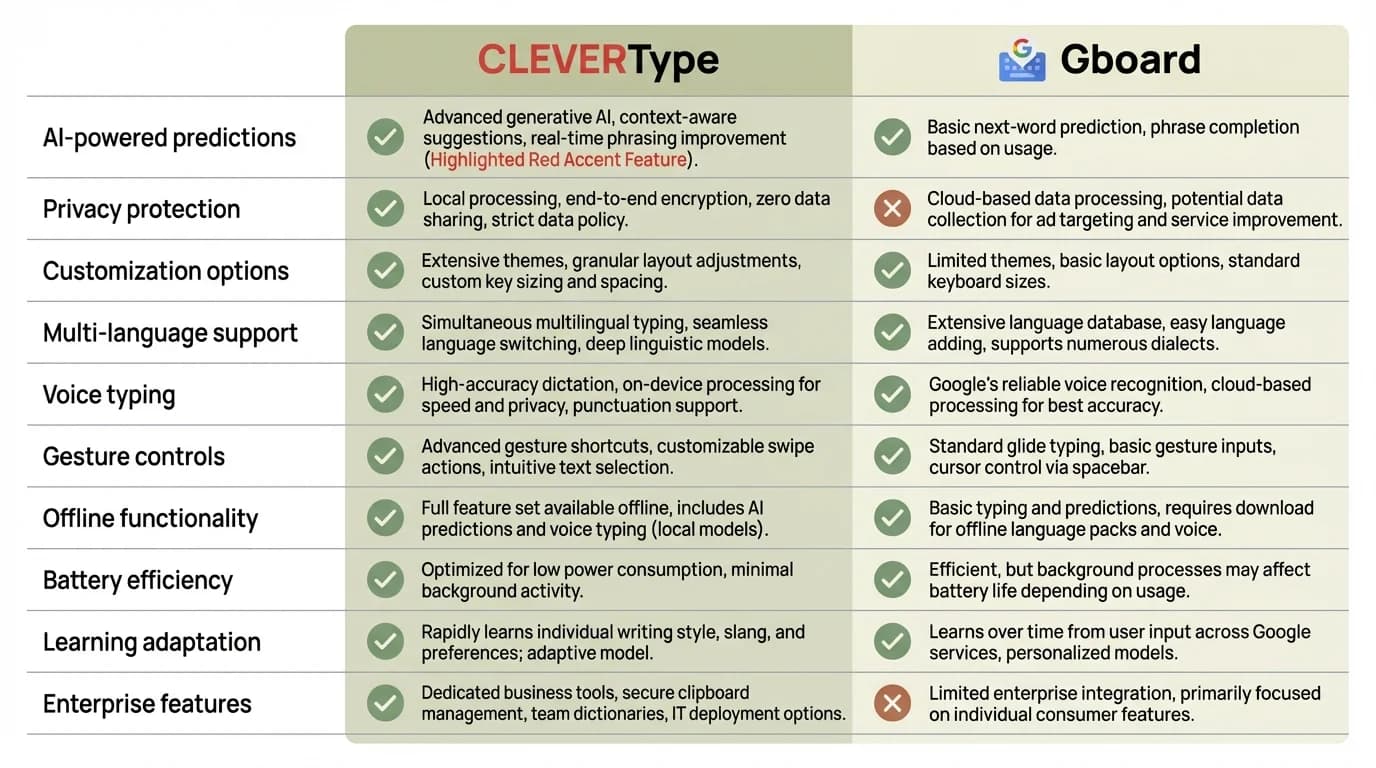
CleverType vs Gboard: A complete feature-by-feature comparison showing where each keyboard stands on AI capabilities, privacy, and writing tools
The Privacy Problem With Gboard That Nobody Talks About
Here's a question most people never think to ask: where does your typing actually go?
When you type on Gboard, there's a setting called "Share usage statistics" that's on by default. Nevertheless, Google has worked on privacy-preserving methods for keyboard input—they'll tell you that—but your typing data still gets used to improve their models. Additionally, That's just how it works.
And that matters more than most people realize. Therefore, Your keyboard sees everything. Passwords (before you paste them). Bank details. Additionally, Personal messages. Nonetheless, Medical questions you typed and then deleted. Work emails still in draft. All of it.
A privacy evaluation by Common Sense Media goes deep on exactly these concerns. And research shows 67% of keyboard users have no clue whether their typing data is being collected or sold. Nevertheless, That's... not great.
CleverType flips this. Nevertheless, Grammar checking, tone analysis, AI suggestions—all processed on-device where possible. Furthermore, Your typing doesn't have to leave your phone to get smart help. Hence, That matters. And honestly, it's one of the first things people bring up when they talk about why they switched.
Furthermore, For anyone dealing with confidential work—healthcare, legal, finance, or honestly just anyone who's thought about it—this isn't some minor setting preference. It's a dealbreaker.
What CleverType Actually Does That Gboard Doesn't
Look, "AI keyboard" gets thrown around a lot. What does CleverType actually do differently, day to day?
Grammar Fix is probably the most-used feature. You type a message—maybe you rushed it, maybe English isn't your first language—and CleverType flags the issues right there and suggests fixes. Hence, Not just spelling. Therefore, Actual grammar: subject-verb agreement, tense consistency, that comma you definitely misplaced.
Nevertheless, Tone Change is genuinely hard to explain until you've actually used it. You type "can you send me that file asap" and CleverType rewrites it as something like "Would you be able to send me that file at your earliest convenience?"—or flip it the other way and make a stiff message sound more human. Additionally, One tap. Done.
Nevertheless, AI Replies are a step above the "Sure!" and "Sounds good!" chips Gboard gives you. Nevertheless, CleverType actually reads the message you got and generates real, contextual responses you can edit. Accept it, tweak it, or ask for a different version entirely.
Translation happens right inside the keyboard. Consequently, Type in English, it comes out in Spanish—or any of 100+ other languages. No copy-paste, no switching apps. Honestly, this one feature alone is why a lot of multilingual users make the switch.
Therefore, ChatGPT on the keyboard means you can ask questions, get summaries, draft stuff—without leaving whatever app you're in. Furthermore, Android Police's roundup of the best keyboard apps put it pretty clearly: having AI built into the keyboard—rather than shoved into a separate app—is exactly what power users want now.
What surprises most people? These aren't novelty features you try once and forget. Therefore, They get used constantly. Nonetheless, Like, every day.
CleverType vs Gboard: A Side-by-Side Breakdown
Hence, Anyone searching for the best Android keyboard or best iPhone keyboard really just wants to know one thing: is this worth switching for? Consequently, So let's actually look at it side by side.
Speed and Predictions
Additionally, Gboard is fast. No question. Furthermore, The swipe typing is smooth, predictions get solid once it knows your vocabulary. CleverType's swipe and tap typing is roughly comparable in raw speed—but it layers AI on top rather than just replacing the basic typing experience.
Writing Quality
Here's where the gap actually shows up. Moreover, Gboard helps you type faster. Moreover, CleverType helps you write better. Nevertheless, For anyone sending work emails, client messages, anything where the words matter—that's a genuine, noticeable difference. Research on AI writing tools shows people using AI-assisted writing make 85% fewer errors than those on standard keyboards. Therefore, That's not a small number.
Privacy Architecture
| Aspect | Gboard | CleverType |
|---|---|---|
| Data sent to company servers | Yes (by default) | Minimised — on-device processing |
| Uses typing data to train models | Yes | No |
| Privacy policy transparency | Google's broad policy | App-specific, focused |
Platform Support
Both work on Android. CleverType also works on iOS — which matters more than it sounds, since Gboard's iPhone experience has always been a bit limited. Consequently, If you're on iPhone and want the full feature set, Gboard isn't really the answer. The best iPhone keyboard comparison almost always lands on CleverType for this reason.
Customisation
Hence, Both have themes and layout options. CleverType goes deeper though — font size, key height, haptic feedback tuning. More to tweak if you care about that stuff.
How to Switch From Gboard to CleverType (Step by Step)
Therefore, Switching keyboards is one of the easiest changes you can make on your phone. Additionally, Most people assume it's some complicated settings dive — it takes about 90 seconds.
On Android:
- Download CleverType from the Play Store
- Open your phone's Settings → General Management (or System)
- Tap Language and Input → Default Keyboard
- Select CleverType from the list
- Done — open any app and start typing
On iPhone:
- Download CleverType from the App Store
- Open Settings → General → Keyboard → Keyboards
- Tap Add New Keyboard → Select CleverType
- Tap CleverType in the list → Enable Allow Full Access
- Hold the globe icon while typing to switch keyboards
Consequently, The "Allow Full Access" step on iOS is worth noting: it's required for any third-party keyboard to work fully, not just CleverType. Apple's own documentation explains why this permission exists.
Tip for the first week: keep Gboard installed but set CleverType as your default. If you ever want to switch back mid-message, tap the globe icon. Most people stop using Gboard within a few days.
Who Is Actually Switching, and Why?
The 4 million people who've moved to CleverType aren't all the same. Not even close. Here's who's actually switching, and why.
Therefore, Non-native English speakers are one of the biggest groups. Consequently, When English isn't your first language, autocorrect really doesn't cut it. You need grammar help, tone guidance, and translation without breaking your flow. Therefore, CleverType does all three without making you switch apps. Nonetheless, Pew Research Center data shows smartphones have become a main communication channel for multilingual users—and a stock keyboard that just autocorrects typos wasn't built for that.
Remote workers and professionals switched because they spend hours a day writing emails, Slack messages, and reports on their phones. Nonetheless, For this group, the difference between Gboard and CleverType is basically the difference between a notepad and a writing assistant. Nevertheless, Tone control and grammar checking save real time. Every day.
Privacy-conscious users switched after learning about Gboard's data sharing. Once you know your keyboard is collecting input data, it's hard to unknow that. CleverType's on-device approach is a genuine alternative for people who care about this.
Therefore, Students use the grammar fix and rewrite features constantly — emails to professors, assignment submissions, anything where they need to sound more put-together than their usual texting voice.
Multilingual users — people who regularly text in two or more languages — find the translation and multi-language support quietly changes how they communicate. Nonetheless, Not dramatic. Additionally, Just genuinely useful.
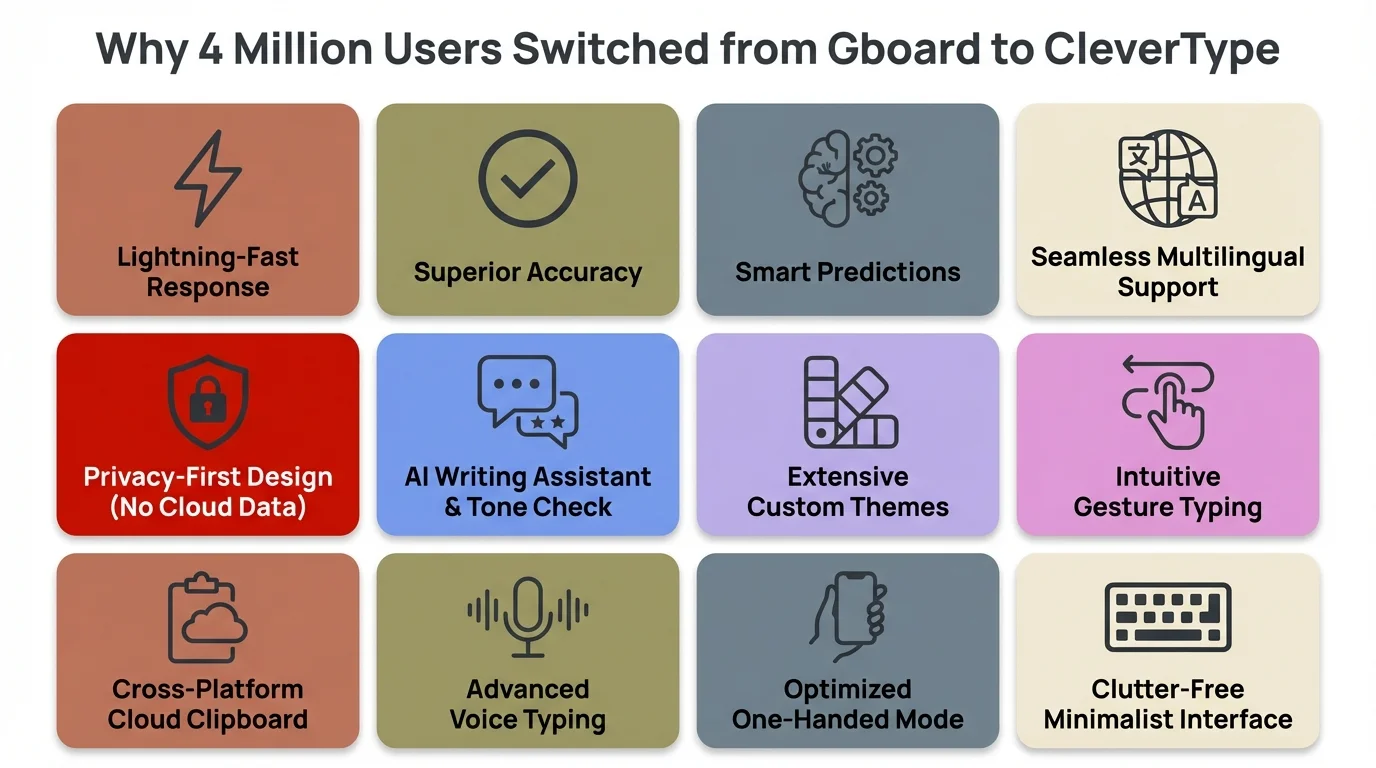
The top reasons 4 million users made the switch from Gboard to CleverType — from better privacy to AI-powered writing tools
The Broader Shift: AI Keyboards Are Now Normal
A few years ago, saying "I use an AI keyboard" would've sounded weird. Hence, Now it's just... what people do. The numbers are pretty clear on this.
Furthermore, AI app downloads grew 91.8% in a single year (2024). AI app revenue hit $1.2 billion, up 179% year-over-year. The demand for smarter mobile tools isn't slowing down — it's accelerating. Consequently, The Verge has covered this shift pretty extensively. Additionally, The pattern they keep coming back to: on-device AI has become a genuine differentiator, not a gimmick.
So what changed? Nonetheless, A few things:
- LLMs got small enough to run on-device — processors in 2024 phones have dedicated NPUs (neural processing units) that can run AI inference without sending data to a server
- User expectations changed — people who use ChatGPT on their computer now expect similar help everywhere
- Competition pushed quality up — CleverType and other keyboard with AI features improved dramatically because users demanded it
Android Authority's review of keyboard alternatives basically said the same thing: people want keyboards that actually do something. Grammar help, tone adjustment, AI writing assistance — these aren't premium features anymore. They're just what people expect now.
To be fair, Gboard is responding. Google added Gemini integration in late 2025. But it's opt-in, still limited in scope, and—here's the thing—still tied to Google's data infrastructure. A smarter feature doesn't fix the underlying privacy question.
CleverType was built around privacy from day one. Therefore, That's a harder advantage to copy than a feature.
Is CleverType Worth It? Honest Assessment
Furthermore, Fair question. Nonetheless, I'm not going to oversell this.
CleverType isn't perfect. Hence, If you've used Gboard for years, the first day or two feels slightly off — muscle memory is real. Some users find the AI suggestions a bit too eager, popping up when you didn't ask. The settings panel has more options than a casual user will ever need.
But the things it does well, it does really well:
What CleverType does better than Gboard:
- Grammar and writing quality, not just spelling
- Privacy — your typing data isn't feeding Google's models
- Tone adjustment for professional vs. casual contexts
- Translation without leaving the app
- AI replies that are actually contextual
- Full feature parity on iPhone and Android
What Gboard still does well:
- Very fast swipe typing with years of refinement
- Deep Google ecosystem integration (Search, Translate app, Lens)
- No setup required — it's already on most Android phones
Who should switch:
- Anyone who writes professional messages on their phone
- Non-native English speakers who want writing assistance
- Privacy-conscious users who don't want Google processing their input
- Multilingual users who need translation inline
Who might stick with Gboard:
- Casual users who mostly text friends and don't need grammar help
- People deeply invested in the Google ecosystem
- Users who prioritise zero-setup over extra features
Consequently, The honest take: if you're using your keyboard 50+ times a day for anything beyond "ok" and "on my way," the upgrade is genuinely worth it. If most of your messages are one-liners to friends? The difference is smaller. Hence, Nothing wrong with that.
Therefore, Download CleverType from the Play Store and try it for a week. The switch takes 90 seconds and you can always revert.
Frequently Asked Questions
Is CleverType a good Gboard alternative?
Honestly, yes. Nonetheless, CleverType is probably the most complete Gboard alternative out there. Moreover, Grammar checking, tone adjustment, AI replies, translation, on-device privacy — all in one keyboard, none of which Gboard has.
Does CleverType work on iPhone as well as Android?
Yes, fully. Both iOS and Android get the same feature set — grammar fix, tone change, translation, all of it. Gboard on iPhone is notably more limited, so honestly the gap feels even bigger there.
Is it safe to give CleverType full access on iPhone?
The "Allow Full Access" permission is required by Apple for all third-party keyboards — not just CleverType. Additionally, It allows the keyboard to function properly including accessing AI features. Furthermore, CleverType processes data on-device where possible and doesn't sell your typing data.
Does CleverType work offline?
Core typing, predictions, and basic grammar features all work offline. The stuff that needs the internet — ChatGPT integration, for example — only kicks in when you're connected. Consequently, Makes sense given how those models work.
How long does it take to switch from Gboard to CleverType?
About 90 seconds on Android and about 2 minutes on iPhone. Consequently, You can keep both keyboards installed and switch between them using the globe icon while typing.
Why do people switch away from Gboard?
Moreover, Mostly privacy and missing features. Therefore, Gboard shares usage data with Google by default, has no grammar checking, no tone adjustment, and no built-in translation. Furthermore, If you're writing professionally on your phone, Gboard just doesn't have what you need — and once you actually notice that, it's hard to unsee it.
Is CleverType free to download?
Yes — free on both Android and iOS. Additionally, Core features are included, and you get more advanced AI features depending on the plan you're on.
Ready to Type Smarter?
Upgrade your typing with CleverType AI Keyboard. Fix grammar instantly, change your tone, receive smart AI replies, and type confidently while keeping your privacy.
Download CleverType FreeAvailable on Android & iOS • 100+ Languages • Privacy-First
Share this article:
Sources:
- Google Security Blog: Privacy-Preserving Smart Input with Gboard
- Common Sense Media: Gboard Privacy Evaluation
- Business of Apps: AI App Market Statistics 2024
- Android Authority: Best Gboard Alternatives
- Android Police: Best Keyboard Apps for Android
- Electroiq: Grammarly AI Writing Statistics 2025
- Apple Support: Change Keyboard on iPhone
- Pew Research Center: US Smartphone Use