Key Takeaways
| What You Want to Know | Quick Answer |
|---|---|
| What is AI sentence completion? | Your keyboard predicts and finishes full sentences based on context, not just the next word |
| How much faster can you type? | Up to 35% faster with 43% fewer keystrokes, according to Carnegie Mellon research |
| Best AI keyboard overall? | CleverType — free, privacy-first, with full sentence prediction + grammar fixing |
| Does it work offline? | Yes, modern AI keyboards switch between on-device and cloud processing automatically |
| Is it safe to use? | Depends on the app — CleverType processes data locally, Gboard ties to your Google account |
| Which platforms are supported? | Android and iOS — most top options are available on both |
You type around 38 words per minute on your phone. That's roughly half of what you'd manage on a real keyboard. Moreover, And honestly, the gap isn't really about screen size — it's all the mental overhead of hunting for each word, one at a time. An AI keyboard that can auto complete sentences changes that whole dynamic. Instead of building every word from scratch, you're mostly just reviewing suggestions that are already 80% of what you wanted to say.
I've tested a bunch of keyboards that claim to use AI, and to be honest, most of them are just better autocorrect. That's fine, but it's not what we're talking about here. Additionally, A real sentence prediction keyboard gets what you're trying to say and hands you the whole sentence. Nonetheless, Not the next word. The whole thing. That's a completely different experience.
What Does “AI Sentence Completion” Actually Mean?
Additionally, Here's what it actually is: AI sentence completion is when your keyboard predicts and hands you full phrases—or whole sentences—based on what you've already typed and the broader context of what you're trying to say.
Consequently, Not the same as basic autocorrect. Nevertheless, Not even close. Old-school predictive text looks at the last word or two and picks the most common follow-up from a frequency table. AI sentence completion uses a language model — the same kind of thing behind ChatGPT — to actually understand what you're trying to say before it suggests anything. That distinction matters more than it sounds.
Here's what that looks like in practice:
- You type: “Can we reschedule our”
- Basic prediction suggests: “meeting” or “call”
- AI sentence completion suggests: “Can we reschedule our meeting to Thursday afternoon? I have a conflict that just came up.”
The difference is huge when you're writing long messages, emails, or anything with context that spans more than one sentence. According to research published in the ACM Digital Library, accepting word prediction suggestions reduces keystrokes by 43% on mobile devices — and sentence-level completion pushes that number even higher.
It's doing a few things simultaneously to generate that suggestion:
- The words you've typed so far in this message
- Your previous writing patterns and vocabulary
- The app you're currently typing in (email vs. text vs. social media)
- Contextual signals like time of day and recipient type
Here's something that caught me off guard when I started using full sentence completion: you stop thinking in words and start thinking in ideas. You write the start of a thought, the keyboard fills in the rest, you confirm or tweak it, and you move on. Nevertheless, It genuinely feels different once your brain adjusts to that rhythm. Hence, Takes a few days, but then it clicks.
How Smart Autocomplete Saves You Time (With Real Numbers)
Consequently, Look, "saves time" is what every app claims. But for AI keyboards, there's real data behind it — not just vibes.
The Keystroke Reduction Effect
Carnegie Mellon research on text entry shows that accurate AI suggestions cut keystrokes by up to 43%. Moreover, For someone who sends 96 messages per day (the average professional, per McKinsey's 2025 workplace report), that works out to roughly 23 minutes saved daily — or nearly 140 hours per year.
140 hours. Per year. Just from better keyboard suggestions. That's wild.
Accuracy Has Jumped Dramatically
Modern smart autocomplete systems now hit 52–58% accuracy for next-sentence prediction — up from 30–40% in 2024. That's a real leap. It happened because keyboard AI dropped the old n-gram frequency tables and switched to transformer-based language models, which actually understand meaning. And here's the thing: once accuracy clears ~50%, the experience totally changes. You stop ignoring suggestions and start scanning for ones to accept.
Who Benefits Most
| User Type | Speed Improvement | Key Benefit |
|---|---|---|
| Novice typists | 20–30% faster | Fewer typos, more confidence |
| Intermediate typists | 15–25% faster | Less rewriting, smoother flow |
| Non-native English speakers | 78% higher writing confidence | Grammar + vocabulary suggestions |
| Expert typists (100+ WPM) | 5–10% faster | Context-aware phrasing, not speed |
| People with motor limitations | Significantly reduced effort | Less physical strain per message |
Non-native English speakers get a particularly big benefit here. Per 2026 usage data, 78% of non-native English speakers report higher writing confidence when using AI keyboards — up from 62% in 2024. The confidence boost comes from real-time grammar correction and sentence suggestions that use natural English phrasing. Two problems solved at once.
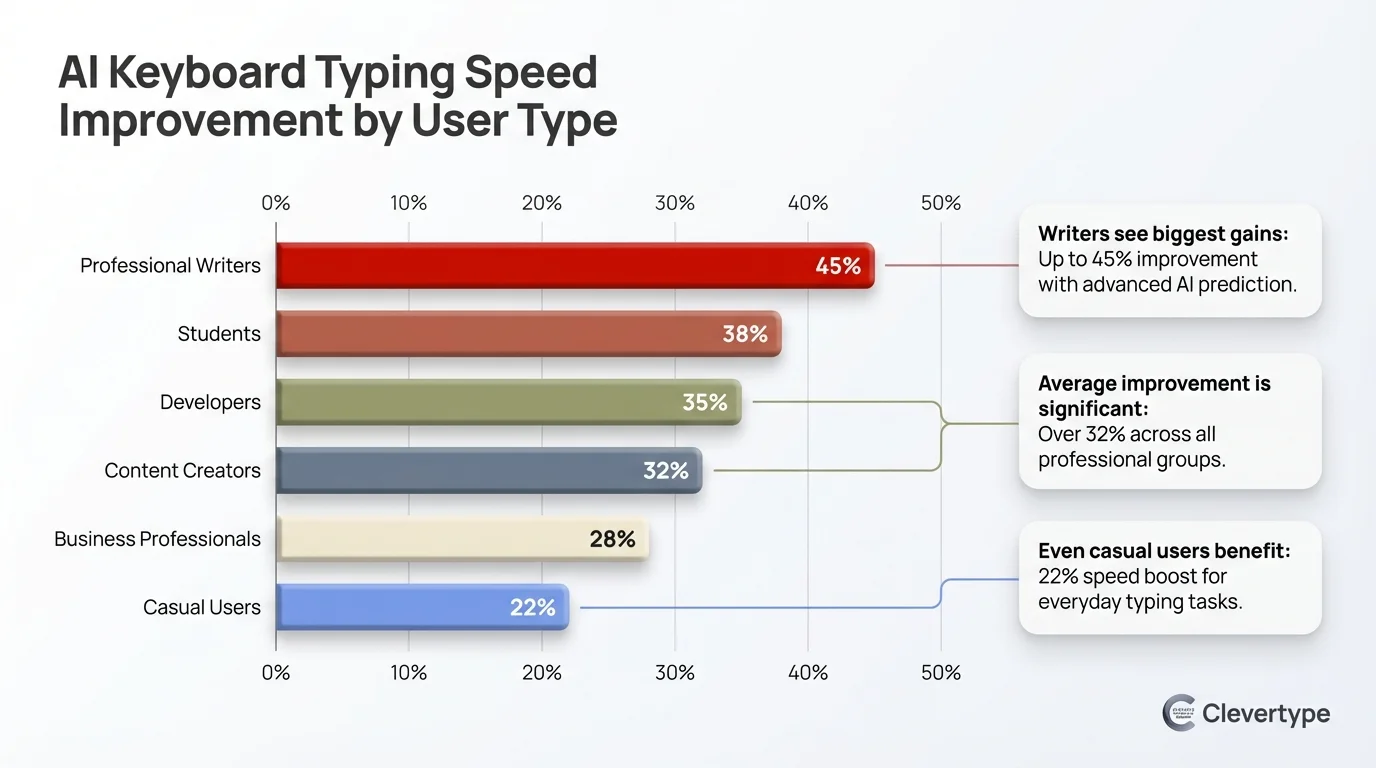
AI keyboard typing speed gains vary significantly by user type — non-native speakers and novices benefit most
Battery and Performance Trade-offs
Fair question if you're worried about battery life: modern AI keyboards use 4–6% more than standard keyboards. That's way down from the 12–15% hit in 2024 — on-device processing has gotten a lot leaner. Simple word predictions run locally; the heavy sentence-level stuff hits the cloud only when needed.
The 5 Best AI Keyboards for Sentence Auto-Complete in 2026
This is where keyboards actually differ from each other. Not in the marketing, but in what they can actually do with a half-typed sentence.
1. CleverType — Best Overall for Fast Typing
Consequently, CleverType stands out for one pretty specific reason: it combines sentence prediction with grammar fixing and tone adjustment in a single free app. Nonetheless, Most keyboards do one of those things. Moreover, CleverType does all three at once, and they actually work together.
When you type a sentence, CleverType doesn't just suggest the next phrase — it quietly fixes grammar in what you already wrote, can shift the tone from casual to professional if that's what you need, and offers a smart reply option if you're responding to something. Hence, That's a full writing workflow, not just autocomplete with a new name.
Key features:
- Context-aware sentence prediction that understands which app you're in
- Real-time grammar correction without interrupting your typing flow
- Tone adjustment — casual, professional, friendly, direct
- Privacy-first design — local processing with no keystroke logging
- 100+ language support with multilingual sentence suggestions
- Smart reply generation for incoming messages
- Completely free core features, no subscription wall for basic AI
Unlike Gboard, CleverType doesn't tie your writing data to an ad profile. Unlike SwiftKey, you don't have to hand over access to your email and social accounts for it to learn your style. It figures you out through actual usage, stored locally on your device. No cloud required for personalization.
Download CleverType from the Play Store — it's free to start.
2. Gboard (Google) — Best for Google Ecosystem Users
Gboard comes pre-installed on most Android phones and has been quietly adding AI features through its Gemini integration. Moreover, Google embedded Gemini directly into the keyboard in 2025–2026, bringing real-time fact-checking and smarter suggestions along with it.
The sentence completion is solid — especially inside Google apps like Gmail and Docs. But step outside that ecosystem and the AI features start to thin out noticeably. The advanced AI stuff also requires a Google One AI Premium subscription at $19.99/month. So it's not really “free.”
What it does well: Speed, voice typing quality, language breadth (1,000+ languages)
Where it falls short: Privacy (all tied to your Google account), grammar correction depth, works best only in Google apps
3. Microsoft SwiftKey — Best for Swipe Typing
Furthermore, SwiftKey, now with Microsoft Copilot integration, uses a combination of neural networks and probabilistic models for context-aware prediction. It can suggest up to 5 words at once and learns from your Gmail, Twitter, and SMS to match your personal writing style.
Nevertheless, The swipe/gesture typing on SwiftKey is genuinely the best I've seen. Moreover, If you're a swipe typist, this is probably your fastest option. Hence, That said, sentence completion isn't quite as strong as CleverType, and the deep personalization requires handing Microsoft access to your other accounts — which some people are fine with and others really aren't.
What it does well: Swipe accuracy, multilingual typing, style learning
Where it falls short: Privacy trade-offs, grammar correction isn't as deep
4. Grammarly Keyboard — Best for Grammar-Only Focus
Additionally, Grammarly Keyboard is solid at catching grammar errors but pretty limited as a fast typing keyboard. Nevertheless, The sentence completion in the free version is basic, and honestly, most of what actually makes Grammarly useful — tone detection, clarity suggestions, vocabulary enhancement — is locked behind the paid plan.
If you already pay for Grammarly's desktop subscription, adding the keyboard makes sense. If you're starting from scratch, CleverType gives you comparable grammar correction plus full sentence completion, and it's free. The math is pretty clear.
5. Apple's Built-in Keyboard (iOS) — Surprisingly Improved
Therefore, Apple's native iOS keyboard is actually pretty decent now in iOS 18, with sentence completion suggestions appearing inline as you type. Not as powerful as dedicated AI keyboards — not even close, really — but for iPhone users who just don't want to install a third-party app, it's a real step up from where it was.
Full comparison:
| Feature | CleverType | Gboard | SwiftKey | Grammarly |
|---|---|---|---|---|
| Sentence completion | Advanced | Good (Google apps) | Good | Basic |
| Grammar correction | Advanced | Basic | Basic | Advanced (Paid) |
| Tone adjustment | Yes (free) | No | No | Yes (Paid) |
| Privacy | On-device | Google account tied | Microsoft account | Cloud-based |
| Cost | Free | Free / $19.99/mo AI | Free / $3.99/mo | Free / Paid |
| Works offline | Yes | Partial | Partial | Limited |
| Languages | 100+ | 1,000+ | 100+ | Limited |
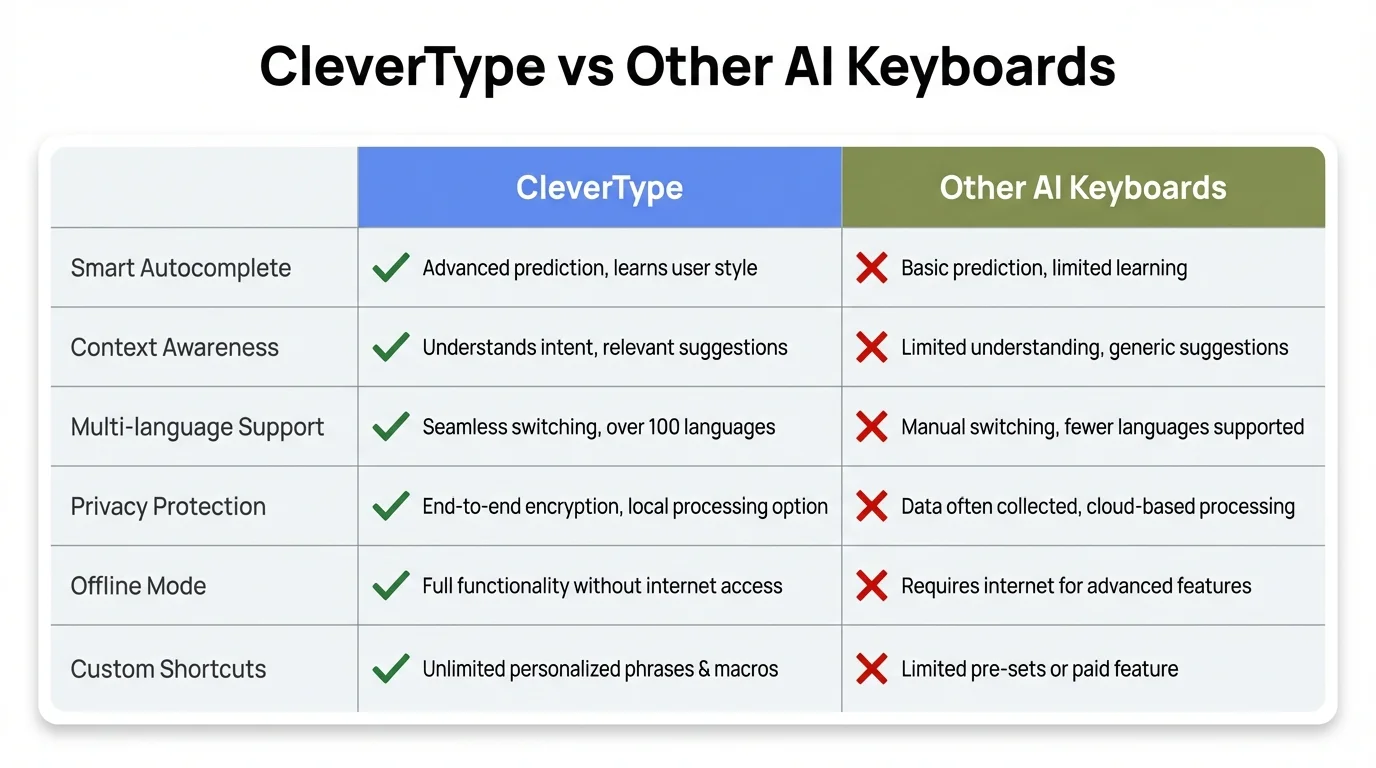
CleverType leads on the features that matter most: sentence completion, grammar, tone, and privacy — all free
How AI Sentence Prediction Actually Works Under the Hood
Most people use these features every day and have zero idea what's happening behind the keyboard. Here's the short version — I'll keep the jargon to a minimum.
The Shift from Statistical to Neural Prediction
Old predictive text ran on n-gram models — basically frequency tables. “After ‘good’, users typed ‘morning’ 34% of the time, ‘luck’ 22% of the time...” Fine for one word. Completely useless for a whole sentence. Context means understanding meaning, not just tallying which words appear next to each other.
Moreover, Modern AI sentence completion uses transformer-based language models — the same architecture behind GPT and similar systems. These models got trained on enormous amounts of text and figured out how to understand meaning and intent, not just which words happen to show up near each other.
When you type the beginning of a sentence, the model isn't looking up a table. Therefore, It's running an inference pass that considers:
- Your current input — the words you've typed
- Conversational context — what the other person said (if you're replying)
- Writing style memory — how you've written similar things before
- App context — an email app suggests more formal completions than a messaging app
On-Device vs. Cloud Processing
Therefore, This is where it gets messy. Nevertheless, Better AI models are bigger and need more compute — and there's a real tension between getting good suggestions and keeping your data on your device.
- Simple next-word suggestions: on-device (fast, private)
- Full sentence completion: often requires cloud processing (slower, data leaves device)
- CleverType's approach: adaptive — uses on-device models for common patterns, cloud for complex completions, with data encrypted in transit
Nevertheless, Harvard SEAS research turned up something actually kind of interesting: predictive text doesn't just change how fast you write — it changes what you write. Suggestions push you toward more common phrasing. Moreover, For non-native speakers, that's usually a good thing. For people with a really distinctive voice, it's worth paying attention to.
How the Keyboard Learns Your Style
Most AI keyboards don't actually retrain the base model on your data — that's computationally too expensive for a phone app. Nevertheless, Instead, they keep a local profile that nudges suggestion weights based on what you accept and reject. Therefore, Accept “sounds great” three times and it starts surfacing that phrase more. Reject a formal suggestion in casual chat and it quietly backs off on that style.
Setting Up AI Sentence Completion for Maximum Speed
Hence, Picking the right keyboard is step one. But honestly, how you use it in the first few weeks matters just as much.
Step 1: Give the keyboard a week
Accuracy improves with use. In the first week, you're training the system on your vocabulary and patterns. Don't judge it on day one. Users who stick with the same AI keyboard for a month see up to 45% keystroke reduction — compared to only 15% in week one.
Step 2: Accept more suggestions, especially early on
I know this sounds backwards, but: accept suggestions even when they're “close but not quite right” in the first few days. Accepting and then editing a suggestion actually teaches the model faster than only accepting perfect matches. Hence, It learns from the correction too. Consequently, Trust the process for about a week.
Step 3: Enable app-specific context
Most AI keyboards can detect which app you're in. Make sure this is turned on. You want different completion styles for email vs. WhatsApp vs. Twitter. If you're writing to your manager, you want more formal suggestions. If you're texting a friend, you want casual ones.
Step 4: Use the keyboard in the apps where you write most
The model learns from actual usage. Consequently, Spend a week primarily using it in whatever app you write in most — probably WhatsApp, Gmail, or Slack — and the suggestions will get notably better for that context.
Step 5: Adjust privacy settings explicitly
Therefore, Don't leave this on default. Furthermore, Check whether your keyboard is uploading typing data, what it retains, and whether you can disable cloud processing for sensitive apps. CleverType lets you toggle between on-device and cloud processing per app.
Step 6: Learn the acceptance shortcut
Most keyboards let you accept a suggestion with a single swipe right or tap on the suggestion bar. Moreover, Get this into muscle memory. The speed benefit of sentence completion disappears if you're stopping to read and consider every suggestion — you need to scan and accept (or reject) in a fluid motion.
Privacy and Security: What Your AI Keyboard Actually Knows
Consequently, People don't ask this enough. Your keyboard sees everything you type — passwords, messages to your doctor, bank info, stuff you wouldn't say out loud. That's a massive amount of trust to hand over to an app.
What keyboards typically collect:
| Data Type | Why They Want It | Privacy Risk |
|---|---|---|
| Keystrokes | Improve predictions | HIGH if stored in cloud |
| App context | Better suggestions per app | Medium |
| Writing style | Personalization | Medium — reveals communication patterns |
| Contacts | Suggest names correctly | Medium |
| Clipboard content | Smart clipboard features | HIGH |
The Google Problem with Gboard
Consequently, Gboard's advanced AI features require a Google account (and a $19.99/month Google One subscription for the good stuff). Consequently, Your typing patterns get tied to your Google identity — the same one that powers advertising targeting across Search, YouTube, Maps. Google isn't doing anything secret here; it's just how their business works. But it's worth knowing before you hand over full keyboard access.
SwiftKey's Personalization Trade-off
Nevertheless, SwiftKey learns your writing style fast — but the way it does that is by scanning your Gmail, Twitter, Facebook, and SMS history. Therefore, You click “grant access” and suddenly Microsoft has processed a pretty substantial chunk of your actual communication history. That's the trade-off. Some people are fine with it; others really aren't.
CleverType's Approach
CleverType processes most data on-device. When cloud processing is needed for complex sentence completions, data is encrypted in transit and not stored after processing. No advertising profile is built from your typing data. For most people — especially anyone who regularly types sensitive stuff — this is just the smarter call.
Hence, According to Pew Research Center data on smartphone usage, 90% of U.S. adults now own a smartphone, and 16% are “smartphone-only” internet users. For that group, their phone keyboard is literally how they communicate with banks, doctors, employers, and family. Furthermore, The privacy stakes are real.
AI Keyboards for Specific Use Cases
Not everyone uses their phone keyboard the same way. Nonetheless, A student grinding out an essay needs something completely different from a customer support rep banging out 80 replies a day — and honestly, the “best” keyboard depends a lot on which box you fall into. Consequently, Here's what to actually look for.
For Professionals Writing Emails
Hence, You need tone awareness more than raw speed. Moreover, An AI that completes “Following up on our conversation, I wanted to” is useful. Therefore, One that also makes sure you didn't accidentally write “their” when you meant “there” in a client email is more useful. CleverType handles both simultaneously.
Therefore, Key features to prioritize: tone adjustment, grammar correction, formal/casual mode switching
For Students Writing Essays and Notes
Speed matters, but vocabulary matters more. Consequently, A good fast typing keyboard for students should push you toward more precise word choices and varied sentence structure—not just autocomplete whatever you've already typed a hundred times. The goal is writing that sounds smarter, not just faster.
Consequently, Key features to prioritize: vocabulary suggestions, grammar correction, academic tone mode
For Non-Native English Speakers
This is where AI keyboards have the most impact. Native speakers notice a 15–30% speed boost. Non-native speakers often see 78% higher confidence in their written English — because the keyboard is simultaneously completing sentences and modeling correct grammar.
Key features to prioritize: grammar correction depth, natural phrasing suggestions, multilingual support
For High-Volume Messaging (Customer Support, Sales)
Smart reply generation is the big one here. If you're answering 50 similar questions every day, an AI that drafts an actual useful reply for you saves a ton of time. CleverType's smart reply feature is particularly good at this — it reads the incoming message and suggests a full response you can send with one tap.
Additionally, Key features to prioritize: smart reply generation, tone presets, speed of suggestions
For Accessibility Needs
Furthermore, Research on word prediction for users with motor limitations shows that AI sentence completion reduces physical effort significantly — fewer keystrokes means less strain for people with tremors, limited mobility, or other motor challenges. This is a practical quality-of-life benefit that rarely gets mentioned in mainstream keyboard reviews.
Key features to prioritize: large suggestion area, voice-to-text integration, minimal required corrections
What's Coming Next in AI Sentence Completion
Additionally, The global keyboard market hit $4.98 billion in 2025 and is on track to hit $5.35 billion by 2029. Standard keyboards aren't driving that — AI features are. And the pace of change right now is surprisingly fast.
Sentence completion is becoming paragraph completion
The current frontier isn't suggesting the next sentence — it's suggesting the next paragraph. Type the opening of an email, and the AI drafts the rest of the message for you to edit. Nevertheless, This already works in CleverType for emails and formal messages.
Context awareness is going multimodal
Nonetheless, Keyboards are starting to read not just what you're typing, but what's on your screen. Replying to an email that mentions a Tuesday 3pm meeting? Nevertheless, The keyboard can pull that right into its suggestion. Texting while looking at a photo? Nevertheless, It can suggest caption text. Nevertheless, Wild, but this is already showing up in Gboard's Gemini integration—it's early-stage but real.
Privacy-preserving AI is becoming a competitive feature
Back in 2024, most users didn't really think about keyboard privacy. Now it's one of the first things people check before downloading. On-device language models are finally powerful enough to deliver near-cloud-quality sentence completion without transmitting anything. CleverType got here first — most others are still catching up.
Personalization without surveillance
Consequently, What's coming next is keyboards that build a detailed model of your writing style entirely on your phone — no cloud upload at all. Nevertheless, The model lives on your device, gets smarter with every message, and the keyboard company never sees it. Some keyboards are already moving this direction. Slowly, but it's real.
Cross-device sync that's actually private
Syncing your keyboard's learned style across phone, tablet, and desktop — without any of those preferences touching a company server — is genuinely hard to pull off. But people are solving it using end-to-end encrypted sync, basically the same approach as iCloud Keychain. By 2027, this will probably just be a standard feature you don't think about.
Frequently Asked Questions
What is AI sentence completion on a keyboard?
It's when your keyboard predicts and suggests full phrases or whole sentences — not just the next word — based on what you've typed and the context you're in. Under the hood, it uses the same transformer-based model technology behind ChatGPT, not the old-school frequency table stuff.
How much faster can I type with AI sentence autocomplete?
Hence, Most people see a 15–35% speed improvement, with up to 43% fewer keystrokes. Nevertheless, Novice typists and non-native English speakers tend to get the biggest boost. The gains also keep improving after the first month — the model is still learning your patterns.
Is it safe to use an AI keyboard that reads everything I type?
It depends entirely on the keyboard. Furthermore, Gboard ties data to your Google advertising profile. SwiftKey requires access to your email and social accounts for full personalization. CleverType processes data on-device and doesn't build an advertising profile from your keystrokes. Always check the privacy policy before granting full keyboard access.
Can AI keyboards complete full sentences, not just suggest the next word?
Therefore, Yes — modern AI keyboards like CleverType can suggest complete sentences and even full paragraphs for emails and structured messages. Hence, Accuracy sits at 52–58% for sentence-level suggestions right now, which sounds middling until you realize it used to be 30–40%. That threshold is actually where it starts being useful instead of annoying.
Do AI sentence completion keyboards work offline?
Consequently, Partially. Consequently, Simple word predictions work fully offline on most AI keyboards. Moreover, Full sentence completion often requires cloud processing for the best results. Consequently, CleverType automatically switches between on-device and cloud processing based on what you're writing and your network connection.
Which AI keyboard is best for non-native English speakers?
Honestly, CleverType. It combines sentence completion with real-time grammar correction and natural phrasing suggestions — all at once, not separately. 78% of non-native English speakers report higher writing confidence with AI keyboards, and CleverType is one of the few that was actually built with this use case in mind.
Does using AI sentence completion change how I write?
Furthermore, Yeah, it does — and it's worth knowing upfront. Harvard SEAS research found that predictive text pushes people toward more common phrasing. For most people that's actually a good thing — writing gets clearer and more natural-sounding. But if you have a very distinctive voice, it's worth occasionally checking whether you're accepting suggestions that don't quite sound like you.
Ready to Type Smarter?
If you're still on stock autocorrect after reading this, give CleverType a real shot. It fixes grammar, adjusts your tone, drafts smart replies—and it won't sell your keystrokes to advertisers. Free to download.
Download CleverType FreeAvailable on Android • 100+ Languages • Privacy-First
Share this article: