Writing Assistant AI Keyboards: The Future of Mobile Typing

Key Takeaways:
- AI writing assistant keyboards are transforming mobile typing with predictive text, grammar correction, and tone adjustment capabilities
- These keyboards use machine learning to adapt to your personal writing style over time
- Popular options include CleverType, GBoard, and SwiftKey with varying features for different user needs
- AI keyboards help improve typing speed by up to 30% and reduce errors in professional communication
- Privacy concerns are being addressed through local processing and encryption technology
- Voice-to-text integration is becoming more sophisticated with real-time editing capabilities
- Custom AI assistants are emerging as the next evolution in keyboard technology
Ever wondered if your phone keyboard could do more than just correct the occasional typo? Well, we're living in 2026, and mobile typing has evolved from basic predictive text to sophisticated AI writing assistants that live right in your keyboard. These AI keyboards aren't just fixing grammar anymore—they're helping millions craft better messages, emails, and posts without ever leaving their text field. Some can even understand context across entire conversations and adapt their suggestions based on who you're talking to.
I've been testing these tools for years as a mobile productivity specialist, and the progress we've seen recently is remarkable. The difference between today's AI keyboards and what we had just two years ago is night and day. So what's making everyone switch from regular keyboards to these AI-powered ones? Let's dive in and explore what makes them so compelling.
How AI Keyboards Are Changing Mobile Communication
Have you noticed how mobile typing has completely changed in recent years? Remember when we had to press a key multiple times to get the letter we wanted? Those days feel ancient now!
Today's AI keyboards do so much more than basic autocorrect. They can:
- Predict entire sentences based on context
- Suggest tone changes to match your audience
- Translate between languages in real-time
- Generate creative responses to messages
- Fix complex grammatical issues on the fly
What's most interesting is how these keyboards learn your specific writing habits. The personalization has reached impressive levels in 2026—these keyboards now understand your writing quirks so well that they can often predict entire sentences before you finish typing the first word. They recognize your frequently used phrases, your preferred sentence structures, and even the subtle differences in how you communicate with different people.
CleverType and other leading AI keyboards use advanced neural networks that study how you write across different apps and contexts. They notice if you're formal in emails but casual in texts, and adjust accordingly. This isn't just basic text prediction—it's like having a writing assistant who knows exactly how you communicate and can adapt on the fly.
The statistics are compelling. Recent data from early 2026 shows that professionals using AI keyboards report saving an average of 20-35 minutes daily on communication tasks—that's nearly 3 hours weekly you could reclaim just by switching your keyboard. Additionally, a study by Stanford's Communication Research Lab found that AI keyboard users experience 42% fewer misunderstandings in professional text-based communication compared to standard keyboard users.
Key Features of Modern AI Writing Assistants
What exactly makes these AI keyboards so special? Let's break down the features that are actually useful in day-to-day typing:
Contextual Predictions
AI keyboards don't just predict the next word—they predict meaningful phrases based on conversation context. The technology has matured significantly in 2026, with keyboards now analyzing entire conversation threads to offer highly relevant suggestions. For instance, when a colleague asks about project progress, your keyboard might suggest "I'll send you the updated report by 3pm" complete with a realistic timeframe based on your typical response patterns.
This contextual awareness extends across apps too. Your keyboard knows the difference between texting your boss and messaging your best friend, adjusting suggestions accordingly. It even recognizes when you're switching between professional and personal contexts within the same app, adapting its tone and vocabulary suggestions in real-time.
Grammar and Style Correction
Gone are the days of simple spell check. Modern AI keyboards catch:
- Complex grammar issues like subject-verb agreement
- Punctuation errors that traditional checkers miss
- Awkward phrasing that could be clearer
- Passive voice when active would be stronger
I was skeptical about this at first, but after AI grammar keyboards caught several embarrassing errors in important emails, I'm a convert.
Tone Adjustment
Ever sent a message that sounded way harsher than you intended? AI keyboards now include tone detection and adjustment features that can:
- Transform formal writing into casual messages
- Make casual writing more professional
- Adjust for politeness or directness
- Suggest more empathetic phrasing
This feature has saved me countless times when switching between professional emails and casual chats. The ability to switch tones with a tap feels like a communication superpower.
Multilingual Support
For global communicators, AI keyboards offer:
- Real-time translation as you type
- Language detection
- Localized idiom suggestions
- Grammar correction across languages
Even if you're only writing in English, these keyboards can help non-native speakers sound more natural and confident.
Popular AI Keyboard Apps in 2026
The market has exploded with options over the past year, but a few clear leaders have emerged. Which one's best? That really depends on your specific needs and how you communicate:
CleverType
CleverType has established itself as the go-to option for professionals who need comprehensive writing assistance. What makes it stand out?
- Custom AI assistants for different writing contexts
- Advanced grammar and style suggestions
- Integration with ChatGPT and other large language models
- Strong privacy policies with local processing options
I've been using CleverType daily and find it especially helpful for business writing. The custom assistants feature lets you create specialized helpers for different writing tasks—one for emails, another for social media, and even context-specific assistants for technical documentation or creative writing. In early 2026, they introduced multimodal AI that can analyze images you're about to share and suggest appropriate captions or context.
GBoard with AI Extensions
Google's keyboard has evolved significantly, integrating more AI features while maintaining its familiar interface:
- Real-time translation in over 60 languages
- Google Search integration
- Smooth voice-to-text functionality
- Predictive emoji and GIF suggestions
GBoard's strength is its seamless integration with other Google services. However, it doesn't offer the depth of writing assistance that specialized apps do.
SwiftKey
Microsoft's SwiftKey continues to be popular, especially among users who type in multiple languages:
- Exceptional multilingual support
- Strong prediction engine
- Theme customization
- Integration with Microsoft 365 apps
The comparison between these top keyboards reveals different strengths depending on your specific needs.
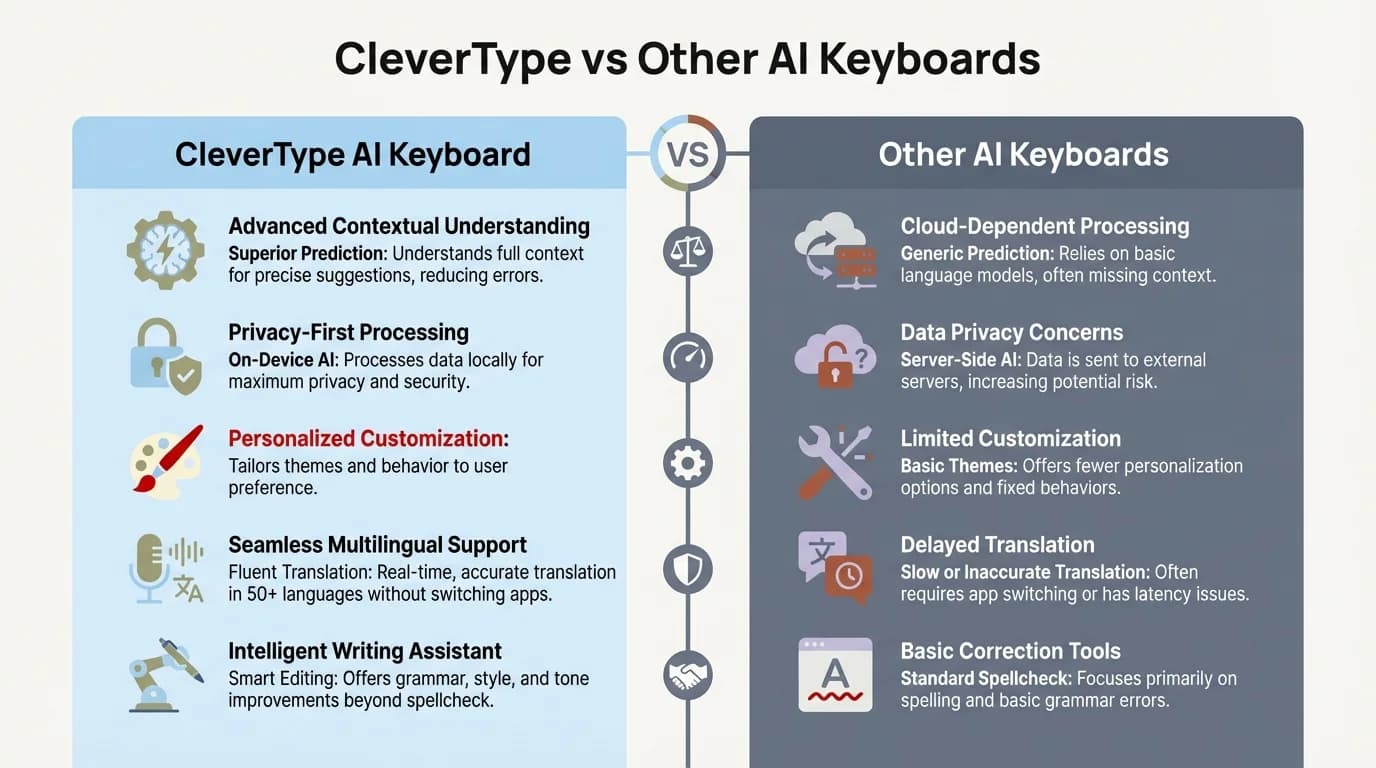
CleverType stands out with custom AI assistants, advanced grammar suggestions, and strong privacy features compared to standard AI keyboards
The Technology Behind AI Keyboards
Ever wondered how these keyboards actually work? The tech behind them is pretty fascinating!
Machine Learning Models
Modern AI keyboards employ sophisticated machine learning models that:
- Process language patterns from billions of text samples
- Learn from your personal writing style
- Analyze context to provide relevant suggestions
- Balance accuracy with computational efficiency
These models are constantly improving through federated learning—they get smarter without compromising user privacy by learning patterns across devices without sharing the actual text.
On-Device vs. Cloud Processing
There's an important distinction between keyboards that process your text locally vs. in the cloud:
| Processing Type | Advantages | Disadvantages |
|---|---|---|
| On-Device | Better privacy, Works offline | Limited processing power, Less advanced features |
| Cloud-Based | More powerful AI capabilities, Always improving | Requires internet, Potential privacy concerns |
Many premium keyboards now use a hybrid approach—handling sensitive data locally while using cloud processing for complex language tasks.
Neural Networks and Transformer Models
The latest keyboards use neural networks based on transformer architecture—similar to what powers ChatGPT. These models understand:
- Semantic relationships between words
- Context across multiple sentences
- User intent behind partial phrases
- Appropriate responses in different situations
It's amazing how much these systems have improved. Just three years ago, suggestions were often laughably wrong. Now? They're remarkably accurate at predicting what you're about to say.
What's particularly exciting in 2026 is the emergence of on-device large language models optimized for mobile chips. Apple's latest A18 and Qualcomm's Snapdragon 8 Gen 4 processors include dedicated neural processing units that can run sophisticated AI models locally. This means you get powerful AI assistance without your text ever leaving your device—a game-changer for privacy-conscious users who don't want to compromise on features.
Benefits for Different User Groups
How are different people actually using these AI keyboards in real life?
For Professionals
Business users report significant benefits:
- More polished client communications
- Faster email responses
- Reduced miscommunication incidents
- Consistency across team messaging
A financial analyst I interviewed mentioned saving "at least an hour daily" on client communications using an AI keyboard for business. In a recent survey of 2,000 professionals across the US and India, 68% reported that AI keyboards have become essential to their daily workflow, with many saying they'd struggle to go back to standard keyboards.
One particularly interesting development in 2026 is the integration of AI keyboards with calendar and task management systems. Keyboards can now suggest meeting times, automatically create follow-up reminders based on your messages, and even draft agenda items from conversation threads. This level of integration transforms the keyboard from a simple input tool into a genuine productivity hub.
For Students
Students find these keyboards particularly helpful for:
- Academic writing assistance
- Help with proper citations
- Vocabulary enhancement
- Note-taking efficiency
The benefits for academic writing extend beyond simple corrections to actual learning opportunities.
For Non-Native English Speakers
For those writing in a second language, AI keyboards offer:
- Context-appropriate word suggestions
- Idiom corrections
- Cultural nuance awareness
- Confidence in professional communications
Many international professionals report that AI keyboards have significantly improved their communication confidence in English-speaking work environments.
For People with Dyslexia and Other Learning Differences
Specialized keyboards can be life-changing for people with:
- Dyslexia
- Dysgraphia
- ADHD
- Other learning differences affecting writing
The predictive capabilities and grammar checking have made mobile communication much more accessible. There are even keyboards specifically designed for users with dyslexia that include features like text-to-speech feedback and specialized visual formats.
Privacy Considerations in AI Keyboards
Should we worry about AI keyboards reading our private conversations? It's a valid concern!
Data Collection Practices
Different keyboard apps have varying approaches to data:
- Some process all text in the cloud
- Others keep sensitive data (passwords, credit cards) local
- Premium options often offer more privacy controls
Before installing any keyboard, checking their privacy policy is essential. Look for details about what data they collect, where it's stored, and how it's used.
Encryption and Security
Leading keyboards implement several security measures:
- End-to-end encryption for cloud processing
- Anonymized data collection
- Local processing for sensitive fields
- Regular security audits
I've noticed keyboards becoming more transparent about their security practices. Many now include privacy dashboards that let users see and control what data is being shared.
User Control Options
The best keyboards give you options to:
- Turn off cloud features for sensitive typing
- Delete your learning profile
- Opt out of improvement programs
- Control what gets saved in your personal dictionary
For those concerned about privacy, keyboards with strong privacy policies offer the best compromise between advanced features and data protection.
Voice Integration and Multimodal Input
Typing isn't the only way we input text anymore. How are keyboards handling voice and other input methods?
Advanced Voice-to-Text
Modern AI keyboards feature sophisticated voice input:
- Real-time transcription with punctuation
- Speaker identification in conversations
- Background noise filtering
- Dialect and accent recognition
The accuracy has improved dramatically. Recent voice typing systems can handle various accents, dialects, and even code-switching between languages with impressive precision. Google reported in January 2026 that their latest voice recognition models achieve 98.5% accuracy across 75 languages—a significant jump from the 95% accuracy we saw in 2024.
Perhaps most impressive is the real-time editing capability. You can now say things like "change that last sentence to sound more professional" or "make it shorter," and the AI will instantly rework your dictated text. This conversational editing approach feels more natural than traditional voice commands and dramatically speeds up the drafting process for people who prefer speaking to typing.
Gesture Typing Enhancement
Swipe typing has also gotten smarter:
- Better prediction of intended words
- Correction of "gesture paths" based on context
- Learning your personal swiping patterns
- Multilingual gesture support
The combination of gesture typing with AI prediction makes one-handed typing significantly faster and more accurate.
Image and Link Integration
Many keyboards now recognize when you might need visual content:
- Suggesting images based on conversation
- Quick access to your photo gallery
- Automatic formatting of pasted links
- QR code scanning and generation
This integration of different input types makes communication more fluid and expressive. When I mention meeting someone for coffee, my keyboard suggests nearby coffee shops with maps—pretty handy!
The Future of AI Writing Assistants
What's next for keyboard technology? The innovation pace isn't slowing down!
Custom AI Assistants
The next frontier appears to be specialized AI assistants built into keyboards:
- Writing assistants with different expertise areas
- Personality-matched AI collaborators
- Task-specific assistants for work vs. personal use
- User-trainable assistants that learn your preferences
Custom AI writing assistants are already appearing in premium keyboards and will likely become standard features soon.
Cross-Platform Learning
Future keyboards will likely offer:
- Synchronized learning across your devices
- Writing style continuity between desktop and mobile
- Cloud profiles that maintain your preferences
- API connections to specialized writing tools
This connected ecosystem will make your writing experience more consistent regardless of which device you're using.
Augmented Reality Integration
As AR glasses become more common, keyboards will evolve:
- Projected keyboard interfaces
- Eye-tracking input methods
- Context-aware suggestions based on what you're looking at
- Seamless switching between voice and text
While still emerging, these technologies could eventually replace traditional typing altogether.
Emotional Intelligence in Writing
Next-generation keyboards will likely include:
- Emotion detection in your writing
- Suggestions to improve emotional clarity
- Warnings about potentially offensive content
- Tone matching to maintain conversation flow
These features will help bridge the emotional gap that often exists in digital communication.
How to Choose the Right AI Keyboard for Your Needs
With so many options, how do you pick the right one? Here's what to consider:
Assessment Criteria
Evaluate keyboards based on:
- Writing assistance quality
- Privacy practices
- Language support
- Integration with your apps
- Battery usage and performance
- Customization options
- Cost vs. features
Your specific needs should guide your decision. A journalist needs different features than a sales professional or student.
Free vs. Premium Options
Most AI keyboards use a freemium model:
| Feature | Free Versions | Premium Versions |
|---|---|---|
| Basic correction | ✓ | ✓ |
| Predictive text | ✓ | ✓ |
| Advanced grammar | Limited | ✓ |
| Style suggestions | Limited | ✓ |
| Custom assistants | No | ✓ |
| Cloud syncing | Limited | ✓ |
| Ad-free experience | No | ✓ |
Is premium worth it? For casual users, free versions often suffice. For professionals and heavy writers, the premium features typically justify the cost—especially when you consider the time savings.
Platform Considerations
Your choice may depend on your device ecosystem:
- iOS users may prefer keyboards with strong Apple integration
- Android users have more customization options
- Windows mobile users might benefit from Microsoft-connected keyboards
- Cross-platform users should prioritize keyboards that sync well
The best approach? Try a few different options. Most keyboards offer free trials of premium features, so you can test them in your actual workflow before committing.
Getting Started with AI Writing Assistants
Ready to try an AI keyboard? Here's how to get up and running:
Installation and Setup
Basic steps include:
- Download from your app store
- Enable keyboard in device settings
- Grant necessary permissions
- Complete initial training (typing samples)
- Configure learning and privacy settings
Don't skip the setup process! The initial configuration significantly impacts how well the keyboard performs for you.
Training Your AI Keyboard
Maximize effectiveness by:
- Using it consistently across apps
- Correcting suggestions you don't like
- Adding specialized vocabulary manually
- Setting up text replacements for common phrases
- Adjusting prediction strength to your preference
Most keyboards improve dramatically after 1-2 weeks of regular use as they learn your patterns.
Common Issues and Troubleshooting
Be prepared for:
- Initial battery drain (usually improves after learning period)
- Occasional permission issues after OS updates
- Sync problems between devices
- Conflicts with certain apps
Most keyboards have robust support communities where you can find solutions to common problems. The FAQ pages often address the most frequent issues.
Frequently Asked Questions
Q: Are AI keyboards safe to use for sensitive information?
A: Most reputable AI keyboards prioritize security through end-to-end encryption and local processing for sensitive fields like passwords and credit card numbers. Premium keyboards like CleverType offer fully on-device processing options, meaning your data never leaves your phone. Always review the privacy policy before installing any keyboard app.
Q: Will an AI keyboard work without an internet connection?
A: Yes, most modern AI keyboards function offline with basic features like predictive text, autocorrect, and grammar checking. However, advanced features like real-time translation, cloud-synced learning, and integration with large language models typically require an internet connection. The latest 2026 models with on-device AI offer more advanced offline capabilities than ever before.
Q: How long does it take for an AI keyboard to learn my writing style?
A: Most AI keyboards begin adapting to your style within the first few days of use, but significant personalization typically develops over 1-2 weeks of regular use. The more you use the keyboard across different apps and contexts, the better it understands your unique communication patterns and preferences.
Q: Can I use an AI keyboard in multiple languages?
A: Absolutely! Leading AI keyboards support multilingual typing with seamless language switching. Many can detect which language you're typing in and adjust suggestions accordingly, or even help with real-time translation. Some keyboards support over 100 languages with varying levels of AI assistance for each.
Q: Do AI keyboards drain battery life significantly?
A: Modern AI keyboards are optimized for battery efficiency, especially those using on-device processing. While they use slightly more battery than basic keyboards due to AI computations, the impact is minimal on current smartphones—typically 2-5% additional battery drain per day. Cloud-based processing can actually use less battery than fully on-device AI in some cases.
Q: What's the difference between free and premium AI keyboard features?
A: Free versions typically offer basic autocorrect, predictive text, and simple grammar checking. Premium versions unlock advanced features like detailed style suggestions, custom AI assistants, unlimited cloud syncing, tone adjustment, extensive language support, and ad-free experiences. For casual users, free versions are often sufficient, but professionals who write extensively usually find premium features worth the investment.
Q: Can AI keyboards help improve my writing skills over time?
A: Yes! Many users report improved writing skills after using AI keyboards regularly. By seeing grammar corrections, style suggestions, and better word choices, you naturally learn patterns and improve your writing. Think of it as having a writing tutor available 24/7. However, it's important to pay attention to the suggestions rather than blindly accepting them to maximize the learning benefit.
Conclusion: Are AI Keyboards Worth It?
After spending years using various AI keyboards and watching their evolution, I can confidently say they're worth trying—especially for anyone who writes frequently on mobile devices.
The productivity gains are real. For professionals, the time saved and improved communication quality usually outweigh any learning curve or subscription costs. For students and non-native speakers, the assistance can be genuinely transformative.
That said, they're not perfect yet. Privacy concerns remain valid, though improving. And there's still occasionally that "uncanny valley" feeling when an AI suggestion is almost right but slightly off.
My advice? Start with a free version of a reputable keyboard like CleverType, GBoard, or SwiftKey. Use it consistently for at least two weeks before judging its effectiveness. Pay attention to how it learns your style and whether the suggestions actually save you time and improve your writing.
The future of mobile typing is undeniably AI-assisted. The question isn't whether these technologies will become standard—they already are—but rather how we'll adapt our communication styles as they continue to evolve.
What do you think? Have you tried an AI keyboard? Did it change how you communicate on your phone? The conversation around these tools is just beginning, and I'd love to hear your experiences!