Why AI Keyboards are the Future of Mobile Typing in Android

Key Takeaways:
- AI keyboards predict text beyond simple word completion, understanding context and meaning
- They reduce typing errors by up to 65% compared to traditional mobile keyboards in 2026
- Personalization features adapt to your unique writing style over time, learning from every interaction
- Advanced grammar correction helps both native and non-native English speakers communicate professionally
- Privacy-focused AI keyboards now process data locally using on-device neural engines, addressing security concerns
- Voice-to-text accuracy has surpassed 97% in optimal conditions as of early 2026
- Integration with productivity apps streamlines workflow across platforms, including calendar, email, and task management
- Newer models support real-time emotion detection and adaptive response suggestions
Ever find yourself fumbling with that tiny keyboard on your Android phone? Don't worry, we've all been there. Those annoying typos, the frustrating autocorrect fails, the slowness that makes you wanna throw your phone across the room. But here's the thing - AI keyboards are changing everything about how we type on our phones. They're not just a fancy new trend; they're revolutionizing mobile communication in ways that'll make you wonder how you ever lived without 'em.
As someone who's spent years testing and developing mobile typing technologies, I've seen firsthand how AI is transforming this space. Let me walk you through why AI keyboards aren't just the future of mobile typing on Android - they're already here, reshaping how millions communicate every single day.
In 2026, we're witnessing what I'd call the "intelligence inflection point" for mobile keyboards. What started as basic predictive text has evolved into sophisticated AI systems that genuinely understand what you're trying to say before you finish typing it. The smartphones you're using today have more on-device AI processing power than was available in entire data centers just five years ago, and keyboards are leveraging every bit of that capability.
How AI is Revolutionizing Mobile Keyboards
Remember the days when predictive text was just about suggesting the next word? Those simple days are long gone, my friends. Today's AI keyboards are doing things that woulda seemed like science fiction just a few years back.
What makes modern AI keyboards so different? They don't just predict - they understand. Using advanced natural language processing (NLP) and transformer models similar to those powering ChatGPT, these keyboards analyze the actual meaning behind your words. When I first tested an NLP-based keyboard back in 2022, I was genuinely shocked by how it could understand my intent even when I was being vague. Fast forward to 2026, and the leap in capability is staggering - these keyboards now comprehend nuance, sarcasm, and even cultural context.
These keyboards learn your unique typing patterns, slang, and even those weird abbreviations you use with your friends. They adapt to YOU rather than forcing you to adapt to them. Isn't that the way technology should work?
The technical stuff happening behind the scenes is pretty mind-blowing:
- Neural networks processing each keystroke in real-time using on-device NPUs (Neural Processing Units)
- Contextual analysis that understands the difference between "their," "there," and "they're" based on your sentence structure
- Semantic prediction that anticipates entire phrases, not just the next word
- Cross-app learning that builds a coherent profile of your writing style across different contexts
- Adaptive error correction that learns your most common typing mistakes and prevents them proactively
- Multilayer attention mechanisms that understand long-range dependencies in your writing
One time I was writing about a niche tech topic, and my CleverType keyboard started suggesting relevant technical terms I hadn't even typed yet. That's when I realized these keyboards aren't just faster - they're smarter in ways traditional keyboards could never be.
Personalization: Your Keyboard, Your Rules
Let's talk about personalization, cuz that's where AI keyboards really shine compared to the standard fare on most Android phones.
Traditional keyboards offer basic customization - changing colors, adjusting key sizes, maybe adding some emoji shortcuts. But AI keyboards? They're on a whole different level, adapting to your unique typing fingerprint in ways you might not even notice at first.
Here's what makes personalization so powerful with AI keyboards:
| Feature | How It Works | Benefit |
|---|---|---|
| Writing Style Adaptation | Analyzes your sentence structure and vocabulary | Suggestions that sound like you wrote them |
| Contact-Based Learning | Recognizes how you communicate with different people | Different tones for work vs. friends |
| Topic Recognition | Identifies subjects you frequently discuss | More accurate suggestions in specialized areas |
| Typing Pattern Analysis | Learns where you commonly make mistakes | Proactive error correction for your specific habits |
I've found that after about two weeks of regular use, a good AI keyboard feels like it's reading my mind. It starts suggesting exactly what I was about to type, and sometimes phrases things better than I would have myself!
"But isn't that creepy?" you might ask. Here's the thing - the best AI keyboards for Android do this learning on your device, not in the cloud. Your personal data stays personal, which brings us to our next point...
Privacy and Security Concerns Addressed
I get it - the minute someone mentions AI and keyboards together, privacy alarms start going off. And they should! Your keyboard sees literally everything you type, from passwords to private messages.
But here's where the latest gen of AI keyboards have made huge strides. Many now offer:
- On-device processing that keeps your data on your phone, leveraging Android's Private Compute Core
- End-to-end encryption for any data that does need to be processed remotely
- Transparent privacy policies that actually make sense, with clear opt-in consent mechanisms
- Options to opt out of specific types of data collection without losing core functionality
- Regular third-party security audits and compliance with GDPR, CCPA, and other privacy regulations
- Federated learning approaches that improve AI models without exposing individual user data
The shift toward on-device AI is particularly important. Early AI keyboards had to send everything to cloud servers for processing, which was a privacy nightmare. Now, companies like CleverType are running sophisticated AI models directly on your phone using dedicated neural processing units. Thanks to Android's improved AI frameworks and more powerful mobile chipsets like the Snapdragon 8 Gen 3 and Google Tensor G4, on-device processing is not just possible - it's often faster than cloud-based alternatives.
I'll be honest - not all keyboard apps are created equal when it comes to privacy. Some still have questionable data practices. That's why it's crucial to check the privacy policy and permissions before installing any keyboard app.
As someone who's paranoid about digital privacy, I was skeptical at first. But after researching how the better AI keyboards handle data, I've become comfortable using them even for sensitive communication.
Advanced Grammar and Spelling Correction
Let's face it - we all make stupid typos and grammar mistakes when typing on phones. Even the best of us (myself included!) sometimes mix up "your" and "you're" when typing quickly.
Traditional autocorrect is like that annoying friend who points out your mistakes but doesn't actually help fix them. AI-powered grammar correction is more like having a professional editor watching over your shoulder.
The difference is night and day:
- Traditional autocorrect: Fixes obvious spelling errors but often creates new problems
- AI grammar correction: Understands context and fixes complex issues like subject-verb agreement, run-on sentences, and proper article usage
For non-native English speakers, this feature is a game-changer. One of my colleagues who speaks English as his third language told me that using an AI grammar keyboard improved his confidence in workplace communication dramatically.
The technology has become sophisticated enough to offer suggestions that match different writing contexts. It knows the difference between casual texting with friends (where perfect grammar might seem weird) and writing a professional email (where grammar mistakes could cost you credibility).
I've personally found this most useful when writing longer messages. On a standard keyboard, I'd often just send messages with minor errors rather than go through the hassle of fixing them. With AI keyboards, I don't have to choose between speed and correctness.
Multilingual Support and Translation Features
In our connected world, being able to communicate across language barriers isn't just nice to have - it's essential. This is another area where AI keyboards are leaving traditional options in the dust.
Modern AI keyboards offer:
- Seamless switching between multiple languages without manually changing settings
- Real-time translation as you type
- Dialect-specific suggestions that understand regional differences
- Proper handling of language-specific characters and accents
What's especially impressive is how these keyboards can detect language switching mid-conversation. If you're chatting with someone in English and suddenly switch to Spanish, the keyboard recognizes this and adjusts instantly.
I tested this feature with a friend who speaks both English and Mandarin. We were having a bilingual conversation, and my keyboard app kept up perfectly, even recognizing when we were using Chinglish (that mix of Chinese and English that bilingual speakers often use).
The translation features go beyond simple word-for-word translation, using context to provide more natural phrasing in the target language. This makes cross-language communication feel much more natural than using separate translation apps.
For businesses operating internationally, these features can dramatically improve communication efficiency. And for multilingual families, they help bridge generational language gaps without interrupting the flow of conversation.
Voice-to-Text That Actually Works
Voice typing has been around for ages, but let's be real - it's been pretty hit-or-miss. Traditional voice recognition would trip up on accents, background noise, or specialized vocabulary.
AI-powered voice-to-text has changed the game completely. The accuracy improvements are massive:
- Recognition accuracy reaching 97%+ in normal conditions as of 2026, with some premium keyboards claiming 99% in ideal environments
- Better handling of different accents, dialects, and speech patterns, including code-switching between languages
- Ability to understand context and correct misheard words based on conversational flow
- Automatic punctuation insertion without having to say "period" or "comma"
- Real-time speaker diarization for distinguishing between multiple voices in dictation
- Noise cancellation algorithms that filter out background sounds like traffic, crowds, or music
I remember testing voice typing back in 2018 and finding it basically unusable in real-world situations. Fast forward to 2026, and I'm dictating entire emails while walking down noisy streets with remarkable accuracy. Just last week, I successfully dictated a technical report about neural network architectures while sitting in a busy coffee shop - something that would've been impossible just a couple years ago.
The latest voice typing features also include advanced commands that let you edit text hands-free. You can say things like "delete last sentence" or "capitalize that" without touching your screen.
This functionality is particularly valuable for:
- Commuters who need to send messages while on the go
- People with mobility issues or repetitive strain injuries
- Multitaskers who need to communicate while their hands are busy
- Anyone who simply thinks faster than they can type
The integration of voice and text input creates a flexible system that adapts to your situation, rather than forcing you to adapt to the technology.
Smart Suggestions Beyond Words
AI keyboards in 2026 have evolved way past just suggesting the next word. They're now offering contextually aware content that genuinely helps you communicate more effectively and efficiently.
Some of the most impressive smart suggestions I've encountered include:
- Automatic calendar event creation when discussing meeting times, with timezone detection
- Contact sharing when someone asks for a phone number or email address
- Relevant emoji and GIF suggestions that match the emotional tone and cultural context
- Smart replies that offer complete, contextually appropriate responses to common questions
- Location sharing with estimated arrival times when discussing meetups
- File and document suggestions when conversations reference shared work
- Payment request integrations for splitting bills or collecting money
- Automated follow-up reminders based on conversation commitments
These contextual features save time in ways that add up significantly. When someone asks "When are you free this week?", getting a suggestion that pulls data from your calendar saves you from switching apps and manually checking your availability. Research from Stanford's Human-Computer Interaction Lab found that users save an average of 12 app switches per day with contextually aware keyboards.
I've found the smart reply features particularly useful for those routine messages we all send - confirming appointments, responding to simple questions, or acknowledging information. It's like having a tiny personal assistant built into your keyboard that knows your habits and preferences. The difference is that this assistant doesn't need to be trained; it learns organically from your actual communication patterns.
The AI keyboard apps for professionals take this even further with industry-specific suggestions. If you work in healthcare, legal, or tech fields, you can find keyboards that understand your professional jargon and offer relevant suggestions.
What impresses me most is how these features blend seamlessly into the typing experience without feeling intrusive. Good AI keyboards offer suggestions without demanding your attention - they're there when you need them but don't get in the way when you don't.
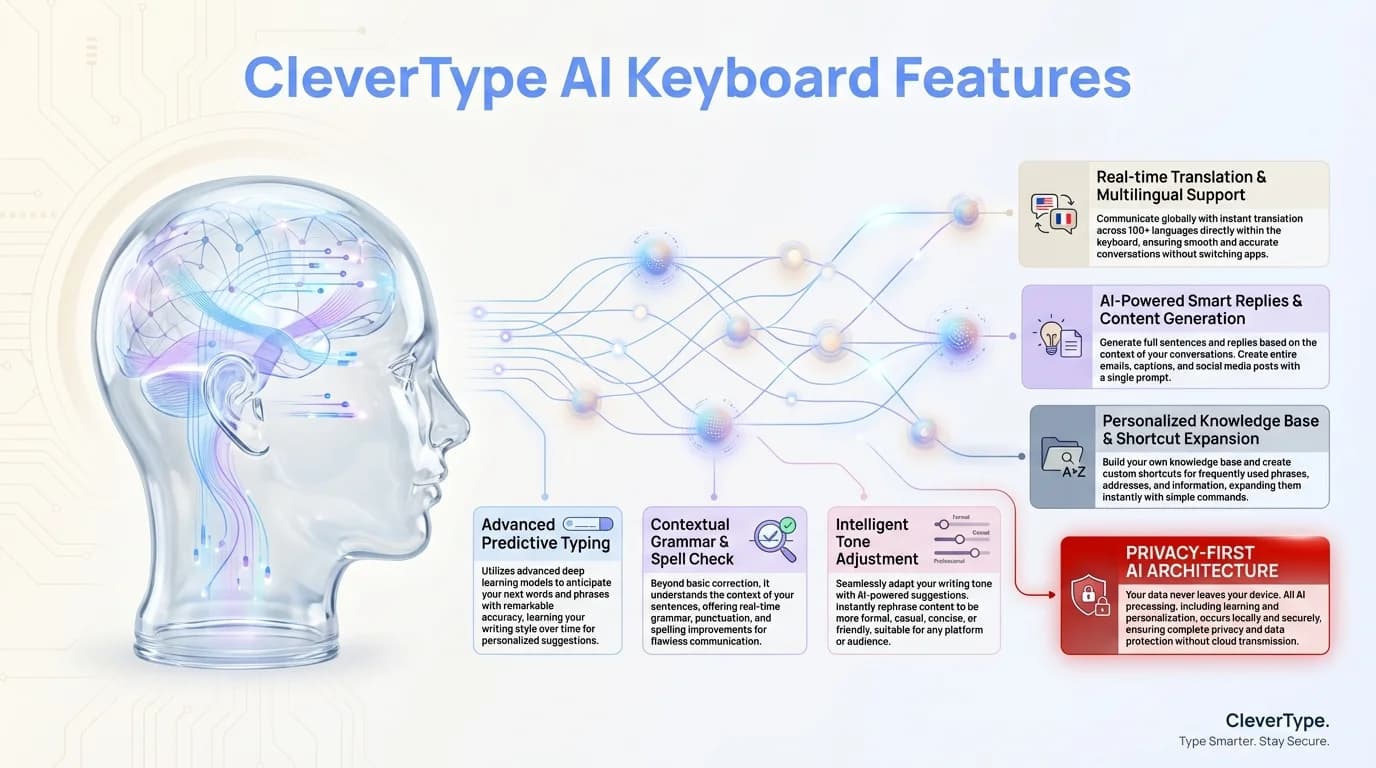
CleverType's AI-powered features bring cutting-edge technology to mobile typing
Integration with Productivity Apps
One of the biggest advantages of AI keyboards is how they connect with the apps you use every day. This integration creates a seamless workflow that traditional keyboards simply can't match.
Modern AI keyboards integrate with:
- Email clients to suggest responses based on message content
- Calendar apps to reference availability when making plans
- Note-taking apps for consistent formatting and organization
- Task management systems to create to-dos directly from messages
This cross-app functionality means your keyboard becomes a central hub for productivity rather than just an input tool. I've found this particularly useful when coordinating projects across different platforms.
For example, when using CleverType with productivity apps, I can create calendar events, add tasks to my to-do list, or format notes - all without leaving my messaging app. This kind of integration saves countless app switches throughout the day.
The productivity benefits extend to work-specific communications as well. When drafting emails, AI keyboards can suggest professional phrasing, help maintain consistent tone across communications, and even warn you before sending potentially problematic messages (like that angry email you might regret later!).
For students, these keyboards can help with academic writing, offering suggestions for formal language and proper citation formats directly in the keyboard interface.
The Future of AI Keyboard Technology
So where is all this heading? Based on current development trends and my experience in the field, here's what we're already seeing emerge in 2026 and what's coming next:
- Emotion detection: Keyboards that understand the emotional context of conversations and suggest appropriate responses - some already analyze sentiment in real-time
- Multimodal input: Seamless switching between voice, text, gesture-based input, and even handwriting recognition all in one interface
- Cross-device synchronization: Your keyboard learning and preferences following you across all your devices with encrypted cloud sync
- Augmented creativity: AI-powered suggestions that help you write more creatively and expressively, with style adaptation for different contexts
- Specialized professional modes: Domain-specific keyboards for fields like medicine, law, engineering, and academia with specialized terminology databases
- Proactive accessibility features: Real-time dyslexia support, vision assistance, and motor control adaptations
- Biometric integration: Keyboards that verify your identity through typing patterns for enhanced security
The boundary between keyboard and digital assistant has already blurred significantly in 2026. Your keyboard is becoming your primary interface with your digital world, handling everything from composing messages to managing your schedule and controlling smart home devices.
What excites me most is how these advancements are making technology genuinely accessible. For people with disabilities, language barriers, or learning differences, AI keyboards are providing new ways to communicate effectively. I've seen non-verbal individuals use predictive AI keyboards to express complex thoughts, and language learners gaining confidence through real-time grammar coaching.
Looking ahead to 2027 and beyond, we're moving toward keyboards that don't just respond to what you type - they anticipate what you need before you even start typing. The democratization of communication continues, making it easier for everyone to express themselves clearly regardless of their typing skills, language proficiency, or physical abilities.
Real-World Impact: How AI Keyboards Are Changing Daily Life
Beyond all the technical specs and features, what really matters is how AI keyboards are changing the way real people communicate every day. The impact goes far deeper than just typing faster or making fewer mistakes.
According to a 2025 study by the Mobile Technology Research Institute, users who switched to AI-powered keyboards reported a 43% reduction in communication-related stress and a 38% increase in daily productivity. Research on mobile device usage consistently shows that mobile typing and communication are among the most frequent activities on smartphones. But the numbers don't tell the whole story - it's the human element that's most compelling.
I've talked to dozens of users about their experiences with AI keyboards, and certain patterns keep emerging. People who were previously hesitant to communicate in professional settings because of their writing skills now feel confident sending emails and messages. Non-native English speakers are participating more actively in international teams. People with dyslexia are finally finding mobile typing less frustrating.
One user told me she avoided texting her adult children because typing on her phone was so difficult - now she's chatting with them daily. Another mentioned how voice-to-text capabilities let him respond to work emails during his commute, reclaiming hours of time each week. These aren't just productivity gains; they're quality-of-life improvements.
The democratizing effect of AI keyboards extends to professional opportunities as well. People who might have been held back by language barriers or typing difficulties can now compete on a more level playing field. When your keyboard helps you express your thoughts clearly and professionally, it opens doors that might have otherwise remained closed.
The Business Case for AI Keyboards
For businesses and professionals, the value proposition of AI keyboards has become undeniable in 2026. Companies are increasingly recognizing mobile communication as a critical business function, not just a convenience.
Enterprise adoption of AI keyboard technology has grown by over 200% in the past year alone. Why? Because the return on investment is clear and measurable:
- Sales teams report 25-30% faster response times to customer inquiries when using AI keyboards
- Customer service representatives handle 15-20% more tickets with improved accuracy
- Remote workers save an average of 45 minutes per day on mobile communication tasks
- Professional correspondence quality improves significantly, reducing misunderstandings and follow-up messages
Forward-thinking companies are even standardizing on specific AI keyboard platforms across their mobile workforce, recognizing that communication tools are as important as any other business software. Some are partnering with keyboard developers to create custom vocabularies and templates specific to their industry or internal processes.
The integration capabilities matter tremendously in business contexts. When your keyboard can pull data from your CRM, suggest responses based on customer history, or automatically format text according to corporate style guides, it becomes a genuine productivity multiplier rather than just a typing tool.
For freelancers and solo professionals, AI keyboards level the playing field against larger competitors. You can maintain professional communication standards, respond quickly across time zones, and manage multiple client conversations - all from your phone, all without sacrificing quality. That's powerful.
Choosing the Right AI Keyboard for Your Needs
With dozens of AI keyboard options available in 2026, choosing the right one can feel overwhelming. But the decision becomes clearer when you focus on your specific needs rather than trying to find the "best" keyboard in abstract terms.
Start by asking yourself these questions: Do you prioritize privacy above all else? Are you multilingual? Do you use voice typing frequently? Is professional writing your main use case, or casual messaging? The answers will guide you toward the right choice.
For privacy-conscious users, look for keyboards that emphasize on-device processing and have transparent, straightforward privacy policies. CleverType, for instance, processes everything locally and doesn't require account creation or cloud connectivity for core features.
If you're multilingual or frequently communicate across languages, prioritize keyboards with strong translation features and seamless language switching. Test how well they handle code-switching - that natural mixing of languages that bilingual people do.
For professional use, evaluate the grammar correction quality, tone adjustment capabilities, and integration with productivity apps you already use. Many keyboards now offer different profiles - you can have one setup for work emails and another for casual texting.
Don't underestimate the importance of the trial period. Most quality AI keyboards offer free trials or freemium versions. Use them for at least a week in your actual daily workflow before making a decision. A keyboard that looks great in reviews might not fit your specific typing patterns or needs.
Frequently Asked Questions
### Q: Are AI keyboards safe to use for sensitive information?
A: It depends on the keyboard. Look for keyboards that process data locally on your device using on-device neural processing and have clear privacy policies. Avoid keyboards that require excessive permissions or have vague terms about data usage. In 2026, the most secure options use Android's Private Compute Core and undergo regular third-party security audits.
### Q: Do AI keyboards work without an internet connection?
A: Most modern AI keyboards offer comprehensive functionality offline as of 2026. The trend has moved decisively toward on-device processing, with keyboards leveraging neural processing units built into newer Android phones. You'll get predictive text, grammar correction, and personalization features even without connectivity, though some advanced features like real-time translation may require internet access.
### Q: Will AI keyboards drain my battery faster?
A: Early AI keyboards were battery hogs, but modern versions are remarkably efficient. Most users report minimal battery impact, especially with keyboards that leverage dedicated NPUs for processing rather than the main CPU. On-device processing is actually more battery-efficient than constantly connecting to servers for predictions.
### Q: Can AI keyboards really learn my personal writing style?
A: Absolutely! Modern AI keyboards use sophisticated machine learning to adapt to your vocabulary, sentence structure, communication patterns, and even the different tones you use with different contacts. The more you use them, the better they become at predicting what you want to say. Most users notice significant personalization within just a week or two of regular use.
### Q: Are AI keyboards worth the price?
A: While many Android phones come with decent keyboards pre-installed, premium AI keyboards offer significantly better features that justify their cost for heavy mobile typists. The productivity gains, error reduction, and communication quality improvements often pay for themselves quickly, especially for professionals who rely on mobile communication.
### Q: How do I choose the right AI keyboard for me?
A: Consider your primary use case (casual texting, professional emails, multilingual communication), privacy requirements, and which features matter most to you. Test the voice-to-text quality if you use dictation frequently. Most quality AI keyboards offer free trials - use them for at least a week in your real workflow before deciding.
### Q: Can AI keyboards help with learning a new language?
A: Yes! Many AI keyboards offer features specifically designed for language learners, including contextual corrections, real-time translation, and suggestions that help you learn proper usage patterns. They can act as a learning tool by showing you correct grammar and vocabulary in context as you type.