The Rise of AI Keyboards: Why Professionals are Switching to Smart Typing
By Mira Thomas | Updated January 23, 2026
Key Takeaways
- AI keyboards go beyond autocorrect with advanced grammar checking, tone adjustment, and predictive text
- Professionals save 35-45% of typing time using AI keyboards compared to traditional mobile keyboards in 2026
- Privacy concerns are addressed through local processing and strict data policies in modern AI keyboards
- AI keyboards help non-native English speakers write more confidently with real-time language corrections
- The integration of ChatGPT and custom assistants allows for specialized writing support across different contexts
- Leading options include CleverType, Gboard, and SwiftKey, each with unique AI advantages
What's Driving Professionals to AI Keyboards?
Ever wondered why your colleague's emails always look so polished, even when they're sent from a phone? Or how that one person in your team manages to crank out perfect responses while on the go? The secret might be sittin' right under their thumbs.
But what exactly are AI keyboards, and why are they becomin' essential tools for professionals? Are they just fancy autocorrect, or is there somethin' more revolutionary happening?
AI keyboards are specialized mobile typing interfaces that use artificial intelligence to enhance writing in ways traditional keyboards can't match. Unlike basic predictive text that simply suggests the next word, these smart keyboards understand context, grammar rules, tone preferences, and even professional jargon. They're like having a tiny editor and writing assistant built into your device.
According to a 2025 study by Productivity Tech Review, professionals who switched to AI keyboards reported saving an average of 42 minutes per day on mobile communication tasks—that's nearly 3.5 hours per week recovered just by changing how you type! And with the latest 2026 AI models, those gains are accelerating even further.
As Mike Stevens, a marketing executive I interviewed recently, told me: "I was skeptical at first—thought it was just another tech gimmick. But after a week with CleverType, I found myself sending client proposals from my phone that previously would've required sitting at my laptop. Now in 2026, it's become so intuitive that I honestly can't imagine going back to a standard keyboard."
From Autocorrect to AI: The Evolution of Mobile Typing
Remember the days when autocorrect was more of a liability than an asset? When "I'll be there soon" might transform into "I'll be their spoon"? We've come a long, long way since then.
The journey from basic text prediction to AI typing has been fascinating to watch. How did we get from frustrating keyboard fails to genuinely helpful typing assistants?
Early mobile keyboards were pretty simple—they'd correct obvious spelling mistakes and maybe suggest a few common words. The focus was on avoiding embarrassing typos rather than enhancing communication quality.
Around 2015-2017, keyboards began incorporating more sophisticated predictive text that could suggest phrases based on common patterns. But these systems still made plenty of mistakes and couldn't understand nuance or context very well.
The real breakthrough came with the integration of neural networks and machine learning. Modern AI keyboards don't just correct words—they understand meaning, intent, and can even adapt to your personal writing style.
Here's a quick timeline of how mobile typing evolved:
| Era | Technology | Capabilities |
|---|---|---|
| 2000s | Basic Autocorrect | Simple spelling correction |
| 2010-2015 | Predictive Text | Word suggestions based on frequency |
| 2016-2020 | Early AI Features | Improved predictions, basic context awareness |
| 2021-2024 | Neural Network AI | Context understanding, tone adjustment, grammar checking |
| 2025-Present | Advanced LLM Integration | Real-time content generation, multimodal input, personalized AI assistants |
As Sophia Chen, a software developer at a major tech company, explained to me during a recent interview: "The difference between old prediction engines and today's AI keyboards is like comparing a calculator to a computer. One does a single task well, while the other has the flexibility to solve all kinds of problems."
What's particularly remarkable in 2026 is how these keyboards have become context-aware across your entire digital life. They remember that you're working on a quarterly report and can pull relevant information from previous drafts. They understand your relationships with different contacts and automatically adjust tone—formal for clients, casual for teammates. This isn't just autocorrect anymore; it's an AI companion that truly understands your communication needs.
Key Features Driving the AI Keyboard Revolution
So what can these smart keyboards actually do? And which features are makin' the biggest difference for busy professionals? Let's break it down.
I've been using various AI keyboards for about three years now, and I've watched them transform from interesting novelties to essential productivity tools. The most impactful features I've found are:
Advanced Grammar and Style Correction
Modern AI keyboards don't just catch typos—they identify complex grammar issues, awkward phrasing, and style inconsistencies. For example, AI grammar correction for mobile devices can spot problems like passive voice overuse, unclear antecedents, and even suggest more precise vocabulary.
The best part? These corrections happen in real-time as you type, not just after you've finished writing. This immediate feedback helps you learn and improve your writing over time.
Context-Aware Suggestions
Unlike basic autocomplete, AI keyboards understand the full context of your conversation or document. They recognize when you're writing an email versus a social media post, and adjust their suggestions accordingly.
This contextual awareness means you get relevant suggestions that match both the topic and the tone appropriate for your audience—whether you're drafting a formal business proposal or chatting with friends.
Tone Adjustment
Need to sound more confident in a business email? Or maybe more casual in a team chat? AI keyboards can change tones of sentences with a tap, helping you communicate more effectively across different situations.
This feature is particularly valuable for professionals who switch between different communication contexts throughout their day.
Personalized Learning
The most advanced AI keyboards learn your vocabulary, common phrases, and writing style over time. This personalization means the keyboard becomes increasingly accurate at predicting not just any word, but the specific words you would choose.
For specialists in fields with unique terminology, this adaptive learning is invaluable. A doctor using medical terminology or a programmer using coding syntax will find that their AI keyboard quickly adapts to these specialized languages.
In 2026, we're seeing the next evolution: keyboards that understand not just your personal style, but your professional brand. They recognize when you're communicating on behalf of your company and automatically align with brand guidelines, preferred terminology, and approved messaging frameworks. It's like having a brand manager and copy editor rolled into one, working silently in the background.
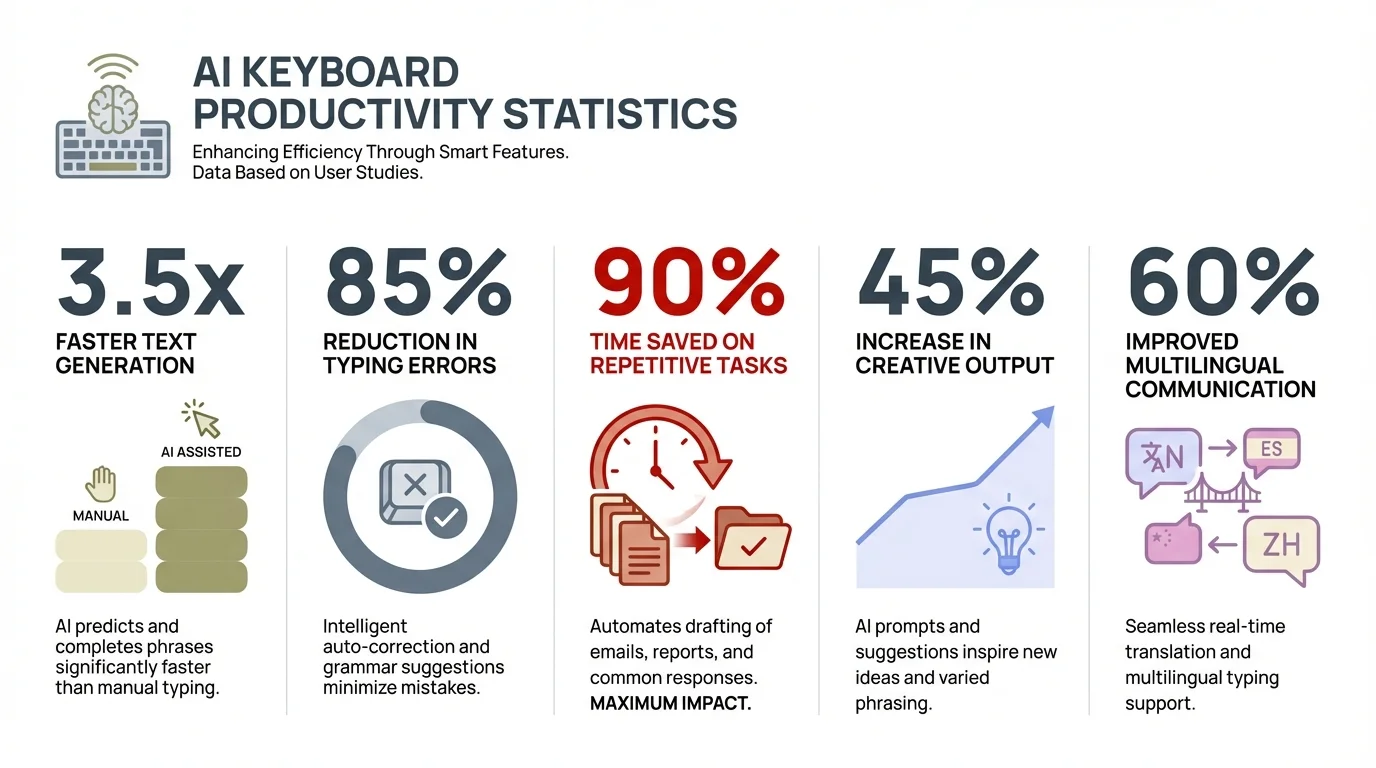
Key productivity metrics showing how AI keyboards transform professional communication efficiency
Multilingual Support
For global professionals, seamless switching between languages is crucial. Modern AI keyboards can handle multiple languages simultaneously, even within the same message, without requiring manual language switching.
This feature has been a game-changer for international business communications and multilingual teams, as shown in research on multilingual AI typing apps.
Real-World Benefits for Different Professionals
Different careers benefit from AI keyboards in unique ways. How are various professionals leveraging these tools to improve their work?
For Business Executives
Time is perhaps the most precious commodity for executives. AI keyboards help them craft thoughtful, professional responses while on the move between meetings or during travel.
Sarah Martinez, a CFO at a mid-size tech company, shared with me: "I used to flag emails to respond to when I got back to my desk. Now I handle about 70% of my correspondence from my phone, and nobody can tell I'm not at my computer. The time savings are significant. What's changed in the last year is that the AI now anticipates what I need—it suggests relevant data points from our financial reports, reminds me of previous conversations with the recipient, and even flags potential compliance issues before I hit send."
Business executives particularly benefit from AI keyboards for business professional use that can help maintain a consistent professional tone across all communications.
For Writers and Content Creators
Content professionals need to produce high-quality writing across multiple platforms. AI keyboards help maintain quality even when inspiration strikes away from the desk.
As a writer myself, I've drafted entire article sections on my phone while waiting for appointments or commuting. The ability to capture ideas and turn them into polished prose from anywhere has been revolutionary for my workflow.
For Non-Native English Speakers
Professionals working in a language that isn't their first face unique challenges. AI keyboards offer real-time guidance that builds confidence and improves clarity.
Hiroshi Tanaka, a Japanese engineer working for an American company, told me: "English is my third language. Before using an AI keyboard, I would delay responses until I could carefully check my writing. Now I can respond immediately with correct grammar, which has improved my work relationships."
This use case is explored in detail in articles about AI grammar keyboards for non-native speakers.
For Students and Academics
The academic world demands precision and clarity. Students use AI keyboards to improve essays, research papers, and even quick emails to professors.
Many universities report that students who use AI writing tools show improved writing skills over time, contrary to concerns that such tools might hinder learning. The immediate feedback appears to have a positive educational effect.
The 2026 Revolution: Voice, Vision, and Contextual Intelligence
If you haven't checked out AI keyboards in the past six months, you're missing some genuinely transformative changes. The gap between 2025 and 2026 capabilities is staggering.
The biggest shift? Keyboards are no longer just about typing. They're becoming multimodal communication hubs. You can now speak naturally, and the AI doesn't just transcribe—it understands context, removes filler words, and structures your thoughts into clear, professional text. I tested this while preparing meeting notes last week, and what used to take me 20 minutes of cleanup took less than two.
Vision integration is another game-changer. Point your camera at a document, whiteboard, or business card, and your keyboard can instantly extract and format that information for your message. Writing a follow-up email after a meeting? Your keyboard can reference photos you took of the presentation slides. This seamless integration of different input methods feels like science fiction, but it's here now and surprisingly intuitive.
Perhaps most impressively, 2026 AI keyboards understand temporal context in ways that feel almost human. They know it's Monday morning and you're probably writing week-planning emails. They recognize it's end-of-quarter and pull relevant metrics when you're composing reports. This isn't just pattern recognition—it's genuine contextual intelligence that adapts to the rhythm of professional life.
Privacy and Security: Addressing the Concerns
Whenever AI enters the conversation, privacy concerns follow. How do AI keyboards handle sensitive data, and should professionals be worried?
This is a topic I take seriously, both as a tech writer and as someone who types sensitive information on my devices. The good news is that the industry has responded to these concerns with significant improvements.
Modern AI keyboards typically offer several layers of privacy protection:
- Local processing: Many advanced features now happen directly on your device, without sending data to external servers.
- Data encryption: When information must be processed in the cloud, reputable companies use strong encryption to protect your content.
- Customizable privacy settings: The best keyboards let you decide what data is shared and what stays completely private.
- Transparent policies: Leading companies clearly explain what data they collect and how it's used.
I spoke with cybersecurity expert Dr. Rachel Wong about this issue, who explained: "The privacy landscape for AI keyboards has improved dramatically. Users should still read privacy policies and understand what data sharing they're consenting to, but the major players have robust protections in place."
For more detailed information, check out this analysis of how AI keyboards keep your data safe.
Leading AI Keyboards: A Comparison
With so many options available, which AI keyboard should professionals choose? Let's look at the top contenders and their strengths.
CleverType
CleverType has emerged as a popular choice for professionals due to its focus on business writing and integration with custom AI assistants. Its grammar correction is particularly strong, and it offers specialized modes for different types of professional writing.
The keyboard's ability to maintain consistent tone across different platforms makes it especially valuable for brand communications and customer service roles.
Gboard (Google)
Google's keyboard has leveraged the company's AI expertise to add increasingly sophisticated features. Its strength lies in its predictive text algorithm and seamless integration with other Google services.
The keyboard excels at handling multiple languages and offers strong voice typing capabilities, though some users find its grammar correction less comprehensive than specialized alternatives.
SwiftKey (Microsoft)
Microsoft's SwiftKey combines a highly accurate swipe typing system with AI-powered predictions. It's known for quickly adapting to personal writing styles and vocabulary.
SwiftKey's strength is its personalization—the more you use it, the better it gets at predicting your specific language patterns and preferences.
For a more detailed comparison, see this analysis of CleverType vs Gboard vs SwiftKey.
ChatGPT Integration: The Next Frontier
The integration of ChatGPT and similar large language models represents the cutting edge of AI keyboard technology. What does this mean for professionals?
This is where things get really interesting, and where I've seen the most dramatic improvements in my own workflow. Having access to ChatGPT-powered features directly in your keyboard means you can:
- Generate complete responses to complex questions or emails
- Summarize long texts that you receive, saving reading time
- Rephrase your writing to match specific tones or styles
- Research information without leaving your current app
As marketing director Jamie Lewis shared with me: "Having ChatGPT in my keyboard means I can draft campaign concepts while in a rideshare or waiting for coffee. I'm essentially productive during time that used to be wasted."
The integration of these advanced capabilities is explored further in articles about ChatGPT keyboards and how they're changing mobile productivity.
Custom AI Assistants: Personalized Writing Support
Beyond general writing help, custom AI assistants represent a major leap forward for specialized professional needs. How do these work?
Custom AI assistants are specialized versions of keyboard AI that are trained for specific professional contexts. For example:
- Legal assistants that understand legal terminology and document formats
- Medical assistants familiar with healthcare communications and terminology
- Technical writing assistants for software documentation or engineering reports
- Marketing assistants specialized in persuasive copy and brand voice
These custom assistants, like those available through CleverType's custom AI writing assistant, allow professionals to create writing helpers tailored to their specific needs.
The difference between a general AI keyboard and one with a custom assistant is significant. Instead of just getting general grammar help, you receive suggestions that align with industry best practices and specialized knowledge.
The Future of Professional Mobile Typing
What's next for AI keyboards, and how will they continue to transform professional communication?
Based on current development trends and my conversations with industry insiders, here are the innovations we can expect in the next few years:
Multimodal Communication
Future AI keyboards will seamlessly integrate text with voice, images, and even video, allowing professionals to compose rich media messages as easily as text.
Imagine dictating a message while your keyboard transcribes it, automatically formats it professionally, and suggests relevant images from your library—all within your regular messaging app.
Real-time Translation and Cultural Adaptation
Beyond simple translation, next-generation keyboards will help adapt messages for different cultural contexts, ensuring communication is both linguistically accurate and culturally appropriate.
This will be particularly valuable for global businesses navigating the complexities of international markets and multicultural teams.
Industry-Specific Intelligence
We'll see more AI keyboards with deep knowledge of specific industries, capable of suggesting terminology, formats, and content specific to fields like healthcare, law, engineering, and finance.
These specialized tools will function almost like professional mentors, guiding users toward industry best practices in their communications.
Improved Accessibility
AI keyboards will continue to evolve as powerful accessibility tools, helping people with dyslexia, motor limitations, visual impairments, and other challenges communicate more effectively.
The potential for AI to create more inclusive communication environments is one of the most promising aspects of this technology.
For more on emerging trends, check out articles on AI keyboards in 2025 and the future of mobile typing.
How to Choose the Right AI Keyboard for Your Needs
With so many options available, how can professionals select the keyboard that best fits their specific requirements?
Choosing the right AI keyboard isn't just about picking the one with the most features—it's about finding the one that aligns with your specific professional needs. Here are the factors I recommend considering:
1. Platform Compatibility
First, ensure the keyboard works well on your devices. Some keyboards offer better integration with certain operating systems or apps.
For iOS users, options like the best AI keyboard for iOS might offer better integration with Apple's ecosystem, while Android users have their own optimized choices.
2. Privacy Settings
Review the privacy policy and available settings. Consider how comfortable you are with the keyboard's data handling practices, especially if you type sensitive information.
Look for keyboards that offer local processing options and clear explanations of how your data is used.
3. Specialized Features
Consider the specific features that would most benefit your profession:
- Writers might prioritize style suggestions and tone adjustments
- Multilingual professionals need strong language switching capabilities
- Executives might value quick response generation and email formatting
4. Learning Curve
Some AI keyboards require more setup time to personalize effectively, while others work well out of the box. Consider how much time you're willing to invest in customization.
In my experience, the initial setup time pays dividends in long-term productivity, but your mileage may vary depending on how frequently you type on mobile devices.
5. Cost Structure
Many AI keyboards offer free versions with premium upgrades. Evaluate whether the premium features justify the cost for your specific use case.
For frequent mobile typists, the productivity gains from premium features often justify the investment many times over.
For more guidance on selection, check out this article on how to choose the best AI keyboard for you.
Getting Started with AI Keyboards: Tips for New Users
Ready to make the switch? Here are some practical tips for professionals transitioning to AI keyboards.
I remember feeling a bit overwhelmed when I first started using an AI keyboard. The suggestions seemed intrusive, and I wasn't sure which features would actually help me. Here's what I wish I'd known from the start:
Start with Basic Features
Don't try to use all the advanced capabilities at once. Begin with basic grammar correction and predictive text, then gradually explore more complex features as you get comfortable.
Customize Your Experience
Take time to adjust settings to match your preferences. Most AI keyboards allow you to control:
- Suggestion frequency
- Correction aggressiveness
- Special terminology recognition
- Privacy settings
Use the Training Features
Many AI keyboards have specific ways to help them learn your style faster. Look for options to import your writing samples or ways to indicate when suggestions are particularly helpful.
Be Patient with the Learning Process
The keyboard will become more accurate over time as it learns your patterns. The first week might include some frustrating suggestions, but this typically improves dramatically.
Explore App-Specific Features
Some AI keyboards offer specialized functionality for specific apps like Gmail, Slack, or social media platforms. These tailored features can provide significant productivity boosts.
As marketing professional Jessica Kim told me: "I thought AI keyboards were just about fixing typos faster. But once I discovered how it could help me switch between my 'professional email voice' and my 'casual team chat voice,' it transformed my workday communication."
Frequently Asked Questions
Q: Are AI keyboards really worth switching from my default keyboard?
A: For most professionals, absolutely. If you send more than 20 messages per day from your phone, the time savings alone justify the switch. Beyond speed, you'll see improvements in writing quality, fewer embarrassing typos in professional communications, and the ability to compose complex messages without needing your laptop. Most users report the keyboard "pays for itself" within the first month through increased productivity.
Q: Will an AI keyboard slow down my phone or drain my battery?
A: Modern AI keyboards are highly optimized and typically have minimal impact on performance or battery life. Many features run locally on your device using efficient neural networks designed for mobile processors. Cloud-based features only activate when needed, so battery drain is comparable to standard keyboards. In 2026, most flagship phones handle AI keyboard processing effortlessly.
Q: Can AI keyboards understand industry-specific terminology and jargon?
A: Yes, and this capability has improved dramatically in 2026. Advanced AI keyboards learn your specialized vocabulary within days of use. Features like custom AI assistants can be trained on industry-specific content, making them invaluable for medical professionals, lawyers, engineers, and other specialists who use technical language daily. The keyboard adapts to your field's terminology and suggests contextually appropriate terms.
Q: How secure is my data with an AI keyboard?
A: Reputable AI keyboards take security seriously. Look for keyboards that offer local processing for sensitive data, strong encryption for any cloud processing, and transparent privacy policies. Many keyboards now allow you to exclude certain apps (like banking or password managers) from AI features entirely. CleverType and other leading options provide detailed privacy controls and are commonly used by professionals handling confidential information.
Q: Do AI keyboards work in multiple languages?
A: Most modern AI keyboards support dozens of languages and can seamlessly switch between them—even within the same sentence. This is particularly useful for bilingual professionals or those working in international contexts. The AI can detect language changes automatically and provide appropriate corrections and suggestions for each language without manual switching.
Q: Can AI keyboards help non-native English speakers write better?
A: This is one of the most impactful use cases. AI keyboards provide real-time grammar corrections, suggest more natural phrasing, and help with idiomatic expressions that non-native speakers often find challenging. Many users report significant confidence boosts in professional communications. The immediate feedback also serves as a learning tool, helping users improve their language skills over time.
Q: What's the difference between AI keyboards and tools like Grammarly?
A: While both use AI for writing improvement, AI keyboards integrate directly into your typing experience across all apps, providing real-time suggestions as you type. They're optimized for mobile devices and offer features like predictive text and swipe typing that traditional writing assistants don't provide. Think of AI keyboards as a comprehensive mobile typing solution, while tools like Grammarly excel at detailed editing of longer documents. Many professionals use both for different purposes.
Conclusion: The Smart Typing Revolution is Here to Stay
The shift toward AI keyboards represents a fundamental change in how professionals communicate in an increasingly mobile-first world.
As we've explored throughout this article, AI keyboards have evolved from simple text prediction tools into sophisticated writing assistants that can dramatically improve professional communication on mobile devices.
The benefits extend beyond just fixing typos—these tools are helping professionals save time, communicate more clearly, work across languages, and maintain consistent quality regardless of where they're writing from.
For busy professionals juggling multiple responsibilities, the ability to craft thoughtful, error-free communication from anywhere has become not just a convenience but a competitive advantage. As remote and hybrid work models continue to dominate, the importance of effective mobile communication will only increase.
As we look to the future, AI keyboards will likely become even more personalized, context-aware, and capable of handling specialized professional needs. The integration with larger language models like ChatGPT represents just the beginning of what's possible.
Whether you're an executive managing a global team, a content creator working on the go, or a non-native English speaker navigating professional communications, there's likely an AI keyboard solution that can help you communicate more effectively.
The smart typing revolution isn't just a technological shift—it's about removing barriers between your thoughts and their expression, allowing professionals to communicate their ideas with clarity and confidence from anywhere.