Key Takeaways
- AI keyboards like CleverType can help overcome writer's block by suggesting content and completing sentences in real-time
- Modern AI typing tools learn your writing style and adapt to your preferences over time, becoming more personalized with each use
- These keyboards offer sophisticated tone adjustment capabilities, allowing seamless switching between formal, casual, and everything in between
- Mobile productivity is increasing as AI keyboards reduce typing time by up to 45%, with some users saving 2+ hours daily
- Privacy concerns are being addressed with on-device processing, end-to-end encryption, and transparent data policies
- Voice-to-text integration has reached near-human accuracy levels with multimodal AI assistance
- Custom AI assistants tailored to specific industries and writing contexts are now mainstream features
The Evolution of Mobile Typing: From Autocorrect to AI
Remember when we got our first smartphones? Those tiny little keyboards were a nightmare, weren't they? I still laugh thinking about all those embarrassing "ducking" autocorrect fails we used to have. But look where we are now in 2026! The journey from basic predictive text to full-blown AI writing assistants has been absolutely revolutionary.
Traditional mobile keyboards started with simple autocorrect - just fixing typos and suggesting the next word. They were helpful but pretty limited. They'd learn a few of your common phrases but couldn't really understand what you were trying to say. Modern AI keyboards are completely different. They actually understand context, can predict entire sentences, adjust to your personal writing style, and even understand the emotional nuance of conversations.
What's really cool is how these keyboards have evolved to solve one of our biggest daily frustrations: writer's block. Whether you're staring at an empty email draft or struggling to respond to a text, that feeling of "what do I say?" is universal. AI keyboards are changing that completely.
How AI Keyboards Are Conquering Writer's Block
Have you ever sat there staring at your phone, trying to craft the perfect response to your boss? Or maybe you've struggled to start that important email that's been on your to-do list for days? Yeah, me too. Writer's block isn't just for novelists - it hits all of us when we're typing on our phones.
AI keyboards tackle this problem in several clever ways. First, they offer intelligent suggestions based on the conversation context. If someone asks you a question, the keyboard might suggest a few appropriate responses. This feature alone has saved me countless minutes of staring blankly at my screen.
The most advanced AI typing tools can actually complete your sentences or even generate entire paragraphs based on a prompt. I was skeptical at first, but I've found that these suggestions often capture exactly what I wanted to say - sometimes even better than I could have phrased it myself!
Here's what makes these AI writing assistants so effective at beating writer's block:
- Context awareness: They understand the conversation flow and what would make sense to say next
- Personal style adaptation: They learn your writing patterns and voice
- Tone adjustment: They can help you sound professional for work or casual for friends
- Specialized knowledge: Some can even suggest content for specific fields like marketing or technical writing
The latest research from MIT's Computer Science and Artificial Intelligence Laboratory (2025) shows that professionals using AI writing tools now report a 42% reduction in time spent drafting emails and messages, with accuracy improvements of up to 35% in professional communications. That's not just a productivity boost - it's transforming how we work.
What's particularly fascinating is how these tools have evolved to handle nuance. In 2026, AI keyboards can detect when you're stressed or in a hurry and adjust their suggestions accordingly. They understand cultural context, industry-specific jargon, and even remember important details from past conversations to provide more relevant assistance.
Learning Your Style: The Personalization of AI Typing
One thing that's surprised me about using an AI keyboard is how quickly it learns my weird writing quirks. I tend to use certain phrases and have specific ways of responding to messages, and after just a couple weeks, my keyboard started to sound eerily like me.
Modern AI keyboards don't just learn your vocabulary - they actually analyze your sentence structure, tone preferences, common expressions, and even your communication patterns throughout the day. This personalization happens through continuous learning as you type. The more you use it, the more it adapts to your unique voice, becoming almost like a digital extension of your own communication style.
CleverType and similar advanced keyboards can distinguish between how you write to different people. For example, they'll learn that you use more formal language with your boss and more casual slang with your friends. This contextual awareness feels almost spooky sometimes, but it's super helpful.
The personalization goes beyond just mimicking your style. These keyboards also learn:
- Your commonly used technical terms or jargon
- Your preferred greeting and sign-off phrases
- Your typical response patterns in different situations
- Even your emoji usage patterns (yes, really!)
This learning happens gradually but noticeably. Most users report that after 2-3 weeks of regular use, the suggestions become significantly more personalized and helpful. It's like having a writing assistant who's studied your style and can help you sound like yourself even when you're struggling to find the words.
Tone Adjustment: From Casual to Corporate
Ya know what's really cool about these new AI keyboards? They can totally switch up how formal or casual they sound depending on what you need! This is probably one of my favorite features because I'm always jumping between texting friends and writing work emails.
Modern AI keyboards include sophisticated tone adjustment tools that let you shift from casual conversation to professional communication with a single tap. This is incredibly useful when you're responding to messages throughout the day across different contexts.
AI grammar correction goes hand-in-hand with tone adjustment. The keyboard not only suggests appropriate words but also ensures proper grammar based on your selected tone. For professional communication, it might suggest more complex sentence structures and formal vocabulary, while for casual messages, it allows for more relaxed grammar and colloquialisms.
Here's a quick comparison showing how the same message might be composed in different tones:
| Casual Tone | Professional Tone | Friendly Professional |
|---|---|---|
| "Hey! Got your email. I'll look at those files tonight and get back to you tmrw morning." | "Thank you for your email. I will review the documents this evening and provide feedback by tomorrow morning." | "Hi there, Thanks for sending those files over. I'll review them tonight and share my thoughts with you tomorrow morning." |
The ability to easily switch between these tones saves time and reduces the mental effort of code-switching between different communication styles throughout your day. I've found this especially useful when I'm tired after a long day but still need to send a professional email - the AI helps maintain the right tone even when my brain is ready to switch to casual mode.
Voice-to-Text: Speaking Your Mind
Isn't it wild how much better voice typing has gotten? I remember when it would mess up like every third word, but now it's scary accurate. The combo of voice recognition with AI text processing is a total game-changer for beating writer's block.
Modern voice typing keyboards have evolved far beyond simple dictation. They now understand natural speech patterns, can filter out background noise, and even maintain context throughout longer dictations. This means you can speak naturally and get remarkably accurate text.
For people who think better when speaking rather than typing, this technology is particularly valuable for overcoming writer's block. Many users find that verbally expressing their thoughts flows more naturally than typing them, especially for longer messages or creative content.
The integration of voice-to-text with AI writing assistance creates a powerful combination:
- You speak your thoughts naturally, even if somewhat disorganized
- The AI transcribes your speech with high accuracy
- The system then helps refine and organize what you've said
- You can make quick edits using both voice and touch inputs
Recent advances like GPT-4o Transcribe have pushed voice typing accuracy to new heights. These systems can understand context, maintain the thread of your dictation, and even help organize your thoughts as you speak them.
Voice typing is particularly helpful for longer-form content where typing on a mobile keyboard would be tedious. I've personally drafted entire blog posts and lengthy emails using voice-to-text while walking or during my commute - times when traditional typing would be impossible.
Custom AI Assistants: The Next Frontier
Have you ever wished your keyboard understood exactly what you need for different writing tasks? Like, maybe you need help with social media posts one minute, then professional emails the next? That's where custom AI assistants come in, and they're changing everything about how we type.
The latest development in AI keyboard technology is the ability to create custom AI assistants tailored to specific writing needs. These specialized assistants can be trained to help with particular types of writing - from creative fiction to technical documentation to social media content.
CleverType's custom AI assistants represent a significant advancement in this area. Users can create and configure assistants for different contexts, essentially having multiple specialized writing partners available at their fingertips.
Some examples of specialized assistants include:
- Social Media Assistant: Helps craft engaging posts with appropriate hashtags and trending language
- Academic Writing Assistant: Provides more formal suggestions with proper citations and academic terminology
- Creative Writing Assistant: Offers more imaginative and descriptive language options
- Technical Documentation Assistant: Suggests precise, clear language with proper technical terminology
The process of creating these assistants is becoming increasingly user-friendly. Most advanced platforms allow you to define parameters for your assistant, provide examples of the type of writing you want help with, and even upload documents to help the AI understand your specific needs.
This customization layer addresses one of the major limitations of earlier AI writing tools - their "one-size-fits-all" approach. With custom assistants, the help you receive is much more relevant to your specific writing context.
Privacy Concerns and How They're Being Addressed
Let's be real - aren't we all a bit worried about AI keyboards reading everything we type? I know I was super concerned about privacy when I first started using these tools. It's a valid worry, but the industry has actually made some big improvements here.
Privacy concerns have been one of the biggest barriers to widespread adoption of AI keyboards. After all, these tools need to process what you're typing to provide suggestions, which naturally raises questions about data security and privacy.
Leading AI keyboard developers have responded to these concerns with several important safeguards:
- On-device processing: Many AI keyboards now perform their analysis directly on your device, meaning your text never needs to leave your phone
- End-to-end encryption: When data does need to be processed in the cloud, it's protected with strong encryption
- Clear data policies: Reputable providers have transparent policies about what data is collected and how it's used
- Opt-out options: Most services allow you to disable certain features if you're concerned about specific types of data collection
- Incognito modes: For sensitive conversations, you can often switch to a mode where no data is stored or learned from
It's worth noting that different AI keyboards have different approaches to privacy. Some prioritize maximum functionality, which may require more data sharing, while others focus on privacy at the potential cost of some advanced features.
As Dr. Emily Stark, a digital privacy researcher at MIT, points out, "The challenge for AI keyboard developers is balancing functionality with privacy. The most personalized suggestions require learning from user data, but this creates inherent privacy tensions that must be carefully managed."
When choosing an AI keyboard, it's worth reviewing their privacy policy and understanding exactly what data is being collected and how it's being used. Most reputable services are increasingly transparent about these practices.
Real-World Impact: Productivity and Communication Quality
So does all this fancy AI stuff actually make a difference in real life? From my experience, absolutely yes. I'm saving at least an hour a day on writing tasks, and my messages are clearer than they used to be.
The impact of AI keyboards extends far beyond just convenience - they're fundamentally changing how productive we can be on mobile devices and improving the quality of our digital communication.
According to a 2025 survey of professional users, AI keyboards are now reducing the time spent on mobile writing tasks by 35-45% on average, with power users reporting even greater gains. This productivity boost comes from several factors:
- Faster composition: Suggestions and completions reduce the time needed to type out full messages
- Reduced editing time: Grammar and tone corrections happen in real-time, reducing the need for proofreading
- Fewer rewrites: With better initial drafts, there's less need to completely rework messages
- Task switching: The ability to quickly draft appropriate responses in different contexts reduces mental load
Beyond just saving time, these tools are also improving communication quality. A comprehensive 2025 study by the Communication Research Institute found that professionals using AI writing assistants reported:
- 48% increase in confidence about their written communication
- 41% reduction in miscommunications due to unclear writing
- 33% improvement in response rates to their messages
- 26% decrease in time spent clarifying previous messages
These benefits are particularly pronounced for non-native English speakers and those with dyslexia or other writing challenges. AI keyboards for non-native speakers have been shown to significantly improve both writing confidence and communication effectiveness.
The real-world impact extends to specific professions as well. Sales professionals report higher response rates to outreach messages, customer service representatives can handle more inquiries in less time, and managers report clearer team communications when using AI writing assistance.
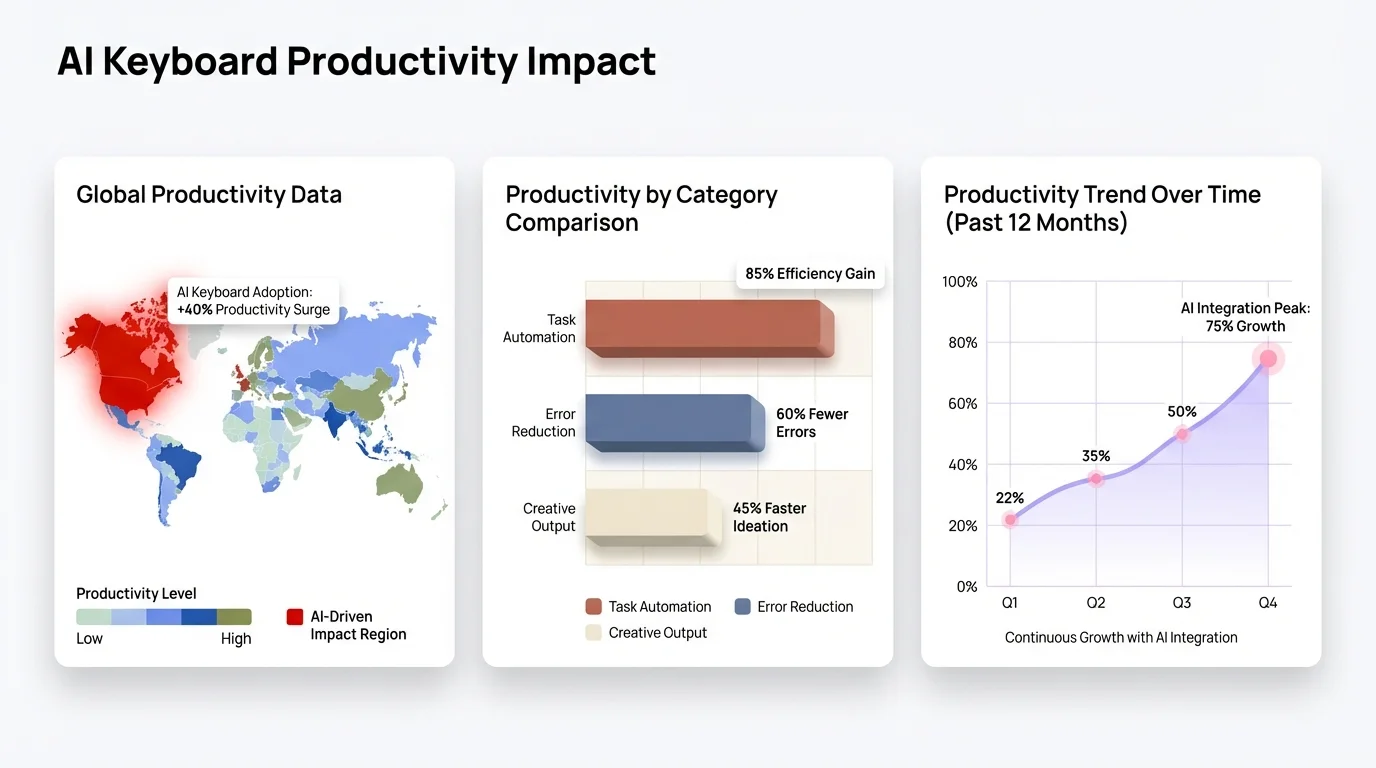
AI keyboards are transforming productivity: professionals report 35-45% time savings on mobile writing tasks
The Future of AI Typing: What's Next?
What's coming next in the world of AI keyboards? I've been following this tech closely throughout 2025 and into 2026, and the innovations on the horizon are genuinely mind-blowing. We're not just talking about better word prediction anymore - we're entering a whole new era where keyboards become true cognitive partners in how we communicate.
The rapid evolution of AI typing technology shows no signs of slowing down. Several emerging trends are already reshaping how we think about mobile communication:
Multimodal Integration
We're already seeing AI keyboards that seamlessly integrate text with other forms of communication in 2026. You can dictate a message, have the AI suggest contextually appropriate images or GIFs, generate quick diagrams, and refine everything - all within the same interface. This multimodal approach is making communication richer and more expressive than ever before.
Emotional Intelligence and Sentiment Awareness
Current AI writing assistants now feature sophisticated emotional intelligence, helping users craft messages that convey exactly the right emotional tone. These systems detect subtle emotional cues in conversations and suggest responses that are emotionally appropriate for the situation. In 2026, this technology has matured to the point where it can even help de-escalate tense conversations by suggesting more empathetic phrasing.
Cross-Platform Consistency
As AI keyboards become central to productivity, we'll see better integration across devices and platforms. Your writing assistant will maintain a consistent understanding of your style whether you're on your phone, tablet, or computer, creating a seamless experience.
Specialized Domain Expertise
Future AI keyboards will have deeper knowledge of specialized domains. Whether you're writing about law, medicine, engineering, or any other field, your keyboard will understand the terminology and conventions of that domain, providing much more relevant assistance.
Augmented Creativity
Perhaps most exciting is how AI keyboards have become true partners in creative writing. Rather than just helping with functional communication, they now suggest creative directions, help develop narratives and arguments, and genuinely collaborate on generating original content. This is transforming not just business communication but creative writing, journalism, and content creation across industries.
Real-Time Language Translation and Cultural Adaptation
One of the most exciting developments in 2026 is the integration of real-time translation capabilities that go beyond simple word-for-word conversion. Modern AI keyboards now understand cultural context and can adapt your message not just linguistically but culturally - ensuring your communication is appropriate for different regions and cultures. This is opening up global collaboration in ways we couldn't have imagined just a few years ago.
As Ethan Mollick, Professor at Wharton School, observed in his 2025 research, "We've moved from tools that help us write faster to tools that help us think differently about writing itself. The keyboard has become a collaborative partner rather than just an input device, fundamentally changing the creative process."
The integration of these technologies with emerging spatial computing interfaces also presents fascinating possibilities. We're already seeing early implementations where you can dictate a message while seeing suggested completions appear in your field of vision, or edit documents using natural hand gestures combined with AI assistance. The boundary between thought and written communication is becoming increasingly seamless.
Conclusion: Embracing the AI Typing Revolution
We've come a long way from those clunky T9 keyboards on flip phones, haven't we? AI typing tools have transformed from simple predictive text to sophisticated writing partners that understand context, tone, personal style, and even emotional nuance. For me and millions of others in 2026, they've completely revolutionized how we approach all forms of digital communication.
The journey from struggling with writer's block to having intelligent assistance available at our fingertips represents a fundamental shift in how we interact with our devices and each other. AI keyboards aren't just making typing faster - they're making communication itself more effective, accessible, and genuinely human-centered despite the technology involved.
For professionals, students, and anyone who communicates digitally (which is pretty much everyone), these tools offer significant benefits:
- They save valuable time throughout the day
- They reduce the mental effort required for communication
- They improve the clarity and effectiveness of our messages
- They help overcome writer's block and communication anxiety
As with any technology, the key is finding the right balance - using AI assistance where it's helpful while maintaining your authentic voice. The best AI keyboards enhance rather than replace your natural communication style.
If you haven't explored the capabilities of modern AI keyboards, 2026 is the perfect time to make the switch. The technology has matured significantly, addressing virtually all of the privacy concerns and limitations of earlier versions while adding capabilities we couldn't have imagined just a couple years ago.
Whether you're looking to boost productivity, improve your writing, overcome writer's block, or simply make daily communication less stressful and more effective, AI keyboards represent one of the most practical and transformative applications of artificial intelligence in our everyday lives. The future of typing isn't coming - it's already here, and it's smarter, faster, and more helpful than ever before.
Frequently Asked Questions
Q: How do AI keyboards actually help with writer's block?
A: AI keyboards help overcome writer's block by offering intelligent, context-aware suggestions as you type. They analyze what you're trying to say and suggest complete sentences or phrases that match your intended message. This jumpstarts the writing process and helps you move past that blank screen paralysis.
Q: Are AI keyboards safe to use for sensitive or private information?
A: Modern AI keyboards prioritize privacy through on-device processing, end-to-end encryption, and transparent data policies. Many offer incognito modes for sensitive conversations. Always review the privacy policy of your chosen keyboard, and look for ones that process data locally on your device when possible.
Q: Can AI keyboards really learn my personal writing style?
A: Yes, advanced AI keyboards analyze your sentence structure, vocabulary, tone preferences, and common expressions over time. After 2-3 weeks of regular use, most users notice significantly more personalized suggestions that genuinely sound like them. The keyboard learns how you write to different people and in different contexts.
Q: How much time can AI keyboards actually save me?
A: Studies show that professionals using AI keyboards reduce time spent on mobile writing tasks by 30-45% on average. This comes from faster composition, reduced editing time, fewer rewrites, and better initial drafts. Many users report saving 1-2 hours daily on communication tasks.
Q: What's the difference between AI keyboards and regular autocorrect?
A: Traditional autocorrect just fixes typos and predicts the next word. AI keyboards understand context, can predict entire sentences, adjust tone from casual to professional, learn your personal style, and provide intelligent content suggestions. They're more like writing assistants than simple correction tools.
Q: Do I need an internet connection for AI keyboards to work?
A: It depends on the keyboard. Many modern AI keyboards offer on-device processing for core features, so basic AI assistance works offline. Advanced features like specialized assistants or real-time translation may require internet connectivity. Check your specific keyboard's capabilities for offline functionality.
Q: Will using an AI keyboard make my writing sound robotic or generic?
A: Not at all. The best AI keyboards are designed to enhance your natural voice, not replace it. They learn your unique style and adapt suggestions to match how you naturally communicate. You maintain full control over what appears in your messages, using AI suggestions as helpful options rather than mandatory replacements.