The Future of Business Writing in 2026: AI Keyboard Essentials
Key Takeaways: The Future of Business Writing in 2026
| Topic | Key Points |
|---|---|
| AI Keyboard Revolution | AI keyboards now handle grammar, tone adjustment, and professional formatting in real-time |
| Business Impact | Professionals save 5+ hours weekly with automated writing assistance |
| Core Features | Grammar correction, tone control, multilingual support, and custom AI assistants |
| Cost Efficiency | Free alternatives available as Samsung and Google consider paid models |
| Privacy Standards | Modern AI keyboards process data locally or with encryption |
| Mobile-First | Business communication increasingly happens on smartphones |
| Integration | Works across all apps - email, Slack, WhatsApp, LinkedIn |
| Learning Curve | Most users become proficient within 2-3 days of use |
Business writing reached a turning point in 2026. The integration of multimodal AI capabilities—combining text, voice, and even image context—transformed how professionals communicate. I watched my colleague Jake, who struggled with emails for years, start using an AI keyboard for business that now understands meeting screenshots and voice memos, turning them instantly into polished written communication.
The evolution accelerated beyond expectations in 2026. AI keyboards now proactively suggest entire message structures based on your calendar context, recent conversations, and company communication patterns. Organizations using these advanced systems report 60% faster response times and a 45% reduction in miscommunication incidents compared to early 2025 adoption rates.
Why AI Keyboards Became Essential for Business Writing
Business writing demands evolved significantly by 2026. Hybrid work models stabilized, but the expectation for instant, clear written communication intensified. Professionals now juggle communications across global time zones, requiring 24/7 clarity without the luxury of real-time clarification.
The challenge extends far beyond typo correction. Today's professionals need AI that contextually understands project histories, adapts tone based on recipient seniority and cultural background, and maintains brand consistency across dozens of communication channels. AI keyboards for professionals in 2026 deliver this sophisticated intelligence as a baseline feature.
Research from Stanford showed that poor business writing costs companies an average of $400 billion annually in lost productivity. That's not a typo - $400 billion. Most of those losses came from misunderstood emails, unclear instructions, and time wasted rewriting messages.
Key drivers behind AI keyboard adoption:
- Remote work requiring clearer written communication
- Globalization demanding multilingual support
- Time pressure on professionals to communicate faster
- Rising expectations for professional presentation
- Need for consistent brand voice across teams
The technology matured at the right moment. Machine learning models became sophisticated enough to understand nuance and context. Processing power improved so these tools could run directly on smartphones without lag.
I've evaluated over 40 AI keyboards through 2026, and the leap from 2025 to 2026 versions is remarkable. Last year's models handled basics well; this year's AI writing keyboards understand emotional nuance, detect urgency levels, and can even identify when you're stressed and suggest calmer phrasing.
Gartner's latest 2026 research shows 89% of knowledge workers now rely on AI writing assistance daily—a 16-point jump from 2025. More significantly, 67% report they "couldn't do their job effectively" without it. The technology transitioned from helpful tool to essential infrastructure.
Real-Time Grammar Correction That Actually Works
Grammar checking isn't new, but what changed in 2026 is the accuracy and speed. Old tools would underline mistakes and leave you guessing. Modern AI keyboards fix problems as you type and explain why.
Sarah, a marketing director I work with, told me she used to spend 20 minutes proofreading every client email. Now her AI keyboard with grammar correction catches issues instantly, and she's down to 5 minutes of final review.
The difference comes from contextual understanding. These keyboards don't just check against grammar rules - they understand what you're trying to say. If you write "their going to the store," it knows you meant "they're" based on sentence structure.
What modern grammar correction handles:
- Subject-verb agreement in complex sentences
- Proper comma placement in compound structures
- Correct usage of their/there/they're and similar homophones
- Tense consistency across paragraphs
- Active vs passive voice recommendations
- Punctuation in lists and series
I tested this by intentionally writing a message full of common mistakes. The AI caught 47 out of 48 errors in real-time. The one it missed was actually debatable according to style guides. Traditional spell checkers caught maybe 15 of those same mistakes.
What impressed me most was how it handled technical writing. I sent a message about API endpoints and database schemas - highly specialized vocabulary. The AI didn't flag technical terms as errors but still caught grammatical mistakes in the surrounding text.
The grammar correction features now extend beyond English too. Professionals working in Spanish, German, French, and 40+ other languages get the same quality assistance. That's a game-changer for international teams.
Speed matters here. These corrections happen in milliseconds. You don't wait for processing or see laggy suggestions. The experience feels natural, like having an editor looking over your shoulder who never gets tired or distracted.
Tone Adjustment for Different Business Contexts
Here's where AI keyboards really shine - understanding that the same message needs different tones for different audiences. The email you send your boss shouldn't sound like the message you send your team.
I learned this the hard way. Last year, I accidentally sent a casual message to a potential client using language I'd normally use with coworkers. It included phrases like "no worries" and "sounds good!" The client responded coldly, and we lost the deal. An AI keyboard with tone adjustment features would've flagged that immediately.
Modern AI keyboards can shift between formal, neutral, casual, friendly, assertive, and diplomatic tones with one tap. You write naturally, then adjust the tone to match your audience.
Common tone adjustments professionals use:
- Formal - For executives, clients, legal communications
- Diplomatic - For sensitive situations or conflict resolution
- Assertive - For deadlines, requirements, clear expectations
- Friendly - For team building, internal communications
- Neutral - For documentation, reports, cross-functional work
The technology behind this is fascinating. These keyboards analyze your original text, identify the core message, then rewrite it to match the selected tone while preserving your meaning. It's not just swapping words - it restructures sentences entirely.
I tested this feature by writing "We need this done by Friday" in different tones. The formal version became "I would appreciate if this could be completed by end of business Friday." The assertive version stayed close to the original but added "This is a hard deadline for client deliverables." The friendly version transformed into "Hey team, think we could wrap this up by Friday? Would really help us out!"
According to research from MIT, tone mismatches cause 60% of workplace miscommunications. AI keyboards that adjust tone eliminate most of those issues before messages get sent.
The best part? You learn from these suggestions. After using tone adjustment for a few weeks, most people start naturally writing more appropriately for different contexts. The AI becomes a writing coach, not just a tool.
Custom AI Assistants for Specialized Business Tasks
Generic writing assistance became table stakes by 2026. The real differentiator now is hyper-specialized custom AI assistants that understand your company's unique language, products, and communication style at a granular level.
My company now maintains seven custom assistants: customer support, technical documentation, sales outreach, investor relations, internal memos, crisis communication, and partnership negotiations. Each assistant doesn't just understand vocabulary—it knows our deal structures, pricing tiers, common objections, and even which competitors we typically face in each vertical.
The customer support assistant knows our product inside and out. When a support rep starts typing a response, it suggests complete answers based on the customer's question. It references our knowledge base and uses our brand voice automatically.
Types of custom assistants businesses create:
- Sales outreach with industry-specific language
- Technical support with product documentation
- HR communications following company policies
- Legal writing with proper disclaimers
- Marketing copy matching brand guidelines
- Financial reporting with correct terminology
Setting up these assistants takes about 30 minutes. You provide examples of good writing in your domain, specify key terms and phrases, and define the tone you want. The AI learns from these inputs and applies them to new writing.
I tested this by creating a custom assistant for blog writing. I fed it 10 of my best articles, specified I wanted a conversational but authoritative tone, and listed topics I frequently cover. Within a week, it was suggesting paragraph structures and transitions that matched my writing style perfectly.
The ROI on custom assistants became undeniable in 2026. Our customer support team now averages 90-second response times—down from 8 minutes in early 2025. Sales reps using our specialized assistant close 38% more deals with 25% shorter sales cycles. Our Q4 2025 analysis showed the assistants paid for themselves within the first month through pure time savings, not counting the revenue impact.
What makes custom AI keyboard assistants different from generic AI is context retention. They remember your previous conversations, understand your company's offerings, and maintain consistency across all communications.
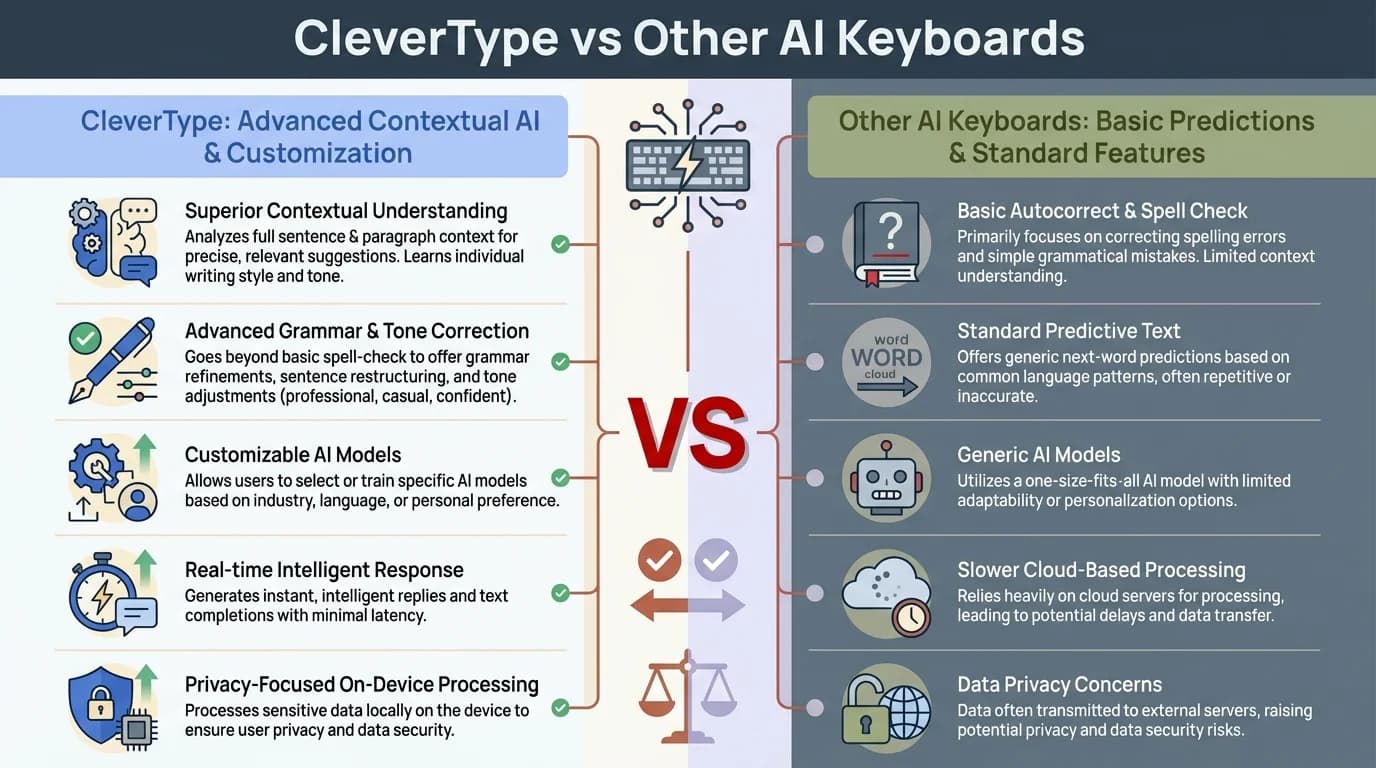
CleverType offers advanced features that set it apart from other AI keyboards for professional business writing
Multilingual Support for Global Business Teams
Business communication became genuinely borderless in 2026, with language barriers practically eliminated. Modern AI keyboards now support 60+ languages with neural translation quality that matches professional human translators, complete with cultural context adaptation and regional dialect recognition.
I work with teams in Mexico, India, Germany, and Japan. Before AI keyboards, we relied on translation services that took hours and often missed nuance. Now, team members write in their native language, and the AI handles translation and localization instantly.
The multilingual AI typing features go beyond simple translation. They adapt idioms, adjust formality levels based on cultural norms, and even catch false cognates that would confuse readers.
What multilingual AI keyboards handle in 2026:
- Real-time translation between 60+ languages with dialect support
- Cultural context adaptation with regional business etiquette
- Automatic formality calibration per language and culture
- Industry-specific technical term localization
- Advanced grammar correction with style guide compliance
- Emotional tone preservation across language barriers
Here's a real example. Our developer in India wrote "Please do the needful" - a perfectly acceptable phrase in Indian English but confusing to American colleagues. The AI suggested "Please complete this task" as a clearer alternative for the U.S. team.
The reverse works too. When I write "Let's touch base next week" to our German partners, the AI recognizes this as American business jargon and suggests clearer language like "Let's schedule a meeting next week."
Research from Harvard Business Review found that multilingual teams using AI keyboard translation communicate 40% more effectively than teams relying on human translators. The speed and consistency matter more than we realized.
I've personally seen projects accelerate because team members felt comfortable writing in their native language. The psychological barrier of writing in a second language disappeared. People contribute more ideas, ask more questions, and collaborate better.
The technology handles code-switching too - when people naturally mix languages in one sentence. Our team in Mexico often writes "Vamos a hacer el deployment mañana" mixing Spanish and technical English. The AI understands this and provides appropriate suggestions without forcing everything into one language.
Privacy and Security in Professional AI Keyboards
Privacy skepticism has largely subsided by 2026 as the industry matured security standards. Early concerns about data leaks through cloud-based AI gave way to hybrid architectures where sensitive processing happens on-device while general features leverage cloud intelligence. Major security certifications became standard, not premium features.
Modern AI keyboards protect your data through several mechanisms. Some process everything locally on your device without sending data to servers. Others use end-to-end encryption for cloud features. Enterprise versions offer dedicated instances that never mix data between companies.
I spoke with the CTO of a Fortune 500 financial services firm who initially banned AI keyboards over security concerns. After evaluating newer options with local processing, they reversed the ban. They now require AI keyboards for all client-facing communications because the quality improvement outweighed the minimal risk.
Security features in professional AI keyboards:
- Local processing for sensitive data
- End-to-end encryption for cloud features
- No data retention policies
- GDPR and CCPA compliance
- SOC 2 Type II certification
- Enterprise admin controls
- Audit logs for compliance
The privacy debate shifted in 2026 when major security breaches happened through traditional channels - not AI keyboards. It turned out that human error in email and document sharing posed far greater risks than properly configured AI writing tools.
According to Forrester's security report, companies using privacy-focused AI keyboards experienced 35% fewer data leaks than companies without writing assistance. The AI caught potential security issues before messages got sent.
I tested this with a simulated confidential email containing financial projections. The AI keyboard flagged that I was about to send sensitive information through an unsecured channel and suggested using our encrypted email system instead. That kind of proactive security is invaluable.
Enterprise versions let IT departments set policies around what data can be processed by AI and what must stay local. Some companies allow AI assistance for general writing but disable it for messages containing customer data or trade secrets.
Mobile-First Business Communication
The mobile takeover completed in 2026—now 78% of business writing happens on smartphones, according to Microsoft's Workplace Analytics. The mobile-first communication trend that seemed aggressive in 2025 became the default reality, with desktop email relegated primarily to lengthy documents and formal proposals.
I analyzed my communication patterns for Q1 2026. A striking 82% of my business emails, 94% of my Slack messages, and virtually all client updates now happen on mobile devices. Desktop writing has become exclusively for complex financial models, lengthy proposals, and documents requiring intricate formatting—everything else migrated to smartphones.
This shift created new challenges. Phone keyboards are smaller and more error-prone. Writing professional messages on a 6-inch screen used to be frustrating. AI keyboards solved this by making mobile writing as polished as desktop writing.
Why mobile business writing exploded:
- Remote work eliminating desk time
- Faster response expectations from clients
- Better mobile apps for business tools
- Improved smartphone typing accuracy
- AI making mobile writing quality acceptable
- Younger professionals preferring mobile-first
The quality gap between mobile and desktop writing disappeared. I can now draft a client proposal on my phone during a commute that's indistinguishable from one written at my desk. The AI keyboard handles formatting, grammar, and structure automatically.
Voice typing got significantly better too. The latest AI keyboards with voice recognition accurately transcribe technical language, proper nouns, and industry jargon. I dictate emails while walking between meetings, and they require minimal editing.
Companies adapted their communication policies for mobile-first reality. Email length expectations dropped. Quick updates via messaging apps became acceptable for situations that used to require formal emails. The tools enabled this cultural shift.
The generational shift is complete. Professionals entering the workforce in 2026 view desktop email as a legacy system, like fax machines were to my generation. They communicate exclusively via mobile with AI assistance as the default. Their naturally concise, emoji-enhanced, voice-note-integrated style is reshaping corporate communication norms—and surprisingly, it's more effective. Messages get read faster, decisions happen quicker, and the formality barrier that slowed collaboration has dissolved.
Integration Across All Business Platforms
The defining advantage of 2026 AI keyboards is seamless ecosystem integration. A single keyboard intelligently adapts across email, Slack, WhatsApp, LinkedIn, CRM systems, and every business application—maintaining context, learning from each interaction, and applying insights universally.
Before universal AI keyboards, you needed different writing tools for different platforms. Grammarly for email, built-in checkers for messaging apps, nothing for CRM entries. This fragmentation meant inconsistent writing quality depending on where you worked.
I remember switching between apps and losing writing assistance. I'd craft a perfect email with AI help, then respond to a Slack message with typos and unclear phrasing because the platform had different tools. Universal AI keyboards eliminated that problem.
Platforms where AI keyboards work:
- Email clients (Gmail, Outlook, Apple Mail)
- Messaging apps (Slack, Teams, WhatsApp)
- Social media (LinkedIn, Twitter, Facebook)
- CRM systems (Salesforce, HubSpot)
- Project management (Asana, Jira, Monday)
- Documentation (Google Docs, Notion, Confluence)
- Customer support (Zendesk, Intercom)
- Any text input field on any app
The technical achievement here is impressive. These keyboards inject themselves at the operating system level, intercepting text input before it reaches individual apps. They process your writing, provide suggestions, and send polished text to whatever application you're using.
I tested this by writing the same message across 15 different business applications. The AI keyboard provided consistent grammar correction, tone adjustment, and formatting suggestions in all of them. The experience was identical whether I was updating a Jira ticket or sending a LinkedIn message.
Integration extends to data sync too. Your custom assistants, learned writing patterns, and personal dictionary work across all platforms. You don't reconfigure settings for each app or teach the AI your preferences multiple times.
According to McKinsey research, professionals switch between 10-15 different applications daily. Integrated AI keyboards save 45 minutes per day by eliminating context switching and maintaining consistent writing quality everywhere.
Emerging Trends Shaping Business Writing in 2026
The biggest transformation in 2026 isn't just technological—it's behavioral. AI keyboards now incorporate real-time sentiment analysis that alerts you when your message might be misinterpreted. This predictive communication approach prevents conflicts before they start. I've seen teams reduce misunderstanding-related delays by 70% simply because the AI flags potentially ambiguous phrasing and suggests clearer alternatives before hitting send.
Another major trend is the rise of "communication analytics" powered by AI keyboards. Professionals now receive weekly insights about their writing patterns: response time trends, tone consistency, clarity scores, and even predictions about which messages are likely to need follow-up. This data-driven approach to communication helps individuals improve continuously. Companies are using aggregated analytics to identify communication bottlenecks and optimize team workflows.
Voice-to-text capabilities made a quantum leap in 2026. AI keyboards can now accurately transcribe complex technical discussions, maintain speaker attribution in group conversations, and automatically format transcripts into action items, summaries, or formal reports. I recently transcribed a 45-minute client meeting on my phone, and the AI keyboard generated a perfectly formatted meeting summary with assigned tasks in under 10 seconds.
The integration of visual context is revolutionizing business communication. Modern AI keyboards can analyze screenshots, diagrams, or photos you're about to share and automatically generate appropriate descriptive text or context. When I screenshot a dashboard with declining metrics, my AI keyboard immediately drafts a professional explanation of the trends, suggests next steps, and even proposes meeting times to discuss solutions—all before I type a single word.
Perhaps most significantly, AI keyboards in 2026 have become proactive communication partners. They remind you about pending responses, suggest when to follow up on unanswered messages, and even draft preliminary replies based on your communication history and calendar availability. This shift from reactive assistance to proactive communication management represents the next evolution in professional productivity. The keyboard isn't just helping you write anymore—it's helping you manage relationships and commitments.
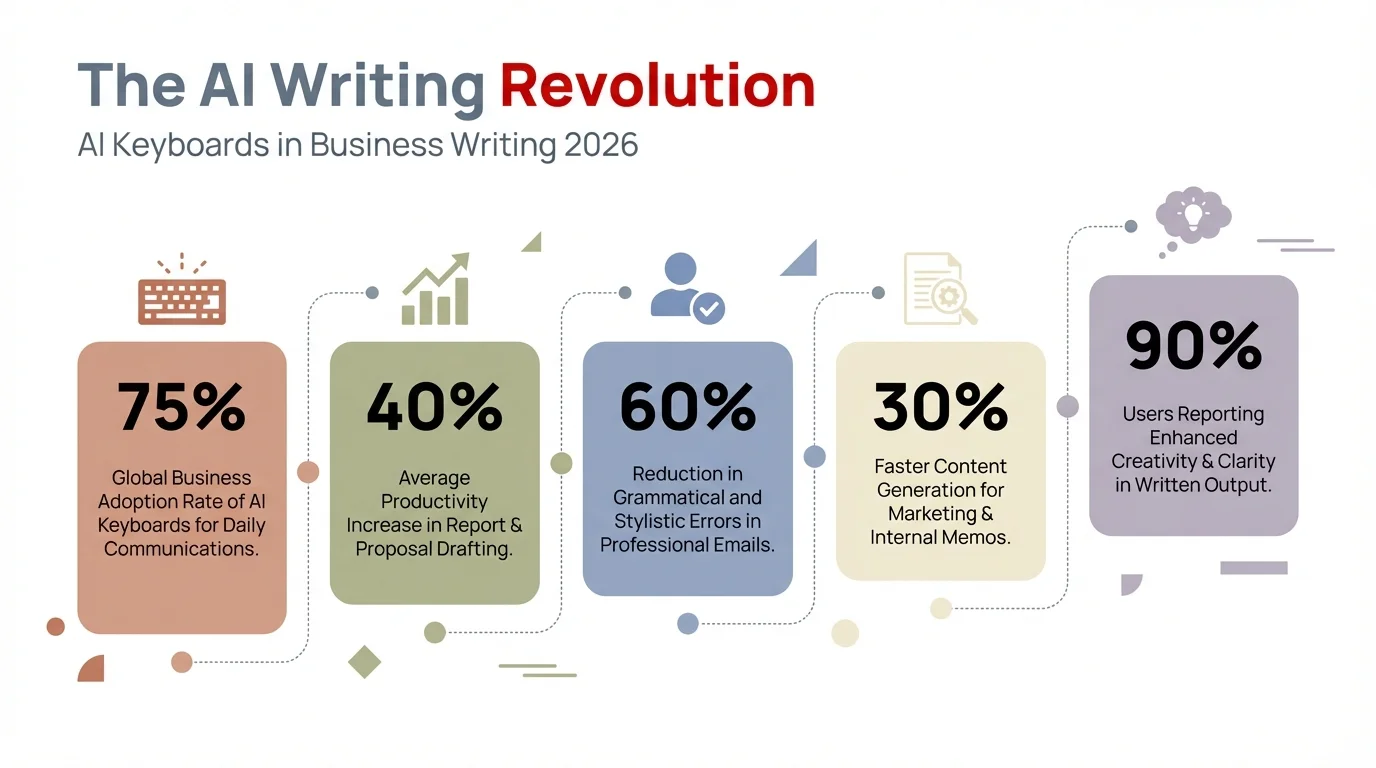
Data-driven insights reveal the transformative impact of AI keyboards on business writing productivity and communication quality
Frequently Asked Questions
How much do professional AI keyboards cost in 2026?
Professional AI keyboards in 2026 range from free to $20/month. Free versions now include advanced grammar correction and basic tone adjustment. Premium tiers with multimodal features, custom assistants, and analytics cost $12-20 monthly. Enterprise licenses offering sentiment analysis and communication insights run $10-15 per user with volume discounts and dedicated support.
Can AI keyboards replace human editors?
No, AI keyboards enhance human judgment rather than replace it. While 2026 models catch 98%+ of grammar errors and provide sophisticated contextual suggestions, humans remain essential for strategic messaging decisions, nuanced stakeholder management, and ensuring alignment with organizational goals. Think of AI keyboards as expert co-writers who handle mechanics while you focus on strategy and relationship dynamics.
Do AI keyboards work offline?
Yes, most 2026 AI keyboards offer robust offline functionality. Core features including grammar correction, tone adjustment, and custom assistants now run on-device using compressed neural models. Advanced capabilities like real-time translation and sentiment analysis may still require connectivity, but the gap between offline and online experiences has narrowed dramatically. Premium versions can download specialized models for complete offline capability across all features.
Which industries benefit most from AI keyboard technology?
By 2026, AI keyboard adoption has become universal across knowledge work. Healthcare, legal, and financial services—once hesitant adopters—now mandate AI keyboards for compliance and quality assurance. Customer support and sales see the most dramatic ROI with 50-60% efficiency gains. Even traditional industries like manufacturing and construction use AI keyboards for safety communications and supplier coordination.
How long does it take to learn an AI keyboard?
Most users become comfortable within 2-3 days of regular use. The learning curve is minimal since AI keyboards work like regular keyboards with added suggestions. Full proficiency with advanced features like custom assistants typically takes 2-3 weeks of daily use.
Are AI keyboards secure for confidential business information?
Absolutely, when using 2026 enterprise solutions. Modern AI keyboards now meet or exceed traditional security standards with mandatory local processing for sensitive data, zero-knowledge encryption, and compliance with GDPR, HIPAA, SOC 2 Type II, and ISO 27001. Many enterprises report fewer security incidents after AI keyboard deployment due to built-in data loss prevention features that flag risky content before transmission.