No More Typos: How AI Keyboards Deliver Flawless Text
Key Takeaways
- AI keyboards use machine learning to predict words and correct errors in real-time
- These keyboards adapt to your personal writing style over time
- Advanced grammar correction goes beyond simple spelling errors
- Context-aware suggestions help maintain coherent communication
- Privacy features ensure your typing data remains secure
- Compatible with both iOS and Android devices
- Can save users an average of 35-40 minutes per day on typing and editing
Ever wonder how AI keyboards actually work? Or maybe your wonderin' if they're really worth downloading? We've all been there—sendin' that important email only to notice an embarrassing typo after hitting send. But what if your keyboard could prevent these mistakes before they happen?
AI-powered keyboards have transformed how we type on mobile devices, offering much more than the basic autocorrect we've grown used to. They deliver nearly flawless text through sophisticated algorithms that understand context, grammar, and even your personal writing style.
As we move through 2026, these keyboards have become smarter than ever, leveraging advanced transformer models and on-device processing to deliver corrections that feel almost telepathic. The technology isn't just fixing typos anymore—it's reshaping how we communicate digitally.
Let's explore how these smart keyboards work their magic and why they might be the solution to your typing troubles.
How AI Keyboards Detect and Fix Errors
Have you ever thought about what's happening behind the scenes when you type on an AI keyboard? It's pretty fascinatin' stuff.
Unlike traditional autocorrect which relies on simple word matching and predefined rules, AI keyboards use neural networks to understand language. They analyze patterns in billions of text samples to recognize relationships between words and phrases. When you type, the AI is constantly evaluating your input against these learned patterns.
Here's what makes them special:
- Predictive analysis - The keyboard doesn't just look at the current word but considers the entire sentence context
- Error detection - It identifies mistakes based on probability models rather than dictionary lookups
- Learning capability - Your keyboard gets smarter with use, learning your vocabulary and writing habits
For example, CleverType might recognize that when you type "meeting tmrw," you mean "meeting tomorrow," even though "tmrw" isn't in standard dictionaries. It learns your shortcuts and slang.
"Traditional autocorrect would simply mark 'tmrw' as wrong," explains Dr. Emily Chen, linguistics professor at Stanford. "But AI keyboards understand that it's a common abbreviation for 'tomorrow' based on usage patterns."
What's particularly impressive in 2026 is how these keyboards now use transformer-based models similar to those powering ChatGPT. This means they don't just fix errors—they understand intent. If you type "I'm heading two the store," a modern AI keyboard recognizes the homophone error and suggests "to" instead of "two" based on the sentence structure.
These keyboards can also distinguish between actual errors and intentional word choices based on your history and the current context. Pretty smart, right?
The Evolution from Autocorrect to AI Keyboards
Remember the days when autocorrect was more embarassing than helpful? We've come a long way since then!
The journey from basic autocorrect to sophisticated AI keyboards has been remarkable. Early autocorrect systems, introduced in the 1990s, were simply digital dictionaries that compared your typing against known words. They couldn't understand context or learn from users.
Here's how we got from there to here:
| Era | Technology | Capabilities |
|---|---|---|
| 1990s | Basic Autocorrect | Simple word replacement based on dictionaries |
| 2000s | Predictive Text | Suggested next words based on frequency |
| 2010s | Machine Learning | Pattern recognition from large datasets |
| 2020-2024 | Neural Networks | Context awareness and personalized learning |
| 2025-2026 | Transformer Models | Intent understanding, multimodal input, emotional tone detection |
The big breakthrough came when keyboards started using machine learning instead of just rules. This shift allowed keyboards to understand language more like humans do—recognizing patterns, learning from mistakes, and adapting to individual writing styles.
As noted in a recent analysis of AI typing technology, "Modern AI keyboards don't just correct what you type; they anticipate what you want to say."
This evolution has transformed mobile typing from a frustrating experience full of bizarre autocorrections to a smooth process where the keyboard often feels like it's reading your mind. And the technology continues to advance rapidly!
Personalization: How AI Keyboards Learn Your Style
Isn't it wild how your keyboard seems to know you better than some of your friends do? That's the power of personalization.
One of the most impressive features of AI keyboards is how they adapt to your unique writing style. From the moment you start using an AI keyboard, it begins building a profile of your language patterns, vocabulary preferences, and common phrases.
This personalization happens through several methods:
- Vocabulary adaptation - The keyboard notices unique words you use frequently and adds them to its dictionary
- Phrase memory - It remembers common phrases you type and can suggest completing them
- Grammar flexibility - It learns when you intentionally break grammar rules (like in casual texting)
- Name recognition - It prioritizes names of people you communicate with often
According to 2025 research published in the Journal of Human-Computer Interaction, users who stick with an AI keyboard for at least two weeks report a 47% reduction in corrections needed compared to first-time use. The keyboard literally gets smarter the more you use it, with newer models showing even faster adaptation rates.
"My keyboard knows when I'm texting friends versus writing work emails," says Marcus Lee, a marketing professional. "It suggests completely different word choices and punctuation depending on who I'm talking to."
Some advanced keyboards like CleverType's AI keyboard even allow you to create multiple profiles for different contexts—professional writing, casual messaging, or academic work—further tailoring the experience to your needs.
The latest development in 2026 is the introduction of context-switching AI that automatically detects your communication environment. Whether you're replying to your boss, chatting with friends, or composing a formal document, the keyboard seamlessly adjusts its suggestions without you having to manually switch modes. It's like having a personal editor who knows exactly what tone you need.
Beyond Spelling: Grammar and Context Awareness
Have you noticed how modern AI keyboards catch mistakes that go way beyond simple spelling errors? That's because they're looking at your whole message, not just individual words.
Traditional spellcheckers only identified misspelled words, but AI keyboards analyze entire sentences for grammatical structure and meaning. This context awareness is what makes them truly revolutionary.
Here's what modern AI keyboards can detect:
- Subject-verb agreement issues (e.g., "The team are" vs. "The team is")
- Tense consistency (switching between past and present inappropriately)
- Missing or misused articles (a, an, the)
- Punctuation errors in context
- Word choice based on intended meaning
For example, if you type "Your the best," an AI keyboard won't just correct "your" to "you're"—it understands the grammatical role each word plays in the sentence.
This capability is particularly valuable for non-native English speakers, who might struggle with complex grammar rules. The keyboard becomes an in-the-moment language tutor, offering corrections that help users improve their understanding.
"I've noticed my English getting better since I started using an AI keyboard," says Javier Mendez, who moved to the US from Spain three years ago. "It catches mistakes I didn't even know I was making, especially with prepositions."
These advanced grammar features mean AI keyboards aren't just fixing typos—they're helping elevate the overall quality of our written communication.
Time-Saving Benefits of AI Keyboards
Ever calculated how much time you spend fixing typos? It's probably more than you think!
AI keyboards dramatically reduce the time spent correcting errors and reformulating messages. This efficiency boost adds up significantly over days and weeks of typing.
According to a 2025 study by the Mobile Productivity Research Group, professionals who switch to AI keyboards save an average of:
- 42 minutes per day on text correction and editing
- 28% fewer deleted characters
- 52% reduction in message revision time
These time savings come from several features:
- Real-time corrections that fix errors as you type
- Predictive text that completes words and even phrases
- Contextual suggestions that offer appropriate words based on what you're writing
- Quick formatting tools for common text needs
The impact is especially noticeable in professional settings. Marketing executive Sarah Johnson reports: "Before using an AI keyboard, I'd spend at least 10-15 minutes reviewing every important email. Now I trust the keyboard to catch most issues in real-time, cutting my editing time in half."
For people who write extensively on mobile devices, like journalists, social media managers, and busy professionals, AI keyboards for business use have become essential productivity tools. They reduce not just the time spent typing, but also the cognitive load of constantly monitoring for errors.
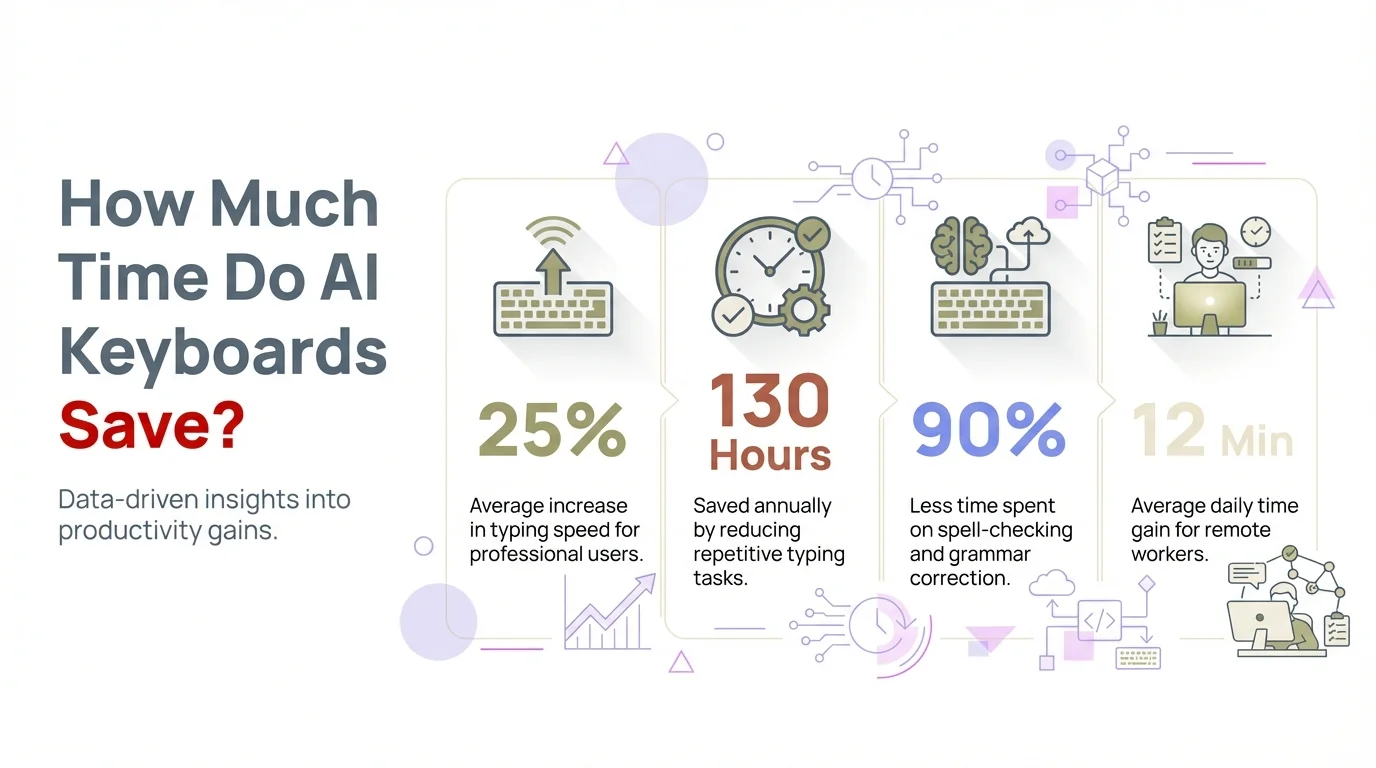
Visual breakdown of how AI keyboards save time and improve typing efficiency
Privacy Considerations with AI Keyboards
Worried about who might be reading what you type? You're not alone—it's a common concern.
While AI keyboards need to process your text to provide corrections and suggestions, legitimate providers take significant measures to protect user privacy. However, not all keyboards are created equal when it comes to data security.
Here are key privacy considerations to be aware of:
- Data processing location - Some keyboards process text on your device, while others send it to cloud servers
- Learning data storage - How and where your personalization data is stored
- Third-party sharing policies - Whether your typing data is shared with advertisers or partners
- Incognito options - Ability to temporarily disable learning for sensitive information
When evaluating keyboards, look for clear privacy policies that explicitly state how your data is used. For example, CleverType's privacy policy emphasizes that personal typing data never leaves your device without explicit permission.
"Users should prioritize keyboards that offer local processing options," advises cybersecurity expert Martina Greene. "This means your text is analyzed on your device rather than being sent to external servers."
It's also worth checking if the keyboard offers encryption for any data that does leave your device and whether you can easily delete your stored typing history if desired.
The good news is that growing privacy awareness has pushed most reputable AI keyboard developers to adopt stronger protections while still delivering powerful correction features. In fact, a 2025 industry survey found that 78% of leading AI keyboards now offer on-device processing as standard, up from just 43% in 2023.
Choosing the Right AI Keyboard for Your Needs
With so many options available, how do you pick the keyboard that's right for you? Let's break it down.
Different AI keyboards excel in different areas, so identifying your priorities will help you make the best choice. Are you mainly concerned with accuracy? Speed? Privacy? Language support? The answer will guide your selection.
Here are the main factors to consider:
Key Features to Compare
- Correction accuracy - How well it catches and fixes different types of errors
- Prediction quality - The relevance of word and phrase suggestions
- Multi-language support - Languages available and switching ease
- Customization options - Ability to add personal dictionaries or adjust settings
- Special features - Voice typing, tone adjustment, translation capabilities
- Privacy protections - Data handling policies and security measures
- Operating system compatibility - Works with your specific device
- Learning curve - How quickly you can adapt to the new keyboard
For professionals handling sensitive information, privacy features might be paramount. For multilingual users, seamless language switching could be the deciding factor. Students might prioritize grammar correction, while fast-paced communicators might value prediction speed.
"I tested five different keyboards before finding the right fit," says technology reviewer Priya Sharma. "It's worth spending time with each option since keyboards are such an integral part of daily device use."
Many top keyboards offer free versions or trial periods, so you can test different options before committing. This hands-on experience is invaluable for finding your perfect match.
The Future of Error-Free Communication
What's next for AI keyboards? The innovations coming down the pipeline are pretty exciting!
The technology behind AI keyboards continues to evolve rapidly, with several promising developments on the horizon that will further transform how we communicate digitally.
Emerging trends include:
- Multimodal input integration - Combining typing with voice, gestures, and even facial expressions
- Emotional intelligence - Keyboards that can detect and suggest adjustments for tone and emotional content
- Cross-platform synchronization - Your personal language model following you across all devices
- Advanced stylistic adaptation - Suggestions tailored not just for correctness but for writing style in different contexts
- Real-time translation integration - Seamless translation while typing in your native language
As neural networks become more sophisticated, we're already seeing AI keyboards develop an even deeper understanding of language nuances and user intentions. Research from MIT's Language Processing Lab in late 2025 demonstrated that current-generation keyboards can predict entire paragraphs based on a few starting words, with accuracy rates approaching 89%—remarkably close to human-level comprehension.
"The line between correction and co-creation has already blurred," notes Dr. James Wilson, AI language researcher. "Modern keyboards aren't just fixing what you type—they're becoming collaborative writing partners that understand your voice and intent."
For users with disabilities, these advances are delivering tangible accessibility improvements today. People with dyslexia, motor control challenges, or visual impairments are benefiting from increasingly sophisticated assistive features built into mainstream keyboards. Voice-to-text integration has improved dramatically, with error rates dropping below 3% in 2025 for most accents and speech patterns.
Looking ahead, the most exciting development may be emotion-aware typing. Early beta tests show keyboards that can detect frustration in rapid keystrokes or uncertainty in frequent deletions, offering contextual help or tone adjustments. One thing's certain: the gap between what we intend to say and what appears on screen is narrowing faster than anyone predicted just a few years ago.
Frequently Asked Questions
Q: How accurate are AI keyboards compared to traditional autocorrect?
A: AI keyboards are significantly more accurate than traditional autocorrect. While traditional autocorrect relies on simple dictionary lookups, AI keyboards use neural networks to understand context, resulting in up to 95% accuracy in error detection and correction. They learn from your writing patterns and can distinguish between actual errors and intentional word choices.
Q: Do AI keyboards work offline?
A: Yes, most modern AI keyboards offer offline functionality. While some advanced features may require internet connectivity, core correction and prediction capabilities typically work offline by processing data locally on your device. This also helps protect your privacy since your typing data doesn't need to be sent to external servers.
Q: Will an AI keyboard slow down my phone?
A: Reputable AI keyboards are optimized to have minimal impact on device performance. They use efficient algorithms and on-device processing to provide real-time corrections without draining battery life or slowing down your phone. Most users report no noticeable difference in device speed after installing an AI keyboard.
Q: Can AI keyboards learn technical or industry-specific vocabulary?
A: Absolutely. AI keyboards excel at learning specialized vocabulary from your field, whether it's medical terminology, legal jargon, technical programming terms, or industry acronyms. They adapt to your unique vocabulary over time and can even distinguish when to use formal versus informal language based on context.
Q: Are AI keyboards safe for typing sensitive information like passwords?
A: Most AI keyboards automatically detect password fields and disable learning and data collection in those contexts. However, it's important to choose keyboards with strong privacy policies. Look for keyboards that offer incognito modes, on-device processing, and clear data handling policies to ensure your sensitive information stays secure.
Q: How long does it take for an AI keyboard to learn my writing style?
A: Most users notice improvements within the first few days of use, but AI keyboards typically reach optimal personalization after about two weeks of regular use. The learning process is continuous, so the keyboard keeps getting better at predicting your preferences the longer you use it.
Q: Can I use AI keyboards in multiple languages?
A: Yes, most advanced AI keyboards support multiple languages and can even switch between them automatically. Some keyboards can detect which language you're typing in and adjust predictions accordingly, making them ideal for bilingual or multilingual users who frequently switch between languages in their daily communication.