How AI for Writing Is Changing the Way We Type
Key Takeaways:
- AI writing tools predict text and suggest improvements as you type, reducing effort and errors by up to 40%
- Advanced language models now understand context across entire conversations, not just individual messages
- Modern AI keyboards offer real-time grammar correction, tone adjustment, translation, and even emotional intelligence features
- On-device AI processing in 2026 has dramatically improved privacy while maintaining powerful suggestions
- AI writing tools benefit professionals, students, non-native speakers, and people with learning disabilities
- Multimodal AI integration now combines voice, images, and text for more contextual writing assistance
Ever wonder how the way our fingers dance across keyboards has changed since AI joined the typing party? If you've typed anything on your phone or computer lately, you've probably noticed—writing just feels different now. AI writing tools aren't just changing what we write anymore; they're fundamentally reshaping how we think about communication itself.
From clunky predictive text that barely understood "hello" back in 2020 to today's sophisticated assistants that can understand the emotional tone of your entire conversation and draft contextually perfect responses, we've witnessed a revolution. And here's the thing: the impact goes way deeper than just faster typing. We're talking about a shift in how humans express themselves digitally.
In this article, we'll explore how AI writing technology is revolutionizing our relationship with keyboards, what this means for different groups of users, and where this technology is heading in 2026 and beyond. Let's dive into the fascinating world where artificial intelligence meets human expression.
The Evolution of AI Writing Technology
Remember those days when autocorrect was the only "smart" feature on our keyboards? It was like having a well-meaning but slightly confused friend who'd occasionally change "I'll be there soon" to something about llamas. We've come a pretty long way since then, haven't we?
From Simple Autocorrect to Contextual Understanding
The journey started simple—fixing obvious typos like "teh" to "the." Not exactly rocket science, right? But today's AI writing tools don't just correct errors; they understand what you're trying to say.
"Early autocorrect was basically pattern matching," says Dr. Emily Chen, linguistic technology researcher. "Now we've got systems that actually understand language context and meaning."
Modern AI can:
- Recognize when you've used "there" instead of "their" based on context
- Suggest synonyms that match your writing style
- Complete sentences based on both what you've typed and the broader conversation
- Adapt to your personal writing habits over time
The Rise of Large Language Models
The real game-changer? Large language models (LLMs) like GPT-4o and Claude, which power many writing tools in 2026. These massive neural networks have been trained on trillions of text examples from books, articles, websites, and real-world conversations—far more diverse and nuanced than earlier models.
What makes them special isn't just their size—it's their ability to understand relationships between words, concepts, and even emotional subtext. They don't just know that "dog" and "puppy" are related; they grasp when to use "canine companion" in formal writing versus "doggo" in a casual text to a friend. In 2026, these models can even detect sarcasm, humor, and cultural references with surprising accuracy.
This technology has enabled a new generation of AI keyboard apps that go far beyond autocorrect. They can:
- Generate complete paragraphs based on a prompt
- Rewrite text to match specific tones (formal, friendly, concise)
- Translate between languages while preserving meaning and nuance
- Summarize longer texts into key points
As Jeffrey Williams, product lead at a major keyboard developer, puts it: "We've moved from tools that fix what you type to tools that enhance how you communicate."
By early 2026, we're seeing another leap forward: on-device processing has become standard on most smartphones and tablets. This means your keyboard can offer intelligent suggestions without sending your text to the cloud, addressing privacy concerns while actually improving response times. It's a win-win that seemed impossible just a couple years ago.
How AI Writing Tools Work
Ever stared at your phone in disbelief when it somehow knew exactly what you wanted to say next? Let's peek behind the curtain and see how these typing wizards actually work their magic.
The Technology Behind Predictive Text
AI writing tools use a combo of techniques to guess what you'll type next:
- Pattern recognition: The system analyzes billions of text examples to learn common word sequences.
- Statistical modeling: It calculates the probability of specific words following others.
- Neural networks: These mimic human brain connections to understand language patterns.
- Personal adaptation: The system learns your unique writing habits over time.
Think of it like having a friend who's read practically everything ever written and knows your personal style. They can anticipate what you might say next based on both universal language patterns and your specific tendencies.
How AI Understands Context and Meaning
But here's where it gets really interesting—modern AI doesn't just predict based on the last few words. It actually tries to understand what you're talking about.
"The breakthrough came when we moved from n-gram models to transformers," explains Dr. Marcus Lee, AI researcher. "Instead of just looking at the previous few words, these systems consider the entire context."
This means your AI keyboard can:
- Recognize when you're writing a formal email vs. a casual text
- Maintain topic consistency across paragraphs
- Understand references to earlier parts of the conversation
- Detect the emotional tone you're trying to convey
For example, if you type "The meeting is at 3," older systems might suggest "pm" or "o'clock" based solely on those words. But modern AI might suggest "I'll send the agenda beforehand" because it understands you're discussing a meeting and what typically happens around meetings.
Real-time Processing and Learning
What's particularly impressive is that all this happens instantly—we're talking single-digit milliseconds in 2026. Modern AI writing tools process your text so fast that suggestions appear before you've even finished your thought. Thanks to advances in neural processing units (NPUs) built into smartphones, this speed comes without draining your battery.
And they're constantly learning:
- From global language trends and emerging slang
- From how users interact with suggestions across millions of conversations
- From your personal writing patterns, adapting within hours rather than weeks
- From contextual signals like time of day, app being used, and conversation history
"Every time you accept or reject a suggestion, you're teaching the system," notes Emma Richardson, UX designer for an AI writing platform. "It's like having a writing assistant that gets better at understanding you every day. In 2026, we're seeing keyboards that truly feel personalized after just a week of use."
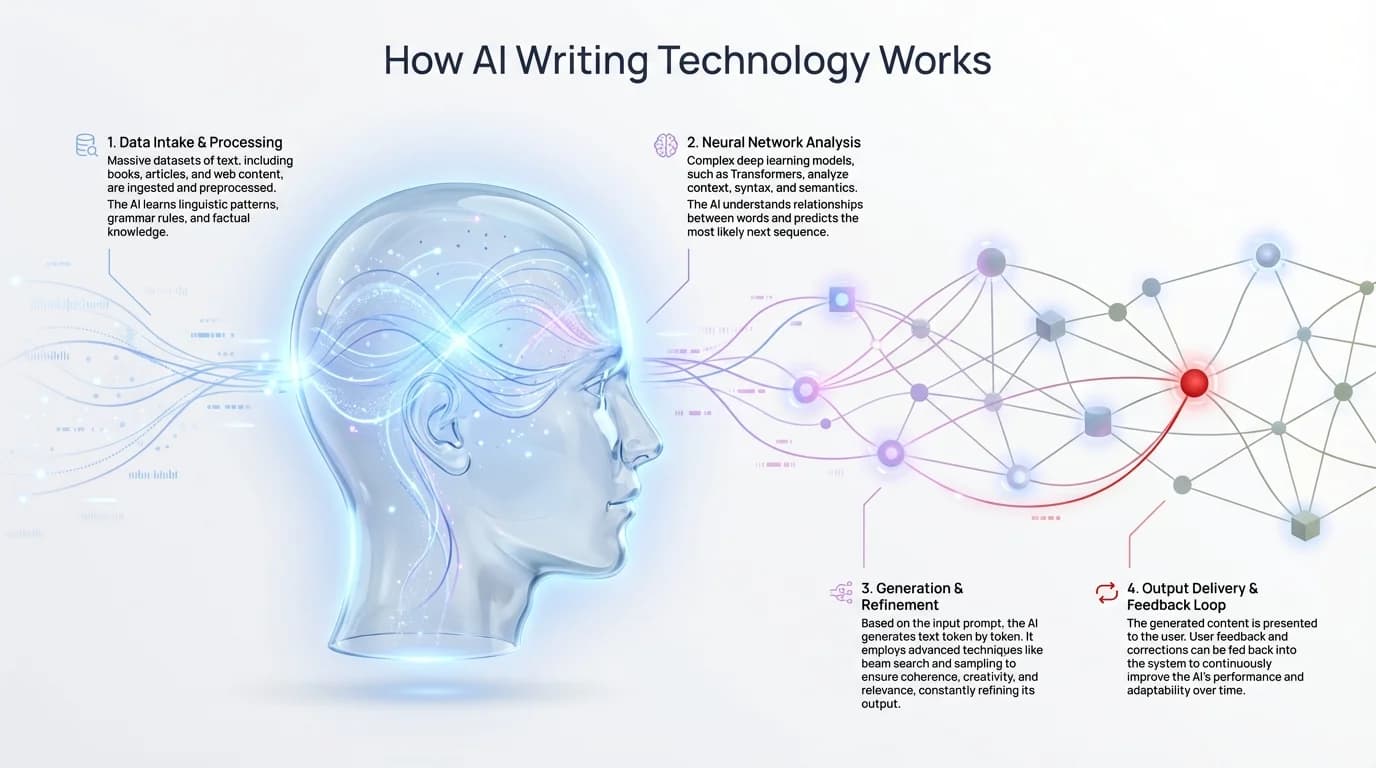
Understanding the technology behind AI writing: neural networks, language models, and real-time learning
Key Features of Modern AI Writing Tools
So what can these smart writing assistants actually do for us? Let's look at the features that are changing how we type in our everyday lives.
Predictive Text and Auto-Completion
The most visible feature is probably predictive text—those suggestions that pop up as you type. But today's prediction engines are smarter than ever:
- They can suggest entire phrases or sentences, not just the next word
- They adapt to your writing style, suggesting words you commonly use
- They understand context across multiple messages or paragraphs
- They can complete technical terminology specific to your profession
Taylor, a software developer, shared: "My coding keyboard literally saves me hours every week by suggesting variable names and common function patterns I use. It's like it reads my mind sometimes."
Grammar and Spelling Correction
Beyond just catching typos, modern AI grammar correction offers:
- Real-time identification of complex grammar issues
- Explanations of why something is incorrect
- Alternative phrasings that maintain your intended meaning
- Sensitivity to different English variants (US, UK, Australian, etc.)
These tools don't just fix mistakes—they help users understand language better. This is especially valuable for non-native speakers and students.
Tone Adjustment and Style Enhancement
One of the most impressive features is the ability to transform your writing style:
- Convert casual text to professional language for work emails
- Make technical writing more accessible for general audiences
- Add warmth and personality to customer service responses
- Adjust formality levels to match different situations
"I used to spend ages rewriting emails to clients to get the tone just right," admits Jamie, a marketing consultant. "Now I draft quickly and let my AI keyboard adjust the tone to sound more professional. It's like having an editor built into my phone."
Translation and Multilingual Support
For global communication, AI writing tools offer:
- Real-time translation as you type
- Preservation of idioms and cultural references where possible
- Dialect-specific suggestions within languages
- Code-switching support for multilingual users
"As someone who works in three languages daily, having a keyboard that seamlessly switches between them is life-changing," explains Sofia, an international business consultant. "It even understands when I'm mixing languages in the same message—something I do all the time."
Custom Vocabulary and Learning
Perhaps most impressively, these tools learn from you:
- They remember specialized terminology from your field
- They note your preferred spellings of names and places
- They adapt to your sentence structure patterns
- They recognize your commonly used phrases
This personalization makes AI writing assistants feel less like generic tools and more like extensions of your own writing process.
Impact on Different User Groups
AI writing tools aren't just changing how we type—they're changing who can communicate effectively in written form. Let's look at how different groups benefit from this technology.
Professional Writers and Content Creators
For those who write for a living, AI tools serve as collaborative partners:
- They help overcome writer's block with suggestions and prompts
- They ensure consistency across long-form content
- They offer alternative phrasings when you're stuck
- They catch subtle errors that might slip past human proofreading
"I was skeptical at first," admits Carlos, a freelance journalist. "But now I use AI writing assistance for my first drafts. It helps me get ideas flowing, then I refine with my own voice. I produce more content without sacrificing quality."
Students and Academic Writers
In educational settings, AI writing tools can:
- Help clarify complex thoughts and arguments
- Suggest academic phrasings for formal papers
- Provide vocabulary enrichment
- Assist with proper citation formatting
However, there's an important educational balance to maintain. As Dr. Patricia Nguyen, education technology researcher, notes: "These tools should enhance learning, not replace it. The goal is helping students express themselves more clearly, not thinking for them."
Many keyboard apps for students now include features specifically designed for academic contexts.
Non-Native English Speakers
For those writing in a second or third language, AI assistance is particularly valuable:
- It suggests natural-sounding phrases that might not be intuitive
- It catches common errors specific to the user's native language
- It offers cultural context for expressions and idioms
- It builds confidence in written communication
"English is my third language," shares Hiroshi, a software engineer. "My AI grammar keyboard doesn't just correct me—it explains why certain phrases sound more natural. I'm actually learning while I write."
People with Dyslexia and Learning Differences
AI writing tools can be truly transformative for people with certain learning differences:
- They reduce the cognitive load of spelling and grammar
- They offer word prediction that helps with word-finding difficulties
- They allow focus on ideas rather than mechanics
- They build writing confidence through immediate feedback
"Before AI keyboards for dyslexia, writing was exhausting for me," explains Alex, a university student. "I'd get stuck on spelling and lose my train of thought. Now I can just focus on expressing my ideas, and the keyboard helps with the rest."
The Changing Nature of Writing and Communication
With AI assistance becoming ubiquitous, our relationship with writing itself is evolving in fascinating ways. Let's examine these broader changes.
How AI is Reshaping Our Writing Habits
We're seeing significant shifts in how people approach writing:
- Increased willingness to write longer, more detailed messages
- Less time spent on editing and proofreading
- More confidence in formal writing situations
- Experimentation with different tones and styles
"I notice people write more complete thoughts now," observes Dr. Sarah Johnson, digital communication researcher. "Before, mobile messages were often abbreviated and fragmented. AI assistance has brought back more complex sentence structures to casual communication."
The Balance Between Authenticity and AI Enhancement
As writing tools become more powerful, questions arise about authenticity:
- When does AI assistance cross into misrepresentation?
- How do we maintain our unique voice while using AI tools?
- What happens to the natural diversity of writing styles?
- Should recipients know when AI has helped craft a message?
These aren't simple questions. Michael, a hiring manager, shares: "I sometimes wonder if the well-written cover letters I receive reflect the candidates' actual communication skills or their AI tools. It changes how I evaluate them."
At the same time, many users find that good AI writing tools enhance rather than replace their voice. "My keyboard doesn't write for me—it writes like me, but better," explains Taylor, a marketing professional. "It helps me sound like myself on my best day."
Evolving Expectations in Digital Communication
As these tools become widespread, our expectations are changing:
- Well-written, error-free messages becoming the norm
- Increased pressure for quick yet thorough responses
- Higher standards for clarity and professionalism
- Growing emphasis on tone-awareness in written communication
"There's definitely less tolerance for poorly structured emails now," notes Jamie, an office manager. "When tools make good writing easy, sloppy communication stands out more."
This evolution raises interesting questions about accessibility and equity, as not everyone has access to the same advanced writing tools.
Privacy and Ethical Considerations
With all these benefits come important questions about privacy and ethics that we shouldn't ignore.
Data Privacy Concerns with AI Keyboards
AI writing tools process enormous amounts of personal text:
- Professional communications containing sensitive information
- Personal messages and private thoughts
- Financial and health-related discussions
- Location and contact information
This raises serious privacy questions:
- Where is this data stored?
- Who has access to it?
- How is it used beyond improving the immediate service?
- What happens if there's a data breach?
"Users should understand that powerful prediction requires data," explains privacy advocate Eliza Martinez. "The more personalized the suggestions, the more the system needs to know about you."
Fortunately, leading companies in this space have made significant strides in 2026:
- On-device processing has become the industry standard, with over 80% of AI keyboards running locally by early 2026
- End-to-end encryption for any cloud-processed text is now table stakes
- Clear, readable data retention policies (no more 50-page legal documents)
- Granular privacy controls that let you opt out of specific features while keeping others
- Third-party privacy audits and certifications are becoming common
The shift to on-device AI has been a genuine breakthrough. Your keyboard can now offer sophisticated suggestions without your text ever leaving your phone. It's not perfect—cloud-based models still have some advantages for specialized tasks—but the privacy-to-performance ratio has improved dramatically.
The Ethics of AI-Generated Content
Beyond privacy, there are broader ethical questions:
- Should there be disclosure when content is AI-assisted?
- What happens to writing as a skill if AI does more of the work?
- How do we address AI biases in writing suggestions?
- Where is the line between helpful assistance and plagiarism?
Dr. Thomas Wright, digital ethics professor, observes: "We're entering a world where the line between human and machine expression is increasingly blurred. This requires new frameworks for thinking about authorship and authenticity."
Choosing Tools That Respect Your Privacy
For users concerned about these issues, there are ways to make informed choices:
- Read privacy policies (yes, actually read them)
- Look for tools that offer local processing options
- Check if the company sells data to third parties
- See if there are offline capabilities that don't require cloud processing
"I specifically chose an AI keyboard app that processes everything on my device," says privacy-conscious user Alex. "It might not have every cutting-edge feature, but I know my data isn't being uploaded to servers somewhere."
The Future of AI Writing Technology
So where is all this heading? Let's look at what might be coming next in the world of AI writing assistance.
Current Innovations in AI Writing Tools (2026)
What seemed like distant possibilities just two years ago are now standard features in 2026:
- Multimodal integration: Writing tools now understand context from images, voice, and text together—snap a photo of a product and your keyboard can help you write a review instantly
- Emotional intelligence: Current AI detects when you're stressed or rushed and adjusts suggestions to be more concise and direct
- Cross-platform memory: Your keyboard remembers conversations across devices, so switching from phone to tablet feels seamless
- Collaborative writing: AI now helps teams maintain consistent voice and terminology across multiple authors
- Predictive context switching: Keyboards automatically adjust formality based on who you're messaging and what app you're using
"We've reached the point where writing assistants understand not just what you're saying, but why you're saying it and who you're saying it to," notes AI developer Rohan Patel. "That contextual awareness makes suggestions feel genuinely helpful rather than mechanical. It's the difference between a tool and a true assistant."
What's Next: Beyond 2026
Looking ahead, developers are working on even more ambitious features. Think brain-computer interfaces that can suggest text based on your thoughts before you even start typing (yes, really—early prototypes exist). We're also seeing development of AI that can maintain your writing style across decades, helping elderly users compose messages that sound authentically like them even as manual typing becomes difficult.
The next frontier? AI writing tools that can truly understand cultural context—not just translating words, but adapting idioms, humor, and references to resonate with different audiences. Imagine writing once and having your keyboard automatically create versions optimized for readers in Tokyo, London, and São Paulo, each feeling locally authentic.
Potential Impact on Languages and Communication
The widespread use of AI writing tools may have far-reaching effects:
- Preservation of endangered languages through better translation and documentation
- Narrowing of language barriers in global business and education
- Potential homogenization of writing styles within certain contexts
- Evolution of new linguistic patterns influenced by AI suggestions
Linguist Dr. Maria Santos raises interesting questions: "Will these tools preserve language diversity or reduce it? Will they help revitalize minority languages or further centralize English dominance? The answer largely depends on how we design and deploy them."
Balancing AI Assistance with Human Creativity
As these tools grow more capable, maintaining the human element becomes crucial:
- Creating AI that enhances rather than replaces human creativity
- Designing systems that explain their suggestions rather than simply imposing them
- Ensuring writers maintain final control over their expression
- Developing education that teaches effective collaboration with AI tools
"The future isn't about AI writing for us—it's about AI writing with us," emphasizes creative writing professor James Wilson. "The most powerful tools will be those that expand our capabilities while preserving our unique voices."
How to Choose the Right AI Writing Tool
With so many options available, how do you find the right AI writing assistant for your needs? Here's a practical guide.
Assessing Your Writing Needs
Start by considering what you actually need help with:
- Are you primarily writing professional emails or casual messages?
- Do you work in a specialized field with unique terminology?
- Are you writing in your native language or a second/third language?
- Do you need help with basic grammar or more complex stylistic enhancement?
- How important is privacy in your communication?
"Different tools excel at different things," advises tech reviewer Sophia Lee. "A journalist needs different features than a doctor or a student. Be clear about your priorities."
Comparing Different AI Keyboard Apps
When evaluating options, consider these factors:
- Accuracy of predictions: How relevant are the suggestions to what you're trying to say?
- Learning capability: How quickly does it adapt to your personal style?
- Privacy features: Does it process data locally or in the cloud? What's the privacy policy?
- Integration: Does it work well with the apps you commonly use?
- Customization: Can you adjust how intrusive or subtle the suggestions are?
Popular options like CleverType, Gboard, and SwiftKey offer different balances of these features.
"I tried three different AI keyboards before finding one that felt right," shares Marcus, a business consultant. "It's worth experimenting because they each have different 'personalities' in how they suggest text."
Getting the Most from Your AI Writing Assistant
Once you've chosen a tool, maximize its value:
- Take time to train it by accepting helpful suggestions
- Customize settings for different writing contexts
- Learn keyboard shortcuts for efficiently managing suggestions
- Regularly review and clear your personal dictionary if needed
"These tools get dramatically better after a few weeks of use," notes productivity coach Emma Chen. "The initial investment in setting them up and training them pays off enormously over time."
Frequently Asked Questions
Q: Are AI writing tools replacing human writers?
A: No, AI writing tools are assistants, not replacements. They help with grammar, suggest phrases, and speed up the writing process, but they can't replicate human creativity, emotional depth, or original thinking. Think of them as extremely sophisticated spell-checkers that help you express your ideas more clearly, not tools that think for you.
Q: Is my data safe when using AI keyboards?
A: It depends on the keyboard you choose. In 2026, most reputable AI keyboards use on-device processing, meaning your text never leaves your phone. Always check the privacy policy and look for keyboards that offer local processing, end-to-end encryption, and clear data retention policies. Avoid keyboards that sell user data to third parties.
Q: Will using AI writing tools make me a worse writer?
A: Not if used thoughtfully. AI tools can actually help you learn by showing you better phrasings and catching errors you might not notice. The key is to use them as learning aids rather than crutches—pay attention to their suggestions and understand why certain phrasings work better. Many non-native speakers report that AI keyboards have actually improved their English skills over time.
Q: How do AI keyboards understand context so well?
A: Modern AI keyboards use large language models trained on trillions of text examples. They analyze not just the words you're typing, but also the app you're using, your conversation history, the time of day, and patterns in your personal writing style. Advanced models in 2026 can even detect emotional tone and adjust suggestions accordingly.
Q: Can AI writing tools help with languages other than English?
A: Absolutely. Most AI keyboards in 2026 support dozens of languages with sophisticated translation, code-switching, and dialect-specific suggestions. They're particularly valuable for multilingual users who switch between languages throughout the day, offering contextually appropriate suggestions in each language.
Q: Should students be allowed to use AI writing tools for schoolwork?
A: This is a nuanced question. AI tools can help students express their ideas more clearly and learn proper grammar, but there's a line between assistance and doing the work for them. Most educators in 2026 are focusing on teaching students how to use AI tools responsibly as collaborators rather than banning them outright, similar to how calculators are now standard in math education.
Q: Do AI keyboards drain battery life?
A: Modern AI keyboards in 2026 are surprisingly efficient thanks to neural processing units (NPUs) built into smartphones. On-device AI processing uses minimal battery compared to older cloud-based systems. Most users report negligible impact on battery life, especially on phones released in the past two years.
Conclusion: The New Era of Assisted Writing
As we've explored throughout this article, AI writing tools aren't just changing how we type—they're transforming our relationship with written expression itself. And in 2026, we're living in the future that seemed impossible just a few years ago.
We're fully in an era where writing is a genuine collaboration between human creativity and machine assistance. The keyboard has evolved from a simple input device into an intelligent partner that understands not just words, but context, emotion, and intent. It's wild when you think about it—your keyboard knows whether you're texting your best friend or emailing a client, and it adjusts accordingly.
For individuals, this means more confident, clear, and efficient communication. For society, we're seeing real shifts in who can participate effectively in written discourse. Non-native speakers, people with learning differences, and those who previously struggled with formal writing now have tools that level the playing field.
Whether you're a professional writer, a student, someone writing in a second language, or anyone who communicates through text, AI writing tools offer remarkable possibilities. The key is approaching them thoughtfully—embracing their benefits while maintaining awareness of their limitations and implications. Use them as partners, not crutches.
As we move further into 2026 and beyond, one thing is certain: the way we type has fundamentally changed. But here's the exciting part—the most transformative innovations are still on the horizon. The question isn't whether AI will influence our writing, but how we'll shape that influence to amplify rather than replace our uniquely human voice.