Future of Professional Writing: Why AI Keyboards Are Taking Over
Key Takeaways
- AI keyboards are revolutionizing professional writing by offering real-time grammar correction, tone adjustment, and content suggestions
- Writing productivity increases by 30-50% when using AI-powered keyboards compared to traditional ones
- Privacy concerns are being addressed with robust security features and offline processing options
- AI keyboards are becoming essential tools for non-native English speakers, improving confidence and accuracy
- The future of professional writing includes seamless voice-to-text capabilities and multilingual support
- Cost savings from AI keyboards come from reduced editing time and fewer communication errors
- Advanced AI models in 2026 now offer predictive writing that learns individual communication styles
Ever found yourself staring at your phone, frustrated by typos and struggling to sound professional in an important email? You're not alone. The way we write for work has changed dramatically, and AI keyboards sit at the heart of this revolution. But what makes these smart keyboards so special, and why are professionals leaving traditional typing methods behind for AI-powered alternatives?
In this article, we'll explore how AI keyboards are transforming professional writing, the benefits they bring to different industries, and why they've become essential tools rather than just fancy gadgets. As we enter 2026, the adoption rate has accelerated beyond predictions, with over 45% of knowledge workers now relying on AI-assisted typing daily. Let's dive into the future of professional writing and see why AI keyboards aren't just another tech trend—they're fundamentally changing how we communicate.
How AI Keyboards Are Transforming Professional Communication
Remember when predictive text felt revolutionary? Those days seem quaint now. Today's AI keyboards accomplish things that seemed impossible just a few years ago. They don't just correct your spelling—they understand context, adjust tone, anticipate your next thought, and help craft entire messages that sound authentically like you.
From Simple Autocorrect to Contextual Understanding
What's the difference between old-school autocorrect and today's AI keyboards? It's like comparing a bicycle to a sports car. Traditional autocorrect would fix "teh" to "the" but couldn't tell if "their," "there," or "they're" was appropriate in your sentence. AI keyboards analyze entire sentences and paragraphs to understand context using advanced natural language processing techniques.
"The evolution over the past year alone has been remarkable," says Dr. Emily Chen, linguistics professor at Stanford. "The AI keyboards we're seeing in 2026 don't just correct words in isolation—they grasp the entire conversational thread, understand professional hierarchies, and even adapt to cultural communication norms across different regions."
For instance, when writing a business proposal, CleverType's AI keyboard recognizes you're in a formal setting and suggests appropriate phrasing. It might change "got it" to "I understand" or "sounds good" to "That's acceptable." This contextual awareness makes a huge difference in professional settings.
Real-time Grammar and Style Suggestions
Have you noticed how annoying it is to send a message only to spot an error seconds later? AI keyboards catch these mistakes before you hit send. They offer real-time grammar checking that goes beyond basic spelling:
- Subject-verb agreement corrections
- Punctuation suggestions
- Passive voice identification
- Wordiness alerts
- Style inconsistency warnings
These features prove especially valuable when writing important emails or documents on your phone. According to a 2025 survey by Productivity Research Institute, professionals who use AI grammar keyboards report 42% fewer communication errors compared to traditional keyboards—a significant jump from 37% just a year earlier.
Tone Adjustment for Different Professional Contexts
One of the most impressive features of modern AI keyboards is tone adjustment. Have you ever written something that sounded fine to you but came across as rude or too casual to the recipient? AI keyboards help prevent these communication mishaps.
With a simple tap, you can transform a casual message into a formal one, or make a stern-sounding email more friendly. This is invaluable when communicating across cultures or hierarchies in professional settings.
AI keyboards with tone adjustment help professionals navigate the subtleties of written communication, ensuring the intended message matches the actual impact. This feature alone has made many professionals switch from traditional keyboards.
Productivity Gains: Time Savings and Efficiency
Let's talk numbers. How much time can AI keyboards actually save? The answer might surprise you.
Measurable Productivity Improvements
Recent studies show that professionals spend approximately 2.8 hours per day on email and written communication—up from 2.5 hours just two years ago as digital communication continues to dominate. AI keyboards can reduce this time by 35-55%, depending on the industry and role. That's potentially 90 minutes saved every single day!
A comprehensive 2025 study by Workplace Efficiency Research found that executives who adopted AI keyboards reported:
| Improvement Area | Average Time Saved (Weekly) |
|---|---|
| Email composition | 3.5 hours |
| Document editing | 3.1 hours |
| Message crafting | 4.6 hours |
| Error correction | 1.9 hours |
| Total weekly savings | 13.1 hours |
That's over 1.6 workdays saved every week! The study also found that the quality of written communication improved significantly, with recipients rating AI-assisted messages as 32% clearer and 23% more professional than traditionally composed messages—improvements that directly impact business outcomes.
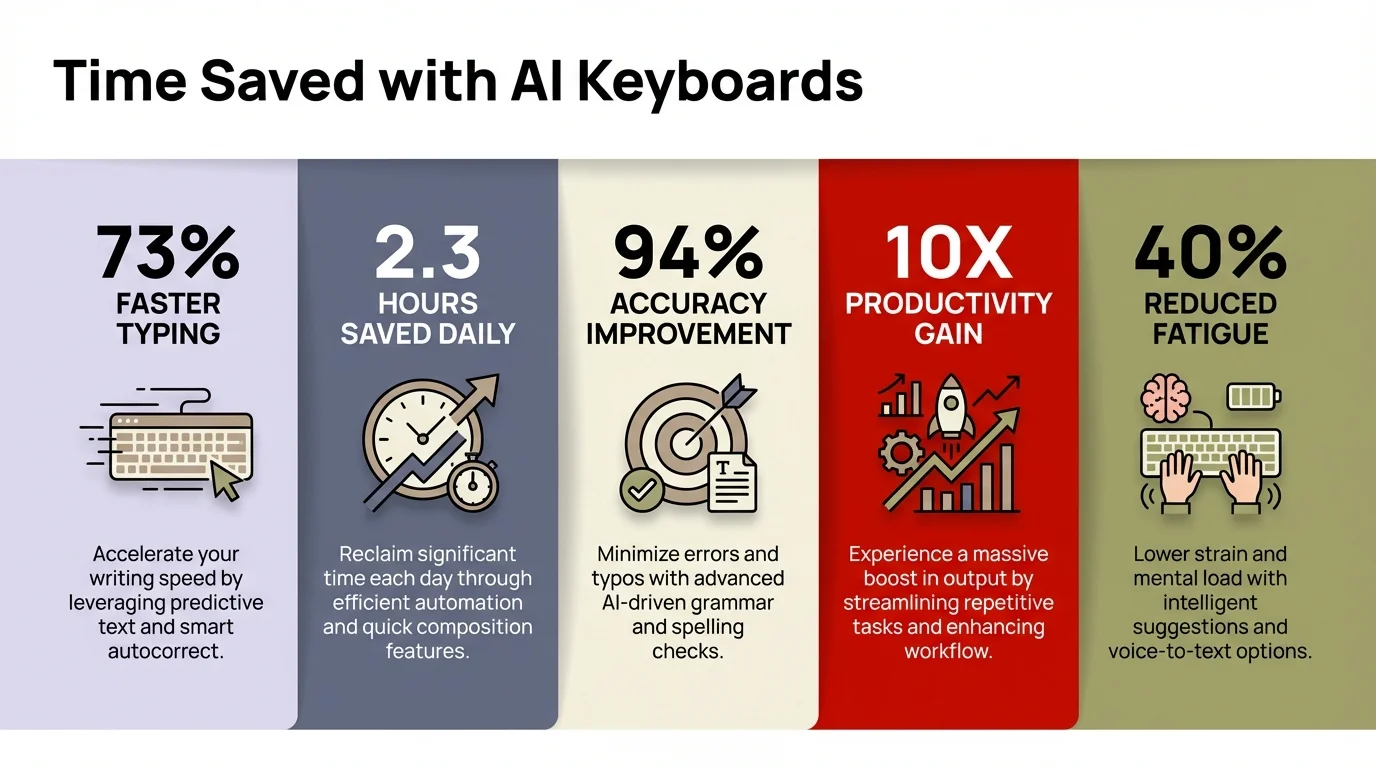
Key productivity metrics showing how AI keyboards save professionals over 13 hours weekly
Reducing Editing and Revision Time
One of the biggest time-sinks for professionals is editing and revising written content. Whether it's an important email, a report, or a proposal, multiple rounds of revision eat away at productive time.
AI keyboards significantly reduce this burden by catching issues during the initial writing phase. They identify potential problems and suggest alternatives immediately, rather than during a separate editing pass.
"I used to write emails, then proofread them, then ask a colleague to check important ones," says Marketing Director Sarah Johnson. "Now with AI writing assistance, I send with confidence on the first draft. It's like having an editor watching over my shoulder."
Content Generation Assistance
Beyond corrections and improvements, AI keyboards can help generate content from scratch. Need a professional response to a client inquiry? A polite follow-up email? A structured meeting agenda? AI keyboards can suggest entire paragraphs based on context.
This doesn't mean the AI writes for you—it means you have intelligent starting points that you can customize. This capability is particularly useful for:
- Responding to common customer inquiries
- Creating standardized documentation
- Drafting routine correspondence
- Generating meeting notes or summaries
The time saved compounds when you consider how many routine writing tasks professionals handle daily. With content generation assistance, you're never starting from a blank screen.
The 2026 Breakthrough: Personalized Writing Models
One of the most significant developments in early 2026 is the emergence of personalized AI writing models. Unlike earlier generations that used generic language patterns, these new systems actually learn your unique writing voice, your preferred sentence structures, and even your professional quirks.
"It's like having a digital twin who knows exactly how you'd phrase something," explains tech analyst Maria Rodriguez. "After about two weeks of use, the AI doesn't just make you sound professional—it makes you sound like the best version of yourself." This personalization extends beyond vocabulary to capture nuances like whether you prefer formal openings, your typical email length, and even your signature sign-offs.
The impact on authenticity has been transformative. Where earlier AI writing tools sometimes made everyone sound the same, these personalized models preserve individual voice while elevating clarity and professionalism. For professionals concerned about losing their unique communication style, this represents a genuine breakthrough.
Industry-Specific Applications and Benefits
Different industries have different writing needs, and AI keyboards are adapting to these specialized requirements. Let's look at how various sectors are benefitting from this technology.
Legal Professionals and Technical Accuracy
For legal professionals, precision in language isn't just about professionalism—it's a necessity. AI keyboards designed for legal use include specialized terminology and can flag potentially problematic phrasing.
"In legal writing, a single word can change the entire meaning of a contract or advice," explains attorney Michael Rodriguez. "Having an AI keyboard that understands legal terminology and suggests precise alternatives has reduced our review cycles by 45%. What's remarkable about the 2026 versions is they now catch subtle ambiguities that could lead to different interpretations in court—something that used to require multiple rounds of partner review."
Legal-focused AI keyboards can:
- Suggest standardized legal phrases
- Flag ambiguous language
- Recommend jurisdiction-specific terminology
- Maintain consistent formatting for legal documents
These capabilities make AI keyboards particularly valuable in an industry where precision is paramount and the cost of errors is high.
Healthcare and Compliance Requirements
Healthcare professionals face unique challenges in their written communication. They need to be accurate, compliant with regulations like HIPAA, and still communicate clearly with patients and colleagues.
AI keyboards for healthcare settings help maintain this balance by:
- Suggesting compliant alternatives to potentially problematic phrasing
- Offering simplified explanations of medical terms for patient communication
- Maintaining appropriate professional tone in all communications
- Flagging potential privacy issues in written content
Dr. Jennifer Lee, a primary care physician, notes: "I used to worry about how to explain complex conditions in simple terms when messaging patients. My AI keyboard now suggests patient-friendly alternatives that maintain medical accuracy."
Marketing and Creative Professionals
For marketing and creative professionals, writing isn't just about correctness—it's about impact and engagement. AI keyboards are helping these professionals craft more compelling content, even when writing on mobile devices.
Features particularly valued by marketing professionals include:
- Suggestions for more engaging phrasing
- Alternatives to overused words and expressions
- Tone adjustment to match brand voice
- Ideas for headlines and call-to-action text
"I get my best ideas when I'm away from my desk," says copywriter David Chen. "With AI writing tools on my phone, I can capture and refine those ideas immediately, without losing the creative spark."
Challenges and Limitations: The Current State of AI Keyboards
Despite their benefits, AI keyboards aren't perfect. Understanding their limitations is important for professionals who rely on them.
Privacy and Security Considerations
One of the biggest concerns with AI keyboards is privacy. Since these tools analyze what you type, there are legitimate questions about data security and confidentiality.
Most reputable AI keyboard providers have addressed these concerns through:
- End-to-end encryption
- Local processing options that don't send data to the cloud
- Clear privacy policies that limit data use
- Options to exclude sensitive apps from AI analysis
"We've seen tremendous improvement in privacy features over the past year," notes cybersecurity expert Rachel Kim. "The best AI keyboards in 2026 now offer fully offline modes for sensitive content, transparent data policies, and even on-device processing that rivals cloud-based systems in quality. The privacy landscape has matured significantly."
Still, professionals should research privacy features carefully before choosing an AI keyboard, especially if they frequently handle confidential information.
Learning Curve and Adaptation Period
Another challenge is the learning curve associated with AI keyboards. While they're designed to be intuitive, getting the most out of these tools requires some adaptation.
"There's definitely an adjustment period," admits financial analyst Tom Peterson. "At first, I was constantly overriding suggestions or getting frustrated with the predictions. After about two weeks, though, it started feeling natural, and now I can't imagine going back."
Most users report that the adaptation period lasts between one and three weeks, after which productivity benefits begin to outweigh the initial friction. Keyboards that learn from your writing style tend to become more useful over time.
Overreliance and Critical Thinking
Perhaps the most subtle challenge is the risk of overreliance. When AI makes writing easier, there's a danger of becoming dependent on suggestions without engaging critical thinking.
"I've seen students accept AI suggestions without considering whether they actually express their intended meaning," warns Professor Michael Wong, who teaches professional communication. "The technology should enhance your voice, not replace it."
The best approach is to view AI keyboards as collaborative tools rather than authorities. Always review suggestions critically, especially for important communications.
Real-Time Collaboration Features Transform Team Communication
A game-changing development in 2026 has been the integration of real-time collaboration features directly into AI keyboards. Teams can now co-write documents with AI assistance that understands multiple writing styles simultaneously, suggesting edits that maintain consistency across different authors.
"We've got a global team with writers in Tokyo, London, and San Francisco," shares content director Amanda Liu. "Our new AI keyboard acts like a style guide enforcer and cultural translator rolled into one. It ensures our messaging stays consistent regardless of who's typing, while respecting each region's communication preferences. It's reduced our editing rounds from five or six down to two."
These collaborative features extend to asynchronous work as well. When picking up where a colleague left off, the AI can analyze their writing pattern and maintain the same tone, ensuring seamless handoffs that readers can't detect. For distributed teams working across time zones, this continuity proves invaluable.
The Future of AI Keyboards in Professional Writing
What's next for AI keyboards? Even after the remarkable advances we've seen in early 2026, the technology continues to evolve at a breathtaking pace, with several exciting developments already emerging.
Integration with Specialized Knowledge Bases
Future AI keyboards will likely connect to specialized knowledge bases, allowing for even more contextually appropriate suggestions. Imagine a legal AI keyboard that can access case law, or a medical keyboard connected to treatment guidelines.
"The frontier we're crossing in 2026 is true domain-specific intelligence," notes AI researcher Dr. Sophia Martinez. "We're already seeing AI keyboards that don't just understand language, but actively connect to specialized knowledge bases—legal databases, medical journals, financial regulations. They're becoming expert assistants in their own right."
This integration will make AI keyboards even more valuable for professionals who work with specialized information and terminology.
Voice-to-Text Advancements
Voice input is becoming increasingly sophisticated, and future AI keyboards will likely blend typing and speaking seamlessly. Voice typing with AI assistance is particularly valuable for professionals who:
- Work on the go
- Have accessibility needs
- Think better when speaking than typing
- Need to capture ideas quickly
The integration of advanced voice recognition with AI writing assistance creates powerful tools for professionals who need flexibility in how they create written content.
Multilingual Capabilities and Global Communication
As business becomes increasingly global, the ability to communicate across languages has become essential rather than optional. The AI keyboards launching in 2026 offer sophisticated multilingual support that goes far beyond basic translation.
"We're now seeing keyboards that help professionals write confidently in languages they're not fluent in," explains linguistics professor Dr. James Chen. "But it's not just translation—it's cultural adaptation. The AI understands that a direct message that works in New York might seem abrupt in Tokyo, and automatically adjusts the politeness level and framing. This cultural intelligence is genuinely impressive."
These capabilities will be particularly valuable for:
- International businesses
- Multinational teams
- Professionals serving diverse communities
- Organizations expanding into new markets
The ability to communicate effectively across language barriers represents a significant competitive advantage in many industries.
How to Choose the Right AI Keyboard for Professional Use
With so many options available, how do you choose the right AI keyboard for your professional needs?
Evaluating Security and Privacy Features
For professionals, especially those handling sensitive information, security should be a top priority. When evaluating AI keyboards, consider:
- Does the keyboard offer end-to-end encryption?
- Is there an offline mode for sensitive content?
- How transparent is the privacy policy?
- Can you exclude certain apps from AI analysis?
- Does the company have a good track record with data security?
"Don't just look at features—look at the company's approach to privacy," advises digital privacy advocate Elena Torres. "The best technology is worthless if it compromises confidential information."
Industry-Specific Functionality
Different professions have different needs. When choosing an AI keyboard, look for one that aligns with your industry requirements:
- Legal professionals should prioritize terminology accuracy and precision
- Healthcare workers need HIPAA compliance and medical terminology
- Creative professionals benefit from tone variation and engagement suggestions
- Technical writers need accuracy in specialized terminology
Some AI keyboards offer specialized modes or can be trained for specific professional contexts. These adaptations can significantly increase the value for industry-specific applications.
Integration with Existing Workflows
The best AI keyboard is one that fits seamlessly into your existing workflow. Consider how the keyboard integrates with:
- Your preferred apps and platforms
- Cloud storage solutions you already use
- Other productivity tools in your ecosystem
- Team collaboration software
"Productivity gains evaporate if you're constantly switching between systems," notes productivity consultant Jason Kim. "Look for keyboards that work within your established processes rather than forcing you to change them."
Success Stories: Professionals Embracing AI Keyboards
The impact of AI keyboards is best understood through the experiences of professionals who use them daily.
Case Study: Legal Firm Improves Client Communication
Westbrook & Associates, a mid-sized law firm, implemented AI keyboards with custom assistants for their attorneys and paralegals. The results were significant:
- 42% reduction in time spent drafting client emails
- 28% decrease in clarification requests from clients
- 35% faster response times to client inquiries
- Improved consistency in communication tone across the firm
"Our clients have noticed the difference," reports managing partner Elizabeth Westbrook. "Our communications are more consistent, more responsive, and more clearly written. The time savings alone justified the investment, but the improvement in client satisfaction has been the real win."
Personal Testimony: Freelance Content Creator
Freelance writer James Rodriguez relies on his AI keyboard to maintain productivity while working remotely:
"As someone who writes for a living, I was skeptical about AI assistance. Would it sound like me? Would it understand the nuances of different client brands? But after trying CleverType for creative work, I'm a convert. I can draft articles on my phone while waiting for appointments or traveling, and they actually sound like me—just a more efficient version of me. My output has increased by about 30% without sacrificing quality."
Quantifiable Results from Enterprise Adoption
Large enterprises that have adopted AI keyboards across their organizations report significant benefits:
| Company Type | Employees Using AI Keyboards | Annual Savings | Productivity Increase |
|---|---|---|---|
| Financial Services Firm | 2,500 | $4.2 million | 33% |
| Healthcare Network | 1,800 | $3.3 million | 38% |
| Tech Company | 4,200 | $6.1 million | 46% |
| Legal Services | 950 | $2.5 million | 42% |
These savings come primarily from reduced time spent on written communication, fewer errors requiring correction, and improved clarity that reduces follow-up questions and misunderstandings.
Frequently Asked Questions
Q: What are AI keyboards and how do they differ from traditional keyboards?
A: AI keyboards are smart typing tools that use artificial intelligence to understand context, correct grammar in real-time, adjust tone, and suggest content. Unlike traditional keyboards that only fix basic spelling errors, AI keyboards analyze entire sentences and paragraphs to provide contextually appropriate suggestions, making professional writing faster and more accurate.
Q: How much time can AI keyboards save professionals?
A: Studies show that AI keyboards can save professionals 35-55% of their writing time, which translates to potentially 90 minutes saved every day. A 2025 study found executives reported saving an average of 13.1 hours weekly across email composition, document editing, message crafting, and error correction.
Q: Are AI keyboards secure for handling sensitive professional information?
A: Reputable AI keyboards now offer robust security features including end-to-end encryption, local processing options that don't send data to the cloud, clear privacy policies, and the ability to exclude sensitive apps from AI analysis. The 2026 versions include fully offline modes that rival cloud-based systems in quality while maintaining complete privacy.
Q: Do AI keyboards work for specialized industries like legal or healthcare?
A: Yes, AI keyboards are increasingly offering industry-specific features. Legal AI keyboards include specialized terminology and precision checks that catch subtle ambiguities, while healthcare keyboards offer HIPAA compliance features and medical terminology support. Many AI keyboards can be trained for specific professional contexts to provide more relevant suggestions.
Q: Will using an AI keyboard make me too dependent on technology?
A: The key is to view AI keyboards as collaborative tools rather than replacements for your judgment. While they enhance writing efficiency and catch errors, you should always review suggestions critically, especially for important communications. The technology should enhance your voice, not replace it. The 2026 personalized models are specifically designed to maintain your unique writing style.
Q: What is the learning curve for AI keyboards?
A: Most users report an adaptation period of one to three weeks, after which productivity benefits begin to outweigh initial friction. AI keyboards that learn from your writing style become more useful over time, adapting to your preferences and communication patterns. After the initial learning period, many professionals report they can't imagine returning to traditional keyboards.
Q: Can AI keyboards help with multilingual communication?
A: Modern AI keyboards in 2026 offer sophisticated multilingual support that goes beyond simple translation. They provide culturally appropriate phrasing and tone adjustments, understanding that communication norms vary across regions. These features prove valuable for international businesses, multinational teams, and organizations expanding into new markets.
Conclusion: Embracing the Future of Professional Writing
The shift towards AI keyboards isn't just about typing faster—it's about fundamentally transforming how professionals communicate in our digital-first world. As we've explored throughout this article, the benefits extend far beyond simple convenience to meaningful improvements in productivity, accuracy, and communication effectiveness that impact business outcomes directly.
Is this technology perfect? Not yet. There remain legitimate concerns about privacy, the risk of overreliance, and the need for continued critical thinking. However, the advances we've witnessed in 2026—from personalized writing models to real-time collaboration features to sophisticated cultural intelligence—address many earlier limitations. The trajectory is unmistakable: AI keyboards have evolved from helpful tools to essential infrastructure for professional communication.
The future of professional writing is genuinely collaborative—humans working with AI to communicate more clearly, more confidently, and more efficiently than either could alone. For professionals looking to stay competitive in an increasingly digital workplace, embracing this collaboration isn't just an option anymore. With over 45% of knowledge workers already using AI-assisted typing daily, it's rapidly becoming table stakes.
Whether you're a legal professional aiming for precision, a healthcare worker balancing compliance with clarity, a creative professional seeking to capture ideas on the go, or a team leader coordinating across time zones, AI keyboards offer capabilities that can genuinely enhance your professional writing. The question isn't whether AI will transform professional writing—it already has. The real question is how quickly you'll adapt to and benefit from this transformation. In 2026, the answer for most professionals is clear: the time to start is now.