From Grammar Fix to Smart Replies: The Evolution of AI Keyboards
Key Takeaways: The Evolution of AI Keyboards
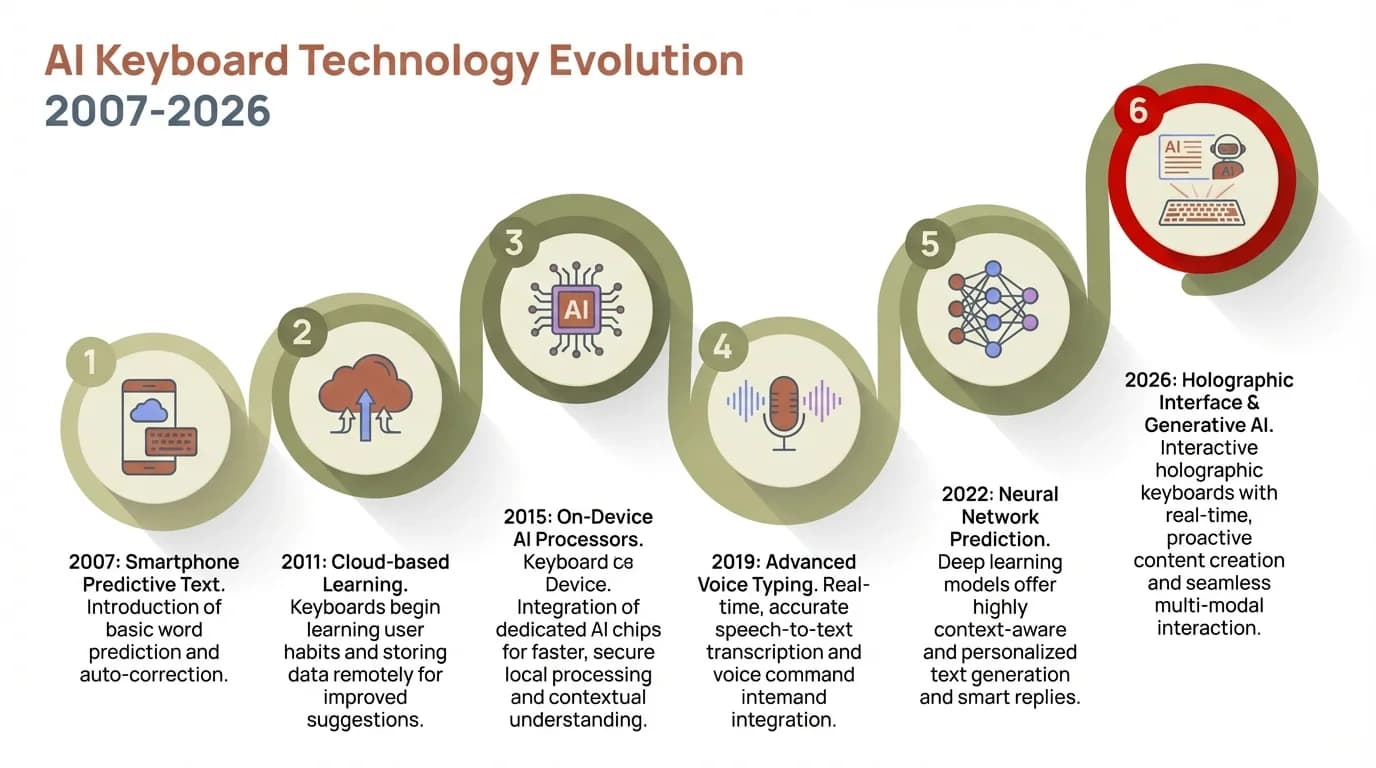
| Era | Key Feature | Impact |
|---|---|---|
| Early 2000s | Basic autocorrect | Fixed simple typos |
| 2010s | Predictive text | Suggested next words |
| Late 2010s | Grammar checking | Caught grammatical errors |
| Early 2020s | Smart replies | Generated quick responses |
| 2025-2026 | Multimodal AI assistants | Contextual writing with voice, image, and real-time collaboration |
Quick Summary:
- AI keyboards evolved from simple spell-checkers to multimodal intelligent writing partners
- Modern keyboards offer grammar fixes, tone adjustment, real-time collaboration, and emotional intelligence
- Voice typing accuracy reached 98%+ in 2026 with advanced transformer models
- Custom AI assistants can be tailored for specific writing tasks and learn your personal style over time
- Privacy concerns addressed with hybrid on-device/cloud processing and transparent data policies
Remember when autocorrect was the biggest innovation in mobile typing? Those days feel ancient now. I've been using smartphones since the first iPhone, and the jump from "duck" replacing every attempt at typing a curse word to having a full AI assistant in my keyboard is honestly mind-blowing.
The transformation of keyboards from simple input tools to intelligent writing partners didn't happen overnight. It took nearly two decades of incremental improvements, failed experiments, and genuine breakthroughs. What started as a basic spell-checker has become something that can write entire emails, adjust your tone, and even translate languages in real-time.
The Autocorrect Era: When Keyboards First Got "Smart"
The first mobile keyboards were basically digital versions of physical keypads. You'd press the number 2 four times to get the letter "C" - painful stuff. When touchscreen keyboards arrived with the iPhone in 2007, autocorrect was revolutionary. It actually worked, most of the time.
But early autocorrect was dumb. Really dumb. It worked off a static dictionary and couldn't learn from your typing patterns. If you used industry jargon or had friends with unusual names, you were constantly fighting with your keyboard. I remember a colleague who gave up trying to type "API" because her phone insisted on changing it to "app" every single time.
The technology behind these early keyboards was simple pattern matching. The system compared what you typed against a pre-loaded dictionary and suggested the closest match. No machine learning, no context awareness, just basic string comparison. This led to some embarrassing moments - we've all sent texts where autocorrect completely changed our meaning.
Limitations of early autocorrect:
- No context understanding
- Couldn't learn new words easily
- Same corrections for everyone
- No grammar awareness
- Fixed dictionary only
Despite these problems, autocorrect was a huge leap forward. It made touchscreen typing actually usable. Before smartphones became ubiquitous, this was the state of the art.
Predictive Text: Keyboards Start Learning Your Style
Around 2013, keyboards got noticeably smarter. SwiftKey and similar apps introduced predictive text that actually learned from your writing. Instead of just fixing typos, your keyboard started suggesting the next word you'd probably type. Looking back from 2026, these early attempts at personalization seem almost quaint, but they laid the groundwork for the AI revolution to come.
This was powered by n-gram models - statistical models that looked at word sequences you commonly used. If you often typed "on my way," after typing "on my," the keyboard would suggest "way" as the next word. Simple concept, but it felt like magic when it worked.
The real breakthrough was personalization. Your keyboard learned your writing style by analyzing your message history. Mine learned I ended most texts with "cheers" and started suggesting it automatically. My boss's keyboard learned he always wrote "Please advise" in emails. These patterns made typing genuinely faster.
But predictive text had limits too. It could suggest common phrases but couldn't understand meaning or context beyond a few words. It couldn't help with grammar mistakes or suggest better ways to phrase something. It was still fundamentally reactive - you had to start typing before it could help.
AI keyboard apps during this period were starting to differentiate themselves from built-in options, but the gap wasn't huge yet.
Grammar Checking Goes Mobile: The Rise of Writing Assistants
The next major shift came when grammar checking technology, previously only available on desktop, made its way to mobile keyboards. Grammarly launched its keyboard app in 2017, and suddenly your phone could catch grammatical errors in real-time.
This wasn't just spell-checking 2.0. These systems used natural language processing to understand sentence structure and identify actual grammar mistakes. They could spot subject-verb disagreement, misplaced modifiers, and punctuation errors. For professionals writing emails on mobile, this was transformative.
I work with non-native English speakers who told me AI keyboards for non-native speakers completely changed their confidence in mobile communication. Instead of worrying about making embarrassing grammar mistakes in work chats, they could trust their keyboard to catch errors before sending.
The technology behind this required more sophisticated AI models that could parse sentence structure and understand grammatical rules across different contexts. Unlike simple pattern matching, these systems needed to understand language at a deeper level.
Grammar checking features that emerged:
- Real-time error detection
- Context-aware corrections
- Style suggestions
- Punctuation fixes
- Sentence structure improvements
However, early grammar keyboards had their own problems. They were resource-intensive, sometimes slow, and occasionally suggested "corrections" that were actually wrong. The AI wasn't perfect at understanding context or informal writing styles.
Smart Replies and Contextual Suggestions: AI Gets Conversational
Around 2019-2020, keyboards started doing something genuinely new - generating entire responses based on context. Google's Smart Reply feature could read an incoming message and suggest three complete responses. "Sounds good," "I'll be there," "Thanks!" - simple but useful.
This required a completely different type of AI. Instead of just analyzing what you wrote, the keyboard needed to understand what someone said to you and generate appropriate responses. This was early natural language generation, the same technology that would eventually power ChatGPT.
The magic was in how contextual these suggestions became. If someone asked "Want to grab coffee tomorrow?" the keyboard might suggest "What time works?" or "I'm free after 2pm." It wasn't just canned responses - the AI understood the question and generated relevant answers.
For busy professionals, this was a productivity game-changer. I started using smart replies for probably 30% of my messages. Quick acknowledgments, simple scheduling responses, basic questions - the AI could handle them instantly. AI keyboards for professionals became genuinely useful productivity tools.
The limitation? Smart replies worked great for simple exchanges but fell apart with complex topics. You couldn't have a nuanced conversation using only suggested responses. They were helpful shortcuts, not replacements for actual writing.
The ChatGPT Revolution: Full AI Assistants in Your Keyboard
Everything changed when ChatGPT launched in late 2022. Within months, developers started integrating GPT-style AI models directly into keyboard apps. By 2026, these keyboards have matured into sophisticated writing partners. They don't just fix grammar or suggest replies - they understand context from previous conversations, anticipate what you're trying to communicate, and adapt to your unique voice. It's like having a personal editor who knows you inside and out.
I remember the first time I used a ChatGPT keyboard to draft a tricky email. I typed a rough outline of what I wanted to say, hit a button, and the AI turned it into a polished, professional message. It took seconds instead of the 10 minutes I would've spent agonizing over the wording.
This wasn't incremental improvement - it was a fundamental shift in what keyboards could do. The AI could:
- Understand context across multiple sentences
- Generate original content based on prompts
- Adjust tone from casual to formal
- Translate languages naturally
- Summarize long text into key points
- Expand bullet points into full paragraphs
The technology behind this is large language models (LLMs) trained on massive text datasets. These models don't just recognize patterns - they understand language structure, context, and meaning in ways previous AI couldn't.
For professionals, this meant being able to handle complex written communication entirely from mobile. Writing professional emails became as easy on phone as on desktop, maybe easier since the AI could draft faster than most people could type.
Voice Typing Evolution: From Frustrating to Flawless
While text-based AI was improving, voice typing underwent its own transformation. Early voice recognition was terrible - maybe 70% accurate on a good day with clear speech. By 2026, with advanced models like GPT-4o Transcribe and beyond, accuracy has reached 98%+ even with heavy accents, background noise, mumbling, and conversational speech patterns. The difference is night and day.
The breakthrough was using the same transformer architecture that powers ChatGPT for speech recognition. Instead of just matching audio patterns to words, the AI understands context and can figure out what you meant even when pronunciation isn't perfect.
I use voice typing constantly now for drafting longer content on mobile. I can speak naturally, with pauses, corrections, and even switch mid-sentence between ideas, and the AI figures it out. It even adds proper punctuation automatically based on speech patterns and can detect when I'm asking a question versus making a statement. Some keyboards in 2026 even understand emotional tone in your voice and adjust the written output accordingly - if you sound frustrated, it might suggest more assertive language.
Modern voice typing capabilities (2026):
- 98%+ accuracy with natural speech and accents
- Automatic punctuation and formatting
- Emotional tone detection and adjustment
- Multi-speaker identification and transcription
- 50+ language support with real-time translation
- Real-time transcription with context awareness
- Advanced noise filtering and echo cancellation
For people with accessibility needs, this evolution has been life-changing. Voice typing went from barely usable to genuinely reliable.
Custom AI Assistants: Tailoring Your Keyboard
The latest innovation is customizable AI assistants within keyboards. Instead of one-size-fits-all AI, you can create specialized assistants for different tasks. I have one configured for technical writing that knows industry jargon, another for casual social media posts, and a third for formal business communication.
This is possible because modern AI models can be fine-tuned with custom instructions. You tell the assistant your preferences, writing style, and common tasks, and it adapts. Custom AI assistants feel like having a personal editor who knows exactly how you want to sound.
For example, my social media assistant knows I prefer casual tone, emoji usage, and shorter sentences. My business assistant knows to be formal, concise, and avoid jargon. Same underlying AI, completely different outputs based on configuration.
This level of customization was impossible with earlier keyboard AI. The technology required both powerful language models and the ability to modify their behavior through prompts and settings. It's genuinely impressive how much control users now have over their AI keyboard behavior.
The practical impact is huge. Instead of fighting with your keyboard to match your style, you configure it once and it adapts to you. For students, professionals, and content creators, this means faster, better writing with less friction.
Privacy and Security: The Ongoing Challenge
All this AI power raises important questions about privacy. Your keyboard sees everything you type - passwords, personal messages, confidential work information. How much of that data gets sent to cloud servers for AI processing?
This has been a major concern throughout the evolution of AI keyboards. Early cloud-based systems sent everything to servers for processing, which made many users uncomfortable. Recent keyboards have started offering on-device AI processing for sensitive data, though this limits capabilities compared to cloud-based models.
The privacy landscape is complex. Some keyboards process everything locally but offer limited AI features. Others use cloud AI for powerful features but encrypt data in transit. Users need to understand these tradeoffs and choose keyboards that match their privacy comfort level.
According to 2025 research from Stanford's Human-Centered AI Institute, 67% of users expressed concern about keyboard data privacy, but only 23% actually checked privacy policies before installing keyboard apps. By 2026, this awareness has improved - a recent survey shows 41% now review privacy settings, partly due to new regulations requiring clearer disclosures. But there's still work to do in helping people understand what their keyboards are actually doing with their data.
Privacy considerations for AI keyboards:
- Where is data processed (device vs cloud)?
- Is typing data stored or deleted immediately?
- What data is used for AI training?
- Are conversations encrypted?
- Can you opt out of data collection?
The best modern keyboards offer transparency about data handling and give users control over privacy settings. This should be a key factor when choosing an AI keyboard.
Real-World Impact: Who Benefits Most?
After watching this evolution for years, I've noticed certain groups benefit dramatically from AI keyboards while others see marginal improvements. The biggest winners are people who write frequently on mobile but aren't professional writers.
Business professionals who handle email on the go see massive productivity gains. Instead of struggling with mobile typing for complex messages, they can draft professional communications as easily as on desktop. A 2026 workplace productivity study found professionals using AI keyboards save an average of 7 hours per week on written communication - up from 5 hours in 2024 - as the AI has become better at understanding workplace context and industry-specific terminology.
Non-native English speakers are another huge beneficiary. AI keyboards help them write confidently in English by catching mistakes and suggesting better phrasings. This removes a major barrier to professional communication and career advancement.
Students using AI keyboards for academic work report higher confidence in their writing and better grades. The AI acts as a 24/7 writing tutor, helping them improve while they work.
People with dyslexia or other learning differences find AI keyboards transformative. Features like grammar correction, voice typing, and text prediction reduce the cognitive load of writing significantly.
Groups seeing major benefits:
- Business professionals handling mobile email
- Non-native English speakers
- Students and academics
- People with learning differences
- Content creators and social media managers
- Customer support teams
Interestingly, professional writers and editors often see less benefit. They already have strong writing skills and specific style preferences that AI sometimes conflicts with. The AI is most helpful for people who need writing assistance, not those who are already expert writers.
Where We Are Now: The State of AI Keyboards in 2026
In 2026, AI keyboards have moved from experimental features to essential productivity tools for millions of people. What seemed futuristic just two years ago is now standard - keyboards that analyze the tone of incoming messages, suggest response styles that match the conversation, and even help navigate tricky workplace communications with emotional intelligence built in.
Multimodal AI has arrived in keyboards. Some 2026 keyboards let you describe an image you want to share and generate it on the spot, or sketch a rough diagram that gets converted to professional graphics. You can dictate a message while the keyboard pulls relevant data from your calendar, recent emails, and even photos to add context automatically. The line between typing and full content creation has officially blurred.
Real-time collaboration features are becoming mainstream too. Several keyboards now let multiple people work on text together through their mobile devices, with AI mediating suggestions and resolving conflicts. I recently watched my team draft an entire client proposal collaboratively through our phones during a taxi ride to the airport. Three years ago, that would have been impossible - now it's just another Tuesday.
The most impressive advancement in 2026 is contextual memory. Modern AI keyboards remember your conversations across apps and time, building a genuine understanding of your communication patterns, relationships, and preferences. When I message my co-founder, the keyboard knows we use specific technical terms and speak casually. When I email investors, it automatically shifts to formal language and remembers details from our last conversation. This isn't just pattern matching - it's actual contextual intelligence.
Research from MIT's Computer Science and Artificial Intelligence Laboratory in 2024 predicted that keyboard AI would focus on emotional intelligence - and that prediction came true faster than expected. By early 2026, many keyboards can understand not just what you're saying but the emotional context behind it. They detect when a conversation is getting tense and suggest more diplomatic phrasings. They catch when your message might come across as curt and offer warmer alternatives. This has genuinely helped reduce miscommunications that are common in text-based conversations.
Integration with other apps and services is now standard practice. In 2026, your keyboard seamlessly pulls relevant information from your calendar, email, or notes when composing messages. Writing "let's meet next week" triggers a suggestion of your actual availability. Mentioning a project automatically pulls up recent files and conversations about it. Some keyboards can even fact-check claims in real-time or suggest credible sources to back up your points - incredibly useful for journalists, researchers, and anyone who needs to cite their sources.
Current keyboard AI capabilities in 2026:
- Emotional intelligence and tone analysis (now standard)
- Multimodal content generation (text, images, diagrams)
- Real-time collaboration features with conflict resolution
- Cross-app context awareness and data integration
- Deep personalized writing style learning with contextual memory
- Natural voice conversation support with emotional detection
- Automated fact-checking and source suggestions
The transformation is remarkable when you step back and look at it. We've gone from keyboards that could barely fix typos to AI assistants that understand context, emotion, and intent. They collaborate with us, learn from us, and adapt to our unique communication styles.
What's next? The frontier in late 2026 and beyond is predictive communication - keyboards that don't just help you write what you want to say, but anticipate entire conversations and outcomes. Imagine your keyboard warning you that a message might trigger a defensive response, or suggesting an approach that historically works better with a specific person based on your past exchanges. We're moving from keyboards as writing tools to keyboards as communication strategists. Whether that excites or concerns you probably depends on how comfortable you are with AI understanding your relationships and communication patterns at such a deep level.
Frequently Asked Questions
Q: How accurate are AI keyboards compared to regular keyboards?
A: Modern AI keyboards in 2026 are significantly more accurate than traditional keyboards. They catch and correct typos in real-time with 97%+ accuracy, identify grammatical errors that standard autocorrect misses, and understand context to make intelligent predictions. Voice typing through advanced AI keyboards achieves 98%+ accuracy compared to 70-80% for older voice recognition systems. The AI continuously learns your writing patterns, vocabulary, and common phrases, making predictions increasingly accurate over time. Some keyboards now predict entire sentences with such accuracy that users report typing 40-50% faster than with traditional keyboards.
Do AI keyboards work offline or need internet connection?
This depends on the specific keyboard and features you're using. Basic features like autocorrect and simple predictions work offline on most AI keyboards. Advanced features like grammar checking, tone adjustment, and AI-generated responses typically require an internet connection since they use cloud-based AI models. Some premium keyboards offer hybrid modes where common tasks work offline but complex AI features need connectivity. If you need offline functionality, check the keyboard's specifications before installing.
Are AI keyboards safe for typing passwords and sensitive information?
Reputable AI keyboards include security features specifically for sensitive input. Most automatically disable AI features when you're typing in password fields or other secure input areas. However, it's important to choose keyboards from trusted developers with clear privacy policies. Look for keyboards that offer on-device processing for sensitive data, don't store typing history without permission, and provide options to exclude specific apps from AI processing. Always review privacy settings after installing any keyboard app.
Can AI keyboards replace learning proper grammar and writing skills?
No, AI keyboards should complement rather than replace learning proper writing skills. While they catch errors and suggest improvements, understanding why something is correct helps you become a better writer. Think of AI keyboards as training wheels - they support you while you develop skills. Many users find that seeing corrections over time actually helps them learn grammar rules. Students and non-native speakers especially benefit from this learning aspect. The AI is a tool to improve your writing, not a substitute for developing writing competence.
How much do AI keyboards cost?
Pricing varies widely depending on features and capabilities. Basic AI keyboards with autocorrect and simple predictions are often free with optional premium upgrades. Mid-tier keyboards with grammar checking and smart replies typically cost $5-15 per month or $50-100 annually. Premium keyboards with advanced AI features, custom assistants, and unlimited usage range from $10-30 monthly. Some keyboards offer free trials so you can test features before committing. Consider what features you actually need - many users find mid-tier options provide the best value for professional use.
Do AI keyboards work with all messaging and writing apps?
Most AI keyboards work as system-wide keyboards on iOS and Android, meaning they function in any app where you can type - messaging apps, email, social media, notes, and browsers. However, some apps have restrictions on third-party keyboards for security reasons, particularly banking apps or password managers. In these cases, the system keyboard automatically takes over. The AI features work best in apps that support rich text input. Check compatibility if you have specific apps you use frequently for critical work.
Share this article: