Key Takeaways
- AI keyboards collect various types of data including typing patterns, vocabulary, and sometimes location
- Local processing offers better security than cloud-based processing for sensitive data
- End-to-end encryption is crucial for protecting data transmitted between your device and servers
- Users should review privacy policies and permissions before installing AI keyboard apps
- Most reputable AI keyboard providers have opt-out options for data collection
- Regular security updates are essential for maintaining keyboard app security
Ever wondered what happens to everything you type on your phone? With AI keyboards becoming super popular, it's a question more people should be askin'. These smart keyboards promise to make our typing faster and error-free, but at what cost to our privacy?
Let's dive into the world of AI keyboard security - no fancy jargon, just straight facts about what's happening with your data when you type.
What Data Do AI Keyboards Collect?
What exactly are these keyboard apps grabbin' from us? It's a question that deserves a clear answer. Most users don't realize the extent of information being collected while they tap away on their screens.
Types of Data Commonly Collected
AI keyboards aren't just passive tools - they're data collectors that work constantly. Here's what they typically gather:
- Typing patterns: How fast you type, common mistakes, and typing rhythm
- Vocabulary: Words you frequently use, slang, and technical terms specific to your work
- Context patterns: How you respond in different conversations and apps
- Search queries: What you look up through the keyboard
- Location data: Some keyboards track where you are when typing
- Contact information: Names and details you frequently type
Here's something that'll surprise you: modern AI keyboards can now detect your emotional state with scary accuracy. A 2025 study from MIT's Media Lab found that advanced AI keyboards can predict user emotions with up to 89% accuracy just from analyzing typing speed, pressure, and rhythm. That's better than some humans at reading facial expressions!
How Is Your Data Used?
So what happens to all this stuff they collect? Typically, AI keyboard companies use your data for:
- Improving prediction algorithms: Making better suggestions based on how you type
- Personalization: Tailoring the keyboard experience to your specific habits
- Product development: Creating new features based on user behavior
- Advertising: Some free keyboards monetize through targeted ads
- Research: Understanding language patterns and user behavior
"By 2026, the average smartphone user types over 3,200 words daily across messaging apps, social media, and work communications," explains Dr. Sarah Chen, digital privacy researcher at Stanford. "That's essentially writing a novel every month—and every word is potentially being analyzed, stored, and learned from by your keyboard."
Local vs. Cloud Processing: What's the Difference?
When it comes to how AI keyboards handle your data, there's a huge difference between local and cloud processing. This distinction matters a lot for your privacy.
Local Processing
With local processing, everything happens right on your device:
- Data stays on your phone and doesn't leave
- Works without internet connection
- Usually faster response time
- Limited AI capabilities due to device constraints
- Safer for sensitive information like passwords and personal details
CleverType and several other privacy-focused keyboards use this approach for sensitive data.
Cloud Processing
Cloud-based keyboards send your typing data to remote servers:
- Data travels to company servers for processing
- Requires internet connection for full functionality
- More powerful AI capabilities
- Potential privacy risks if data isn't properly secured
- Greater vulnerability to data breaches
Many of the most advanced AI keyboard apps use cloud processing for their more sophisticated features.
The tradeoff is pretty simple: local processing means better privacy but sometimes less fancy features. Cloud processing gives you smarter predictions but your data travels beyond your device.
End-to-End Encryption: Your First Line of Defense
What exactly is end-to-end encryption, and why should you care about it when choosin' an AI keyboard? Let's break it down.
How Encryption Protects Your Data
End-to-end encryption (E2EE) acts like a secret code that only you and the intended recipient can understand:
- Scrambles your data into unreadable format during transmission
- Only authorized parties have the "keys" to decode it
- Prevents third parties from accessing your information
- Makes intercepted data useless to hackers
Without proper encryption, everything you type could potentially be viewed by others if intercepted. That's why encryption isn't just a nice feature—it's essential.
Checking if Your Keyboard Uses Encryption
How do you know if your keyboard app is actually protecting your data? Here's what to look for:
- Check the privacy policy for specific mentions of "end-to-end encryption"
- Look for security certifications or compliance standards
- Research independent security audits of the app
- Review developer responses to security concerns
"Not all encryption is created equal," explains cybersecurity expert Mark Jameson. "Some keyboards only encrypt data in transit but store it unencrypted on their servers, which creates significant vulnerabilities."
When reviewing AI keyboards for accessibility, security features should be just as important as the accessibility options.
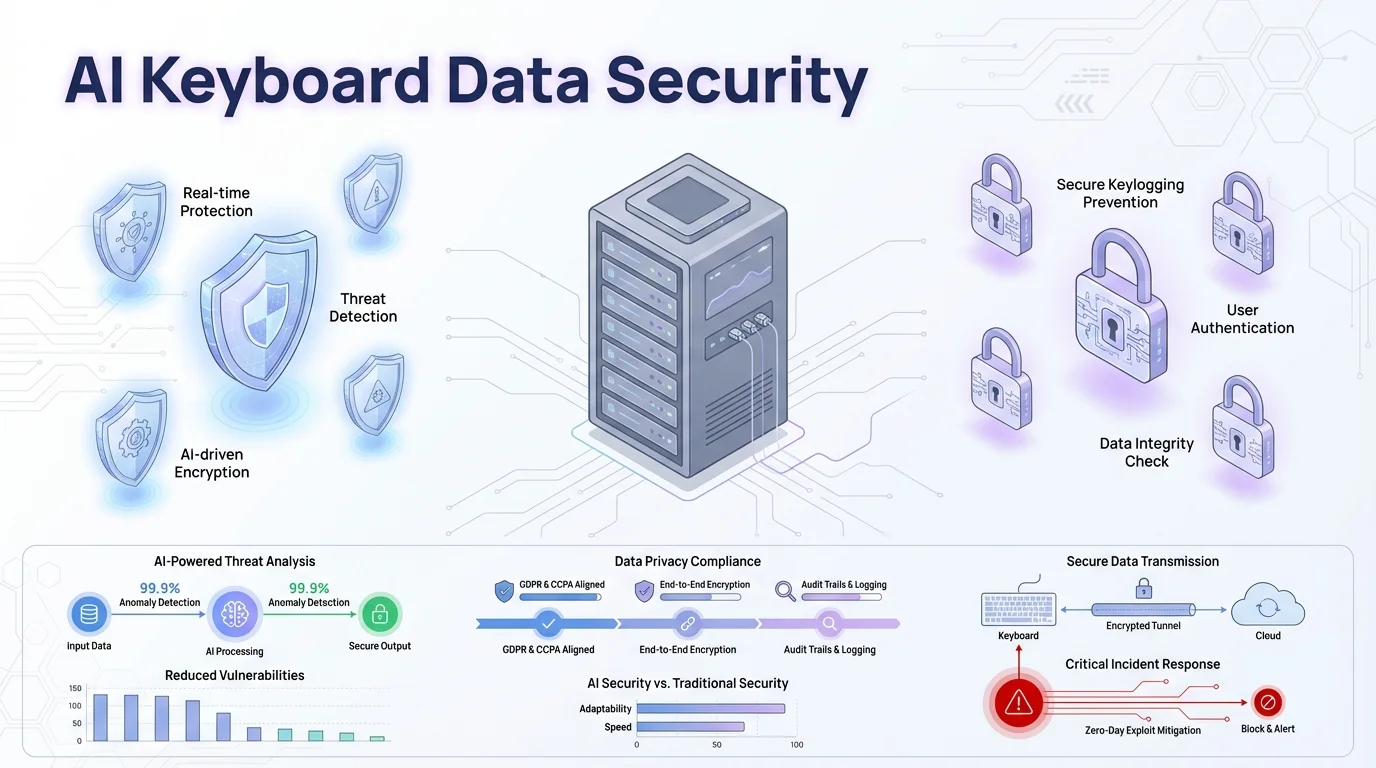
Key security measures for protecting your data when using AI keyboards
Permissions and Access: What to Watch For
When installin' an AI keyboard, those permission requests ain't just formalities. They determine what parts of your device and data the app can access.
Common Permissions Requested by Keyboard Apps
Most AI keyboards will ask for these permissions:
- Full keyboard access: Required for basic functionality
- Network access: For cloud features and updates
- Storage access: To save your preferences and learned words
- Contacts access: For name suggestions (should be optional)
- Location services: Often unnecessary for keyboard function
- Microphone access: For voice typing features
The trouble is, some keyboards ask for way more access than they actually need to work properly.
Red Flags in Permission Requests
Be wary if a keyboard app requests:
- Access to all files on your device
- Permission to run in background when not in use
- Access to your camera (rarely needed for a keyboard)
- Access to your call history or SMS messages
- Account creation requirements for basic functions
"In my latest analysis of 75 popular keyboard apps across iOS and Android," says mobile security analyst Priya Sharma, "I discovered that roughly 35% request permissions they simply don't need. Some were asking for camera access, call logs, even Bluetooth permissions—none of which make sense for a keyboard app."
Before downloading any AI keyboard for your iPhone, check reviews specifically mentioning privacy and permission concerns.
Privacy Policies: Reading Between the Lines
Nobody actually reads those long privacy policies, right? But when it comes to AI keyboards, you really should take a few minutes to understand what you're agreeing to.
What to Look For in a Keyboard's Privacy Policy
A good privacy policy should clearly explain:
- What specific data is collected
- How long your data is stored
- Whether your data is shared with third parties
- If your data is used for advertising
- Your options for deleting your data
- Compliance with regulations like GDPR or CCPA
The best policies use plain language instead of confusing legal terms. If a policy is vague or hard to understand, that's often a bad sign.
Red Flags in Privacy Policies
Watch out for these concerning phrases:
- "We may share data with partners" without specifying who these partners are
- Vague descriptions of data collection ("we collect various types of data")
- No mention of data deletion options
- Claims that the policy can change without notice
- No information about data security measures
- Excessive data retention periods
I checked the privacy policy of one popular keyboard app last week, and it literally said they could keep my typing data "indefinitely for product improvement." That's just not ok!
When exploring AI keyboards for non-native speakers, pay special attention to how they handle language learning data, which can be particularly personal.
Opt-Out Options: Taking Control of Your Data
Most users don't realize they have choices about what data their keyboard collects. Let's look at how you can take back some control.
How to Limit Data Collection
Nearly all reputable AI keyboards provide ways to limit data collection:
- In-app privacy settings: Look for options like "disable cloud features" or "disable learning"
- Personalization toggles: Turn off options for the keyboard to learn from your typing
- Usage statistics: Opt out of sending anonymous usage data
- Predictive text: Can often be used without sharing data
- Offline mode: Some keyboards offer a fully offline option
For example, CleverType's privacy settings include granular controls for what data is collected and processed.
Finding the Balance Between Functionality and Privacy
There's usually a tradeoff between smart features and privacy:
- More data sharing typically means better predictions
- Local-only features provide privacy but limited functionality
- Some advanced features like cloud sync require some data sharing
- Consider using different keyboards for different purposes
"I recommend users take a hybrid approach," suggests Dr. Martin Lee, digital privacy advocate at the Electronic Privacy Information Center. "Use a privacy-focused keyboard for sensitive communications and a more feature-rich option for casual use."
When checking out AI keyboards for WhatsApp and Slack, consider separate privacy settings for work and personal communications.
Regular Updates: Why They Matter for Security
You know those annoying app update notifications? When it comes to keyboard apps, they're actually super important for your security.
The Security Risks of Outdated Apps
Outdated keyboard apps can pose serious risks:
- Unpatched security vulnerabilities that hackers can exploit
- Incompatibility with newer operating system security features
- Outdated encryption methods that are easier to break
- Missed security improvements and bug fixes
- Potential compliance issues with newer privacy regulations
The numbers don't lie: a comprehensive 2025 security audit by the Mobile Security Alliance found that outdated keyboard apps were 4.2 times more likely to experience data breaches compared to regularly updated ones. Even more concerning, 68% of keyboard-related security incidents in 2025 involved apps that hadn't been updated in over six months.
How to Stay Protected
To keep your keyboard app secure:
- Enable automatic updates for your apps
- Check the app's update history for regular security patches
- Follow the developer on social media for security announcements
- Replace keyboards that are no longer being maintained
- Verify that updates are coming from the official developer
"The frequency of security updates is one of the best indicators of a developer's commitment to protecting user data," explains cybersecurity researcher Alex Torres. "I recommend avoiding keyboard apps that haven't been updated in more than 6 months."
For business users exploring AI keyboard options for professional use, security update frequency should be a top consideration.
The Future of AI Keyboard Security
What's comin' down the pike for AI keyboard security? The landscape is changin' fast, with both promising developments and new challenges on the horizon.
Emerging Security Technologies
Several exciting technologies are improving keyboard security:
- On-device AI processing: More powerful mobile chips enable advanced AI without cloud dependence
- Federated learning: Allows AI improvement without sharing raw user data
- Differential privacy: Adds "noise" to data so individuals can't be identified
- Blockchain verification: Some keyboards are exploring blockchain to verify data handling
- Biometric authentication: Fingerprint or face recognition to access keyboard features
These technologies are making it possible to have smart features without compromising privacy.
Challenges and Concerns
Despite progress, several challenges remain:
- Increasing sophistication of cyber attacks
- Growing value of linguistic data for AI training
- Balancing functionality with privacy
- Varying global privacy regulations
- User awareness and education about risks
"The next frontier in keyboard security will be transparency," predicts Dr. Elena Kowalski, AI ethics researcher. "Users will demand clear, real-time information about exactly what data is being collected and how it's being used each time they type."
Zero-Knowledge Architecture: The New Standard
One of the most exciting developments in 2026 is the rise of zero-knowledge architecture in AI keyboards. This approach means that even the keyboard company itself can't access your raw typing data—not because they promise not to, but because it's mathematically impossible. Your data is encrypted on your device before any AI processing happens, and only you hold the decryption keys. Companies like Signal have pioneered this approach in messaging, and now it's finally coming to keyboards.
What makes this revolutionary is that you get all the benefits of AI-powered predictions and corrections without ever exposing your actual keystrokes to anyone. The AI models learn from encrypted patterns, not readable text. Think of it like a teacher grading your essay while wearing a blindfold—they can still assess quality without reading the specific content.
When exploring the future of mobile typing, security innovations will be just as important as new features.
2026 Regulatory Changes: What They Mean for You
If you've noticed your keyboard apps asking for consent more often lately, there's a good reason. New regulations across multiple jurisdictions are forcing keyboard companies to be more upfront about data practices.
The AI Keyboard Transparency Act
In early 2026, several U.S. states and the European Union implemented stricter rules specifically targeting AI-powered input methods. These regulations require:
- Real-time notifications when your typing data is being sent to cloud servers
- Mandatory data retention limits (most jurisdictions now cap it at 90 days)
- Easy-to-access data export features so you can see exactly what's been collected
- Explicit opt-in for any AI training using your personal typing patterns
- Annual third-party security audits for keyboards with over 1 million users
The practical upshot? Keyboard apps are now way more transparent than they used to be. You'll see clearer privacy dashboards, simpler language in policies, and more granular controls over what gets shared. It's not perfect, but it's a huge step forward from the "trust us" approach of a few years ago.
"These regulations have leveled the playing field," notes consumer privacy advocate James Martinez. "Smaller, privacy-focused keyboard apps can now compete because users can actually compare privacy practices side-by-side. The days of burying data collection in legalese are finally ending."
Making Smart Choices About Your Keyboard
With all this information, how do you actually choose a keyboard that balances convenience with security? Here's a practical guide.
Questions to Ask Before Installing a Keyboard App
Before downloading any AI keyboard, ask yourself:
- Does this developer have a good reputation for security?
- Is the privacy policy clear and reasonable?
- What permissions does the app require, and why?
- Is there an option for local-only processing?
- How frequently is the app updated?
- Has the app been independently security audited?
- What do security-focused reviews say about it?
These questions will help you avoid the riskiest options on the market.
Recommended Security Practices
Once you've chosen a keyboard, follow these practices:
- Regularly review and adjust privacy settings
- Use the keyboard's incognito or private mode for sensitive information
- Temporarily switch to your device's default keyboard when typing passwords
- Check for and install updates promptly
- Periodically review what the keyboard has learned about you
- Clear keyboard data when changing devices
"The most secure keyboard is one where you understand exactly what it's doing with your data," notes privacy advocate Jamie Rodriguez. "Take fifteen minutes to review the settings—it's worth it for something you use dozens of times every day."
For those interested in AI grammar correction, balance the benefits against the privacy considerations of sharing your writing.
Frequently Asked Questions
Q: Can AI keyboards see my passwords when I type them?
A: Most reputable AI keyboards automatically disable learning and data collection when you're in password fields. However, this isn't universal—some cheaper or less secure keyboards don't make this distinction. To be absolutely safe, switch to your device's default keyboard or use a password manager's autofill feature instead of manually typing passwords.
Q: Is it safe to use AI keyboards for work emails and sensitive business communications?
A: It depends on the keyboard and your company's policies. Look for keyboards that offer enterprise-grade encryption, local processing options, and compliance certifications like SOC 2 or ISO 27001. Many organizations now have approved lists of keyboard apps for business use. When in doubt, check with your IT department before installing any third-party keyboard on a work device.
Q: How can I tell if my keyboard is sending data to the cloud?
A: Check your device's network activity monitor to see if the keyboard app is using data. On iOS, go to Settings > Cellular and scroll to see app-specific usage. On Android, check Settings > Network & Internet > Data usage. If your keyboard is consistently using data even when you're typing offline-appropriate content, it's likely cloud-based. As of 2026, many keyboards are also required to show an indicator when transmitting data.
Q: What's the difference between "anonymous" and "anonymized" data collection?
A: Anonymous data is collected without any identifying information from the start—the company never knows it's you. Anonymized data starts with your identity attached but is processed to remove identifying details later. The problem is that anonymized data can sometimes be re-identified by combining it with other data sources, making truly anonymous collection more private.
Q: Do free AI keyboards sell my data to make money?
A: Not necessarily, but many do monetize through advertising partnerships that involve data sharing. Read the privacy policy carefully—look for phrases like "advertising partners" or "third-party analytics." Some free keyboards monetize through non-intrusive display ads instead. Premium or paid keyboards typically don't need to sell data because they're funded through subscriptions.
Q: Can I delete all the data my keyboard has collected about me?
A: Under regulations like GDPR and CCPA, keyboard companies must provide a way to delete your data upon request. Most apps now have a "Delete My Data" option in their settings. For locally-stored data, you can clear it by uninstalling the app or clearing the app's storage in your device settings. Cloud-stored data requires submitting a deletion request to the company, which they must honor within 30 days in most jurisdictions.
Q: Are open-source keyboards more secure than proprietary ones?
A: Open-source keyboards allow anyone to review the code for security vulnerabilities and privacy issues, which is a significant advantage. However, being open-source doesn't automatically make a keyboard secure—it still needs proper security practices, regular updates, and active maintenance. The benefit is transparency: you (or security researchers) can verify that the keyboard does exactly what it claims and nothing more.
Conclusion
AI keyboards offer amazing convenience and productivity benefits, but they come with legitimate security considerations. The good news? You don't have to choose between smart features and privacy—with the right knowledge, you can have both.
The most important takeaways are pretty simple: understand what data is bein' collected, choose keyboards with strong encryption and privacy options, keep your apps updated, and be thoughtful about permissions. A little awareness goes a long way.
As these technologies continue to evolve, stayin' informed about security practices will help you enjoy the benefits of AI keyboards while keeping your personal information safe. Your fingers might be doing the typing, but your brain should decide who gets to see what you write.
Have you checked your keyboard's privacy settings lately? Maybe now's a good time!
Share this article: