Correcting Grammar vs Traditional Keyboards: What's Better for You?
Key Takeaways:
- Grammar-correcting keyboards offer real-time error detection and suggestions while traditional keyboards require manual proofreading
- AI-powered keyboards can adapt to your writing style over time, learning your common phrases and expressions
- Traditional keyboards provide more typing speed and familiarity but lack advanced writing assistance
- Privacy concerns exist with grammar keyboards that may analyze your text through cloud services
- Battery consumption is higher with AI grammar keyboards compared to traditional options
- Grammar keyboards are particularly beneficial for non-native speakers, students, and professionals writing formal communications
The Evolution of Keyboard Technology: From Basic to Smart
Have you ever stopped to think about how much keyboards have changed? They've gone from simple letter-punching tools to smart assistants that genuinely understand context and intent. It's remarkable how far we've come in just a few years.
The traditional keyboard has been around for ages, basically unchanged in its core functionality. You press a key, a letter appears. Simple, right? But then companies started adding features like autocorrect which, let's be honest, sometimes creates more confusion than clarity. We've all sent an embarrassing text because autocorrect decided to "help."
Then came the revolution—AI-powered grammar-correcting keyboards that don't just fix your typos but actually understand what you're trying to say. In 2026, these smart keyboards have evolved to analyze your writing patterns in real-time, detect grammatical errors with over 95% accuracy, and suggest contextually appropriate alternatives. They're not just fixing spelling mistakes; they're helping you communicate more effectively across professional, casual, and creative contexts.
What sparked this transformation? Breakthroughs in large language models and on-device AI processing have turned keyboards from simple input devices into sophisticated writing partners. But does this mean we should all ditch our traditional keyboards? Well, that's what we're here to explore together.
How Grammar-Correcting Keyboards Work
Ever wondered how these sophisticated grammar keyboards actually work their magic? The technology is fascinating, and understanding it helps you make better choices about which keyboard to use.
At their core, grammar-correcting keyboards use Natural Language Processing (NLP) powered by advanced transformer models to understand text contextually. When you type, the AI analyzes your sentences in real time, checking them against billions of language patterns learned from vast datasets. In 2026, many keyboards now run these models directly on your device, eliminating privacy concerns while delivering instant feedback.
What's the difference between these smart keyboards and traditional autocorrect? Traditional autocorrect simply matches individual words against a dictionary, but modern grammar keyboards understand entire sentence structures. They check if your verbs agree with your subjects, if you're using the right tense, whether your punctuation is correct, and even if your tone matches your intended audience.
Here's a quick breakdown of what happens behind the scenes:
- You type a sentence
- The AI analyzes the grammatical structure and context
- It identifies potential errors or improvements
- It offers contextually relevant suggestions in real-time
- You can accept, ignore, or customize the suggestions
Most advanced grammar keyboards like CleverType actually learn from your writing style over time. The more you use them, the better they become at understanding your personal patterns and preferences. This adaptive learning means they become more helpful and less intrusive as you continue to use them.
Modern keyboards offer multiple checking modes. You might want strict grammar enforcement when writing a business email, but a more relaxed approach when texting friends. Some even detect the app you're using and automatically adjust their suggestions—formal for LinkedIn, casual for Instagram. That's something traditional keyboards simply can't replicate.
The Pros and Cons of Grammar-Correcting Keyboards
So what's the real deal with these smart keyboards? Are they actually worth it? Let's break down the good and the not-so-good stuff.
Advantages of Grammar-Correcting Keyboards
The most obvious benefit is significantly better writing quality. When you have AI actively checking your grammar, you'll make fewer mistakes—studies from 2025 show that users make up to 70% fewer grammatical errors with AI assistance. This is especially helpful if you're not a native English speaker or if you struggle with certain grammar rules. We all occasionally mix up "their," "there," and "they're," right?
Time-saving is another huge advantage. Instead of writing something, then proofreading it, then maybe running it through a separate tool, you're getting real-time corrections as you type. The AI-powered keyboard catches issues instantly, which can save professionals up to 30 minutes per day on average.
These keyboards excel at helping you sound more professional. They suggest better word choices, help you avoid overly casual language in formal settings, and can even adjust your tone to match different audiences. This can genuinely impact your career trajectory if you're sending important emails, writing reports, or communicating with stakeholders.
Disadvantages of Grammar-Correcting Keyboards
But it's not all perfect. Privacy concerns remain a consideration, though they've improved dramatically. While many keyboards now process data entirely on-device in 2026, some still send text to cloud servers for analysis. It's worth checking whether your keyboard provider stores or shares your typing data—these are legitimate questions that deserve clear answers.
Battery drain was historically a major issue, but advances in on-device AI processing have significantly reduced power consumption. Still, AI keyboards use approximately 10-15% more battery than traditional keyboards, which matters if you're already struggling to get through the day on a single charge.
Over-reliance is a real concern. When you depend too heavily on grammar correction, your own writing skills might stagnate. It's similar to always using a calculator—eventually, you lose some of your mental math abilities. Educational experts recommend occasionally disabling AI assistance to maintain your core writing skills.
Finally, there's the cost factor. While basic grammar features are often free, advanced capabilities typically require subscriptions ranging from $5-15 monthly. That's $60-180 annually. You'll need to decide whether the productivity gains and improved writing quality justify that investment.
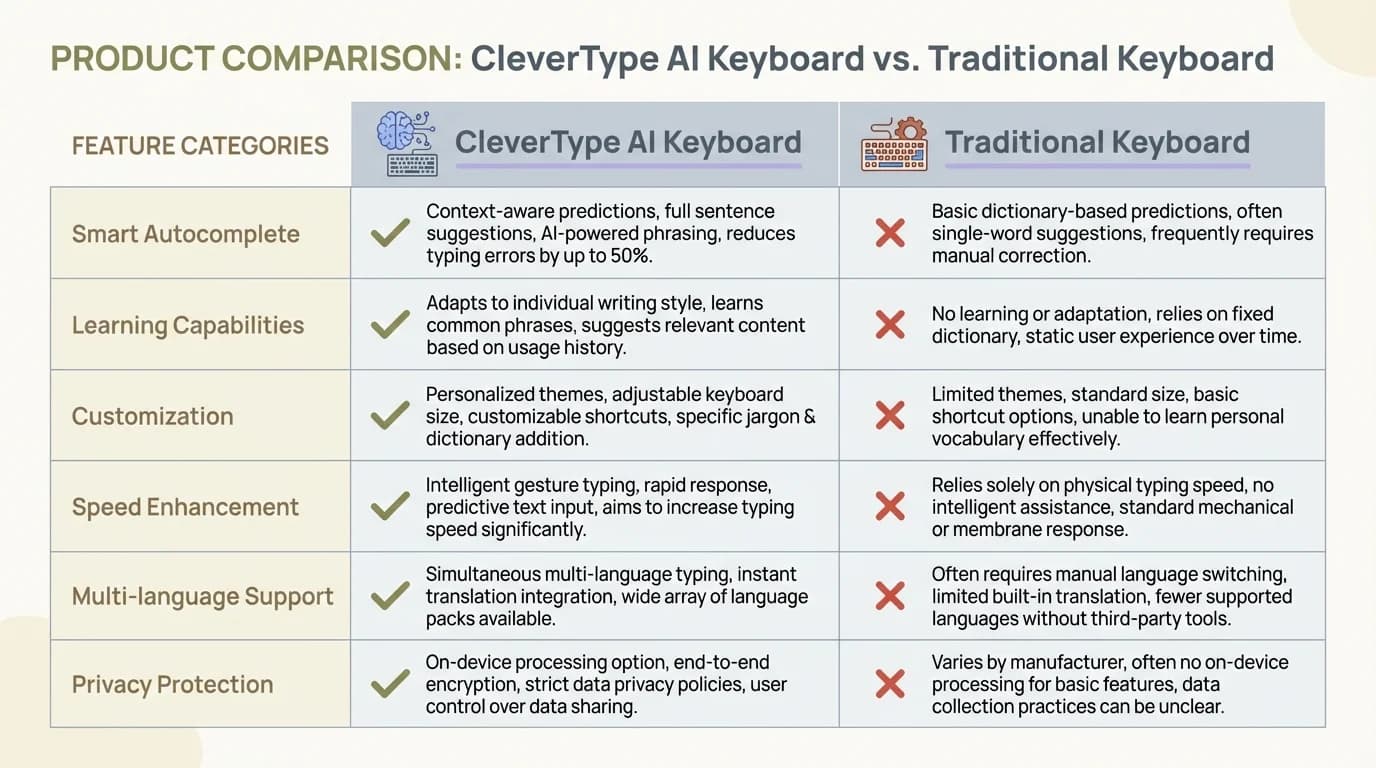
Side-by-side comparison of CleverType AI Keyboard features versus traditional keyboard capabilities
When to Choose a Traditional Keyboard
Sometimes the old ways are still the best ways, ya know? Traditional keyboards definitely still have their place in today's tech world.
Scenarios Where Traditional Keyboards Excel
If you're typing in multiple languages frequently, traditional keyboards often handle language switching more smoothly. They're built for this basic functionality, and they do it well without trying to "help" you with grammar that might be correct in one language but not in another.
For gamers, traditional keyboards are still king. The response time is faster, and there's no AI trying to correct your gaming commands or chat messages. When you're in the middle of an intense gaming session, the last thing you want is your keyboard second-guessing your rapid-fire inputs.
Privacy-conscious users also tend to prefer traditional keyboards. With no cloud-based grammar checking, your keystrokes stay on your device. This is particularly important if you're typing sensitive information like passwords, financial details, or confidential work documents.
Battery life is another consideration. If you're traveling or away from power sources for extended periods, a traditional keyboard will drain your device's battery much more slowly than an AI-powered alternative.
User Profiles That Benefit From Traditional Keyboards
Who should stick with traditional keyboards? Well, fast typists often find that grammar checkers slow them down. If you're already typing at 80+ words per minute with few errors, the constant suggestions might just get in your way.
Content creators who have developed their own unique voice or style sometimes find grammar checkers too restrictive. These tools tend to push writing toward a standardized, sometimes corporate tone that might not fit creative content.
Programmers and coders also generally prefer traditional keyboards. Code doesn't follow the rules of natural language, so grammar checkers just add frustration to the coding process by trying to correct syntax that's perfectly valid in programming languages but not in English.
And finally, if you're someone who just values simplicity in your tech tools, a traditional keyboard gives you exactly what you need without the bells and whistles. Sometimes simpler is better!
When to Choose a Grammar-Correcting Keyboard
Alright, so when does it make sense to go for one of these fancy AI grammar keyboards? Let's talk about who really benefits from these tools.
Scenarios Where Grammar-Correcting Keyboards Shine
Professional communication is a biggie. If you're regularly sending important emails, writing reports, or communicating with clients, a grammar-correcting keyboard can be your secret weapon. It helps you come across as polished and professional, which can make a real difference in how people perceive your competence.
Academic writing is another area where grammar correction is super valuable. Whether you're a student working on essays or a researcher preparing papers, having real-time grammar assistance can help you focus on your ideas rather than worrying about technical writing issues.
Social media managers can also benefit hugely. When you're posting content that represents a brand, typos and grammar mistakes can damage credibility. AI keyboards for social media help ensure your posts are error-free before they go live to potentially thousands of followers.
Job searching is another critical time for perfect writing. When you're sending cover letters or responding to potential employers, grammar mistakes can cost you opportunities. A grammar-correcting keyboard adds an extra layer of protection against career-damaging errors.
User Profiles That Benefit From Grammar-Correcting Keyboards
Non-native English speakers often find grammar-correcting keyboards invaluable. They provide real-time language lessons by showing you correct usage as you write. Over time, this can actually improve your overall English skills, not just your writing.
People with dyslexia or other language-processing challenges can find these keyboards life-changing. AI keyboard apps for dyslexia reduce the cognitive load of having to spot errors, allowing users to focus on expressing their thoughts rather than struggling with the mechanics of writing.
Busy professionals who are constantly multitasking appreciate the efficiency of grammar correction. When you're juggling multiple responsibilities, having your keyboard catch errors saves valuable time that would otherwise be spent proofreading.
Students preparing important assignments also benefit greatly. The stakes are high for academic work, and grammar-correcting keyboards provide an extra layer of quality control before submission.
The Learning Curve: Adapting to New Keyboard Technology
Switching to a grammar-correcting keyboard isn't always a smooth ride. There's definitely a learning curve involved, and it's worth knowing what to expect before you make the jump.
Initial Challenges When Switching to Grammar-Correcting Keyboards
First off, you'll probably notice your typing speed takes a hit at the beginning. It's kinda like when you got your first smartphone—remember how slow you were compared to your old flip phone? You're not just typing anymore; you're interacting with suggestions and corrections, which requires new habits.
There's also this weird feeling of being "watched" as you type. It can be distracting to see those little squiggly lines or suggestion bubbles appearing while you're still forming your thoughts. Some people find this super annoying at first—like having someone constantly looking over your shoulder and pointing out mistakes.
Another challenge is learning to trust the AI. Sometimes it'll make suggestions that seem wrong to you, but it's actually right. Other times, it'll suggest changes that would alter your intended meaning. Learning when to accept suggestions and when to ignore them takes time and judgment.
Tips for a Smooth Transition
So how do you make this transition easier? Start by using the keyboard in low-pressure situations first. Don't make your first experience with it be writing an important work email or school assignment. Use it for casual texting or personal notes until you get comfortable with how it works.
Customize your settings! Most grammar keyboards let you adjust how aggressive the correction features are. You might want to start with minimal interference and gradually increase it as you get used to the system.
Take time to learn the shortcuts and gestures. Grammar keyboards often have efficient ways to accept or reject suggestions, add suggested words, or access additional features. Learning these can significantly speed up your workflow once you get past the initial slowdown.
Finally, be patient with yourself. Any new technology takes time to master. Most users report that after a few weeks, they not only adapt to grammar-correcting keyboards but actually become more efficient writers than they were before.
Privacy and Security Considerations
Let's talk about the elephant in the room—privacy. When you're using a keyboard that analyzes everything you type, where does all that data go?
How Grammar-Correcting Keyboards Handle Your Data
Most grammar-correcting keyboards process your text in one of two ways: either locally on your device or by sending it to cloud servers for analysis. Local processing is more private but often less powerful, while cloud processing offers better suggestions but raises more privacy questions.
Different keyboard apps have very different privacy policies. Some, like CleverType, are pretty transparent about not storing the content of what you type. Others might collect data to improve their services or even for targeted advertising.
The bigger concern is sensitive information. Are you typing passwords? Financial details? Health information? Most grammar keyboards claim they don't store this type of data, but the very fact that it passes through their systems makes some users nervous.
Choosing a Privacy-Focused Grammar Keyboard
If privacy is important to you (and honestly, it should be for everyone), look for keyboards that explicitly offer local processing options. This means your text never leaves your device.
Check if the keyboard has a "private mode" or "incognito mode" that you can enable when typing sensitive information. This typically disables cloud-based features temporarily.
Read the privacy policy before installing any keyboard app. Yes, I know nobody ever reads these things, but with keyboards, it's worth it. Look specifically for what data they collect, how long they store it, and who they share it with.
Consider using different keyboards for different purposes. You might use a grammar-correcting keyboard for work emails and social media, but switch to a traditional keyboard for banking apps or medical information.
Remember that free services often come with a privacy cost. If you're not paying for the product, your data might be the product. Premium grammar keyboards often have stronger privacy protections because their business model isn't dependent on data collection.
Productivity Impact: Speed vs. Accuracy
When it comes to keyboards, there's always this tradeoff between typing speed and accuracy. Let's explore how this plays out with grammar-correcting vs. traditional keyboards.
Measuring Efficiency: Traditional vs. Grammar-Correcting
With traditional keyboards, your typing speed is limited only by how fast your fingers can move. Experienced typists can reach impressive speeds because there's no processing lag or interruptions from suggestions. But the tradeoff is that any errors you make stay there until you manually correct them.
Grammar-correcting keyboards typically slow down raw typing speed initially. Having to pause to read suggestions or accept corrections interrupts the flow. However, they reduce the need for editing afterward, which can save significant time in the overall writing process.
Here's an interesting way to think about it: traditional keyboards are faster at getting words on the page, but grammar keyboards are often faster at getting the final, polished text completed.
Finding Your Personal Balance
The ideal balance depends entirely on what kind of writing you do. If you're drafting creative content where flow is important, you might prefer to type quickly on a traditional keyboard and worry about grammar later. On the other hand, if you're writing customer emails where accuracy is critical, the real-time corrections of a grammar keyboard might be worth the slight typing slowdown.
Many people develop a hybrid approach. They type quickly to get their thoughts down, then pause periodically to review and accept or reject the grammar suggestions. This provides a nice balance between maintaining flow and ensuring accuracy.
Experiment with different settings on your grammar keyboard. Most allow you to adjust how aggressively they offer suggestions. You might find that minimal interference during initial typing, followed by a more thorough grammar check before sending, works best for you.
Remember that there's a learning curve with grammar keyboards. While they might slow you down initially, many users report that they eventually type faster with grammar assistance than they did with traditional keyboards once they adapt to the new workflow.
The Future of Keyboard Technology
What's next for keyboards? The technology is evolving rapidly, and some genuinely exciting innovations are already here in 2026.
Emerging Trends in Keyboard Development
Voice-to-text integration has become remarkably seamless within modern keyboards. You can now switch effortlessly between typing and speaking, with the same grammar assistance applying to both inputs. Advanced transcribe keyboards can now understand context, correct spoken grammar in real-time, and even adjust your spoken words to match written conventions.
Context-aware suggestions have reached impressive levels of sophistication. Modern keyboards don't just correct your grammar—they understand the specific context of what you're writing and who you're writing to. They can detect whether you're emailing your boss, chatting with friends, or posting on social media, and automatically adjust tone, formality, and vocabulary accordingly. This contextual intelligence was science fiction just a few years ago.
Multilingual capabilities have expanded far beyond simple translation. Today's keyboards help you write naturally in multiple languages simultaneously, understanding the nuances, idioms, and cultural context of each. For bilingual professionals and international teams, this has been transformative—you can switch between languages mid-sentence without missing a beat.
Haptic feedback technology has become more sophisticated, with keyboards providing different tactile sensations for different types of corrections or suggestions. This multi-sensory approach helps users process information through touch rather than relying solely on visual cues, making typing more intuitive and reducing screen-time fatigue.
Perhaps most exciting is the emergence of predictive writing that goes beyond simple word completion. Advanced keyboards can now suggest entire sentences or paragraphs based on context, your writing history, and the conversation thread. This isn't about replacing your voice—it's about helping you express your thoughts more efficiently when you're in a hurry or dealing with writer's block.
Will Traditional Keyboards Become Obsolete?
Despite all these advancements, traditional keyboards aren't disappearing. They remain essential in specific contexts like gaming (where split-second responses matter), programming (where AI suggestions can interfere with code syntax), and situations where maximum privacy is required.
What we're seeing instead is a convergence. The line between "traditional" and "grammar-correcting" is blurring. Basic grammar features are becoming standard on virtually all keyboards, with users able to dial the assistance up or down according to their needs and preferences. This flexibility gives everyone the power to choose their ideal balance.
We're also witnessing the rise of specialized keyboard profiles for different purposes. You might have one configuration optimized for creative writing, another for business communication, a third for coding, and a fourth for casual messaging—all seamlessly switching based on the app you're using or manual selection.
The most exciting development is increased personalization. Modern keyboards learn not just your common phrases and mistakes, but your unique voice, style, and communication patterns. They help you sound more authentically like yourself—only polished and refined—rather than pushing everyone toward the same standardized corporate writing style. This preservation of individual voice while improving technical accuracy represents the best of both worlds.
2026 Update: What's Changed in Keyboard Technology
The keyboard landscape has transformed significantly in recent years. Here's what's new in 2026 that might influence your decision.
On-Device AI: The Privacy Game-Changer
The biggest shift in 2026 is the widespread adoption of on-device AI processing. Unlike earlier grammar keyboards that sent your text to cloud servers, modern keyboards like CleverType process everything locally on your phone or computer. This means your sensitive emails, passwords, and private messages never leave your device. The privacy concerns that plagued early AI keyboards have largely been resolved through this technological advancement.
This local processing also brings speed improvements. Real-time suggestions now appear instantaneously, with zero lag—even without an internet connection. You can write emails on airplanes, edit documents in remote locations, or compose messages in areas with poor connectivity, all while enjoying full AI assistance.
The Rise of Hybrid Keyboards
In 2026, we've seen the emergence of "hybrid keyboards" that intelligently adapt to your needs. These keyboards automatically detect your context and adjust their behavior accordingly. When you're typing code, they disable grammar suggestions. When you're composing a professional email, they activate. When you're texting friends, they relax their standards. This contextual intelligence eliminates the need to manually switch between different keyboards for different tasks.
This means the old debate of "grammar-correcting vs traditional" is becoming outdated. Modern keyboards offer the best of both worlds—the speed and simplicity of traditional keyboards when you need it, and sophisticated AI assistance when it's helpful. You're no longer forced to choose one approach for all situations.
Making Your Choice: A Practical Guide
Still feeling torn between traditional and grammar-correcting keyboards? Let's get practical about how to decide which is right for you.
Questions to Ask Before Choosing
What's your primary use case? Be honest about what you actually use your keyboard for most often. Gaming? Work emails? Creative writing? Social media? Different activities have different requirements.
How important is accuracy in your writing? If you're in a profession where writing errors could have serious consequences, the benefits of grammar correction might outweigh any drawbacks.
How's your battery life situation? If you're already struggling to make it through the day on a single charge, be aware that AI keyboards will increase battery consumption.
Do you have privacy concerns? If you regularly type sensitive information, consider whether you're comfortable with that text being analyzed, even if the keyboard claims not to store it.
What's your budget? Some of the best grammar-correcting keyboards require subscriptions. Is this an expense you're willing to take on?
Try-Before-You-Buy Strategy
Most grammar keyboards offer free trials or freemium versions. Take advantage of these to test how they work with your specific writing style before committing.
Try using a grammar keyboard for one specific purpose first, rather than switching completely. You might use it just for work emails for a week, then evaluate whether it made a positive difference.
Ask for recommendations from people who write similar content to you. A keyboard that works well for a novelist might not be ideal for a business professional or a student.
Check out comparison videos and reviews online, but remember that keyboard preferences are highly personal. What works for a reviewer might not work for you.
Consider trying multiple options. The best AI keyboard for Android might be different from the best option for iOS, and different apps have different strengths.
Frequently Asked Questions
Q: Are grammar-correcting keyboards worth the extra cost?
A: It depends on your specific needs. If you write professional emails, academic papers, or client-facing content regularly, the improved accuracy and time savings typically justify the $5-15 monthly subscription. For casual users who mainly text friends and family, a free basic keyboard might be sufficient. Consider that even saving 15-20 minutes per day can translate to significant productivity gains over time.
Q: Will using grammar-correcting keyboards make me a worse writer?
A: Not necessarily, but it depends on how you use them. If you blindly accept every suggestion without understanding why, your skills might stagnate. However, if you treat the keyboard as a learning tool—paying attention to corrections and understanding the grammar rules behind them—it can actually improve your writing skills over time. Many users find that they make fewer errors even when AI assistance is turned off.
Q: How do grammar keyboards handle privacy and data security?
A: This varies by provider. In 2026, leading keyboards like CleverType process all text on-device, meaning your data never leaves your phone or computer. However, some keyboard apps still use cloud processing, which may involve sending your text to remote servers. Always read the privacy policy and look for keyboards that explicitly offer local processing or have strong privacy guarantees. Avoid typing passwords or highly sensitive information with any keyboard that uses cloud processing.
Q: Can I use different keyboards for different apps on my phone?
A: Most modern smartphones allow you to install multiple keyboards and switch between them manually. Some advanced keyboards in 2026 even automatically adjust their behavior based on which app you're using—being strict in email apps but relaxed in messaging apps. This flexibility means you don't have to choose just one keyboard type for everything you do.
Q: Do grammar keyboards work well for non-native English speakers?
A: Absolutely. Grammar-correcting keyboards are particularly valuable for non-native speakers because they provide real-time feedback and learning opportunities. Many users report that their English improves significantly after using AI keyboards for several months, as they begin to internalize common patterns and corrections. The instant feedback helps build confidence in professional and academic communication.
Q: How much battery life do grammar keyboards consume compared to traditional keyboards?
A: Modern on-device AI keyboards use approximately 10-15% more battery than traditional keyboards. This was a bigger concern with earlier cloud-based keyboards, but improvements in AI efficiency have dramatically reduced power consumption. For most users with typical daily usage, this translates to maybe 30-60 minutes less battery life, which is usually manageable with modern smartphone batteries.
Q: Can grammar keyboards understand technical jargon, slang, or industry-specific terminology?
A: Yes, modern grammar keyboards can learn your vocabulary over time. They build personal dictionaries that include technical terms, industry jargon, company names, and slang you use frequently. Initially, they might flag these as errors, but once you add them to your dictionary or ignore the suggestions a few times, the AI learns to recognize them as valid in your context. This adaptive learning makes them suitable for specialized fields like medicine, law, or technology.
Conclusion: The Best of Both Worlds
So what's the verdict in 2026? Is one type of keyboard definitively better than the other? As with most technology questions, the answer depends on your individual needs and how you use your devices.
The debate between grammar-correcting and traditional keyboards is evolving beyond a simple either/or choice. With hybrid keyboards that intelligently adapt to context, on-device AI that protects privacy, and dramatically improved efficiency, today's tools offer unprecedented flexibility. Many people no longer need to choose—their keyboard simply adjusts to provide the right level of assistance for each situation.
The great news is that keyboard technology continues advancing at an impressive pace. Grammar keyboards have become less intrusive and more contextually aware, while traditional keyboards are incorporating smart features without sacrificing the speed and simplicity users love. The gap between these two categories is narrowing.
Ultimately, the best keyboard is the one that becomes invisible as you use it—the tool that lets you focus entirely on what you're trying to communicate rather than the mechanics of typing. Whether that's a cutting-edge AI grammar assistant like CleverType, a simple traditional keyboard, or a hybrid that adapts to your needs, depends entirely on your writing style, priorities, and use cases.
Looking ahead, we can expect the boundaries between keyboard types to blur even further. The future isn't about choosing between AI assistance and traditional simplicity—it's about having intelligent tools that know when to help and when to step back. The keyboard, once a simple input device, has evolved into a sophisticated writing partner that respects your voice while helping you communicate more effectively. And that evolution continues to accelerate.