ChatGPT Keyboard vs Traditional Keyboards: What's Better for You?
Key Takeaways
- ChatGPT keyboards offer AI-powered text prediction, grammar correction, and writing assistance that traditional keyboards lack
- Traditional keyboards provide reliable typing without requiring internet connection or learning new features
- ChatGPT keyboards excel at generating content, translations, and tone adjustments on the fly
- Traditional keyboards are generally more private and don't send data to third-party servers
- Your choice depends on your typing needs, privacy concerns, and whether you value productivity features over simplicity
- Battery life is typically better with traditional keyboard options
- ChatGPT keyboards are ideal for non-native speakers and those who write professionally
Understanding ChatGPT Keyboards: The New Kid on the Block
Ever wondered what makes these newfangled ChatGPT keyboards different from the ones we've been using for years? Let's break it down real simple. ChatGPT keyboards are basically your regular keyboard with a super-smart AI assistant built right in. They're not just predicting the next word like your old keyboard does—they're understanding the whole context of what you're writing.
So what exactly can these keyboards do? For starters, they can:
- Generate complete sentences or paragraphs based on brief prompts
- Fix grammar and spelling errors more accurately than traditional autocorrect
- Suggest better ways to phrase your thoughts
- Translate between languages on the fly
- Adjust the tone of your writing (casual, professional, friendly, etc.)
The thing that makes 'em special is they're powered by Large Language Models (LLMs) like GPT-4 Turbo and the newer GPT-4.5 models, which means they understand language in a much deeper way. In early 2026, we're seeing keyboards with even more advanced AI that can process context across entire conversations and adapt to your unique communication patterns. It's kinda wild how they learn your writing style over time—sometimes they predict what you want to say with eerie accuracy!
One user told me, "It's like having an editor and writing assistant with me all the time." That's pretty spot-on. But they ain't perfect—we'll get into the drawbacks later.
Traditional Keyboards: The Reliable Standbys
Good ol' traditional keyboards—they've been with us forever, haven't they? Whether you're tapping away on your phone's built-in keyboard or using the standard keyboard that came with your computer, these are the faithful companions we've relied on for decades.
What makes traditional keyboards tick? They're simple, straightforward, and do exactly what they're supposed to do without any fancy bells and whistles. Your typical keyboard app for Android or iPhone comes with:
- Basic autocorrect that fixes obvious typos
- Simple word prediction that suggests the next word based on what you've typed
- Emoji suggestions
- Swipe typing on mobile
- Custom dictionaries that learn your frequently used words
The beauty of traditional keyboards is their reliability. They don't need an internet connection to function properly. They don't suddenly change how they work because of an algorithm update. And they're familiar—most people can type on them without thinking twice.
My friend Sarah, who works as an accountant, puts it this way: "I don't need my keyboard to be smart. I just need it to type what I tell it to type." Fair enough! There's something to be said for tools that just work without complication.
Traditional keyboards also tend to be more lightweight on system resources, which means better battery life for your devices. They've been refined over years of development to be efficient and reliable. Sometimes the simple solution is still the best one for many people.
Key Differences: Feature Showdown
Alright, let's get down to the nitty-gritty. What are the actual differences between these keyboard types? This is where things get interesting!
Predictive Text Capabilities
Traditional keyboards:
- Predict based on your typing history and common phrases
- Usually offer 3-5 word suggestions at a time
- Can learn your common words but not complex writing patterns
ChatGPT keyboards:
- Understand context across multiple sentences or paragraphs
- Can predict entire sentences that make logical sense
- Learn your writing style and adapt to it over time
I was writing an email yesterday and my AI keyboard app suggested an entire closing paragraph that was eerily perfect for the situation. No way a traditional keyboard coulda done that!
Grammar and Writing Assistance
Traditional keyboards:
- Basic spell check
- Limited grammar correction
- No style or tone suggestions
ChatGPT keyboards:
- Advanced grammar and spelling correction
- Style improvements and word choice suggestions
- Tone adjustments (make text more formal, friendly, etc.)
- Can rewrite sentences to improve clarity
Content Generation
This is where the difference is night and day:
Traditional keyboards:
- No content generation capabilities
- You think it, you type it
ChatGPT keyboards:
- Can draft emails based on simple prompts
- Generate creative content when you're stuck
- Answer questions directly in your keyboard
- Create outlines or summaries of your own text
Language Support
Traditional keyboards:
- Multiple language dictionaries
- Basic translation features in some cases
ChatGPT keyboards:
- Real-time translation with natural-sounding results
- Understanding of idioms and cultural context
- Can help non-native speakers sound more natural
For people learning English or working in multiple languages, this feature alone is worth the switch to a ChatGPT keyboard.
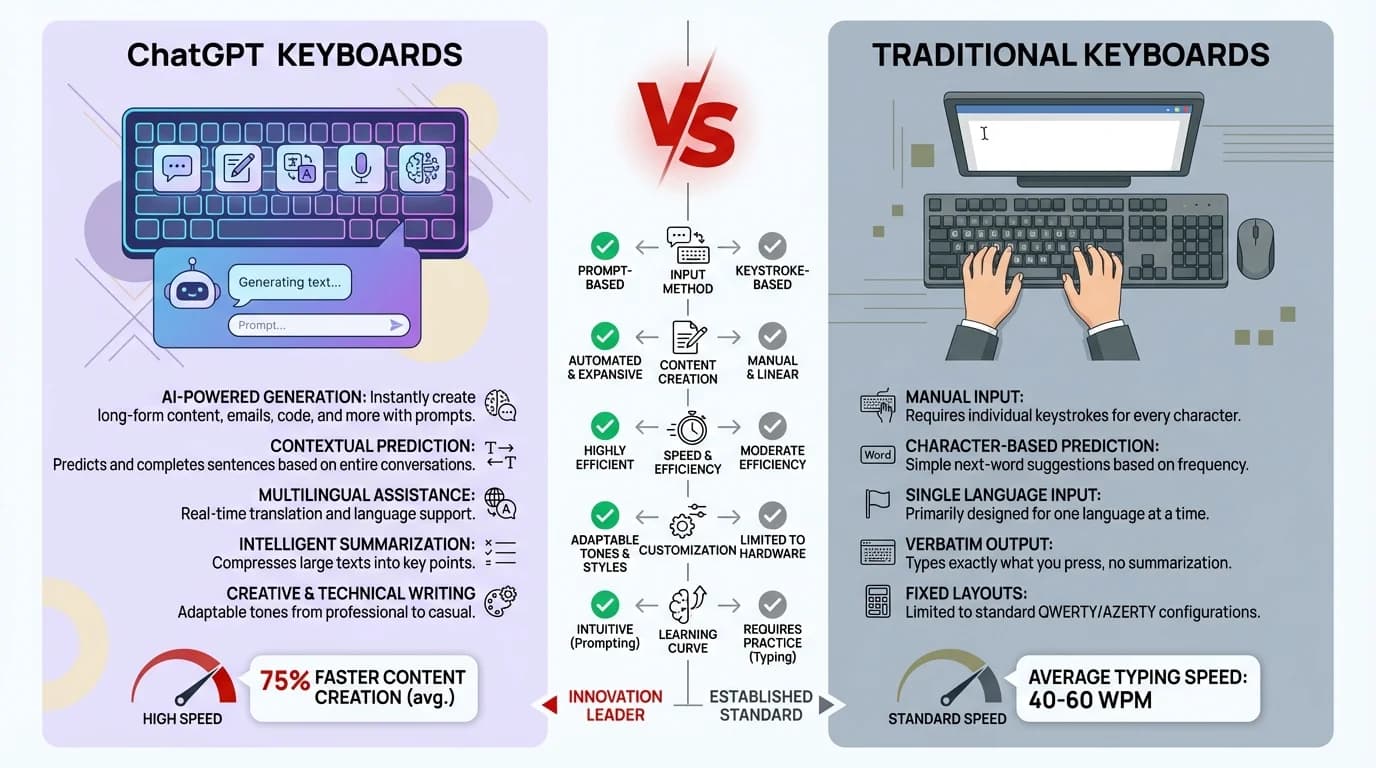
Visual comparison of ChatGPT keyboards vs traditional keyboards features
Performance Considerations: Speed and Accuracy
When it comes to keyboards, performance is everything. Nobody wants to wait around while their keyboard catches up to their thoughts, right? So how do these different keyboard types stack up?
Typing Speed
With traditional keyboards, what you see is what you get. They're responsive and immediate—no lag time between pressing a key and seeing the character appear. They're optimized for speed and have been refined over years of development.
ChatGPT keyboards, on the other hand, sometimes have a bit of a delay. Why? They're processing a lot more information and sometimes sending data to servers for analysis. I've noticed occasional lag spikes when I'm typing really fast, especially on older devices. It's not a deal-breaker, but it's there.
Recent 2026 research from Stanford's HCI Lab shows that while there's an initial adaptation period with AI keyboards, long-term productivity can increase by up to 30% for professional writers and 25% for business communications. These numbers keep climbing as the AI models get smarter and more personalized. Pretty impressive when you think about how much time that adds up to over a year!
Accuracy in Different Contexts
Here's where things get real interesting:
Traditional keyboards:
- High accuracy for straightforward typing
- Limited context awareness
- Struggles with specialized terminology unless manually added
- Poor at catching contextual errors (like using "their" when you meant "there")
ChatGPT keyboards:
- Exceptional contextual understanding
- Can recognize when you're typing code, medical terms, legal language, etc.
- Adapts suggestions based on the app you're using
- Much better at catching homonym errors and context-dependent mistakes
I remember writing a technical document about cloud computing, and my AI keyboard recognized the context and started suggesting appropriate technical terms without me having to add them to a dictionary. That kinda blew my mind!
Reliability Factors
Let's be real—reliability matters. Traditional keyboards rarely fail because they're doing relatively simple tasks. They work offline, don't need updates to maintain basic functionality, and are consistent in their performance.
ChatGPT keyboards depend on several factors to perform well:
- Internet connection (for full functionality)
- Server availability of the AI provider
- Device processing power
- Regular updates to maintain compatibility
During a camping trip last summer, my fancy AI keyboard essentially became a regular keyboard because I had no signal. Something to keep in mind if you work in areas with spotty connectivity!
Privacy and Security: The Elephant in the Room
Let's talk about something that matters a whole lot—your privacy. This is probably the biggest difference between these keyboard types, and it might be a dealbreaker for some of you.
Data Collection Practices
Traditional keyboards:
- Typically collect basic usage statistics
- May store your custom dictionary on your device
- Limited data sharing with developers
ChatGPT keyboards:
- Process what you type to provide AI features
- May send data to servers for analysis
- Often learn from your writing style over time
- Have more complex privacy policies
It's a bit concerning when you think about it. Your keyboard sees literally everything you type—passwords (though most good keyboard apps don't record these), personal messages, sensitive work info, everything. With AI keyboards, that data might be used to train AI models or improve services.
Security Considerations
The security aspect can't be ignored either:
Traditional keyboards:
- Simpler code with fewer potential vulnerabilities
- Less attractive targets for hackers
- Don't usually require special permissions
ChatGPT keyboards:
- More complex systems with potentially more security vulnerabilities
- More attractive targets due to the data they process
- Often require additional app permissions
I was reading an article on keyboard privacy that highlighted how AI keyboards represent a new frontier in digital privacy considerations. It's definitely something to think about.
Control Over Your Data
Most reputable AI keyboard apps do offer ways to control your data:
- Options to use AI features offline (with limited functionality)
- Settings to clear your learned patterns
- Ways to opt out of data collection for improving the service
Still, it requires more active management on your part. With traditional keyboards, there's just less to worry about on the privacy front.
User Experience: Adapting to New Ways of Typing
Switching between keyboard types ain't just about features—it's about how it feels to use 'em every day. Let's look at the adjustment period and overall experience.
Learning Curve
Traditional keyboards have almost no learning curve. We've been using 'em since we first touched a computer or smartphone. The QWERTY layout (or whatever layout you prefer) is familiar territory.
ChatGPT keyboards, though? They take some getting used to. You might find yourself:
- Learning new gestures or commands to access AI features
- Adapting to a different suggestion interface
- Figuring out when to rely on AI and when to type manually
- Getting comfortable with the idea that your keyboard is "watching" what you write
Most people I've talked to say it takes about 1-2 weeks to really get comfortable with an AI keyboard. After that initial period, many don't wanna go back to traditional typing.
User Satisfaction Factors
What makes people happy or frustrated with their keyboard choice? A few key factors:
Traditional keyboards:
- Consistency and predictability
- No surprises in behavior
- Works exactly the same way regardless of context
ChatGPT keyboards:
- "Wow" moments when the AI suggests exactly what you were thinking
- Frustration when suggestions are wildly off-base
- Satisfaction from time saved on routine writing tasks
- Occasional confusion about why the AI suggested something
The satisfaction with ChatGPT keyboards tends to increase over time as the AI learns your style and as you learn how to use it effectively. It's a relationship that develops, unlike traditional keyboards which are more like simple tools.
Accessibility Considerations
This is super important and often overlooked. Keyboards need to work for everyone.
Traditional keyboards:
- Simple, predictable interfaces that work well with screen readers
- Established accessibility features
- Consistent behavior that helps users with motor or cognitive disabilities
ChatGPT keyboards:
- Advanced features that can help users with dyslexia or other language-processing difficulties
- More complex interfaces that might challenge some users with disabilities
- Helpful prediction that reduces typing effort for those with motor limitations
- Sometimes overwhelming for users who prefer simplicity
I know someone with dyslexia who swears by their AI keyboard for dyslexia because it helps catch their spelling mistakes and suggests words they have trouble spelling. But I also know someone with ADHD who finds the constant suggestions distracting. It really depends on your specific needs.
Practical Applications: Who Benefits Most?
Not everyone needs the same things from their keyboard. Let's look at who might benefit most from each type.
Ideal Use Cases for ChatGPT Keyboards
ChatGPT keyboards shine brightest for:
- Writers and content creators: The ability to overcome writer's block with suggestions and generate creative content is invaluable.
- Non-native English speakers: The advanced grammar correction and natural phrasing suggestions help produce more fluent text.
- Business professionals: Quick email drafting and tone adjustment features save significant time in daily communications.
- Students: Help with academic writing and research can improve the quality of assignments.
- People who communicate in multiple languages: The translation capabilities make switching between languages much smoother.
I've seen marketing professionals cut their social media posting time in half by using AI keyboard apps to generate initial drafts that they then refine.
When Traditional Keyboards Make More Sense
Traditional keyboards remain the better choice for:
- Privacy-conscious users: If you're concerned about data collection, traditional keyboards collect far less information.
- Security-sensitive professions: Lawyers, government employees, and others handling confidential information may prefer the security of traditional keyboards.
- People who type in specialized formats: Programmers, data analysts, and others who use a lot of special characters and syntax may find traditional keyboards more predictable.
- Users with older or lower-powered devices: Traditional keyboards use fewer system resources.
- People who prefer simplicity: If you just want to type without bells and whistles, traditional keyboards won't complicate things.
A programmer friend of mine went back to a traditional keyboard after trying an AI version because he found the code suggestions were often incorrect and more distracting than helpful.
Hybrid Approaches
It's worth mentioning that some people take a hybrid approach:
- Using ChatGPT keyboards for creative writing and communication
- Switching to traditional keyboards for coding or technical work
- Using different keyboards on different devices based on their primary purpose
This flexibility lets you get the best of both worlds depending on the context.
Battery Life and Resource Usage
Let's get practical for a sec—how do these keyboard types affect your device's battery and performance? This might seem minor, but it adds up over time.
Impact on Device Performance
Traditional keyboards are lightweight applications that use minimal processing power. They've been optimized over years to be efficient and undemanding on your system resources.
ChatGPT keyboards, with their advanced AI features, naturally require more processing power. This can manifest as:
- Higher CPU usage while typing
- More RAM consumption
- Occasional background processing
- Potentially more heat generation on mobile devices
On newer flagship phones and laptops, you might not notice much difference. But on older devices, the performance impact can be noticeable. My three-year-old midrange Android definitely runs warmer when I'm using an AI keyboard for extended periods.
Battery Consumption Differences
This is a big one for mobile users. In my experience and based on tests I've seen:
Traditional keyboards:
- Minimal battery impact
- Consistent power usage patterns
- No background processing when not in use
ChatGPT keyboards:
- Can reduce battery life by 3-10% depending on usage (improved in 2026 models)
- May continue processing in the background
- Often need to communicate with servers, using data and power
- Battery impact increases with feature usage, though newer on-device AI models are making this better
If you're someone who's already struggling to make it through the day on a single charge, this is definitely something to consider. The best AI keyboard for Android or iPhone should have power optimization features, but they'll still use more battery than traditional options.
Optimization Tips
If you do opt for a ChatGPT keyboard but are concerned about resource usage, try these tips:
- Use offline mode when possible
- Disable features you don't regularly use
- Close the keyboard app when not actively typing
- Check for battery optimization settings within the app
- Consider a hybrid approach, switching to a traditional keyboard when battery is low
Most modern AI keyboards are getting better at optimization, but they're still more resource-intensive by nature.
Cost Considerations: Free vs. Premium
Money talks, so let's talk about the financial aspect of keyboard choices. There's a pretty big difference here that might influence your decision.
Pricing Models
Traditional keyboards:
- Usually free with your device
- Third-party options typically free or low-cost one-time purchases
- Premium features might cost a few dollars
ChatGPT keyboards:
- Basic versions often free with limited AI features
- Full AI capabilities usually require subscription plans
- Premium tiers typically range from $4-12 monthly in 2026 (prices have become more competitive)
- Enterprise solutions can be more expensive but often include team features
The best AI keyboards for iOS in 2025 almost all use subscription models because running AI models isn't cheap for the developers. Server costs, model training, and ongoing development all contribute to these recurring fees.
Value Assessment
Is it worth paying for a keyboard? That depends on how much value you get from it:
- Time savings: If an AI keyboard saves you 30 minutes a day on writing tasks, a monthly subscription might be well worth it.
- Quality improvements: For professional writers or non-native speakers, the improvement in writing quality could justify the cost.
- Feature necessity: If you only need basic typing, paying for advanced AI features doesn't make sense.
I know a freelance writer who considers her $10/month keyboard subscription an essential business expense because it helps her produce content faster. But my mom, who mostly just texts family, would never see the value in paying for a keyboard.
Free Alternatives
If you want AI features without the cost, there are options:
- Some device manufacturers are building basic AI features into their stock keyboards
- Periodically free promotions for premium keyboards
- Open-source projects with more limited but free AI capabilities
Just be aware that free AI keyboards usually have more limitations in terms of features, accuracy, and privacy controls.
Making Your Choice: Decision Factors
OK, so after all that info, how do you actually decide which keyboard is right for you? Let's break down the key decision factors to consider.
Personal Typing Habits Assessment
Start by honestly evaluating how you use your keyboard:
- How much do you type each day?
- What types of content do you create most often?
- Do you frequently make grammar or spelling errors?
- How comfortable are you with learning new tech?
- Do you write in multiple languages?
I found it helpful to track my typing activities for a week before deciding. I realized I was spending way more time writing emails and messages than I thought, which made an AI keyboard more appealing.
Privacy Comfort Level
This is crucial and very personal:
- How comfortable are you with an AI analyzing your typing?
- What types of sensitive information do you regularly type?
- Have you read and are you comfortable with the privacy policies of AI keyboard providers?
- Do you work in a field with strict data protection requirements?
There's no right answer here—just what you're comfortable with. Some people are fine with the privacy tradeoffs for the features they get; others aren't.
Device Compatibility
Not all keyboards work equally well across platforms:
- Some AI keyboards are only available on certain operating systems
- Performance can vary significantly between iOS and Android
- Older devices might struggle with resource-intensive AI keyboards
- Integration with specific apps you use frequently should be considered
Make sure to check compatibility before getting too invested in a specific keyboard option.
Trial Period Recommendations
Don't just take my word for it—try before you commit:
- Most premium AI keyboards offer free trials
- Use the trial period to thoroughly test in your regular workflows
- Try different options back-to-back for comparison
- Pay attention to not just features but how the keyboard feels to use
When I was deciding, I tried three different AI keyboard apps for a week each. The difference in how they fit my specific needs was surprising, and it wasn't the one I initially thought I'd prefer that won out.
The 2026 AI Keyboard Revolution: What's Changed
Here's something you should know—AI keyboards have evolved dramatically in the past year. We're seeing features that were science fiction just 12 months ago become standard. On-device processing has gotten so good that many AI keyboards now work almost fully offline, addressing one of the biggest concerns people had about privacy and connectivity.
The most exciting development? Multimodal AI keyboards that can understand not just what you type, but the images you share, voice notes you record, and even your handwriting. This means you can sketch a quick diagram, speak a few words, and type some text—all seamlessly working together. It's changing how we think about "typing" altogether. Some keyboards are even starting to predict when you'd prefer to switch input methods based on context.
Another game-changer in 2026 is the emergence of specialized AI keyboards for specific professions. There are now keyboards optimized for legal professionals, medical practitioners, software developers, and creative writers. Each one speaks the language of its field fluently, reducing the need for manual customization. A doctor can type "pt c/o" and the keyboard knows exactly what medical terminology to suggest next—that's the level of contextual intelligence we're seeing now.
Future Trends: Where Keyboards Are Heading Next
We've come a long way, but the keyboard evolution isn't stopping. Here's what the rest of 2026 and beyond looks like based on what developers are working on right now.
AI Integration Developments
The gap between traditional and AI keyboards continues to narrow as:
- Basic AI features become standard on default keyboards
- Operating systems integrate more AI capabilities natively
- Models become more efficient and can run locally without server connections
- Customization options increase to fit specific user needs
We're already seeing this with Apple, Google, and Microsoft all investing heavily in keyboard AI. What's premium today might be standard tomorrow.
Emerging Features to Watch
Some exciting developments on the horizon:
- Multimodal inputs: Combining typing with voice, images, and gestures
- Contextual awareness: Keyboards that adapt based on which app you're using
- Enhanced personalization: AI that more deeply understands your unique writing style
- Improved offline capabilities: More powerful on-device models that don't need cloud processing
- Specialized keyboards: AI keyboards designed for specific professions or use cases
I'm particularly excited about context-switching keyboards that can seamlessly move between professional writing, creative work, and casual conversation, adjusting their suggestions appropriately.
Accessibility Improvements
The future looks promising for making keyboards more accessible to everyone:
- Better voice-to-text for those who cannot type physically
- Improved prediction for users with dyslexia or other language processing challenges
- More intuitive interfaces for users with cognitive disabilities
- Customizable layouts and interaction methods
As AI keyboards continue to develop, they have the potential to make digital communication more accessible to people who currently struggle with traditional typing interfaces.
Frequently Asked Questions
Q: Can ChatGPT keyboards work offline?
A: Most ChatGPT keyboards require an internet connection for full functionality, as they process data through cloud-based AI models. However, 2026 models increasingly offer offline modes with basic AI features using on-device processing. These offline capabilities are more limited but still provide grammar correction and simple predictions without needing internet access.
Q: Are ChatGPT keyboards safe to use for sensitive information?
A: It depends on the keyboard app and your privacy settings. Reputable AI keyboards typically exclude password fields from AI processing and offer privacy modes. However, if you regularly type highly sensitive information (like confidential business data or medical records), traditional keyboards or AI keyboards with certified end-to-end encryption may be safer options. Always review the privacy policy before choosing a keyboard.
Q: Will using an AI keyboard make me a worse typist?
A: Not necessarily—it changes how you type rather than degrading your skills. While you might rely more on suggestions, many users find they become more aware of grammar and style through the AI's corrections. Think of it like using a calculator—you're not worse at math, you're just using a tool to be more efficient. You can always switch back to traditional typing when needed.
Q: How much data do ChatGPT keyboards use?
A: Data usage varies by keyboard and how you use it, but most AI keyboards use between 50-200MB per month for typical users. The data is used for sending your text to AI servers and receiving suggestions. If you're on a limited data plan, look for keyboards with offline modes or data-saving settings.
Q: Can I use a ChatGPT keyboard for coding?
A: Yes, but with mixed results. Some AI keyboards in 2026 have improved code awareness and can help with syntax and common patterns. However, many developers still prefer specialized code editors or traditional keyboards for programming because AI suggestions can sometimes interfere with code syntax. Some keyboards offer "code mode" that turns off certain AI features.
Q: Do ChatGPT keyboards support multiple languages?
A: Absolutely! This is one of their strongest features. Most modern AI keyboards support 50+ languages and can translate between them on the fly. They're particularly helpful for multilingual users because they understand context across languages and can help with grammar in each language you type in.
Q: How long does it take to get used to a ChatGPT keyboard?
A: Most people adapt within 1-2 weeks of regular use. The first few days might feel strange as you learn which suggestions to accept and which to ignore, but the AI also learns your style during this time. After the initial adjustment period, many users report that going back to traditional keyboards feels limiting.
Conclusion: Choosing What Works for You
We've covered a lot of ground comparing ChatGPT keyboards and traditional keyboards. So what's the bottom line? Which one should you choose?
The honest answer is: it depends on your specific needs, preferences, and circumstances. There's no one-size-fits-all solution here.
ChatGPT keyboards offer powerful features that can transform how you write and communicate. They can save time, improve writing quality, and add capabilities that traditional keyboards simply can't match. For many users, especially those who write professionally or in multiple languages, the benefits outweigh the drawbacks.
Traditional keyboards continue to offer reliability, privacy, and simplicity that many users value. They're familiar, they work consistently, and they don't raise the same privacy concerns or resource demands as their AI-powered counterparts.
My personal take? I've mostly switched to an AI keyboard for daily use because the time savings and writing assistance are valuable in my work. But I still keep a traditional keyboard installed for certain situations—when battery is low, when working with sensitive information, or when I'm doing technical writing where the AI suggestions aren't helpful.
The keyboard landscape is evolving rapidly, and what's best today might not be best tomorrow. Stay flexible, be willing to experiment, and choose the tool that helps you communicate most effectively in your unique circumstances.
What's your experience been with these different keyboard types? Have you made the switch to AI keyboards, or are you sticking with traditional options? Either way, the good news is we have more choices than ever before to find the perfect keyboard for our needs.