Boost Your Career With Better Writing: The AI Keyboard Advantage
Key Takeaways
- AI keyboards can improve writing quality by up to 70% through real-time grammar and spelling corrections
- Professionals save an average of 5-7 hours weekly using AI writing assistants
- Clear communication through better writing directly correlates with career advancement
- AI keyboards help non-native English speakers achieve near-native fluency in professional communications
- Mobile AI writing tools allow for consistent quality across all devices and platforms
- Using tone adjustment features can help tailor messages appropriately for different professional contexts
Do you ever wonder why some colleagues seem to get ahead faster? Or why certain emails get quicker responses? The secret might be simpler than you think. It's often about how well you write. But here's the good news: you don't need to be a literary genius to communicate effectively in today's workplace. Modern technology, specifically AI keyboards, are changing the game completely—and they're more accessible and powerful than ever in 2026.
Let's look at how better writing can boost your career and how AI keyboards are making professional communication easier than ever before.
How Writing Quality Impacts Career Growth
Ever noticed how the people who get promoted tend to communicate really well? It's not a coincidence. Good writing is kinda like a secret weapon in the professional world. But why exactly does it matter so much?
Why Clear Communication Matters in the Workplace
What happens when your boss can't understand what you're trying to say? Or when your clients are confused by your emails? Nothing good, that's for sure. Clear communication is the foundation of professional success, and writing is at the heart of it.
Recent 2026 research from the Society for Human Resource Management shows that poor communication now costs companies an average of $31,200 per employee annually—a figure that's increased significantly as remote and hybrid work have made written communication even more critical. That's a substantial loss just because people struggle to express themselves clearly! When you communicate effectively, you:
- Reduce misunderstandings and conflicts
- Save everyone's time (including your own)
- Build stronger professional relationships
- Demonstrate your competence and attention to detail
"People judge your intelligence based on your writing," says Dr. Lena Martinez, communication specialist at Harvard Business School. "Fair or not, grammatical errors and unclear messages can seriously damage your professional reputation."
The Connection Between Writing Skills and Promotions
Ever wonder why some people seem to climb the career ladder faster? Their writing skills might be giving them an edge. A 2025 LinkedIn survey found that 78% of employers now consider strong written communication a must-have skill when promoting employees—up from 73% just a year earlier. In today's hybrid work environment, where face-to-face interactions are limited, your written words carry more weight than ever.
Think about it - as you move up in your career, you'll be writing more, not less. Executive positions require constant communication through:
- Strategic plans and proposals
- Company-wide emails and announcements
- Presentations and reports
- Client communications
A 2025 analysis of job postings revealed that 94% of senior-level positions now explicitly require "excellent written communication skills"—and many companies are using AI-powered screening tools to evaluate communication quality during the hiring process. The bar is rising, and strong writing skills have become non-negotiable for career advancement.
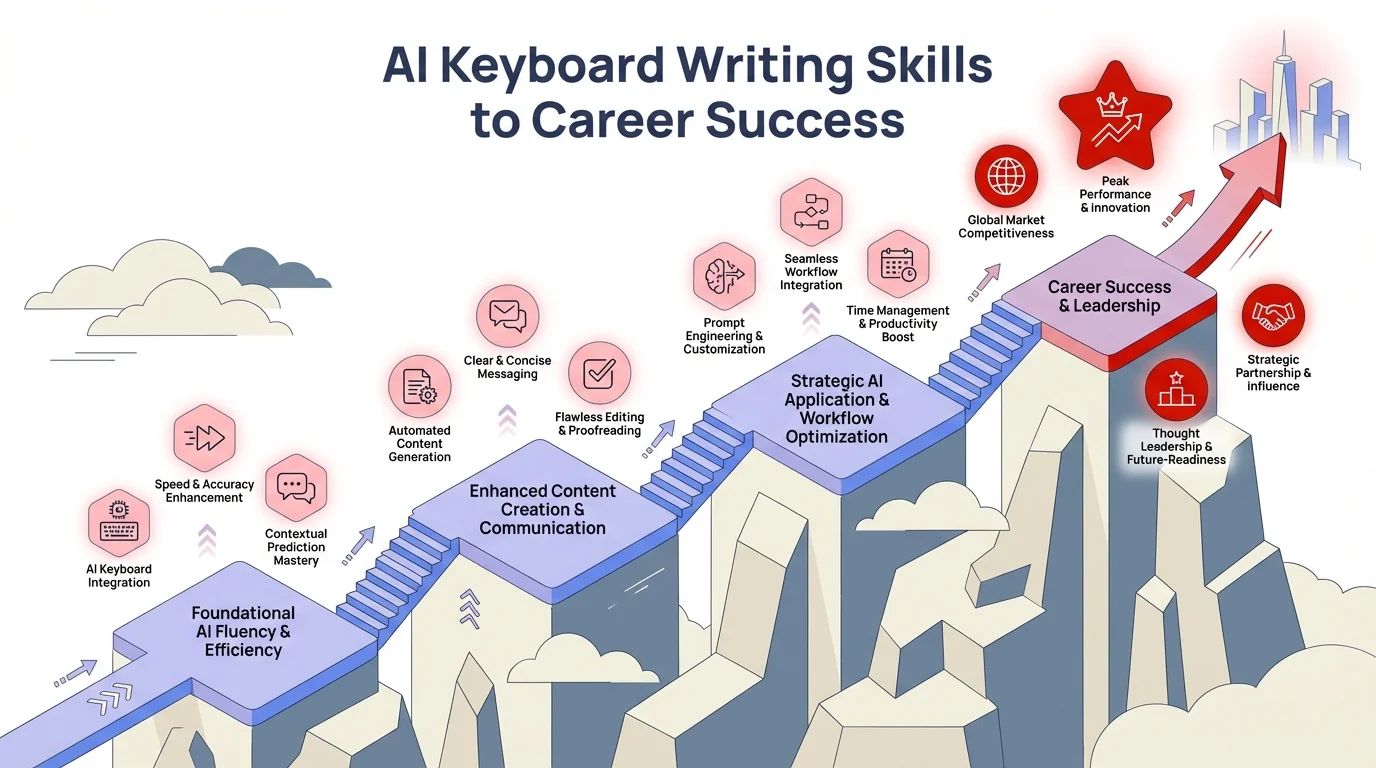
The career progression journey powered by AI keyboard writing skills
How Poor Writing Can Limit Your Professional Growth
We all make mistakes sometimes, but consistent writing problems can seriously hold you back professionally. A survey of 547 business executives revealed that 86% would not promote someone with poor writing skills, regardless of their other qualifications.
Some common writing issues that damage professional credibility include:
- Grammatical errors and typos
- Overly complex or confusing sentence structures
- Inability to adjust tone for different audiences
- Poor organization of ideas
- Wordiness and redundancy
These problems don't just make you look bad—they actively prevent people from understanding your ideas and recognizing your value. As one senior manager put it, "If you can't communicate clearly, I assume you're not thinking clearly either."
The Rise of AI Writing Assistants
Remember when spell-check felt revolutionary? Well, we've come a long way since then! AI writing assistants have completely transformed how professionals communicate, making it easier than ever to write clearly and effectively without spending hours agonizing over every word.
Evolution from Basic Autocorrect to AI Keyboards
The journey from basic spell-check to today's sophisticated AI keyboards is pretty amazing when you think about it. Let's look at how far we've come:
- Basic Spell Check (1970s-1990s): Simply identified misspelled words
- Autocorrect (1990s-2000s): Automatically fixed common typos and misspellings
- Predictive Text (2000s-2010s): Suggested next words based on frequency and patterns
- Grammar Checkers (2010s): Identified grammatical errors beyond spelling
- AI Writing Assistants (Early 2020s): Provided context-aware suggestions for grammar, tone, clarity, and style
- Advanced AI Keyboards (2025-2026): Offer real-time multimodal assistance with deep context understanding, personalized learning, and seamless integration across all platforms
Today's AI keyboards don't just fix mistakes—they actively help improve your writing by understanding context and intent. They can suggest better word choices, restructure awkward sentences, and even adjust the tone of your message to match your audience.
What's particularly exciting in 2026 is how these tools have evolved beyond simple corrections. Modern AI keyboards now understand workplace dynamics, company culture, and even the communication preferences of specific teams or departments. They're becoming true writing partners that adapt to your unique professional environment rather than offering generic suggestions.
Key Features of Modern AI Writing Tools
Modern AI keyboards offer way more than just spell-checking. They're like having a writing coach, editor, and communication expert all built into your keyboard. Here's what today's top AI writing tools can do:
Real-time Grammar and Style Correction
No more embarrassing errors in important emails! AI keyboards catch mistakes as you type, including:
- Grammar and punctuation errors
- Spelling mistakes and typos
- Awkward phrasing and wordiness
- Passive voice overuse
- Inconsistent tense or tone
Tone Adjustment Capabilities
Different situations call for different tones. You wouldn't write to your CEO the same way you'd text a coworker. AI keyboards with tone adjustment can help you strike the right balance, offering:
- Formal vs. casual options
- Professional vs. friendly tones
- Confident vs. humble approaches
- Direct vs. diplomatic phrasing
Smart Suggestions and Predictive Text
Why type everything from scratch when AI can help? Modern keyboards offer:
- Word and phrase suggestions based on context
- Complete sentence predictions
- Alternative phrasing options
- Industry-specific terminology suggestions
Multilingual Support
In our global workplace, communicating across languages is increasingly important. Many AI keyboards now offer:
- Real-time translation suggestions
- Multilingual grammar support
- Cultural context awareness
- Idiom and expression translations
How AI Keyboards Integrate with Mobile Devices
One of the biggest advantages of AI keyboards is their seamless integration with mobile devices. Unlike traditional desktop writing tools, AI keyboards on smartphones and tablets work across all your apps, providing consistent writing support whether you're:
- Responding to emails
- Messaging colleagues on Slack or Teams
- Creating documents in Google Docs or Office
- Writing social media posts
- Taking notes in meetings
This integration means you maintain professional communication standards even when you're on the go. No more "Sent from my iPhone" excuses for poorly written messages!
In 2026, the expectation is clear: quality matters regardless of device. With Gen Z entering the workforce in larger numbers and remote work remaining prevalent, the ability to communicate professionally from any device has become a baseline expectation. AI keyboards are meeting this moment by providing consistent, reliable support wherever you are—whether you're responding to an urgent email from a coffee shop or drafting a proposal on your tablet during a commute.
Practical Benefits for Career Advancement
Let's get specific about how AI keyboards can actually help your career. These aren't just fancy features—they translate into real professional advantages that can help you stand out and move ahead.
Time Savings and Productivity Gains
Time is money, especially in the workplace. AI keyboards can save you significant time in your daily communications:
- Faster composition: AI suggestions can reduce typing time by up to 30%
- Fewer revisions: Real-time corrections mean less time spent editing
- Quick responses: Predictive text allows for faster replies to urgent messages
- Template creation: AI can learn your common responses and suggest them when appropriate
A study by Productivity Research Group found that professionals using AI writing tools saved an average of 5-7 hours per week on communication tasks. Imagine what you could do with that extra time!
Improved Communication Clarity and Impact
It's not just about writing faster—it's about writing better. AI keyboards help professionals communicate more effectively by:
- Eliminating ambiguity and confusion
- Ensuring appropriate tone for each situation
- Maintaining consistent messaging
- Highlighting potential misunderstandings before sending
"Since I started using an AI keyboard, my emails get responses about 40% faster," says marketing director Jamie Chen. "I think it's because my requests are clearer and more direct now."
The impact goes beyond just faster responses. In early 2026, a study by the International Association of Business Communicators found that professionals using AI writing assistants reported 52% fewer miscommunications and follow-up clarifications. That's real time saved and real frustration avoided—both for you and your colleagues. When everyone understands your message the first time, projects move forward smoothly, decisions get made faster, and your reputation as a clear communicator grows.
Building Confidence in Professional Writing
Many professionals suffer from writing anxiety, especially in high-stakes situations. AI keyboards can boost your confidence by:
- Providing a safety net for grammar and spelling
- Suggesting better phrasing when you're stuck
- Confirming that your tone is appropriate
- Offering alternatives when you're not sure about a word choice
This increased confidence doesn't just make writing less stressful—it shows in the quality of your communication, helping you project more authority and competence.
Overcoming Language Barriers for Non-Native Speakers
For non-native English speakers, AI keyboards can be particularly transformative. They help level the playing field by:
- Catching common ESL grammar mistakes
- Suggesting more natural-sounding phrases
- Identifying culturally appropriate expressions
- Providing context-specific vocabulary
"As a non-native speaker, my AI keyboard has been life-changing," shares Brazilian software engineer Paulo Oliveira. "My colleagues used to ask me to clarify my emails constantly. Now they just respond to my questions directly because my writing is so much clearer."
Implementing AI Writing Tools in Your Daily Workflow
Knowing about these tools is one thing—actually incorporating them into your daily work is another. Let's look at how you can start using AI keyboards to improve your professional communication right away.
Choosing the Right AI Keyboard for Your Needs
Not all AI keyboards are created equal, and the best choice depends on your specific needs. Consider these factors when selecting an AI writing assistant:
Professional vs. General Use Features
Some AI keyboards are specifically designed for professional settings, with features like:
- Business-appropriate tone suggestions
- Industry-specific terminology
- Integration with workplace tools (Slack, Teams, etc.)
- Professional templates and formatting
Others are more general-purpose but might still offer excellent writing support. Think about your primary use case before choosing.
Platform Compatibility
Make sure any AI keyboard you choose works well with:
- Your device's operating system (iOS, Android, Windows)
- The apps you use most frequently
- Your company's security requirements
- Any existing writing tools you rely on
Privacy and Security Considerations
When using AI keyboards in professional contexts, privacy is crucial. Look for:
- Clear data handling policies
- Options to work offline or locally
- Compliance with industry standards (GDPR, HIPAA, etc.)
- Enterprise-grade security features
CleverType and similar professional AI keyboards often offer stronger privacy protections than consumer-focused alternatives.
Setting Up Your AI Keyboard for Maximum Efficiency
Once you've chosen an AI keyboard, proper setup will help you get the most benefit:
- Customize your settings for your specific industry and writing style
- Integrate with your most-used apps to ensure consistent support
- Create personal dictionaries for specialized terminology in your field
- Set tone preferences that match your typical professional communication
- Enable learning features so the AI improves based on your writing patterns
"I spent about 30 minutes configuring my AI keyboard when I first installed it," says financial analyst Miguel Torres. "That initial setup has saved me countless hours since then because the suggestions are so tailored to my work."
Developing a Balanced Approach to AI Assistance
While AI keyboards are powerful tools, they work best when used thoughtfully. Here's how to develop a balanced approach:
- Use AI as a guide, not a replacement for your own judgment
- Review important communications carefully before sending
- Gradually rely less on suggestions as your own skills improve
- Be particularly cautious with sensitive or complex topics
- Maintain your authentic voice while benefiting from AI assistance
Remember that the goal is to enhance your communication, not to sound like everyone else who uses the same tool.
Training Your AI to Match Your Professional Style
The more you use your AI keyboard, the better it gets at matching your style. You can accelerate this process by:
- Accepting helpful suggestions and rejecting unhelpful ones
- Using the feedback features many AI keyboards provide
- Creating custom shortcuts for phrases you use frequently
- Reviewing your writing analytics if your tool offers them
- Periodically updating your preferences as your needs change
With consistent use, your AI keyboard will become increasingly personalized, offering suggestions that feel like they're coming from a colleague who knows your work style perfectly.
Real-World Success Stories
AI keyboards aren't just theoretically helpful—they're making a real difference in people's careers. Let's look at some specific examples of how professionals have benefited from using these tools.
Case Study: From Overlooked to Promoted
Sarah Jenkins, a data analyst at a financial services firm, consistently produced excellent technical work but struggled to communicate her findings effectively in writing. Her emails were often misunderstood, and her reports went unread.
"I knew my analysis was good, but I couldn't seem to get my points across in writing," Sarah explains. "My manager even mentioned my communication skills as an area for improvement in my performance review."
After implementing an AI keyboard across all her devices, Sarah saw immediate improvements:
- Her emails received faster and more positive responses
- Colleagues began coming to her directly for insights
- Senior management started quoting her reports in company meetings
- Her next performance review highlighted her "dramatically improved communication"
Six months later, Sarah was promoted to a senior analyst position that included team leadership responsibilities—something she believes wouldn't have happened without improving her writing.
Testimonial: Non-Native Speaker's Experience
Dr. Wei Chen, a research scientist who moved from China to the United States for his career, found that language barriers were limiting his professional growth despite his technical expertise.
"My English vocabulary was good, but my grammar and especially my tone in emails was causing problems," Dr. Chen recalls. "Sometimes I sounded too demanding when I was trying to be helpful, or too uncertain when I needed to be authoritative."
After using an AI keyboard designed for non-native speakers, Dr. Chen experienced several benefits:
- Colleagues responded more positively to his communications
- His research proposals began receiving more favorable reviews
- He felt more confident volunteering for projects requiring significant writing
- His annual performance rating increased from "meets expectations" to "exceeds expectations"
"The AI doesn't just correct my grammar," Dr. Chen says. "It helps me understand why certain phrases work better in professional contexts. I'm actually learning while I write."
Before and After: Email Communication Examples
Let's look at a concrete example of how AI keyboards can transform professional communication:
BEFORE (without AI assistance):
Subject: Report deadline issue
Hello team,
I wanted to inform that the report due date is changed because of some technical problems we are facing with the data collection system. So we need to push back the deadline to next week Friday instead of this week Wednesday. Sorry for this inconvenience and hope everyone can adjust their schedule accordingly. If you have already finished your part, you can send it early or wait until the new deadline, it's up to you. Let me know if there is any problems.
Thanks,
Michael
AFTER (with AI keyboard assistance):
Subject: Important: Report Deadline Extended to Friday, May 12
Hello team,
I'm writing to let you know that we need to extend the quarterly report deadline from this Wednesday to next Friday (May 12) due to technical issues with our data collection system.
If you've already completed your section, you're welcome to submit it early, or you can use the extra time for additional refinement.
Please adjust your schedules accordingly, and let me know if this change creates any significant challenges for you.
Thanks for your flexibility,
Michael
The difference is clear: the second email is more concise, better organized, and conveys both authority and consideration. It's also more likely to get a positive response and prevent follow-up questions.
Common Challenges and How to Overcome Them
While AI keyboards offer tremendous benefits, they also come with certain challenges. Being aware of these potential issues and knowing how to address them will help you use these tools more effectively.
Avoiding Over-Reliance on AI Suggestions
One common pitfall is becoming too dependent on AI suggestions, which can lead to:
- Loss of your authentic voice and style
- Decreased ability to write without assistance
- Reduced critical thinking about your communication
- Potential homogenization of workplace writing
How to overcome this challenge:
- Regularly practice writing without AI assistance
- Be selective about which suggestions you accept
- Take time to understand why the AI made certain suggestions
- Maintain your unique perspective and expertise in your field
"I use my AI keyboard as a consultant, not a ghostwriter," explains marketing director Alisha Patel. "I consider its suggestions, but I make the final decisions about my communication."
Maintaining Privacy and Security in Professional Settings
When using AI keyboards for work-related communication, privacy and security concerns are valid:
- Sensitive company information might be processed by third parties
- Client confidentiality could potentially be compromised
- Intellectual property might be exposed to external systems
- Compliance issues could arise in regulated industries
How to address these concerns:
- Choose AI keyboards with strong privacy policies and security features
- Check with your IT department before installing new keyboard apps
- Use offline modes when handling particularly sensitive information
- Understand your company's policies regarding AI writing tools
- Consider enterprise versions of AI keyboards that offer enhanced security
Handling Technical Limitations and Learning Curves
No technology is perfect, and AI keyboards come with their own technical challenges:
- Initial setup and configuration can be time-consuming
- Learning to work with AI suggestions requires adjustment
- Some specialized terminology may not be recognized
- Occasional inappropriate or incorrect suggestions
Strategies for managing these limitations:
- Invest time upfront in proper setup and customization
- Start with simple features and gradually explore more advanced options
- Create custom dictionaries for industry-specific terms
- Report incorrect suggestions to help improve the AI
- Be patient as both you and the AI adjust to working together
Balancing Efficiency with Thoughtful Communication
While AI keyboards can make writing faster, speed isn't always the goal in professional communication:
- Some messages deserve careful, human consideration
- Complex ideas might require nuanced expression beyond AI capabilities
- Emotional intelligence remains essential in workplace communication
- Relationship-building often requires authentic, personal writing
Finding the right balance:
- Use AI for routine communications but take more time with important messages
- Consider the purpose and audience before relying heavily on AI suggestions
- Recognize when a phone call or meeting might be better than a written message
- Remember that efficiency serves communication, not the other way around
Future Trends in AI Writing Assistance
The field of AI writing assistance is evolving rapidly. Understanding upcoming trends can help you stay ahead of the curve and continue leveraging these tools for career advancement.
Emerging Capabilities in AI Writing Technology
Several exciting developments are on the horizon for AI keyboards and writing assistants:
Context-Aware Writing Support
Future AI keyboards will better understand the broader context of your communications, including:
- Previous conversations and relationships with recipients
- Company-specific terminology and communication norms
- Industry trends and recent developments
- Your personal communication history with different colleagues
This deeper contextual awareness will lead to more relevant and helpful suggestions.
Enhanced Personalization
AI writing tools are becoming increasingly personalized, with features like:
- Learning from your writing patterns across multiple platforms
- Adapting to your specific professional goals and challenges
- Offering targeted improvement suggestions based on your weaknesses
- Creating custom writing models for different professional contexts
"The next generation of AI keyboards will be more like writing partners than tools," predicts Dr. Marcus Williams, AI researcher at MIT. "They'll understand your communication goals and help you achieve them more effectively."
Integration with Other Professional Tools
Look for tighter integration between AI keyboards and other workplace systems:
- Automatic formatting based on document type or platform
- Connection to company style guides and communication policies
- Integration with project management and CRM systems
- Collaboration features for team writing projects
How These Advancements Will Impact Professional Communication
These technological advancements will likely transform workplace communication in several ways:
- Higher quality standards: As writing assistance becomes more accessible, expectations for clear communication will rise
- More efficient knowledge sharing: Better writing tools will facilitate more effective information exchange within organizations
- Reduced communication barriers: Advanced translation and cultural context features will improve global collaboration
- New communication formats: AI might enable entirely new ways of sharing information in professional settings
Preparing for the Next Generation of Writing Tools
To make the most of future developments in AI writing assistance:
- Stay informed about new features and capabilities in writing technology
- Experiment with new tools as they become available
- Provide feedback to developers about your professional writing needs
- Consider how AI writing tools might change your specific role or industry
- Continue developing your own writing skills alongside technological assistance
"The professionals who will benefit most from AI writing tools are those who see them as enhancing their skills, not replacing them," notes career coach Elena Rodriguez. "The goal isn't to outsource your communication, but to communicate more effectively with technological support."
Looking ahead, we're also seeing AI keyboards begin to incorporate emotional intelligence features—understanding not just what you're saying, but the appropriate emotional context for different situations. By late 2026, experts predict these tools will be able to suggest not just tone adjustments, but optimal timing for sensitive communications, and even detect when a written message might be better delivered in person or via video call. The technology is evolving from being a writing assistant to a comprehensive communication coach.
Frequently Asked Questions
Q: How can AI keyboards improve my professional writing?
A: AI keyboards enhance professional writing by providing real-time grammar and spelling corrections, tone adjustments, and context-aware suggestions. They help you communicate more clearly and confidently while saving time on editing and revision.
Q: Will using an AI keyboard make my writing sound generic?
A: Not if you use it thoughtfully. AI keyboards work best as assistants, not replacements. You maintain control over your voice and style while benefiting from technical improvements and clarity enhancements.
Q: Are AI keyboards safe for confidential work communications?
A: Professional AI keyboards like CleverType offer enterprise-grade security features, including offline modes and strong data protection policies. Always check with your IT department and choose tools that comply with your industry's security requirements.
Q: How long does it take to see career benefits from better writing?
A: Many professionals notice improved response rates to their emails within weeks. Career advancement takes longer, but consistently clear communication builds your reputation over time, typically showing measurable impact within 3-6 months.
Q: Can AI keyboards help non-native English speakers?
A: Absolutely. AI keyboards are particularly valuable for non-native speakers, offering real-time grammar corrections, natural phrasing suggestions, and cultural context awareness. Many users report achieving near-native fluency in professional communications.
Q: What's the difference between AI keyboards and basic spell-check?
A: AI keyboards go far beyond spell-check by understanding context, tone, and intent. They offer comprehensive writing assistance including style improvements, tone adjustments, predictive text, and even help with sentence structure—all in real-time as you type.
Q: Do I need technical skills to use an AI keyboard?
A: No technical expertise required. Modern AI keyboards are designed for ease of use and integrate seamlessly with your existing apps. Most users are up and running within minutes, with the AI learning and adapting to your writing style over time.
Conclusion: Leveraging AI Keyboards for Career Success
Better writing can significantly impact your professional trajectory, and AI keyboards provide powerful tools to improve your communication skills. By implementing these technologies thoughtfully and balancing AI assistance with your own judgment, you can enhance your workplace effectiveness and open doors to new opportunities.
Key Takeaways for Professionals
As you incorporate AI keyboards into your professional life, remember these essential points:
- Clear communication directly influences career advancement and professional reputation
- AI keyboards offer more than just error correction—they provide comprehensive writing assistance
- The right AI keyboard for you depends on your specific needs, industry, and privacy requirements
- Setting up your AI keyboard properly maximizes its benefits for your particular situation
- A balanced approach to AI assistance preserves your authentic voice while improving clarity
- Common challenges can be overcome with thoughtful strategies and awareness
- Future developments in AI writing technology will continue to transform professional communication
Getting Started with AI Writing Tools Today
Ready to boost your career with better writing? Here's how to get started:
- Assess your current writing challenges and identify areas for improvement
- Research AI keyboards that address your specific needs
- Start with a free trial of a professional-focused AI keyboard like CleverType
- Begin with simple implementations in low-stakes communications
- Gradually expand your use as you become more comfortable
- Track the impact on your professional communication effectiveness
- Share successful strategies with colleagues who might benefit
Remember that improving your writing is an investment in your professional future. As communication becomes increasingly central to workplace success, the ability to express yourself clearly and effectively will only grow more valuable.
By embracing AI keyboards and other writing assistance tools, you're not just keeping up with technology—you're actively developing a competitive advantage that can help you advance in your career for years to come.