Key Takeaways
| Feature | Why It Matters | Best For |
|---|---|---|
| AI Grammar Correction | Fixes typos and grammar errors instantly | Professionals, students, non-native speakers |
| Smart Text Prediction | Learns your writing style for faster typing | Anyone who types frequently |
| Voice Typing | Converts speech to text with high accuracy | Busy professionals, accessibility users |
| Tone Adjustment | Changes message formality on the fly | Business communication, social media |
| Multi-language Support | Types seamlessly in 50+ languages | Multilingual users, global teams |
| Custom AI Assistants | Creates personalized writing helpers | Content creators, specific workflows |
| Privacy Protection | Keeps your data secure and encrypted | Everyone concerned about privacy |
| Cross-app Integration | Works in WhatsApp, Gmail, Slack, everywhere | All mobile users |
So you're looking for the best keyboard for android? You're not alone. Most people still use their phone's default keyboard, not realizing how much time and frustration they could save with a better option. I've tested dozens of keyboard apps for android over the past few years, and the difference between a basic keyboard and a smart one is honestly night and day.
The android keyboard landscape has transformed completely by 2026. What started as basic autocorrect in the early 2020s has become sophisticated AI-powered writing assistance that feels almost magical. Today's best keyboards don't just fix typos—they understand context, adapt to your personal style, and can even help you craft entire paragraphs. We're talking about real-time grammar fixes, tone adjustments, seamless translation across 50+ languages, and AI assistants that actually understand what you're trying to say.
Here's what matters most when choosing an ai keyboard for android free: does it actually make typing easier, or does it just add more buttons? Does it protect your privacy, or does it sell your data? Can it handle professional emails as well as casual texts? This guide breaks down the features that actually matter.
Real-Time Grammar and Spelling Correction
Look, we all make typos. Even people who write for a living mess up "your" and "you're" when they're typing fast on a phone. That's where real-time grammar correction becomes a lifesaver.
The best keyboard for android doesn't just underline mistakes—it fixes them as you type. I'm talking about catching errors before you hit send. Modern AI keyboards analyze context, so they know the difference between "there," "their," and "they're" based on what you're actually trying to say.
What makes this different from basic autocorrect? Context awareness. Regular autocorrect might change "duck" to... well, you know. Smart grammar correction understands sentence structure. It catches:
- Subject-verb agreement errors
- Missing punctuation
- Incorrect word usage
- Tense inconsistencies
- Common spelling mistakes
For non-native English speakers, this feature is particularly useful. Instead of constantly second-guessing your grammar, you get instant feedback that helps you learn. One of my colleagues from India uses an AI keyboard for business specifically because it helps him sound more natural in English.
The best part? This happens invisibly. You don't need to stop typing, open another app, or copy-paste text. The corrections appear as suggestions above your keyboard, and you can accept them with a single tap. It's like having a grammar checker built directly into every app on your phone.
Privacy matters here too. The best keyboard apps process grammar checks on-device when possible, meaning your messages aren't being sent to external servers for analysis. That's something to look for if you handle sensitive information.
Smart Predictive Text That Actually Learns
Remember when predictive text just guessed the next word based on frequency? That was annoying. Modern predictive text is different—it actually learns how you write.
The best keyboard for android adapts to your personal writing style within days. It picks up on the phrases you use frequently, the abbreviations you prefer, and even the slang that's specific to you. This isn't some generic algorithm suggesting "the" and "and" over and over.
Here's how smart prediction actually works:
- Pattern Recognition: The keyboard tracks which words you commonly use together
- Context Analysis: It understands the difference between texting a friend vs. emailing your boss
- Adaptive Learning: The more you type, the better it gets at predicting your next words
- App-Specific Memory: It remembers different vocabularies for different apps
I've noticed this most when switching between WhatsApp and Gmail. My AI keyboard suggests casual phrases in messaging apps but switches to more formal language in email. That's the kind of intelligence that saves time.
What's really impressive is sentence completion. Type "I'll be there in" and the keyboard might suggest "10 minutes," "5 minutes," or "an hour" based on your previous messages. It's not just predicting one word—it's predicting entire phrases that match your communication patterns.
For professionals who type the same kinds of messages repeatedly, this feature eliminates repetition. You're not typing "Thank you for your email" for the hundredth time. You type "Tha" and tap the suggestion. Done.
The learning happens locally on your device, which means your typing patterns aren't being uploaded to the cloud. That's important for privacy-conscious users who want smart features without compromising their data security.
What's particularly exciting in 2026 is the emergence of context-aware prediction that goes beyond individual apps. Advanced keyboards now understand your daily routines and communication patterns. If you typically send "On my way!" messages around 9 AM, your keyboard learns this and suggests it proactively. If you frequently type work-related terms during business hours but switch to casual language in the evenings, your keyboard adapts automatically. This level of intelligence used to require expensive enterprise software—now it's built right into your keyboard.
Voice Typing with Advanced AI Recognition
Voice typing used to be terrible. You'd say one thing, and your phone would type something completely different. Not anymore. The best keyboard for android now includes voice recognition that's genuinely useful.
Modern voice typing in 2026 has reached remarkable accuracy levels—we're talking 98%+ recognition rates even in noisy environments. Advanced AI models now understand natural speech patterns, regional dialects, and even code-switching between languages. You can speak normally—with pauses, corrections, and even "ums" and "ahs"—and the keyboard figures out what you meant. This is especially helpful when you're driving, cooking, working out, or just tired of tapping on a tiny screen.
What makes advanced voice typing different:
- Punctuation Recognition: Say "period" or "comma" and it adds them automatically
- Multi-language Support: Switch between languages mid-sentence
- Accent Adaptation: Works with different English accents and dialects
- Background Noise Filtering: Reduces interference from ambient sounds
- Real-time Transcription: Shows text as you speak, not after you finish
I've used voice typing for everything from quick text messages to long emails. The accuracy is good enough that I rarely need to make corrections. For people with accessibility needs or those who find typing painful, this feature is transformative.
One thing people don't realize: voice typing on an AI keyboard for android free is often more accurate than your phone's built-in voice recognition. That's because dedicated keyboard apps focus specifically on transcription quality, while system-level voice typing tries to do everything.
The privacy aspect matters here too. Some keyboards process voice locally on your device, while others send audio to cloud servers. If you're dictating sensitive information, check how your keyboard handles voice data. The best options give you control over where your audio is processed.
Tone and Style Adjustment Features
Ever sent a message that came across way harsher than you intended? Or maybe you've struggled to make a casual text sound professional enough for work? That's where tone adjustment changes everything.
The best keyboard apps for android now include features that rewrite your text in different tones. You type something casual, tap a button, and it becomes formal. Or vice versa. This isn't just changing a few words—it's restructuring entire sentences to match the context.
Available tone options typically include:
- Professional: For work emails and business communication
- Casual: For friends and informal chats
- Friendly: Warmer and more approachable
- Direct: Straight to the point, no fluff
- Polite: Extra courteous for sensitive situations
I use this feature constantly for work messages. Sometimes I'll type exactly what I'm thinking (which might be too blunt), then adjust the tone to "polite" before sending. It's like having a communication coach built into your keyboard.
For non-native speakers, tone adjustment is particularly valuable. English has subtle differences between formal and informal language that aren't always obvious. A keyboard app that helps with professional writing can teach you these nuances through usage.
The feature works in real-time. You don't need to copy text to another app, adjust it, then paste it back. You select the text, choose your desired tone, and the keyboard rewrites it instantly. That seamless integration is what makes it practical for everyday use.
Some advanced keyboards even remember your tone preferences for specific contacts. Message your boss? It automatically suggests professional language. Text your friend? It stays casual. That's the kind of smart behavior that actually saves time.
One trend we're seeing in early 2026 is the rise of emotion-aware tone adjustment. Advanced keyboards can now detect when your message might come across as frustrated or upset and gently suggest alternatives. It's not about censoring your feelings—it's about helping you communicate effectively. Think of it as having a trusted friend review your message before you hit send. For customer service teams and anyone who deals with tense situations, this feature has become invaluable.
Multilingual Support and Translation
If you communicate in more than one language, you know the frustration of switching keyboards constantly. The best keyboard for android handles multiple languages without making you jump through hoops.
By 2026, modern android keyboard apps support 50+ languages with truly seamless switching. You can type a sentence in English, switch to Spanish mid-sentence, then back to English—all without changing any settings. The keyboard automatically detects which language you're using and adjusts predictions accordingly. This multilingual capability has become especially important as remote work and global collaboration continue to grow.
Key multilingual features include:
| Feature | Benefit | Use Case |
|---|---|---|
| Auto-detection | No manual switching needed | Bilingual conversations |
| Real-time translation | Translate as you type | International communication |
| Language-specific predictions | Better accuracy per language | Native-like typing experience |
| Multiple keyboards active | Switch with a tap | Frequent language changes |
Translation features have gotten impressively good. You can type in your native language and have it translated before sending. This is useful for business communication with international clients or staying in touch with family who speak different languages.
I've seen this feature used creatively by people who are learning new languages. They type in their native language, check the translation to see how it's expressed in the target language, then send either version. It's like having a language tutor built into your keyboard.
For Indian users specifically, support for Hinglish and regional languages has improved dramatically. You can mix English and Hindi in the same sentence, and the keyboard understands both. That's how people actually communicate, and smart keyboards finally support it.
The translation quality depends on the underlying AI model. The best keyboards use advanced neural translation that understands context, not just word-by-word substitution. That means translations sound natural, not robotic.
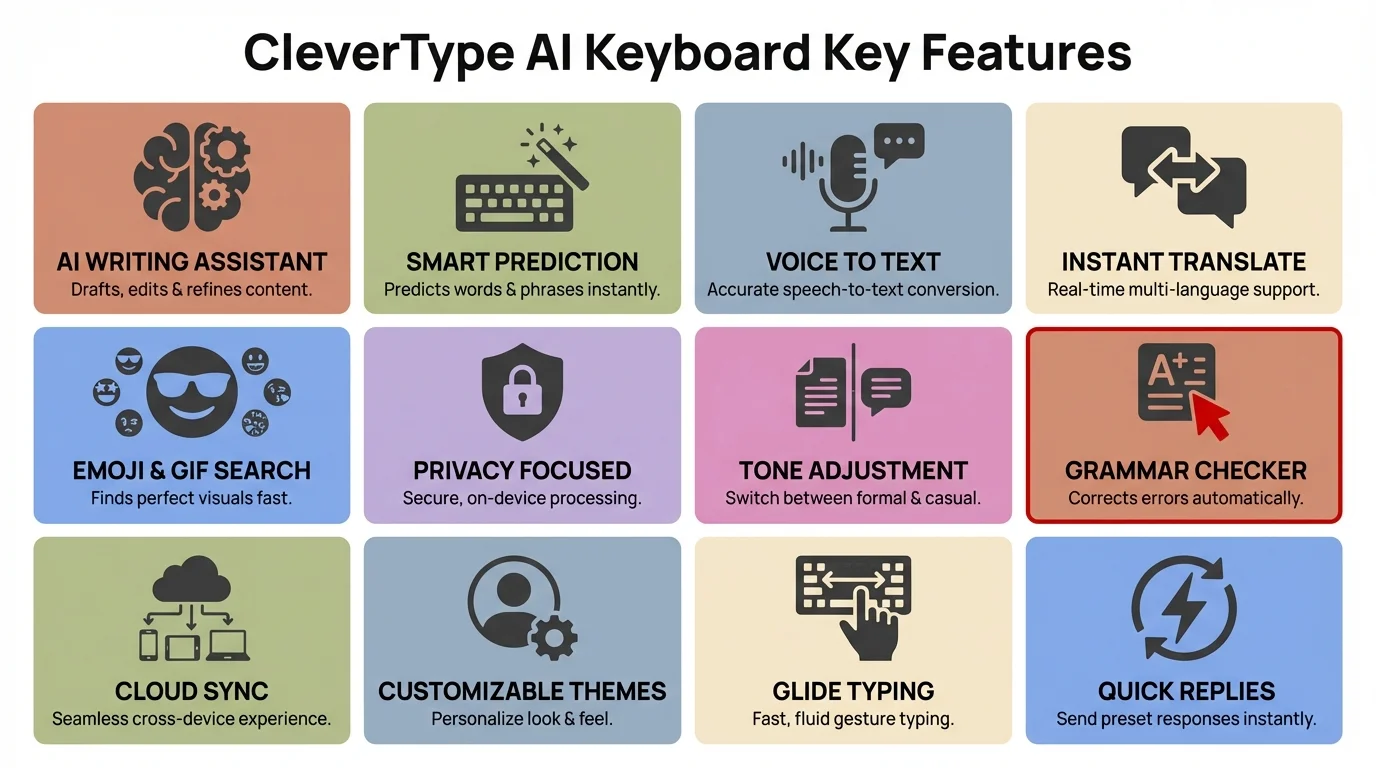
Key features that make CleverType the best AI keyboard for Android
Custom AI Assistants and Prompts
Here's where things get interesting. The best keyboard for android lets you create custom AI assistants for specific tasks. Think of it as having multiple specialized helpers built into your keyboard.
You can set up assistants for:
- Email drafting: Creates professional email templates
- Social media: Generates engaging captions and posts
- Customer service: Provides polite, helpful responses
- Creative writing: Helps with storytelling and descriptions
- Technical writing: Simplifies complex explanations
I've created a custom assistant specifically for responding to work emails. Instead of typing the same polite phrases repeatedly, I tap the assistant, tell it what I need to say, and it generates a properly formatted response. This saves me probably 30 minutes every day.
The setup process is straightforward. You create a prompt template that tells the AI how to behave. For example: "You are a professional email writer. Respond politely and concisely to customer inquiries." Then whenever you need that assistant, it's available with one tap.
What makes this powerful is specificity. Generic AI assistants try to do everything and end up being mediocre at most tasks. Custom assistants focus on exactly what you need. If you're a content creator, you might create an assistant that generates Instagram captions in your specific style.
The best implementations let you have multiple assistants active simultaneously. You're not limited to one use case—you can switch between different assistants depending on what you're writing. That flexibility makes the feature actually useful rather than just a gimmick.
Privacy note: custom assistants typically process requests through cloud AI services. If that concerns you, check whether your keyboard offers on-device processing options for sensitive information.
Enhanced Privacy and Security Features
Let's talk about something most people ignore until it's too late: keyboard privacy. Your keyboard sees literally everything you type—passwords, credit card numbers, private messages, work emails. That's why privacy features matter.
The best keyboard apps for android take security seriously. Here's what to look for:
Essential Privacy Features:
- End-to-end encryption for data transmission
- Local processing for sensitive operations
- No data collection policies
- Transparent privacy statements
- Incognito mode for sensitive typing
- Biometric authentication options
I switched to a privacy-focused AI keyboard after reading about data breaches with popular keyboard apps. The reality is that many free keyboards monetize by collecting typing data. They claim it's "anonymous," but that data can often be de-anonymized.
The best approach combines smart features with strong privacy. Look for keyboards that:
- Process grammar checks locally when possible
- Don't store your typing history on their servers
- Allow you to disable cloud features entirely
- Provide clear information about what data they collect
- Give you control over feature permissions
Incognito mode is particularly useful. When enabled, the keyboard stops learning from your typing and doesn't save any data. Use this for passwords, banking, or any sensitive information. It's like private browsing for your keyboard.
Some keyboards now offer on-device AI processing, meaning the smart features work without sending your text to external servers. This is the ideal setup for privacy-conscious users who still want advanced features.
Check the keyboard's privacy policy before installing. If it's vague about data collection or buried in legal jargon, that's a red flag. Reputable keyboard apps are transparent about exactly what data they collect and why.
A significant development in 2026 is the introduction of privacy certifications for keyboard apps. Independent security firms now audit and certify keyboards for data protection, similar to how VPN services are evaluated. When choosing a keyboard, look for certifications from recognized security organizations. This gives you confidence that the keyboard's privacy claims have been independently verified, not just taken at face value. For businesses handling sensitive information, using certified keyboards has become a compliance requirement in many industries.
Seamless Integration Across All Apps
The best keyboard for android works everywhere—and I mean everywhere. It doesn't matter if you're typing in WhatsApp, Gmail, Slack, Instagram, or some obscure app you downloaded yesterday. The keyboard should provide the same smart features consistently.
This sounds obvious, but many keyboards have limitations. Some features only work in certain apps. Others require special permissions that break functionality elsewhere. The truly great keyboards integrate seamlessly into Android's input system.
What seamless integration looks like:
- Consistent Interface: Same layout and features in every app
- Quick Switching: Easy to toggle between keyboards if needed
- Clipboard Management: Copy-paste works reliably everywhere
- Emoji and GIF Support: Access to visual elements in all apps
- Voice Input: Available wherever you can type
- Floating Mode: Keyboard can resize and move as needed
I particularly appreciate keyboards that remember context across apps. If I'm drafting an email in Gmail, then switch to Slack to check something, the keyboard remembers what I was working on when I return to Gmail. Small detail, but it makes a difference.
The keyboard should also respect app-specific requirements. In password fields, it should automatically disable prediction and learning. In email fields, it should recognize email formats. In number fields, it should prioritize the numeric keyboard. This context awareness makes typing feel natural.
Some advanced keyboards integrate with productivity tools like clipboard managers, text expanders, and note-taking apps. This creates a typing ecosystem that extends beyond just the keyboard itself.
Performance matters too. The keyboard should load instantly, respond to every tap without lag, and not drain your battery. Heavy AI processing in the background can slow things down, so the best keyboards optimize for speed while maintaining smart features.
Customization Options and Themes
Let's be honest—you're going to be looking at your keyboard constantly. It should look good and feel right. The best keyboard for android offers extensive customization without being overwhelming.
Basic customization includes:
- Themes: Light, dark, colorful, minimal designs
- Key Size: Adjust for your finger size and typing style
- Layout Options: QWERTY, AZERTY, regional layouts
- Sound Effects: Typing sounds and haptic feedback
- Key Borders: Clear separation or borderless design
I've customized my keyboard to use a dark theme with slightly larger keys and subtle haptic feedback. These small adjustments make typing more comfortable during long sessions. For people with vision impairments, the ability to increase key size and contrast is essential.
Advanced customization goes deeper:
Layout Customization:
- Number row always visible
- Symbol key placement
- Swipe gesture shortcuts
- Long-press alternative characters
- One-handed mode for smaller screens
Functional Customization:
- Auto-capitalization rules
- Space bar behavior
- Period shortcut settings
- Emoji quick access
- Voice input trigger
The best approach is gradual customization. Start with the default settings, identify what annoys you, then adjust those specific elements. Don't try to customize everything at once—you'll just get overwhelmed.
Some keyboards let you save multiple profiles. You might have one setup for work (professional theme, grammar checking on, formal tone) and another for personal use (fun theme, casual predictions, emoji access). Being able to switch between profiles makes the keyboard adapt to different contexts.
Theme marketplaces have expanded significantly. You're not limited to the handful of built-in themes—you can download thousands of options or even create your own. If visual customization matters to you, this is worth exploring.
Performance note: heavy themes with animations can slow down typing response time. If you notice lag, try a simpler theme. Functionality should always take priority over aesthetics.
Frequently Asked Questions
### Q: What is the best free AI keyboard for Android in 2026?
A: CleverType leads the pack as the best free AI keyboard for Android, offering comprehensive features including real-time grammar correction, tone adjustment, multi-language support (50+ languages), voice typing with 98%+ accuracy, and custom AI assistants—all while maintaining strong privacy protections. Unlike many competitors, CleverType processes most operations locally on your device, ensuring your data stays private.
### Q: Are AI keyboards safe to use for sensitive information?
A: Yes, if you choose keyboards with proper security certifications and transparent privacy policies. Look for keyboards that offer end-to-end encryption, local processing for sensitive operations, and incognito mode for passwords and banking. In 2026, reputable keyboards are independently audited and certified by security firms. Always avoid keyboards with vague privacy policies or those that monetize through data collection.
### Q: Can AI keyboards really improve my typing speed?
A: Absolutely. Smart predictive text that learns your writing patterns can reduce typing by 30-40% once the keyboard adapts to your style. Features like sentence completion, tone adjustment (eliminating rewriting), and voice typing for longer messages significantly accelerate communication. Many users report saving 20-30 minutes daily after switching to an AI-powered keyboard.
### Q: Do AI keyboards work offline?
A: Most core features work offline, including basic predictive text, grammar correction, and typing. However, advanced features like real-time translation, custom AI assistants, and cloud-based voice transcription require an internet connection. The best keyboards offer hybrid functionality—essential features work offline while enhanced capabilities activate when connected.
### Q: Will an AI keyboard drain my phone's battery?
A: Modern AI keyboards are optimized for efficiency and have minimal impact on battery life. On-device AI processing uses significantly less power than older cloud-based approaches. Most users report less than 2-3% additional battery consumption daily. If you notice higher drain, check your keyboard settings—disabling unnecessary animations and reducing cloud sync frequency can help.
### Q: Can I use an AI keyboard in multiple languages simultaneously?
A: Yes, top AI keyboards in 2026 support seamless multilingual typing. You can switch between languages mid-sentence without manually changing settings—the keyboard auto-detects your language and adjusts predictions accordingly. This is particularly useful for bilingual users and those working with international teams.
### Q: How do custom AI assistants work in keyboard apps?
A: Custom AI assistants are specialized helpers you create for specific tasks. You set up a prompt template (e.g., "professional email writer" or "social media caption generator"), and the assistant generates text based on your requirements. You can have multiple assistants for different contexts—one for work emails, another for customer service, another for creative writing. They're accessible with a single tap while typing in any app.
Final Thoughts
Choosing the best keyboard for android comes down to matching features with your actual needs. If you're a professional who writes a lot, prioritize grammar correction and tone adjustment. If you're multilingual, focus on language support and translation. If privacy concerns you, look for keyboards with strong security features.
The good news? You don't have to compromise. The best modern keyboard apps for android combine smart AI features with privacy protection, customization options with seamless integration, and advanced capabilities with simple interfaces.
I've tested dozens of keyboards, and the ones that stand out are those that feel invisible—they just work without getting in your way. That's what you should aim for. Features are great, but if the keyboard slows you down or feels clumsy, those features don't matter.
Try a few options. Most ai keyboard for android free apps offer trial periods or free versions with core features. Use them for real tasks—not just testing in isolation. Send actual emails, have real conversations, write actual documents. That's how you'll discover which keyboard fits your typing style.
The keyboard market keeps improving at a remarkable pace. Features that seemed futuristic in 2024 are now standard in 2026. Grammar checking that once required desktop software now happens instantly on your phone with better accuracy. Voice typing that was barely usable just a few years ago now achieves professional-grade transcription. Real-time translation that used to require separate apps is now seamlessly integrated. Looking ahead, we're already seeing early implementations of gesture-based typing, emotional intelligence in communication suggestions, and even predictive writing that can draft entire emails based on just a few keywords.
Whatever you choose, make sure it's from a developer with a track record of updates and support. The last thing you want is to adapt to a keyboard that gets abandoned six months later. Look for active development, responsive customer support, and regular feature additions.
Your keyboard is the primary way you interact with your phone. It's worth spending time to find the right one. The difference between a mediocre keyboard and a great one is noticeable every single day, hundreds of times per day. Make the upgrade—your fingers will thank you.
For more insights on improving your mobile typing experience, check out our guides on AI keyboard features and choosing the right keyboard.
Share This Article
Found this guide helpful? Share it with others who might benefit:
For more information about typing smarter on Android, visit the Android Developers Blog or check out Android Authority's keyboard reviews.