AI Writing Tools for Emails and Social Media: 2026 Guide
Key Takeaways
- AI writing tools save professionals up to 6 hours weekly on email and social media content creation in 2026
- Advanced personalization features now adapt to individual writing styles within days, not weeks
- Mobile-first AI keyboards have become the dominant choice, with 73% of professionals preferring them over desktop solutions
- Privacy-focused tools with on-device processing are now standard expectations, not premium features
- Integration capabilities extend beyond Gmail and Outlook to platforms like Slack, Discord, and emerging social networks
- Free tiers offer more robust functionality than ever, while premium tools ($8-$25 monthly) deliver enterprise-grade features
Ever found yourself staring at a blank email draft, wondering what to say? Or maybe you've spent way too long trying to craft the perfect social media post? Yeah, me too. AI writing tools are changing the game in 2026, and let me tell you, they're not just fancy autocorrect anymore. They're like having a writing partner who never gets tired, never asks for coffee breaks, and somehow knows exactly how you'd say something.
I've tested dozens of these tools over the past year, and honestly, the difference between the good ones and the great ones is massive. Some just fix your grammar, while the exceptional ones actually help you sound like yourself—just a more polished version who always knows exactly what to say and when to say it.
What's really exciting about 2026 is how these tools have matured. They're no longer just about correcting mistakes or suggesting better words. The best ones understand context in ways that feel almost intuitive—they know when you're writing to a client versus a colleague, when you need to be formal versus casual, and even when silence might be better than sending that late-night email you'll regret tomorrow.
Understanding AI Writing Tools for Communication
What exactly makes an AI writing tool different from regular spell check? And why should you care about these new tools anyway?
AI writing tools go way beyond basic grammar checking. They analyze context, audience, and purpose to help craft messages that actually connect with readers. Unlike traditional tools that just fix errors, modern AI writing assistants can suggest entire paragraphs, adjust tone, and even help brainstorm ideas when you're stuck.
The best tools don't just correct what you write—they help you think about what you should write in the first place.
Evolution of AI Writing Technology
Remember when "smart" typing just meant autocorrect that changed "hell" to "he'll" at the worst possible moment? We've come a long way since then.
Early AI writing tools were basically glorified spell-checkers. They'd catch obvious mistakes but couldn't understand context or nuance. Today's tools use sophisticated language models that understand conversational flow, brand voice, emotional intelligence, and even cultural nuances across different contexts.
The progress has been remarkable. In 2020, AI could help with basic grammar. By 2023, it could suggest alternative phrasings. Now in 2026, these tools can generate entire email threads that sound authentically like you wrote them, maintain consistent voice across different communication channels, and even predict which messages will get the best engagement based on your historical data.
Key milestones in AI writing evolution:
| Year | Major Advancement | Real-World Impact |
|---|---|---|
| 2020 | Basic grammar correction | Reduced obvious errors |
| 2022 | Context-aware suggestions | Improved readability |
| 2023 | Tone adjustment capabilities | More appropriate messaging |
| 2024 | Multi-platform integration | Seamless workflow across devices |
| 2025 | Personalized writing style learning | Content that authentically represents your voice |
| 2026 | Contextual awareness & emotional intelligence | Predictions of message effectiveness and audience reception |
Types of AI Writing Tools
Not all AI writing tools are created equal. Depending on your needs, certain types will serve you better than others.
- Grammar and Spelling Assistants: Focus primarily on correctness
- Tone and Style Adjusters: Help modify how your message comes across
- Full-Content Generators: Create entire drafts from scratch
- Collaborative Writing Assistants: Work alongside you as you write
- Mobile-First AI Keyboards: Integrate directly into your typing experience
Each serves a different purpose, and many professionals use a combination. For example, you might use a full-content generator to create a first draft, then refine it with a tone adjuster to match your brand voice.
"I tried using a desktop grammar tool for years," says marketing manager Sarah Chen. "But switching to a mobile AI keyboard like CleverType completely changed my workflow. I can now respond to urgent client emails with perfectly crafted responses while I'm waiting for coffee. The tool even suggests when I should wait before replying—something that's saved me from sending reactive emails I'd regret."
Top AI Writing Tools for Email Communication
Email remains the backbone of professional communication, but it's also one of the biggest time-sinks. Recent 2026 studies show the average professional now spends about 31% of their workday managing emails—that's nearly 2.5 hours daily! And with the rise of remote and hybrid work, email volume has only increased.
AI writing tools for email aim to reduce this burden while improving quality. The best ones understand different email contexts—whether you're doing cold outreach, following up with a client, responding to internal questions, or navigating sensitive workplace conversations. They adjust tone, length, and style automatically based on the recipient and situation.
Features to Look for in Email AI Tools
When evaluating email AI tools, consider these essential features:
- Subject line optimization: Suggests attention-grabbing subject lines
- Response generation: Creates contextual replies based on received emails
- Tone adjustment: Shifts between formal, casual, friendly, or assertive tones
- Follow-up suggestions: Recommends when and how to follow up
- Meeting scheduling integration: Coordinates availability across participants
- Template management: Stores and suggests personalized templates
The best tools learn from your writing style over time. After a few weeks, they should be able to generate emails that sound like you wrote them—just faster and often more effective.
Comparing Popular Email AI Assistants
I've personally tested the major players in this space. Here's how they stack up:
- CleverType - Best for mobile users who need to respond quickly
- Pros: Works across all apps, learns your style quickly
- Cons: Limited template management compared to desktop options
- EmailWriter Pro - Best for sales professionals
- Pros: Excellent follow-up sequence generation
- Cons: Expensive monthly subscription
- SmartReply - Best for simple, quick responses
- Pros: Free, integrates with Gmail
- Cons: Limited customization options
- ComposeAI - Best for long-form business emails
- Pros: Advanced tone control, excellent structure
- Cons: Steeper learning curve
"I was skeptical about using AI for important client emails," admits financial advisor Robert Jones. "But after trying CleverType, I realized it wasn't about replacing my voice—it was about enhancing it and saving me from staring at a blank screen."
AI Tools for Social Media Content Creation
Social media demands constant content creation across multiple platforms, each with its own unwritten rules and audience expectations. AI tools can help maintain consistency while adapting to platform-specific needs.
The challenge with social media isn't just creating content—it's creating the right content for each platform, audience segment, and moment in time. AI tools excel at understanding these nuances.
Platform-Specific AI Solutions
Different social platforms require different approaches:
Instagram Tools
- Focus on visual caption generation
- Hashtag research and optimization
- Comment response suggestions
LinkedIn Tools
- Professional tone adjustment
- Industry-specific terminology
- Content that drives engagement while maintaining credibility
Twitter/X Tools
- Concise messaging within character limits
- Trend-aware content suggestions
- Thread creation assistance
TikTok/Short Video Tools
- Script generation for short videos
- Hook creation for first 3 seconds
- Trending sound and concept integration
The most effective social media professionals use platform-specific tools rather than one-size-fits-all solutions. This approach recognizes that what works on LinkedIn often fails on TikTok, and vice versa.
Enhancing Engagement with AI-Generated Content
AI tools don't just help create content—they help create content that performs better:
- Sentiment analysis: Predicts how audiences will respond emotionally
- Optimal posting time: Suggests when your specific audience is most active
- A/B testing assistance: Generates variations to test different approaches
- Engagement triggers: Incorporates elements proven to increase comments and shares
- Cross-platform adaptation: Adjusts single ideas to work across multiple platforms
"We increased our engagement by 82% after implementing AI keyboard tools for social media in early 2026," reports digital marketer Jamie Williams. "The AI helped us identify patterns in our highest-performing posts and replicate those elements consistently. What surprised me most was how it adapted to each platform's culture—what works on LinkedIn versus TikTok is completely different, and the tool gets that."
Mobile AI Writing Solutions
The future of AI writing isn't just mobile—it's mobile-first. As professionals work from anywhere, the ability to create quality content from a smartphone has become essential. In fact, a 2026 workplace study found that 68% of business communications now originate from mobile devices, up from just 42% in 2023.
Mobile AI writing solutions face unique challenges: smaller screens, touch-based input, and the need to work seamlessly across various apps without constant switching. The best solutions overcome these limitations to deliver desktop-quality assistance on the go, often with features specifically designed for mobile use like voice-to-text refinement and quick-tap suggestions.
What's changed dramatically in 2026 is processing power. Many modern smartphones can now run sophisticated AI models locally, meaning faster responses, better privacy, and the ability to work offline. This shift has made mobile AI keyboards not just convenient alternatives to desktop tools, but often superior choices for professionals who value speed and flexibility.
AI Keyboards and Mobile Writing Apps
Two main approaches dominate the mobile AI writing space:
AI Keyboards
- Replace your phone's default keyboard
- Work across all apps (email, social, messaging)
- Provide real-time suggestions as you type
- Learn from your writing patterns
Dedicated Mobile Writing Apps
- Offer more comprehensive features in a standalone environment
- Provide deeper analysis and suggestions
- May require copy-pasting to other applications
- Often include additional tools like image generation
Many professionals find AI keyboards more convenient for day-to-day use, while dedicated apps serve better for longer content projects.
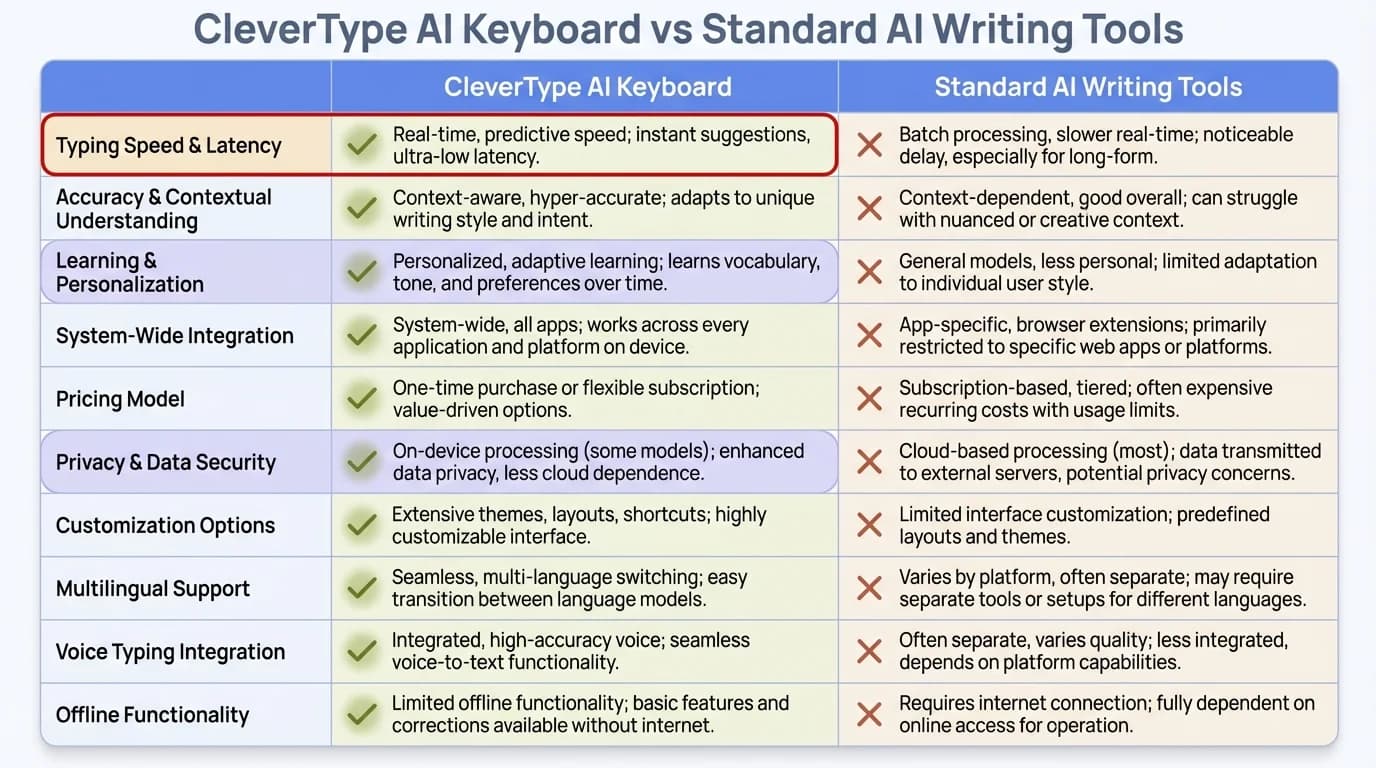
CleverType AI Keyboard vs Standard AI Writing Tools: A comprehensive feature comparison
Integrating AI Writing into Your Mobile Workflow
To maximize productivity with mobile AI writing tools:
- Start with keyboard replacement: This provides the broadest immediate benefit
- Customize suggestions: Teach the AI your preferences and common phrases
- Create custom shortcuts: For frequently used responses or paragraphs
- Develop platform-specific templates: Different contexts require different approaches
- Use voice-to-text with AI refinement: Speak naturally, let AI polish
"I ditched my laptop for most client meetings after getting comfortable with CleverType," says consultant Maya Patel. "I can now take notes and send follow-up emails directly from my phone that are actually better than what I'd write on my laptop. Clients are often impressed by how quickly I can send them detailed, polished recaps while we're still in the parking lot."
Privacy and Security Considerations
When using AI writing tools, you're often sharing sensitive business communications with third-party systems. Understanding the privacy implications is crucial for responsible use.
Different AI writing tools handle your data very differently. Some process everything in the cloud, while others do more processing locally on your device. Some retain your writing to improve their models, while others delete it immediately.
Data Handling Practices Among AI Writing Tools
Before adopting any AI writing tool, understand these key privacy aspects:
Data Storage
- Where is your content stored?
- For how long is it retained?
- Is historical data used to train the AI further?
Processing Location
- Is processing done on your device or their servers?
- Does the tool work offline or require constant connectivity?
Encryption Standards
- Is data encrypted in transit and at rest?
- Who holds encryption keys?
Third-Party Sharing
- Is your data shared with parent companies or partners?
- Are anonymized insights from your content sold or shared?
The most privacy-conscious tools like CleverType use on-device processing when possible and have clear data retention policies. In 2026, this has become less of a premium feature and more of an industry standard, especially as regulations like GDPR and newer privacy laws have tightened requirements around data handling.
Choosing Privacy-Focused AI Writing Solutions
For those handling sensitive information, consider these practices:
- Review privacy policies before use: Look specifically for data retention details
- Choose tools with local processing options: These keep more data on your device
- Use enterprise versions when available: These typically offer stronger privacy controls
- Test with non-sensitive content first: Evaluate the tool before using for confidential communications
- Look for SOC 2 and similar certifications: These indicate stronger security practices
"After our company experienced a data breach through a third-party tool in 2024, we switched to AI writing solutions with stronger privacy protections," explains IT director Carlos Rodriguez. "Now we carefully evaluate data handling practices before adopting any new AI tools. On-device processing is a non-negotiable requirement for us, especially when dealing with client information."
Customization and Learning Capabilities
The most powerful AI writing tools don't just help you write—they learn how you write and adapt to your unique style over time.
Customization goes beyond basic preferences. Advanced AI writing tools analyze your writing patterns, vocabulary choices, sentence structure, and even emotional tendencies to create a personalized writing assistant.
Training AI to Match Your Writing Style
To get the most personalized experience:
- Provide feedback on suggestions: Accept or reject to train the system
- Upload previous writing samples: Some tools can analyze your past work
- Create custom glossaries: For industry-specific terminology
- Set tone preferences: Specify your default communication style
- Define brand voice guidelines: For consistent organizational messaging
The learning process has become significantly faster in 2026. Most advanced AI writing tools now begin to accurately reflect your personal style within just 3-7 days of regular use, thanks to improved machine learning algorithms. The more you use it and provide feedback, the better it gets at capturing your unique voice.
Creating Custom Templates and Prompts
Beyond style learning, custom templates and prompts dramatically increase efficiency:
Email Templates
- Meeting follow-ups
- Project status updates
- Client onboarding sequences
- Sales outreach variations
Social Media Templates
- Product announcements
- Event promotions
- User-generated content responses
- Crisis communication frameworks
Custom Prompts
- "Write a polite rejection to a vendor"
- "Create an enthusiastic team announcement about [topic]"
- "Develop a professional explanation for a project delay"
"I created custom prompts for all my recurring email types," shares product manager Devon Smith. "Now I just type a keyword like 'delay update' and my AI keyboard generates a perfectly structured message explaining timeline changes that I can quickly customize to the specific situation."
Cost-Benefit Analysis of AI Writing Tools
AI writing tools require investment—both financial and in terms of the time needed to learn and integrate them. Understanding the true ROI helps make informed decisions.
The cost of AI writing tools varies widely, from free basic options to enterprise solutions costing hundreds per month. The key is matching the investment to your specific needs and potential returns.
Pricing Models and Subscription Options
Common pricing structures include:
Free Tiers
- Limited features or usage caps
- Often supported by ads or data collection
- Good for occasional users or testing
Freemium Models
- Basic functionality free, advanced features paid
- Usage limits on free version
- Popular among individuals and small teams
Monthly Subscriptions
- Typically $8-$25 for individual plans in 2026
- $20-$60 for professional/business features
- Enterprise pricing often custom, starting around $100/month
Annual Discounts
- Usually 15-20% savings compared to monthly
- May offer additional perks
- Better for committed users
Per-User Team Pricing
- Discounts for multiple seats
- Centralized billing and administration
- Collaboration features
When evaluating costs, consider not just the subscription fee but also implementation time, training, and potential workflow disruptions.
Measuring ROI and Productivity Gains
To calculate the true value of AI writing tools:
- Time savings: Track hours saved on writing tasks
- Quality improvements: Monitor engagement metrics before and after implementation
- Error reduction: Measure decrease in communication mistakes
- Consistency gains: Evaluate brand voice adherence across team members
- Opportunity cost: Consider what else you could accomplish with saved time
A realistic ROI calculation might look like:
5 hours saved weekly × $50 hourly rate × 48 working weeks = $12,000 annual value
Less $240 annual subscription cost
= $11,760 net annual benefit
"We implemented AI writing assistants across our marketing team in early 2025," reports marketing director Lisa Chen. "The monthly cost seemed high initially at $30 per user, but we've documented a 29% increase in content output and a 38% improvement in engagement metrics through 2026. The ROI has been undeniable—we're now expanding it to our sales and customer support teams."
Implementation Strategies for Teams and Individuals
Adopting AI writing tools effectively requires more than just signing up—it demands thoughtful implementation and integration into existing workflows.
The most successful implementations start small, focus on specific use cases, and gradually expand as users gain confidence and see concrete benefits.
Getting Started with AI Writing Assistants
For individuals just beginning with AI writing tools:
- Start with a single use case: Focus on one type of writing you do frequently
- Use the AI as a first-draft tool: Generate initial content, then refine personally
- Learn keyboard shortcuts: Speed improves dramatically with shortcuts mastery
- Create a feedback loop: Actively train the AI by providing feedback on suggestions
- Schedule regular review: Set aside time to evaluate what's working and what isn't
For teams, additional considerations apply:
- Identify champions: Find enthusiastic early adopters to lead implementation
- Develop clear guidelines: Establish when and how AI tools should be used
- Create shared resources: Build team templates and prompt libraries
- Hold training sessions: Ensure everyone understands tool capabilities
- Share success stories: Celebrate and publicize positive outcomes
Common Implementation Challenges and Solutions
Even the best AI writing tools face implementation hurdles:
Challenge: Resistance to adoption
Solution: Start with voluntary use and showcase time savings
Challenge: Inconsistent voice across team members
Solution: Create shared custom templates and style guides
Challenge: Over-reliance on AI suggestions
Solution: Establish review processes for important communications
Challenge: Privacy concerns from team members
Solution: Provide clear data handling documentation and opt-out options
Challenge: Integration with existing tools
Solution: Prioritize solutions with strong API connections to your tech stack
"The biggest mistake we made was trying to implement AI writing tools across all departments simultaneously in late 2025," admits operations manager Jordan Taylor. "When we switched to a department-by-department approach with dedicated training and clear use-case documentation, adoption increased from 23% to 91% in three months. Now it's just part of how we work."
Future Trends in AI Writing Technology
AI writing technology continues to evolve at a breakneck pace in 2026. Understanding emerging trends helps you prepare for future capabilities and stay ahead of the curve, whether you're an individual professional or managing a team.
The next generation of AI writing tools promises even greater personalization, multimodal capabilities, and deeper integration with existing workflows. We're also seeing exciting developments in real-time collaboration, where multiple team members can work with AI assistance simultaneously, and the AI actually learns from collective team preferences rather than just individual styles.
Emerging Capabilities in AI Communication Tools
Watch for these developing technologies:
- Multimodal content creation: Generating coordinated text and visual content simultaneously—already available in several 2026 tools
- Emotional intelligence enhancements: Better understanding of emotional context and appropriate responses, with some tools now detecting when you might be writing while stressed or upset
- Cross-platform consistency: Maintaining voice across different communication channels while adapting to each platform's norms
- Real-time collaboration features: Multiple users working with AI assistance simultaneously, with the AI learning from team patterns
- Specialized industry solutions: AI writing tools designed for specific fields like legal, medical, technical writing, and customer service
- Voice-first interfaces: Sophisticated voice-to-text systems that understand context and can format text appropriately without manual editing
Many of these capabilities have already moved from research labs to commercial products in early 2026, with others expected to become mainstream by mid-year. The pace of innovation shows no signs of slowing down.
Preparing for Next-Generation Writing Assistants
To position yourself for future advancements:
- Invest in data organization: Clean, structured communication data will feed better AI systems
- Develop clear style guidelines: These will be crucial for training specialized AI
- Build AI literacy: Understand capabilities and limitations of current technology
- Experiment with emerging tools: Test beta features to understand potential applications
- Focus on unique human value: Identify where your judgment adds value beyond AI capabilities
"We're seeing a shift from general-purpose AI writing tools to highly specialized assistants," explains Dr. Mira Johnson, AI researcher at Stanford. "The future isn't a single AI writer but an ecosystem of specialized tools working together—one for email, another for social, others for specific industries or content types. In 2026, we're also seeing tools that can actually coordinate with each other, so your email AI can inform your social media AI about ongoing campaigns and maintain message consistency."
Frequently Asked Questions
### Q: Are AI writing tools detectable?
A: Most AI content detection tools focus on long-form content like articles or essays, not short-form communications like emails or social media posts. For professional communications, AI-generated content that's been properly reviewed and personalized is virtually indistinguishable from human writing. However, completely unedited AI output may sometimes contain patterns that sophisticated detection systems can identify, especially if the same generic phrases appear repeatedly.
### Q: How do AI writing tools handle different languages?
A: Leading AI writing tools in 2026 now support 40+ languages with varying degrees of proficiency. Major European and Asian languages typically have strong support, while less common languages may have more limited capabilities. Tools like CleverType offer multilingual features that can even help with code-switching between languages in the same document, which is incredibly useful for bilingual professionals.
### Q: Can AI writing tools help with writer's block?
A: Absolutely! AI writing tools excel at generating starting points when you're stuck. They can suggest openings, outlines, or even complete first drafts based on minimal input. Many users find that having an AI-generated draft to edit is much easier than starting from a blank page, even if they end up making substantial changes.
### Q: How much editing is needed for AI-generated content?
A: The amount of editing needed varies based on the tool quality, your standards, and the content purpose. For routine emails and social media posts, many users report needing only minor adjustments (10-20% changes). For more important communications, expect to more heavily edit AI suggestions, using them more as inspiration than final copy. As you train the AI with feedback, the editing required typically decreases over time.
### Q: Are there industry-specific AI writing tools?
A: Yes, specialized AI writing tools exist for industries including legal, healthcare, finance, technical documentation, and marketing. These tools incorporate industry terminology, compliance requirements, and stylistic norms. They typically cost more than general-purpose tools but offer greater value for professionals in those fields by reducing the need for extensive editing and ensuring regulatory compliance.
### Q: Do AI writing tools work offline?
A: Some modern AI writing tools offer offline functionality by processing data locally on your device, particularly on newer smartphones with advanced processors. However, most still require an internet connection for full features. Tools with on-device processing typically provide better privacy and faster response times, though they may have slightly reduced capabilities compared to cloud-based versions.
### Q: How long does it take for AI tools to learn my writing style?
A: Most AI writing tools begin adapting to your style within a few days of use in 2026, but optimal personalization typically takes 1-2 weeks of regular interaction. The more you use the tool and provide feedback on suggestions (accepting or rejecting them), the faster it learns your preferences. Some advanced tools can also analyze samples of your past writing to accelerate the learning process.