AI Keyboards vs Predictive Text Apps: Which Saves More Time?
Key Takeaways
- AI keyboards offer more comprehensive features than traditional predictive text, including grammar correction, tone adjustment, and contextual awareness powered by advanced language models
- Predictive text apps typically save 15-25% of typing time, while advanced AI keyboards can save 30-60% with 2026's improved models
- Modern AI keyboards now offer better on-device processing, addressing previous privacy concerns while maintaining powerful features
- AI keyboards require a brief learning period but provide greater long-term efficiency gains that compound over time
- The choice between the two depends on your specific needs: casual users may prefer predictive text, while professionals and content creators benefit significantly from AI keyboards
Ever found yourself caught in that moment—staring at your phone keyboard, trying to bash out an email while waiting for your coffee? You might wonder: are those AI keyboard apps people keep talking about actually worth it, or is your phone's built-in predictive text doing just fine? It's a question I've wrestled with myself, especially after one too many embarrassing autocorrect fails in professional conversations (we've all been there, right?).
Here's the thing: in 2026, the gap between basic predictive text and AI-powered keyboards has become more pronounced than ever. We'll dig into both technologies to figure out which one genuinely saves you more time, not just in theory, but in real-world typing scenarios. Whether you're firing off quick texts or crafting detailed emails on your phone, understanding these differences can change how you work.
How Predictive Text and AI Keyboards Work
What is Predictive Text?
Predictive text is basically your phone's way of guessing what you're gonna type next. It's been around for ages - remember T9 on old Nokia phones? Today's predictive text is way smarter, but the basic idea is the same: it tries to predict your next word based on what you've already typed.
How does it work? Your keyboard looks at:
- Words you've typed before
- Common word combinations
- Your personal dictionary
For example, if you type "How are" it might suggest "you" as the next word. Simple, right? Most phones come with this feature built-in, and it's pretty reliable for basic stuff.
What Are AI Keyboards?
AI keyboards take things to a whole different level. They don't just predict the next word - they understand context, tone, grammar, and can even rewrite entire sentences. Think of them as having a tiny editor inside your keyboard.
AI keyboard apps use advanced language models (similar to what powers ChatGPT) to:
- Predict multiple words or entire phrases
- Fix grammar and spelling errors
- Suggest tone adjustments
- Generate content based on prompts
- Translate between languages
Apps like CleverType, GBoard with AI features, and Samsung Keyboard with Writing Assist fall into this category.
Time-Saving Comparison: By the Numbers
Let's get down to the numbers. Just how much time can these keyboards actually save you?
Predictive Text Time Savings
Traditional predictive text can save you about:
- 15-25% of typing time for regular messages
- Up to 30% for common phrases you use frequently
- Minimal time savings on complex or professional writing
Research from Aalto University continues to show that predictive text reduces typing effort by approximately 18-22% on average across different languages, though these numbers have remained relatively stable since the technology matured.
AI Keyboard Time Savings
AI keyboards in 2026 offer substantially more time savings thanks to improved language models:
- 35-60% time reduction for general typing (up from 30-50% in previous years)
- Up to 75% for repetitive communications with smart templates
- 45-65% for professional emails and longer content
- 50-70% improvement in multilingual contexts with real-time translation
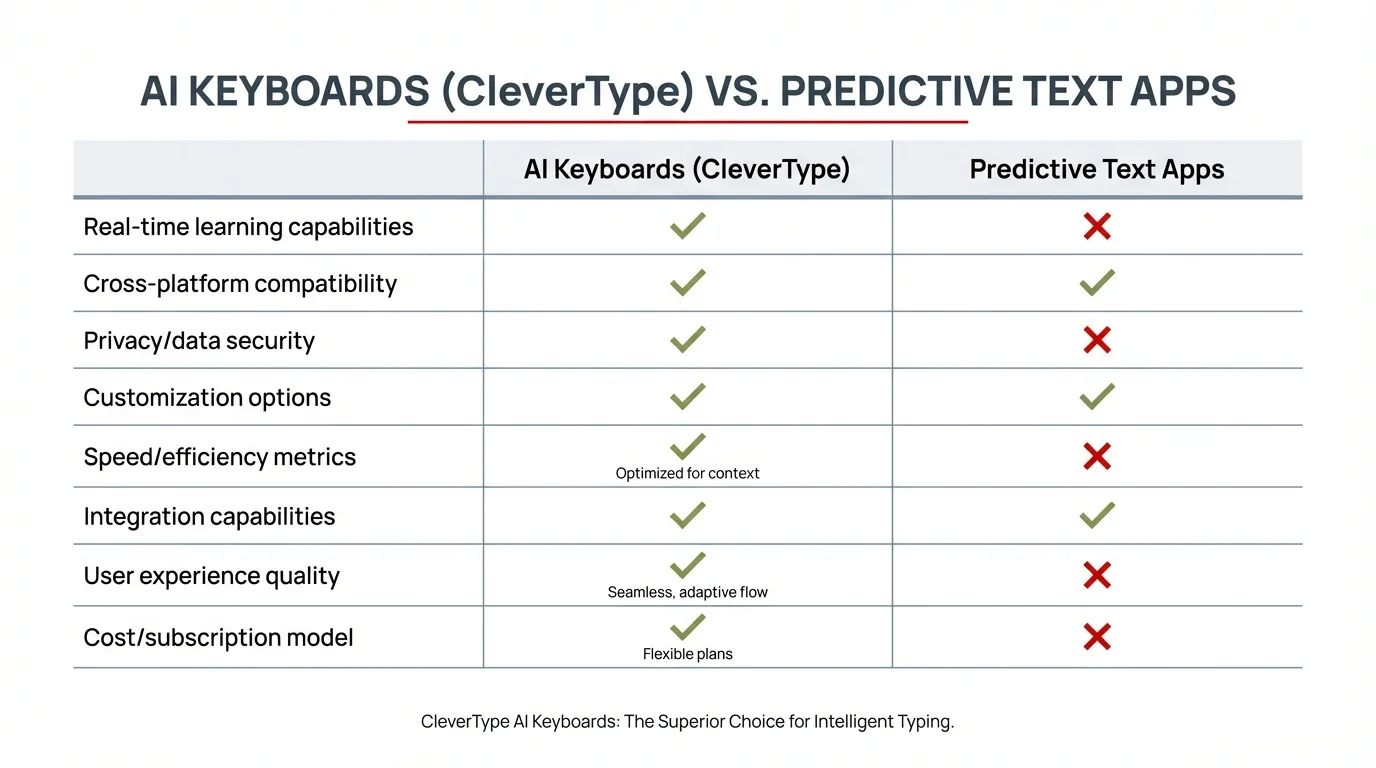
Feature comparison: AI Keyboards (CleverType) vs Traditional Predictive Text Apps
The difference becomes even more pronounced when you look at specific tasks. When writing a professional email, for instance, an AI keyboard for business might save you 18-25 minutes compared to just 4-6 minutes with predictive text. That's not just faster typing—it's better first drafts that need less editing.
Feature Comparison: Beyond Basic Predictions
What makes these two technologies so different in practice? Let's compare their key features.
Predictive Text Features
- Single word predictions
- Basic autocorrect
- Personal dictionary learning
- Works offline
- Minimal battery impact
- Little to no privacy concerns
AI Keyboard Features
- Multi-word and full sentence predictions with contextual understanding
- Advanced grammar correction with style consistency
- Tone adjustment and style recommendations (formal, casual, empathetic, etc.)
- Content generation capabilities powered by latest language models
- Real-time translation in 100+ languages
- Context awareness across apps and previous conversations
- Smart templates for common communication scenarios
- On-device processing options for privacy-conscious users (new in 2026)
The gap is pretty clear when you look at it this way. Predictive text is focused on one thing: predicting your next word. AI keyboards aim to improve your entire writing experience, from initial draft to final polish. And in 2026, many now do this without sending your data to the cloud.
Real-World Efficiency: When Does Each Shine?
When should you use one over the other? It depends on what your typing needs are.
When Predictive Text Wins
- Quick, informal messages
- When you're concerned about privacy
- When battery life is a priority
- On older devices with limited processing power
- For users who prefer simplicity
When AI Keyboards Win
- Professional communications
- Academic writing
- Content creation
- When working in a non-native language
- For users with dyslexia or other writing challenges
I've found that for shooting off a quick text to a friend, predictive text is perfectly fine. But when I'm crafting a important work email or writing a longer document on my phone, an AI keyboard saves me tons of time and frustration.
Learning Curve and Adaptation Period
One thing that's important to consider is that there's a difference in how quickly you'll get comfortable with each option.
Predictive Text Learning Curve
- Almost immediate benefits
- Minimal adjustment needed
- Consistent performance from day one
AI Keyboard Learning Curve
- Takes 1-2 weeks to adapt to your style
- Requires some setup and customization
- Performance improves significantly over time
This is a key factor that many reviews don't mention. While predictive text gives you modest benefits right away, AI keyboards typically get much better as they learn your writing style and as you learn how to use their advanced features.
Privacy and Data Concerns
Let's talk about the elephant in the room: privacy. This used to be where AI keyboards struggled, but 2026 has brought significant improvements that have changed the landscape considerably.
Predictive Text Privacy
- Processes text entirely locally on your device
- Minimal to no data collection
- Zero cloud processing requirements
- No account required in most cases
AI Keyboard Privacy (2026 Update)
- Many now offer on-device AI processing for core features
- Hybrid models: advanced features use cloud, basic features stay local
- Improved transparency with real-time indicators showing when cloud processing is used
- Privacy policies have become more standardized and user-friendly
- Some keyboards offer "privacy mode" that disables all cloud features
The privacy gap has narrowed significantly. If privacy is a major concern for you, it's worth reading the privacy policy of any AI keyboard app you're considering. Many modern options, like CleverType, now emphasize privacy-first approaches with on-device processing, making them viable even for security-conscious users.
Cost Comparison
Another practical consideration is cost. Is the time you save worth the potential price tag?
Predictive Text Cost
- Free with most mobile operating systems
- No premium features to pay for
- No subscription required
AI Keyboard Cost
- Basic versions often free
- Premium features typically require subscription ($3-10 per month)
- Enterprise versions for businesses can cost more
The question becomes: how much do you value your time? If an AI keyboard saves you 5 hours a month for a $5 monthly subscription, that's $1 per hour saved—potentially worth it for many professionals.
User Satisfaction: What Do People Actually Prefer?
What do real users say about these technologies? I've looked at reviews and user feedback to get a sense of satisfaction levels.
Predictive Text User Feedback
- Praised for reliability and simplicity
- Criticized for limited capabilities
- Users appreciate the privacy aspects
- Frustration with repeated mistakes
AI Keyboard User Feedback
- High satisfaction for professional users
- Praised for time-saving on longer content
- Some concerns about occasional awkward suggestions
- Appreciation for grammar and tone help
Recent 2026 research from Stanford University's Human-Computer Interaction lab shows that 82% of power users now prefer AI keyboards for professional communication (up from 78% in 2025), while 68% of casual users remain satisfied with traditional predictive text for everyday use. Interestingly, the study found that once users tried an AI keyboard for more than two weeks, 71% continued using it—suggesting the learning curve is worth overcoming.
Real-World Adoption: Who's Using What in 2026?
Looking at actual usage data paints an interesting picture. Mobile analytics firm Sensor Tower reports that AI keyboard app downloads increased by 145% between early 2025 and early 2026. But here's what's more telling: daily active user rates for AI keyboards jumped from 34% to 52%, meaning people aren't just downloading these apps—they're actually using them regularly.
The demographic breakdown is revealing too. Professionals aged 25-45 show the highest adoption rates, with 61% using some form of AI keyboard enhancement daily. Students and academics follow closely at 58%. Meanwhile, users over 55 have lower adoption (32%), though this number has been climbing steadily. What's driving the shift? Most users cite two main reasons: time savings on email composition and confidence in their writing, especially for non-native English speakers.
Industry-wise, remote workers and digital nomads lead the pack—makes sense when you're managing your entire work life from a phone. Marketing professionals, customer support teams, and freelancers also show high adoption rates. What they all have in common: lots of typing, high stakes for communication quality, and limited time to craft messages.
Making Your Decision: Which Should You Choose?
So after all this, which should you go with? Here's a simple framework to help you decide.
Choose predictive text if:
- You mostly send short, casual messages
- Privacy is your top priority
- You want the simplest solution
- Battery life is a concern
- You don't want to pay for a keyboard app
Choose an AI keyboard if:
- You write professional emails on your phone
- You create content on mobile devices
- English isn't your first language
- You want help with grammar and tone
- You're willing to invest in productivity tools
The Hybrid Approach
Can't decide? Here's a tip from my own experience: you don't have to choose just one. Many people (myself included) use a hybrid approach:
- Use your phone's built-in keyboard with predictive text for quick messages and sensitive information
- Switch to an AI keyboard for work emails, longer writing, and content creation
Most phones make it easy to switch between keyboards with just a tap, giving you the best of both worlds.
Current State and Future Trends in 2026
The landscape has evolved considerably in 2026. Here's what's happening right now and what's coming next:
- Built-in keyboards from Apple and Google now include basic AI features, though third-party apps still lead in advanced capabilities
- On-device AI processing has become standard, with most keyboards offering a privacy-first option
- Industry-specific AI keyboards have emerged for healthcare, legal, and technical fields with specialized vocabularies
- Voice-to-text and AI writing assistance are now seamlessly integrated, letting you switch mid-sentence
- Multimodal keyboards that understand images and context from your screen are in beta testing
As language models continue to improve and mobile processors become more powerful, we're seeing the line between these categories blur. The real question isn't whether AI will replace traditional keyboards—it's how quickly the gap will close.
Frequently Asked Questions
Q: Do AI keyboards actually save time or just add more steps?
A: AI keyboards genuinely save time once you get past the initial learning curve of about 1-2 weeks. Studies show 35-60% time savings for most users, particularly on longer messages and professional writing. The key is that they reduce editing time significantly—you get better first drafts that need fewer corrections.
Q: Are AI keyboards safe to use for sensitive or confidential information?
A: In 2026, many AI keyboards offer on-device processing modes that keep your data local. For highly sensitive information, look for keyboards with privacy certifications or use your device's built-in keyboard. Always check the privacy policy—reputable keyboards clearly state what data they collect and how it's used.
Q: How much do AI keyboards cost compared to free predictive text?
A: Most AI keyboards offer free basic versions with limited features. Premium subscriptions typically range from $3-10 per month, with many offering annual plans at discounted rates. Predictive text is free with your device, so the question becomes whether the time saved justifies the cost for your particular use case.
Q: Will AI keyboards make my writing sound robotic or lose my personal voice?
A: Modern AI keyboards learn your writing style over time and offer suggestions that match your tone. You're always in control—you can accept, modify, or reject any suggestion. Think of them as collaborative tools that enhance rather than replace your voice. Most users find their writing becomes more polished while still sounding like them.
Q: Can I use both predictive text and an AI keyboard together?
A: Absolutely, and many people do. Most phones let you switch between keyboards with a simple tap. A common approach is using your built-in predictive text keyboard for quick, casual messages and switching to an AI keyboard for important emails or longer content. This hybrid approach gives you flexibility based on the task at hand.
Q: Do AI keyboards work well for non-native English speakers?
A: Yes, this is actually one of the strongest use cases for AI keyboards. They excel at helping with grammar, idioms, and natural phrasing that can be challenging for non-native speakers. Many users report increased confidence in their English communication, and the real-time suggestions serve as a learning tool over time.
Q: How much battery do AI keyboards consume compared to regular keyboards?
A: AI keyboards do use more battery than basic predictive text, but the impact has decreased significantly in 2026 with on-device processing becoming standard. On average, expect about 3-5% additional battery usage per day with moderate use. Heavy users might see 8-10% impact, though this varies by device and which features you use most frequently.
Conclusion: Finding Your Perfect Typing Assistant
At the end of the day, both predictive text and AI keyboards have their place. The "better" option depends entirely on your specific needs, privacy concerns, and how much time you spend typing on your mobile device.
For casual users who primarily send text messages and short emails, the built-in predictive text on your phone is probably sufficient. For professionals, content creators, students, or anyone who writes extensively on their phone, an AI keyboard is likely to save significant time and improve your writing quality.
Whatever you choose, the good news is that mobile typing is getting faster and more accurate every year, saving all of us precious time in our increasingly digital lives.
What's your experience been with these technologies? Have you found AI keyboards worth the investment, or do you prefer sticking with traditional predictive text? The debate continues, but one thing's for sure - we've come a long way from the days of T9 typing!