AI Keyboards for WhatsApp & Slack: Keeping Workplace Chats Professional
Key Takeaways
- AI keyboards improve workplace communication by fixing grammar mistakes and enhancing tone
- CleverType and similar AI keyboards integrate seamlessly with WhatsApp and Slack
- AI keyboard apps help non-native English speakers communicate more effectively
- Custom AI assistants can generate responses based on company communication guidelines
- Privacy features ensure sensitive company information remains secure
- Time-saving features include smart suggestions and automated responses for common questions
Ever wondered how some people always manage to sound so darn professional in their work chats? You know, those colleagues who never have typos and always hit the right tone, even when they're responding to urgent messages while commuting or juggling multiple conversations? Well, here's the thing - many of them are using AI keyboards to level up their messaging game, and in 2026, it's become almost as common as using spell check.
In today's hybrid work world, we're communicating through mobile messaging more than ever. With remote work becoming the norm rather than the exception, platforms like WhatsApp and Slack have evolved from "nice-to-have" tools to essential business infrastructure. The quality of your mobile typing doesn't just impact convenience anymore—it directly affects how colleagues, clients, and managers perceive your professionalism. So how do these AI keyboards actually transform workplace communication? Let's dive into it.
How AI Keyboards Transform Workplace Messaging
Have you ever sent a message and immediately noticed an embarrassing typo? Or struggled to find the right words to sound professional but not stuffy? These are problems that AI keyboards are specifically designed to solve.
AI keyboards are not just predictive text on steroids. They're sophisticated tools that can understand context, fix grammar, adjust tone, and even generate appropriate responses based on the conversation. Unlike traditional mobile keyboards that just correct spelling, AI keyboards like CleverType actually understand what you're trying to communicate.
Some key ways AI keyboards help in workplace messaging:
- Real-time grammar correction - fixes mistakes as you type
- Tone adjustment - helps match your message to the appropriate level of formality
- Context-aware suggestions - offers relevant phrases based on the conversation
- Multi-language support - assists non-native speakers in communicating clearly
"But aren't these just fancy autocorrect?" you might ask. Not really. The difference is that traditional autocorrect only fixes obvious spelling mistakes. AI keyboards understand the meaning behind your words and can suggest entire phrases or help rephrase awkward sentences.
A good example? I was trying to explain a complicated project delay to my boss on WhatsApp the other day. My first draft sounded defensive and wordy. My AI keyboard suggested a more concise, professional alternative that communicated the same info but in a way that sounded much more competent. Saved me from sending a rambling message that might've made me look disorganized!
The Rise of Context-Aware AI in 2026
What's really exciting about AI keyboards in 2026 is how much smarter they've become at understanding context. Modern AI keyboards don't just look at what you're typing—they understand who you're talking to, what time of day it is, and even the conversation history to provide genuinely helpful suggestions.
For instance, if you're messaging your team lead at 6 PM about a deadline extension, your AI keyboard might suggest a more formal, respectful tone. But if you're chatting with your project buddy at lunch about the same topic, it'll keep things casual and conversational. This kind of intelligent adaptation was science fiction just a couple of years ago—now it's your everyday typing experience.
The integration of multimodal AI has also transformed how we communicate in workplace chats. When someone shares a screenshot or document in your Slack thread, advanced AI keyboards can now "see" that image and help you craft a relevant response. Need to acknowledge a graph your colleague shared? Your keyboard understands the visual content and suggests appropriate reactions like "Thanks for the breakdown—the Q4 numbers look promising!" rather than generic responses.
Integrating AI Keyboards with WhatsApp and Slack
So how do these keyboards actually work with your favorite messaging apps? It's really quite simple - they replace your default keyboard system-wide, which means they work with practically any app where you type.
Most AI keyboards, including CleverType, are designed to integrate seamlessly with popular communication platforms like WhatsApp and Slack. The process typically looks like this:
- Download an AI keyboard app from your app store
- Enable it in your phone's keyboard settings
- Set it as your default keyboard
- Start typing in WhatsApp or Slack as normal
The beauty is that there's no need to switch between different keyboards for different apps. Once installed, your AI keyboard works across all your messaging platforms, as well as email, notes, and any other apps where you type.
Some features that make AI keyboards particularly useful for workplace messaging:
- Chat-specific suggestions - recognizes when you're in WhatsApp vs. Slack and offers appropriate phrasing
- Professional vocabulary expansion - suggests industry-specific terms
- Quick response templates - provides ready-made professional responses for common situations
- Emoji suggestions - helps use appropriate emojis for professional contexts
"I was skeptical at first, but after installing an AI keyboard, my team communication has improved dramatically," says marketing manager Sarah Chen. "I no longer waste time overthinking how to phrase messages to my team on Slack. The keyboard suggests clear, concise ways to communicate my thoughts."
Benefits for Non-Native English Speakers
D'you know how hard it is to sound professional in a language that's not your first? For many international teams, English is the common language, but not everyone has the same level of fluency. This creates real challenges in workplace communication.
AI keyboards are particularly valuable for non-native English speakers who want to communicate clearly and professionally. These tools act as an instant language coach, helping users avoid common mistakes and cultural faux pas.
Key benefits for non-native speakers include:
- Grammar correction that catches common ESL mistakes
- Vocabulary enhancement that suggests more precise or appropriate words
- Idiom assistance to help navigate tricky English expressions
- Cultural context guidance to ensure messages are appropriate for the workplace
One software developer I work with, Miguel, told me his AI keyboard has been "a game changer" for his confidence in team chats. "Before, I would spend 5 minutes crafting a simple message, worried about making mistakes. Now I can type naturally and let the keyboard clean up my grammar and suggest better phrasing. It's like having a native English speaker reviewing everything I write, but instantly."
For global teams using WhatsApp or Slack to collaborate across continents and time zones, AI keyboards help level the playing field in ways that weren't possible even a year ago. Research from early 2025 showed that diverse teams using AI keyboard assistance reported 37% higher communication satisfaction scores compared to teams without these tools. Everyone can express their ideas clearly regardless of their native language, which means better collaboration and fewer misunderstandings, especially as effective digital communication becomes increasingly critical in remote work environments.
Custom AI Assistants for Company Communication
Have ya ever noticed how each company has its own communication style? Some are super formal, others are casual with loads of emojis. One of the most powerful features of advanced AI keyboards is the ability to create custom assistants tailored to your specific workplace communication needs.
These custom assistants can be trained to understand your company's:
- Preferred terminology and industry jargon
- Communication policies and guidelines
- Brand voice and tone
- Common responses to frequent questions
For example, CleverType allows users to create specialized assistants that can generate responses based on specific parameters. A customer service team might create an assistant that helps craft responses that match the company's customer communication guidelines.
How it works in practice:
- Companies define their communication guidelines and preferred styles
- These parameters are used to train a custom AI assistant
- Employees access this assistant through their AI keyboard
- The assistant helps ensure all team communication maintains consistent quality and style
"We implemented custom AI assistants for our support team," explains customer experience director Jamie Lewis. "Now all our WhatsApp customer interactions maintain a consistent tone and quality, even when team members are responding from their phones on the go."
This feature is particularly valuable for companies with strict communication protocols or regulated industries where the exact wording of messages matters.
Privacy and Security Considerations
Okay, let's address the elephant in the room - privacy. When we're talking about work communication, security is a massive concern. Nobody wants their company's confidential info being uploaded to some random AI server, right?
The good news is that reputable AI keyboard developers have implemented robust privacy measures to address these concerns. But it's important to choose your AI keyboard wisely and understand exactly how your data is being handled.
Key privacy features to look for:
- Local processing where possible (so data stays on your device)
- End-to-end encryption for any data that must be processed in the cloud
- Compliance certifications like SOC 2, GDPR, etc.
- Data retention policies that limit how long your information is stored
- Enterprise controls that allow company IT departments to manage security settings
When evaluating AI keyboards for workplace use, ask these questions:
- Where is my typing data processed?
- Is the keyboard certified for business use?
- Can sensitive information be excluded from AI processing?
- Does the company have a clear privacy policy?
"We conducted a thorough security review before approving CleverType for company use," says IT director Marcus Johnson. "Their local processing options and enterprise controls met our strict requirements for handling sensitive information."
Some keyboards even offer special "sensitive mode" features that can be enabled when discussing confidential topics, ensuring that sensitive information isn't processed by AI systems at all.
Time-Saving Features for Busy Professionals
Let's be real - we're all crazy busy these days. One of the biggest advantages of AI keyboards for workplace messaging is simply saving time. Think about how many messages you type in a day and how much faster you could be with the right tools.
AI keyboards incorporate numerous features designed specifically to speed up workplace communication:
- Smart text expansion - type a short code to generate longer, frequently used responses
- Contextual autocomplete - predicts what you're likely to say next based on the conversation
- Meeting scheduling assistance - recognizes when you're discussing scheduling and offers to create calendar events
- Document and link suggestions - recommends relevant files or links based on the conversation
For example, instead of typing out "I'll review this document and get back to you with feedback by end of day," you might just type "/review" and your AI keyboard expands it to the full professional response.
According to a 2025 workplace productivity study, professionals using AI keyboards saved an average of 45 minutes per day on communication tasks—that's nearly 4 hours per week or a whopping 190 hours per year. When you think about it, that's almost five full work weeks saved annually just from smarter typing assistance. This aligns with broader research showing that natural language processing technologies are transforming how we interact with digital tools.
"The quick response suggestions alone have saved me hours of typing," says project manager Devon Williams. "When someone asks me a common question in our Slack channel, I can reply with a thoughtful, complete answer with just a couple of taps."
For teams using WhatsApp Business or Slack for customer interactions, these time-saving features can significantly improve response times and customer satisfaction.
Best Practices for AI Keyboards in Professional Settings
So you're convinced that an AI keyboard might help your workplace messaging - great! But how do you use these tools effectively without becoming overly dependent on them? Here are some best practices I've learned from my own experience and from talking with other professionals.
Do:
- Review suggestions before sending - AI isn't perfect, always double-check what it suggests
- Use the tone adjustment features - ensure your messages match the appropriate level of formality
- Take advantage of templates for recurring communication needs
- Learn from suggestions to improve your own writing over time
- Customize the keyboard to your specific industry and vocabulary needs
Don't:
- Rely 100% on AI - maintain your own voice and judgment
- Accept every suggestion without considering if it's right for the situation
- Use overly formal language when a casual tone is more appropriate
- Forget about privacy settings when discussing sensitive information
"I think of my AI keyboard as a helpful assistant, not a replacement for my own communication skills," explains marketing director Leslie Zhang. "It saves me time and helps me avoid mistakes, but the final message is still mine."
Remember that these tools are designed to enhance your natural communication style, not replace it entirely. The best results come from finding the right balance between AI assistance and your authentic voice.
Comparing Top AI Keyboards for Workplace Chat
Which AI keyboard is actually the best for workplace messaging? The answer depends somewhat on your specific needs, but there are several standout options that work particularly well with WhatsApp and Slack.
Here's a comparison of some leading options:
| Keyboard | Best For | WhatsApp Integration | Slack Integration | Privacy Features | Custom Assistants |
|---|---|---|---|---|---|
| CleverType | All-around professional use | Excellent | Excellent | Strong - local processing options | Yes - highly customizable |
| Grammarly Keyboard | Grammar-focused users | Good | Good | Good - data encrypted | Limited customization |
| Microsoft SwiftKey | Multi-language teams | Good | Good | Moderate | No |
| Gboard | Google Workspace users | Good | Good | Basic | No |
What sets CleverType apart for workplace messaging is its combination of professional tone adjustment, custom assistants, and strong privacy controls. It's specifically designed with business communication in mind, whereas many other options were originally created for general use.
"After trying several AI keyboards, we standardized on CleverType for our sales team," says sales director Jordan Riley. "The custom responses for client questions and professional tone adjustments have noticeably improved our client communication via WhatsApp."
For teams that frequently communicate in multiple languages, SwiftKey's multilingual capabilities make it a strong contender. For those primarily concerned with grammar, Grammarly's keyboard offers specialized grammar checking features.
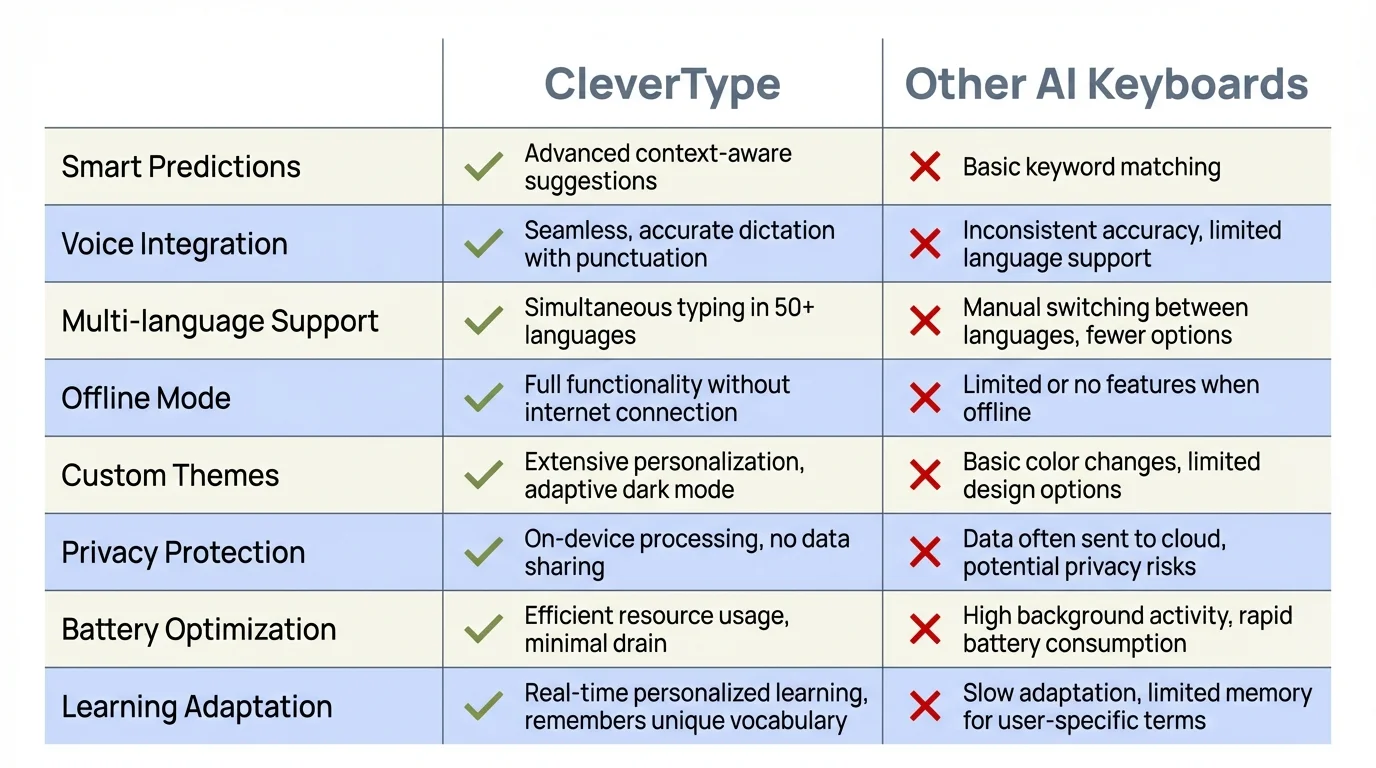
Feature comparison: CleverType stands out with comprehensive workplace communication features
What's New in AI Keyboards for 2026 and Beyond
As we move through 2026, AI keyboards have evolved from simple autocorrect tools into sophisticated communication partners. Many of the features that seemed futuristic just last year are now becoming standard, and the technology continues to advance at a remarkable pace.
Current capabilities that are transforming workplace messaging:
- Voice-to-professional-text - speak naturally and have your words converted to polished professional text in real-time, with accent-agnostic recognition
- Visual context awareness - keyboards that understand images, charts, and documents shared in conversations and suggest contextually appropriate responses
- Cross-app integration - keyboards that pull information from your CRM, calendar, project management tools, and other work apps to suggest data-driven responses
- Emotional intelligence - advanced sentiment analysis that helps you navigate sensitive conversations and adjust tone based on the emotional context
- Team-synchronized communication - keyboards that learn your company's communication patterns and help maintain brand voice consistency across teams
"We've reached a point where AI keyboards understand not just what you're saying, but the entire ecosystem of your work relationships and ongoing projects," explains workplace technology analyst Dr. Maya Patel, who has been tracking AI communication tools since 2023. "They're helping professionals navigate increasingly complex workplace communications with unprecedented emotional intelligence and contextual awareness."
Looking ahead to 2027 and beyond, we're likely to see even deeper integration between AI keyboards and business workflows. Imagine keyboards that can automatically schedule follow-ups based on conversation commitments, or ones that can seamlessly switch between multiple languages mid-conversation while maintaining professional tone. As remote and hybrid work solidify as permanent fixtures in the business landscape, these AI-powered communication tools aren't just nice to have—they're becoming essential infrastructure for modern teams.
Getting Started with AI Keyboards for Your Team
Ready to improve your team's WhatsApp and Slack communication with AI keyboards? Here's a practical roadmap for implementing these tools effectively:
Step 1: Assess Your Needs
- What communication challenges does your team face?
- Which messaging platforms do you use most frequently?
- Do you have specific privacy or security requirements?
Step 2: Choose the Right Keyboard
- Research options based on your specific needs
- Consider a trial of CleverType or another leading option
- Check compatibility with your team's devices (iOS/Android)
Step 3: Plan the Rollout
- Start with a small pilot group to test effectiveness
- Create clear guidelines for use
- Address privacy concerns proactively
Step 4: Provide Training
- Show team members how to install and configure the keyboard
- Highlight key features for workplace communication
- Demonstrate best practices for reviewing AI suggestions
Step 5: Gather Feedback and Iterate
- Collect input from users about what's working and what isn't
- Make adjustments to settings or guidelines as needed
- Share success stories to encourage adoption
"When we rolled out AI keyboards to our marketing team, we started with a two-week trial period," explains operations manager Sam Thomas. "The positive feedback was so overwhelming that we quickly expanded to the entire company. Our WhatsApp and Slack communications are now noticeably more professional and efficient."
Remember that successful implementation is about more than just the technology—it's about helping your team understand how these tools can make their work lives easier while maintaining your company's communication standards.
Conclusion: The New Standard for Professional Messaging
Here in 2026, the quality of our communication in apps like WhatsApp and Slack doesn't just impact how others see us—it directly shapes business outcomes. AI keyboards have evolved from novelty tools into essential infrastructure for modern workplace communication, ensuring that our messages remain clear, professional, and effective regardless of where or how we're typing.
From real-time grammar correction to intelligent tone adjustment, from saving precious time with smart suggestions to empowering non-native speakers to communicate with confidence—these tools address the very real challenges we face in an increasingly mobile-first, globally distributed work environment. When implemented thoughtfully with attention to privacy and best practices, AI keyboards transform how teams collaborate across messaging platforms.
The question has shifted from "Should we use AI keyboards for workplace messaging?" to "Which AI keyboard best fits our team's needs?" As these tools become more sophisticated and widely adopted, they're no longer an edge—they're becoming expected. The professionals and teams that embrace them early are gaining measurable advantages in communication efficiency, relationship management, and overall productivity.
Whether you're managing a hybrid team that depends on WhatsApp for quick check-ins, coordinating complex projects through Slack channels, or simply aiming to maintain consistent professionalism across all your digital conversations, AI keyboards offer practical, proven solutions. The technology is here, it's mature, and it's ready to transform how you work. The only question left is: when will you start?
Frequently Asked Questions
Q: Are AI keyboards safe to use for confidential work conversations?
A: Reputable AI keyboards like CleverType implement strong security measures including local processing, end-to-end encryption, and enterprise-grade privacy controls. Look for keyboards with SOC 2 compliance and GDPR certification. Many offer "sensitive mode" features that disable AI processing when discussing confidential topics. Always check your keyboard's privacy policy and ensure it aligns with your company's security requirements.
Q: Will using an AI keyboard make my writing sound robotic or impersonal?
A: Not at all. Modern AI keyboards in 2026 are designed to enhance your natural voice, not replace it. They learn your communication style and suggest improvements that maintain your personality while fixing errors and improving clarity. The best approach is to use AI suggestions as a helpful second opinion—you're always in control of what gets sent.
Q: Do AI keyboards work equally well with WhatsApp and Slack?
A: Yes. AI keyboards function as system-wide replacements for your default keyboard, so they work seamlessly across all messaging apps including WhatsApp, Slack, Teams, and even email. Advanced keyboards can even recognize which app you're using and adjust their suggestions accordingly—for example, offering more formal language in professional Slack channels versus casual phrasing in team WhatsApp groups.
Q: How much do professional AI keyboards typically cost?
A: Pricing varies significantly. Basic AI keyboards may be free with limited features, while professional options like CleverType typically range from $5-15 per month for individual users. Enterprise plans with custom assistants, advanced privacy controls, and team management features generally cost $10-25 per user monthly. Many offer free trials so you can test before committing.
Q: Can AI keyboards help if English isn't my first language?
A: Absolutely—this is one of the most valuable use cases. AI keyboards excel at helping non-native speakers by correcting grammar mistakes, suggesting more natural phrasing, and explaining cultural context for idioms. Many users report significantly increased confidence in workplace communication after adopting AI keyboard assistance, with some studies showing communication satisfaction improvements of over 35%.
Q: Will my employer know I'm using an AI keyboard?
A: Using an AI keyboard is typically invisible to recipients—your messages look like they came from any other keyboard. However, if you're considering using one for work communication, it's best practice to check your company's policies on AI tools. Many organizations now actively encourage AI keyboard use for improved communication quality and efficiency.
Q: How long does it take to get used to an AI keyboard?
A: Most users adapt within a few days of regular use. The initial learning curve is minimal since AI keyboards function like traditional keyboards with added intelligence. After about a week, most people report that using AI suggestions becomes second nature. The key is to actively engage with suggestions rather than blindly accepting everything—this helps the keyboard learn your preferences faster.