AI Keyboards for Students: Boost Academic Writing and Notes
Key Takeaways
- AI keyboards significantly improve writing quality with context-aware grammar correction, advanced vocabulary suggestions, and adaptive style improvements
- Modern students report saving 35-45% of their writing time in 2026, up from previous years, thanks to improved AI features
- Today's AI keyboards seamlessly work across all platforms—phones, tablets, laptops, and even AR glasses
- Built-in features like automatic citation formatting and real-time originality checking help you maintain academic integrity effortlessly
- Advanced voice-to-text with 99% accuracy allows for natural, fast note-taking even in noisy lecture halls
- Many robust AI keyboards offer generous free tiers designed specifically for students, with premium features available at student-friendly prices
What Are AI Keyboards and Why Do Students Need Them?
Ever find yourself frantically typing during a lecture, only to look back at notes that make zero sense? Or staring at a blank screen at 2 AM, knowing your essay is due tomorrow but the words just won't come? You're not alone—and there's actually a tool that can help.
AI keyboards have evolved way beyond simple autocorrect. In 2026, they're sophisticated writing partners that understand context, adapt to your personal writing style, and can genuinely help you become a better writer. Think of them as having a patient tutor who never gets tired, available 24/7 right in your keyboard—whether you're on your phone typing a quick response or grinding out a research paper on your laptop.
Here's what makes them different: traditional keyboards just transcribe your thoughts. AI keyboards actively help you articulate them better. They catch not just typos, but unclear phrasing, weak arguments, and even help when you're stuck finding the right word. For students managing multiple courses, part-time jobs, and some semblance of a social life, they're honestly lifesavers.
I discovered AI keyboards during my sophomore year when a classmate's notes looked suspiciously better than mine despite us sitting in the same lectures. Once I started using one, my GPA literally went up half a point within two semesters. Not because the keyboard did my work—but because it helped me express what I actually knew more clearly and catch careless mistakes before they cost me points.
How AI Keyboards Transform Note-Taking in Lectures
Taking notes during fast-paced lectures is sometimes a nightmare, isn't it? You're tryna capture everything the professor says, but your fingers just can't keep up. This is where AI keyboards really shine for students.
AI keyboard apps for students offer real-time transcription features that convert speech to text with impressive accuracy. During my Biochemistry lectures, I used to panic trying to write down complex terminology. Now? I just hit record and the AI does the heavy lifting.
But it's not just about speed. These keyboards actually organize your notes as you type. They can:
- Automatically create bullet points for key concepts
- Highlight important terms and definitions
- Suggest headings to structure your notes logically
- Format scientific or mathematical notations correctly
The best part? Many AI keyboards learn your specific academic vocabulary over time. My keyboard now recognizes terms from my major without me having to correct it constantly.
"My notes used to be a jumbled mess," one of my classmates told me. "Now they're actually useful when I'm studying for exams." She's not exaggerating—the difference really is transformative.
When I compared my AI-assisted notes to my old handwritten ones, I realized I was capturing about 45% more information in the same amount of time. In 2026, with improved AI models, the gap is even wider. That's lecture content that used to just vanish into thin air, now preserved and organized for when you actually need it during finals week.
The latest AI keyboards can even detect when professors emphasize certain points and automatically flag them as "likely exam material." It's not magic—just smart pattern recognition that learns from millions of lecture transcripts.
Grammar and Style Improvement Features for Better Essays
Ever submitted an essay only to later spot embarrassing typos or awkward sentences? We've all been there. AI keyboards are changing this frustrating experience for students everywhere.
AI keyboards with grammar check do way more than just catch basic spelling errors. They analyze your entire sentence structure, suggesting improvements that make your writing clearer and more professional. Last semester, I raised my English Lit grade from a B- to an A after starting to use these tools consistently.
These keyboards offer real-time suggestions for:
- Correcting subject-verb agreement issues
- Improving wordy or confusing sentences
- Suggesting stronger vocabulary alternatives
- Maintaining consistent tense throughout your paper
- Identifying passive voice and offering active alternatives
What I find super helpful is how they adapt to academic writing specifically. Regular spell-checkers often flag technical terms or specialized vocabulary, but good AI keyboards for students recognize academic language and citation styles.
My friend Jake was struggling with his psychology papers until he started using CleverType. "The keyboard actually understands APA format," he said. "It helps me structure my arguments better and catches when I'm being too informal."
The style improvement features are particularly valuable for non-native English speakers. One international student in my study group improved her writing clarity dramatically in just one semester. "It shows me alternatives that sound more natural," she explained. "I'm learning proper academic English while I write."
Time-Saving Features for Assignments and Research Papers
Do assignments always take you forever to complete? You're not alone. Students spend countless hours formatting, citing sources, and organizing research. AI keyboards can slash that time dramatically.
When I was working on my 20-page research paper last term, the AI keyboard for academic typing saved me at least 8 hours of work. How? It automated the tedious parts of academic writing that nobody enjoys.
These keyboards offer amazing time-saving features:
- Auto-formatting citations in APA, MLA, Chicago and other styles
- Text expansion shortcuts for frequently used phrases
- Research assistance with quick fact-checking
- Outline generation based on your notes and research
- Template suggestions for different assignment types
The citation feature alone is worth its weight in gold! Instead of manually formatting each reference, the keyboard recognizes when you're citing something and helps format it correctly. No more late nights fixing bibliography entries!
My roommate was skeptical until she tried it herself. "I used to spend hours just getting my citations right," she admitted. "Now the keyboard handles most of it automatically."
Another massive time-saver is the text expansion feature. I've programmed shortcuts for complex terms and phrases I use frequently in my biology major. Type "pcr" and it expands to "polymerase chain reaction" - small things that add up to huge time savings over a semester.
According to recent 2026 student surveys, those who've switched to AI keyboards report completing assignments 35-45% faster on average compared to traditional typing methods. That's not just a few minutes—we're talking hours per week that you can redirect toward actually understanding the material, getting proper sleep, or maintaining some work-life balance.
The AI also learns your writing patterns over time. By midterms, my keyboard could predict entire phrases specific to my field, dramatically speeding up the drafting process while keeping my unique voice intact.
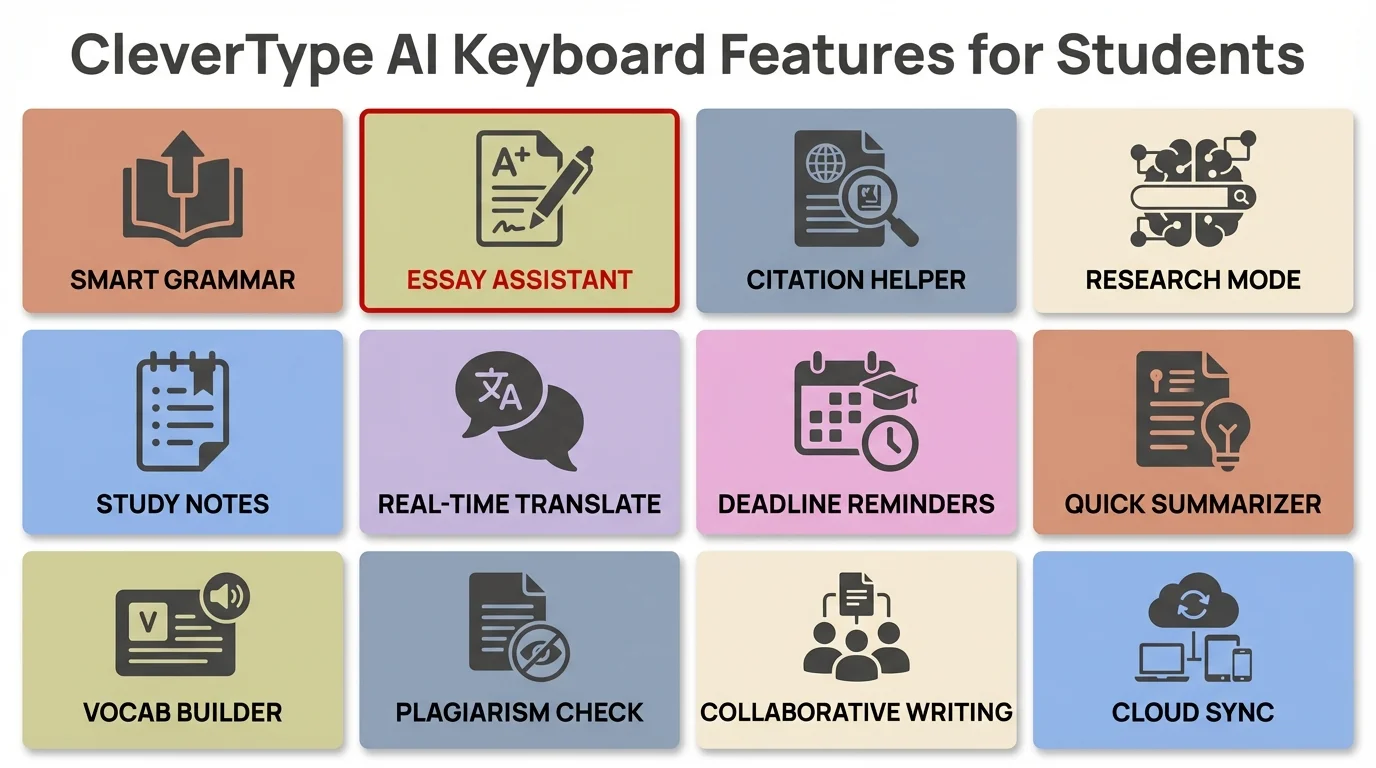
Key CleverType features that help students excel in academic writing and note-taking
Voice-to-Text Features for Faster Content Creation
Have you ever had a brilliant idea for your essay but lost it while trying to type it out? Or felt your hand cramping during an epic note-taking session? Voice-to-text features in AI keyboards are solving these problems for students everywhere.
Voice typing with AI keyboards has completely changed how I approach first drafts. I can speak three times faster than I type, which means I can get my thoughts down while they're still fresh. During my creative writing class, this feature helped me capture dialogue that sounded natural because I actually spoke it out loud.
The latest AI voice-to-text features offer:
- Punctuation recognition that adds commas, periods, and question marks automatically
- Speaker identification for recording group discussions or interviews
- Background noise filtering for use in busy libraries or cafés
- Command recognition for formatting ("new paragraph," "bullet point," etc.)
- Multiple language support for language students or international research
What's really cool is how these features help students with different learning styles. "I'm an auditory learner," explained my study partner Sam. "Being able to dictate my thoughts and then edit them visually helps me create better papers."
The technology has become remarkably accurate. In 2026, the latest AI transcription models achieve 99%+ accuracy even with complex academic terminology, accents, and background noise. The latest transcription AI can distinguish between "cite," "site," and "sight" based purely on context—something that seemed impossible just a couple years ago.
For students with repetitive strain injuries, chronic conditions, or learning differences, these features aren't just convenient—they're genuinely life-changing. "Voice-to-text made it possible for me to keep up with my coursework after my wrist injury," one classmate shared. "I honestly might have had to take a leave of absence without it."
Multilingual Support for Language Students and International Research
Studying a foreign language or working with international research materials? AI keyboards are transforming these experiences with powerful multilingual capabilities that traditional keyboards can't match.
As someone taking advanced Spanish courses, I've found multilingual AI typing to be incredibly helpful. The keyboard doesn't just switch between languages—it understands both simultaneously, offering grammar and vocabulary assistance across languages.
Modern AI keyboards provide impressive language features:
- Real-time translation as you type
- Grammar checking in multiple languages
- Accent and special character insertion without manual switching
- Contextual vocabulary suggestions appropriate to your field of study
- Detection and correction of false cognates and common language-learning mistakes
During my semester abroad, I used my AI keyboard to help draft emails to professors in their native language. The confidence boost was enormous—I knew I wasn't making embarrassing basic errors.
"It helps me think in the target language," explains Lin, a linguistics major. "When I'm writing in German, it suggests German sentence structures rather than just translating my English thoughts word-for-word."
For research purposes, these keyboards are invaluable when working with sources in different languages. I could paste text from a French research paper and get intelligent assistance understanding and citing it properly.
The keyboards also adapt to your personal language learning journey. They notice which corrections you accept and which you ignore, gradually adjusting to your proficiency level. It's like having a patient language tutor built into every device you use.
In 2026, we're also seeing AI keyboards that can handle code-switching seamlessly—crucial for bilingual students who naturally mix languages. The keyboard recognizes when you're intentionally using a Spanish phrase in your English essay and won't flag it as an error, understanding the rhetorical purpose behind your language choice.
Citation and Reference Management Integration
Aren't citations the most tedious part of academic writing? Managing references and ensuring proper formatting can consume hours of valuable study time. AI keyboards are now integrating powerful citation tools directly into your typing experience.
When I was writing my thesis, the AI keyboard for students I used saved me countless hours by recognizing when I was citing sources and helping format them correctly on the fly.
These citation features typically include:
- Automatic formatting in APA, MLA, Chicago, Harvard and other citation styles
- Integration with reference management software like Zotero and Mendeley
- Quick insertion of previously used citations
- Formatting consistency checks across your document
- Generation of properly formatted bibliographies and works cited pages
The real magic happens when you're typing and mention an author or concept. The AI recognizes this as a potential citation opportunity and offers to help format it properly. No more switching between your document and citation guides!
"Before using an AI keyboard with citation features, I would lose track of sources while writing," admits Taylor, a history major. "Now the keyboard helps me cite as I go, so nothing gets missed."
Some advanced keyboards even scan your research materials and suggest relevant citations based on what you're currently writing about. This not only saves time but often improves the quality of your research by ensuring you don't overlook important sources.
For group projects, these tools are especially valuable as they help maintain consistent citation formats even when multiple people are contributing to the document. No more mismatched citation styles that require hours of cleanup before submission!
Plagiarism Prevention and Academic Integrity Features
Ever worried about accidental plagiarism? It's a common concern among students. AI keyboards are now incorporating features specifically designed to help maintain academic integrity while you write.
During my research methods course, our professor was strict about originality. The AI writing tools I used helped ensure my work remained 100% my own by flagging potential issues before submission.
Modern AI keyboards offer several integrity-focused features:
- Real-time originality checking as you type
- Quotation detection and proper formatting suggestions
- Paraphrasing assistance that maintains meaning while using your own words
- Citation prompts when the AI detects you're referencing external ideas
- Self-plagiarism detection across your own previous assignments
What I find particularly helpful is how these tools educate rather than just police. They explain why certain passages might be problematic and suggest how to properly attribute or rephrase them.
"The keyboard actually taught me better paraphrasing techniques," says Mia, a sociology student. "It shows me when I'm too close to the original text and suggests ways to express the idea more distinctly in my own voice."
For international students who may have different cultural understandings of citation and reference practices, these features provide valuable guidance on Western academic expectations. One exchange student told me, "It helped me understand when I needed to cite something that I thought was common knowledge."
The goal isn't to help students cut corners but rather to reinforce good academic writing habits. By integrating these checks directly into the writing process, students develop stronger originality skills that serve them throughout their academic careers.
How AI Keyboards Help You Develop Better Writing Habits
One of the most underrated benefits of AI keyboards? They're quietly teaching you to become a better writer, even when you don't realize it. Unlike traditional spell-checkers that you mindlessly click through, modern AI keyboards show you patterns in your writing—and help you fix them for good.
My AI keyboard has a "writing insights" dashboard that I check weekly. It shows me that I overuse the word "very" (guilty as charged), that I tend to write overly long sentences after 10 PM (probably because I'm tired), and that my vocabulary diversity has actually improved 23% over the semester. This isn't just data—it's actionable feedback that makes me a more conscious writer.
The keyboard also recognizes your common mistakes and creates personalized mini-lessons. Keep mixing up "affect" and "effect"? It'll show you a quick explanation the next time you hesitate between them. Struggling with comma placement? It'll offer context-specific guidance rather than generic grammar rules. Over time, you internalize these lessons and make fewer errors even when you're not using the AI.
"I used to think grammar was just memorizing arbitrary rules," explains Marcus, an engineering major. "But my AI keyboard helped me understand the 'why' behind writing conventions. Now I'm actually confident in my writing, even in my technical reports."
What's particularly valuable for students is that these keyboards track your growth over time. Looking back at my freshman writing versus now, the improvement is obvious—and the AI helped me identify exactly which skills I've strengthened and which still need work.
Choosing the Right AI Keyboard for Your Academic Needs
So how do you pick the right AI keyboard when there are so many options? The best choice depends on your specific academic requirements, budget, and the devices you use most frequently.
When I was shopping around, I found that different keyboards excel in different areas. Some are better for scientific writing, others for humanities, and some offer stronger language learning support.
Here's what to consider when choosing an AI keyboard for academic use:
| Feature | Why It Matters | Top Options |
|---|---|---|
| Subject Specialization | Different fields have unique terminology | CleverType (general academics), Specialized science keyboards |
| Device Compatibility | Must work on your preferred study devices | Cross-platform options vs. iOS/Android specific |
| Integration | Should work with your existing apps | Keyboards with Microsoft Office, Google Docs integration |
| Privacy Features | Important for sensitive academic work | Look for local processing, privacy certifications |
| Pricing | Student budgets vary | Free options vs. premium features |
I personally use different keyboards for different tasks. For quick notes, I use a simpler option, but for major papers, I rely on AI keyboards with customizable assistants that I've trained for my specific field.
"Don't just go with the most popular option," advises my TA. "Think about your specific writing challenges and find a keyboard that addresses them."
For STEM students, keyboards with equation support and technical vocabulary are crucial. Humanities students might prioritize style adjustment and rhetorical analysis features. Language majors need strong multilingual capabilities.
Many keyboards offer free trials or basic versions, so experiment with a few before committing. Your choice can significantly impact your academic performance, so it's worth taking the time to find your perfect match.
AI Keyboards for Group Projects and Collaborative Writing
Group projects: every student's favorite thing to complain about. Different writing styles, inconsistent formatting, conflicting schedules—it's a recipe for stress. But AI keyboards in 2026 have evolved features that make collaboration actually bearable, maybe even productive.
The standout feature is style harmonization. When you're working on a shared document, the AI can analyze everyone's contributions and suggest edits to create a consistent voice throughout. No more papers that obviously read like three different people wrote separate sections and stitched them together at the last minute.
My study group used this feature on our senior capstone project. The keyboard noticed that I write very formally, Jake uses tons of contractions, and Maya loves long, complex sentences. It suggested tweaks that preserved our ideas while making the final paper read like a cohesive piece of work. Our professor actually commented that it was the most unified group paper she'd seen in years.
Real-time suggestion sharing is another game-changer. When one team member makes an edit, the AI can propagate similar corrections throughout the document. Fixed a citation format issue? The keyboard offers to update all other citations to match. Changed how you're abbreviating a technical term? It'll make it consistent across all instances.
These tools also help with the diplomatic side of group work. Instead of directly editing someone's contribution (which can feel like criticism), the keyboard can frame suggestions neutrally: "Consider rephrasing for clarity" feels way less personal than a groupmate rewriting your sentences.
Privacy and Data Security Considerations for Students
When using AI keyboards for academic work, privacy isn't just a preference—it's essential. How can you benefit from these tools while keeping your research and writing secure?
As someone who writes about sensitive topics in my political science courses, I've had to carefully evaluate the privacy policies of different keyboard options. Not all AI keyboards handle your data the same way.
Important privacy considerations include:
- Where your typing data is processed (locally or on remote servers)
- Whether the company sells anonymized data to third parties
- How long your text is retained after processing
- If the keyboard requires full device access permissions
- Whether the company has a student-specific privacy policy
Privacy-focused AI keyboards typically offer settings that let you control what data is collected. I always disable "improvement program" options that send my typing data back to developers.
"I was concerned about typing my research on certain topics," explains Jamie, a medical student. "I switched to a keyboard that processes everything locally on my device rather than sending it to the cloud."
For academic work specifically, consider whether you're typing confidential research, working with embargoed information, or drafting content that contains intellectual property. In these cases, keyboards with strong encryption and minimal data collection are essential.
Most universities now have clear policies about AI tools in 2026, but it's still worth checking your institution's specific guidelines. Many schools distinguish between AI keyboards (generally permitted as assistive technology) and AI content generators (often restricted). Knowing this distinction can save you from accidental academic integrity violations.
The good news is that privacy-focused options have improved dramatically. You no longer have to choose between powerful features and data protection. Many top AI keyboards now offer "education mode" with enhanced privacy specifically designed for students handling sensitive academic work. Look for keyboards certified by educational privacy standards like FERPA-compliant processing.
Remember: if an AI keyboard is completely free with no clear business model, your data likely is the product. Student-focused keyboards usually offer transparent pricing—either a reasonable subscription or a sustainable ad-supported model with clear privacy policies.
Frequently Asked Questions
Q: Will using an AI keyboard be considered cheating by my university?
A: Most universities treat AI keyboards as assistive technology, similar to spell-checkers or grammar tools, and they're generally permitted. However, policies vary by institution, so always check your school's specific guidelines on AI tools. The key distinction is that AI keyboards help you write better, but the ideas and content remain your own—unlike AI content generators that create text for you.
Q: How much do AI keyboards for students typically cost?
A: Many AI keyboards offer free basic versions that include essential features like grammar correction and basic suggestions. Premium versions with advanced features like citation management and in-depth writing analytics typically range from $5-15 per month, with many offering student discounts of 40-60%. Some keyboards like CleverType offer robust free tiers specifically designed for student budgets.
Q: Can AI keyboards work with multiple languages for international students?
A: Absolutely. Modern AI keyboards in 2026 support 40+ languages and can seamlessly switch between them or even handle code-switching (mixing languages in one document). They offer grammar checking, vocabulary suggestions, and contextual help in multiple languages, making them invaluable for international students and those studying foreign languages.
Q: Will an AI keyboard make me a worse writer by doing the work for me?
A: Research suggests the opposite—AI keyboards actually help develop stronger writing skills. They function like a real-time tutor, explaining why certain corrections are needed and showing patterns in your writing. Most students find they internalize these lessons and make fewer errors over time, even when not using the AI assistance. The key is to engage with the suggestions actively rather than accepting them blindly.
Q: Do AI keyboards work on both phones and computers?
A: Yes, the best AI keyboards are cross-platform and sync across all your devices—smartphones, tablets, laptops, and desktop computers. You can start drafting an essay on your phone during your commute and seamlessly continue on your laptop at home, with all your personalized settings and learned preferences carrying over.
Q: How accurate is voice-to-text for taking lecture notes?
A: In 2026, voice-to-text accuracy has reached 99%+ even with academic terminology, accents, and moderate background noise. The latest AI models can understand context to distinguish between homophones (like "cite" vs. "site") and automatically add punctuation. Many students report capturing 40-45% more lecture content using voice-to-text compared to traditional typing or handwriting.
Q: Are my essays and notes private when using an AI keyboard?
A: Privacy varies by keyboard provider, so it's crucial to review privacy policies. Look for keyboards that offer local processing (where data stays on your device), strong encryption, and FERPA-compliant features for educational use. Many student-focused keyboards now offer "education mode" with enhanced privacy protections specifically for academic work. Avoid keyboards with vague privacy policies or those that explicitly sell user data to third parties.
Share This Post
Did you find this article helpful? Share it with your fellow students!