AI Keyboards for Dyslexia and Accessibility: Voice Typing and Grammar Support
Key Takeaways
- AI keyboards offer specialized features like voice typing, grammar correction, and word prediction to help users with dyslexia and other accessibility needs
- Voice typing technology can reduce typing errors by up to 85% for people with dyslexia in 2026
- Grammar support features provide real-time corrections and suggestions to improve writing confidence
- Text-to-speech functionality helps users verify what they've written through audio feedback
- Customizable interfaces allow for personalized settings like font type, size, and color schemes
- Most AI accessibility keyboards work across multiple platforms including iOS and Android
- The learning curve is minimal with most users reporting comfort within 1-2 weeks of use
- New multimodal input features combine typing, voice, and gesture controls for enhanced flexibility
Ever wondered how technology can make typing easier for those with reading and writing challenges? AI keyboards are revolutionizing accessibility in ways we couldn't imagine just a few years ago. Let's dive into how these smart tools are breaking down barriers and making digital communication more inclusive.
How AI Keyboards Are Changing Lives for People with Dyslexia
Have you ever tried to write something but the words just wouldn't come out right? For people with dyslexia, this is an everyday struggle. Dyslexia affects approximately 15-20% of the global population according to 2026 research, making reading and writing challenging tasks that many of us take for granted. That's roughly 1 in 5 people navigating daily communication barriers.
AI keyboards are like helpful friends that understand these challenges. They're not just ordinary keyboards—they're packed with features specifically designed to address the unique needs of dyslexic users. But what exactly makes them so helpful?
For starters, AI keyboard apps for dyslexia offer predictive text that goes beyond the basics. They can suggest complete phrases based on context, not just the next word. This means less time struggling to find the right words and more time expressing thoughts clearly.
The text-to-speech feature is another game-changer. It lets users hear what they've typed, which is incredibly helpful for catching mistakes that might be hard to spot visually. As Megan, a college student with dyslexia, told me: "Hearing my text read back to me helps me catch errors I would've missed otherwise. It's like having a proofreader built into my phone."
Color-coding and customizable fonts also make a huge difference. Many dyslexic users find reading easier with specific fonts like OpenDyslexic or Dyslexie, which have heavier bottom parts of letters to anchor them visually. Good AI keyboards allow users to adjust these settings to what works best for them.
But perhaps most importantly, these keyboards learn and adapt. They remember common corrections and gradually adjust to each user's unique writing patterns. This personalized approach means the keyboard gets smarter and more helpful over time—kinda like a friend who gets to know your habits.
The impact? Students reporting better grades on written assignments. Professionals feeling more confident in workplace communications. And people of all ages experiencing less anxiety when writing texts, emails, or social media posts.
Voice Typing Technology: Speaking Instead of Typing
Isn't it amazing how we can just talk to our devices now? Voice typing has completely changed how many people with motor or visual limitations, dyslexia, and other conditions interact with technology. Instead of struggling with traditional typing, they can simply speak their thoughts.
But how does it actually work? Voice typing tech uses advanced speech recognition algorithms powered by neural networks to convert spoken words into text. The AI listens to your voice, processes the audio, and transforms it into written text almost instantly. The technology has improved dramatically—accuracy rates in 2026 now regularly exceed 98% even for complex vocabulary and accented speech, thanks to advances in transformer-based models.
For dyslexic users, this feature is particularly valuable. "When I'm having a 'bad dyslexia day,' as I call it, I can switch to voice typing and bypass the whole spelling struggle," says Jamie, a marketing professional who's been using AI keyboards for accessibility for about two years.
The benefits go beyond just convenience:
- Reduced cognitive load: Users can focus on their thoughts rather than spelling
- Faster communication: Speaking is typically 3x faster than typing for most people
- Decreased frustration: Fewer errors means less time spent on corrections
- Greater independence: Less reliance on others for writing assistance
Voice typing isn't perfect though. Background noise can still cause problems, and speaking punctuation commands (like "period" or "new paragraph") takes some getting used to. But these minor inconveniences pale in comparison to the freedom this technology provides.
What's particularly exciting is how voice typing is evolving to understand context better. Modern AI in 2026 can reliably distinguish between homophones (like "their" vs. "there") based on the sentence meaning. Advanced systems now detect emotion in speech and adjust punctuation accordingly—a frustrated tone might add an exclamation mark, while a questioning inflection adds a question mark without you having to say "question mark."
The integration of on-device processing has also been a breakthrough. Many keyboards now process voice input locally on your device, ensuring privacy while maintaining lightning-fast response times. This means your personal conversations stay private, addressing one of the biggest concerns users had about early voice typing technology.
I've seen firsthand how this technology transforms lives. A student I worked with went from spending hours on writing assignments to completing them in a fraction of the time—with better results. The relief on her face was unforgettable when she realized technology could bridge this gap for her.
Grammar Support Features That Make Writing Easier
Ever noticed how embarrassing grammar mistakes can be? For people with dyslexia and other learning differences, these errors aren't just occasional slip-ups—they're persistent challenges that can affect confidence and how others perceive their intelligence. That's where AI grammar support comes to the rescue.
Modern AI keyboards don't just correct spelling—they provide comprehensive grammar assistance that works in real-time. As you type, these smart tools analyze sentence structure, verb tense, word choice, and more to offer suggestions that improve clarity and correctness.
The technology behind this is pretty impressive. Natural Language Processing (NLP) algorithms examine not just individual words but entire sentences and paragraphs to understand context. This means the corrections are much more accurate than the basic spell-checkers of yesteryear.
Some of the most helpful grammar features include:
- Contextual spelling correction (distinguishing between "their," "they're," and "there")
- Punctuation assistance (suggesting commas, semicolons, and other punctuation)
- Subject-verb agreement checks
- Passive voice identification
- Wordiness detection
- Clarity improvements
For dyslexic users, these tools provide a safety net that allows them to write more confidently. "The grammar support in my AI keyboard catches mistakes I wouldn't even know to look for," explains Tara, a business owner with dyslexia. "It's like having an editor looking over my shoulder."
What's particularly valuable is how these features teach as they correct. Instead of just fixing errors, many AI-powered grammar correction keyboards explain why something is incorrect, helping users learn over time.
The psychological impact shouldn't be underestimated either. Research shows that writing confidence increases significantly when users have reliable grammar support. This leads to more willingness to communicate in writing—something many with language-based learning differences have avoided in the past.
I've seen this transformation firsthand with several clients. One young professional who previously avoided sending emails now confidently handles all her written communication. "The grammar support gives me peace of mind," she told me. "I know I won't send something embarrassing."
Word Prediction and Completion Tools
Don't ya hate when you're trying to type something and can't quite remember how to spell a tricky word? For people with dyslexia, this frustration is multiplied. That's where word prediction technology becomes a game-changer.
AI keyboards use sophisticated prediction algorithms that go way beyond basic autocorrect. These systems analyze what you're typing in real-time and offer suggestions for completing words or even entire phrases. The technology is constantly learning from your writing style, vocabulary choices, and common phrases to make increasingly accurate predictions.
For users with dyslexia, this feature reduces cognitive load in several important ways:
- It minimizes the need to recall exact spellings
- It suggests appropriate vocabulary when word-finding is difficult
- It speeds up the writing process, reducing fatigue
- It offers alternative words when you're stuck, expanding vocabulary options
The prediction quality has improved dramatically in recent years. Early word prediction was fairly basic, offering only common words regardless of context. Today's AI keyboards can understand the semantic meaning of your sentences and suggest contextually appropriate words that maintain your intended meaning.
Sarah, a high school student with dyslexia, shared how this changed her experience: "Before, I'd avoid using certain words because I couldn't spell them. Now I can use whatever vocabulary I want because the keyboard helps me find the right spelling. My essays have gotten so much better."
What makes this technology particularly effective is its adaptability. The AI keyboard with customizable assistants learns your personal vocabulary, including technical terms, names, and phrases you use frequently. This personalization means the suggestions become increasingly relevant over time.
The statistics support these anecdotal experiences. Studies from 2025-2026 show that effective word prediction can:
- Reduce spelling errors by up to 85%
- Increase writing speed by 30-35%
- Expand vocabulary usage by offering synonyms and alternatives
- Improve overall writing quality and readability by 40%
- Decrease cognitive load, allowing users to focus on message content rather than mechanics
For professionals in specialized fields, this adaptability is crucial. A medical student with dyslexia explained: "The keyboard learned medical terminology I use regularly, which has been invaluable during my clinical rotations when I need to take quick notes."
Customizable Interfaces for Different Needs
Have you ever tried wearing someone else's glasses? The world looks all wrong, right? The same principle applies to digital interfaces—what works perfectly for one person might be completely unusable for another. This is why customizable interfaces are so important in accessibility technology.
AI keyboards for accessibility recognize that different users have different needs. Someone with dyslexia might benefit from certain font types and color schemes, while a user with motor limitations might need adjusted key sizes and spacing. The beauty of modern AI keyboards is that they allow for extensive personalization.
Some of the most helpful customization options include:
- Font selection (including dyslexia-friendly fonts like OpenDyslexic)
- Text size and spacing adjustments
- Color schemes and contrast settings
- Keyboard layout modifications
- Key sensitivity and timing adjustments
- Feedback options (visual, auditory, haptic)
These aren't just nice-to-have features—they're essential for making technology truly accessible. As Alex, an IT professional with dyslexia, explains: "Being able to adjust the contrast and use a specialized font makes the difference between struggling to read what I'm typing and being able to work efficiently."
The customization extends beyond just visual elements too. Users can adjust how prediction works, how much grammar assistance they receive, and even create custom shortcuts for frequently used phrases. This level of control helps people create a typing environment that works with their specific needs rather than against them.
What's particularly impressive is how some AI keyboards remember different settings for different apps. For instance, a user might want maximum grammar support when writing emails but prefer minimal interruption when chatting with friends. The keyboard adapts accordingly.
Research supports the importance of these personalization options. Studies from leading accessibility institutes show that properly customized interfaces can reduce error rates by up to 70% and increase typing speed by 30-45% for users with various accessibility needs. The key is finding the right combination of settings that work for your unique neurology.
In 2026, we're seeing exciting developments in AI-powered customization that automatically adapts to your needs. Some keyboards now analyze your typing patterns and proactively suggest interface adjustments. If you're making frequent errors at a certain time of day, the keyboard might suggest increasing key size or enabling more aggressive autocorrect during those hours.
I've witnessed this transformation with many clients. One memorable case was a writer with both dyslexia and slight motor control issues who had nearly abandoned her career due to frustration with typing. After setting up a customized AI keyboard interface, she returned to writing with renewed confidence. "It feels like the keyboard finally understands me," she said.
Text-to-Speech and Speech-to-Text Integration
Ever tried reading your own writing out loud to catch mistakes? There's something about hearing text that helps us process information differently than when we just see it. This principle is at the heart of text-to-speech and speech-to-text features in AI keyboards.
For users with dyslexia, this dual-channel approach—combining visual and auditory processing—creates a powerful tool for both understanding and creating text. Let's break down how these integrated features work together:
Text-to-speech technology converts written text into spoken words, allowing users to hear what they've typed. This auditory feedback helps identify errors that might be missed visually and confirms that the text conveys the intended message. Modern versions sound increasingly natural, with proper inflection and rhythm that makes listening comfortable.
On the flip side, speech-to-text (also called voice typing, which we discussed earlier) converts spoken words into written text. This feature allows users to bypass the mechanical aspects of typing altogether when needed.
The real magic happens when these technologies work together in a seamless loop:
- User speaks their thoughts
- AI converts speech to text
- User reviews the text visually
- Text-to-speech reads it back for auditory confirmation
- User makes any needed corrections (by voice or typing)
This multi-sensory approach is particularly effective for dyslexic users because it engages different cognitive pathways, creating multiple opportunities to catch and correct errors.
"The combination of being able to dictate and then hear my text read back to me has completely changed how I communicate," says Marcus, a business consultant with dyslexia. "I can actually focus on my ideas instead of struggling with the mechanics of writing."
The technology has practical applications beyond just error correction too. Many users report that hearing their text helps them refine their tone and style. It's easier to detect when a sentence is too long or awkwardly constructed when you hear it spoken aloud.
Integration with other apps makes these features even more powerful. Advanced AI keyboards can read incoming messages, emails, or documents, making text consumption easier as well. This comprehensive approach addresses both sides of communication—creating and consuming text.
Educational research supports this multi-sensory approach. Studies show that engaging both visual and auditory processing can improve comprehension by up to 45% for individuals with dyslexia and similar learning differences. This dual-channel processing helps reinforce learning and builds stronger neural pathways for language processing.
Real-World Success Stories and User Experiences
Nothing speaks louder than real stories from real people, right? I've collected experiences from various users who've transformed their relationship with writing through AI keyboards. Their stories show just how life-changing these technologies can be.
Take James, a 42-year-old architect with dyslexia who struggled with client communications throughout his career. "I used to have my assistant proofread everything before sending," he admits. "Now with my AI keyboard, I handle all my own correspondence. The grammar support catches my mistakes, and voice typing lets me get ideas down quickly when I'm on construction sites. It's given me independence I never thought I'd have."
Or consider Mia, a 16-year-old high school student whose grades were suffering despite her intelligence. "Before using an accessible keyboard, I'd get marked down for spelling and grammar even though I understood the material," she explains. "Now my essays reflect what I actually know. My English grade went from a C- to a B+ in one semester."
These transformations extend to professional settings too. Raj, a software developer, shares: "Code documentation was always my weakness. I knew what to explain but couldn't get it written clearly. The word prediction and grammar support in my AI keyboard have made documentation so much easier that my team has noticed the improvement in my work."
The impact isn't just academic or professional—it's deeply personal too. Lisa, a mother of three, tearfully shared how AI keyboards changed her family dynamics: "I used to avoid texting my kids because I was embarrassed about my spelling. Now we have group chats and I can stay connected to their lives. It might sound small, but it means everything to me."
Research data backs up these anecdotal experiences. A 2025 study of 300 dyslexic professionals found that 82% reported improved workplace confidence after adopting AI keyboard technology, and 71% said they were more likely to participate in written communication than before. These aren't just marginal improvements—they're life-changing shifts in how people engage with the world.
The learning curve varies, but most users report feeling comfortable with their AI keyboard within 1-2 weeks. What's particularly encouraging is the lasting impact—94% of users in a recent survey said they continued using the technology regularly after six months, indicating that the benefits are substantial enough to create permanent behavior change.
Even skeptics find themselves converted. "I thought it would be complicated or intrusive," admits Theo, a journalist with dyslexia. "But it's become so natural that I forget I'm using special technology. It just feels like typing should have always felt—easy."
Comparing Different AI Keyboard Options
So you're convinced AI keyboards can help with accessibility—but which one should you choose? With so many options available, finding the right fit can feel overwhelming. Let's compare some of the leading contenders to help you make an informed decision.
CleverType stands out for its comprehensive approach to accessibility. It combines strong grammar correction with customizable interfaces specifically designed for dyslexic users. The voice typing accuracy is particularly impressive, even in noisy environments. Users praise its learning capabilities—the more you use it, the better it adapts to your specific patterns and challenges.
Gboard (Google's keyboard) offers solid accessibility features with the advantage of deep integration with other Google services. Its voice typing technology leverages Google's extensive speech recognition research, making it particularly accurate. However, some users find its dyslexia-specific features less robust than specialized alternatives.
When comparing these options against traditional keyboards, the differences become stark. Standard keyboards offer minimal support beyond basic autocorrect, while AI keyboards provide comprehensive assistance tailored to specific needs.
Here's a feature comparison table to help you visualize the differences:
| Feature | CleverType | Gboard | Traditional Keyboard |
|---|---|---|---|
| Dyslexia-specific fonts | ✓ | Limited | ✗ |
| Advanced grammar support | ✓ | Partial | ✗ |
| Voice typing accuracy | 98%+ | 96% | Limited/None |
| Customizable interface | Extensive | Moderate | Minimal |
| Learning capability | High | Moderate | Low |
| Word prediction quality | Context-aware | Word-level | Basic |
| Text-to-speech integration | ✓ | Limited | ✗ |
Cost is another consideration. While some basic AI keyboard features are available in free versions, the most comprehensive accessibility tools often require a subscription. However, many users find the investment worthwhile given the significant impact on daily communication.
Compatibility matters too. Some keyboards work better on specific operating systems—iOS versus Android, for instance. The best AI keyboard for iOS might differ from the ideal Android solution based on how deeply the keyboard can integrate with the operating system.
Privacy is an important factor as well. Since keyboards process everything you type, it's crucial to choose one with strong privacy policies. Look for keyboards that process data locally when possible and have clear policies about how your information is used.
User reviews consistently highlight that the "best" keyboard often comes down to individual needs. As one reviewer put it: "I tried three different AI keyboards before finding my perfect match. It's worth experimenting to find what works for your specific challenges."
The good news? Most offer free trials, so you can test different options before committing. Many users actually end up using different keyboards for different purposes—perhaps one for professional writing and another for quick social media posts.
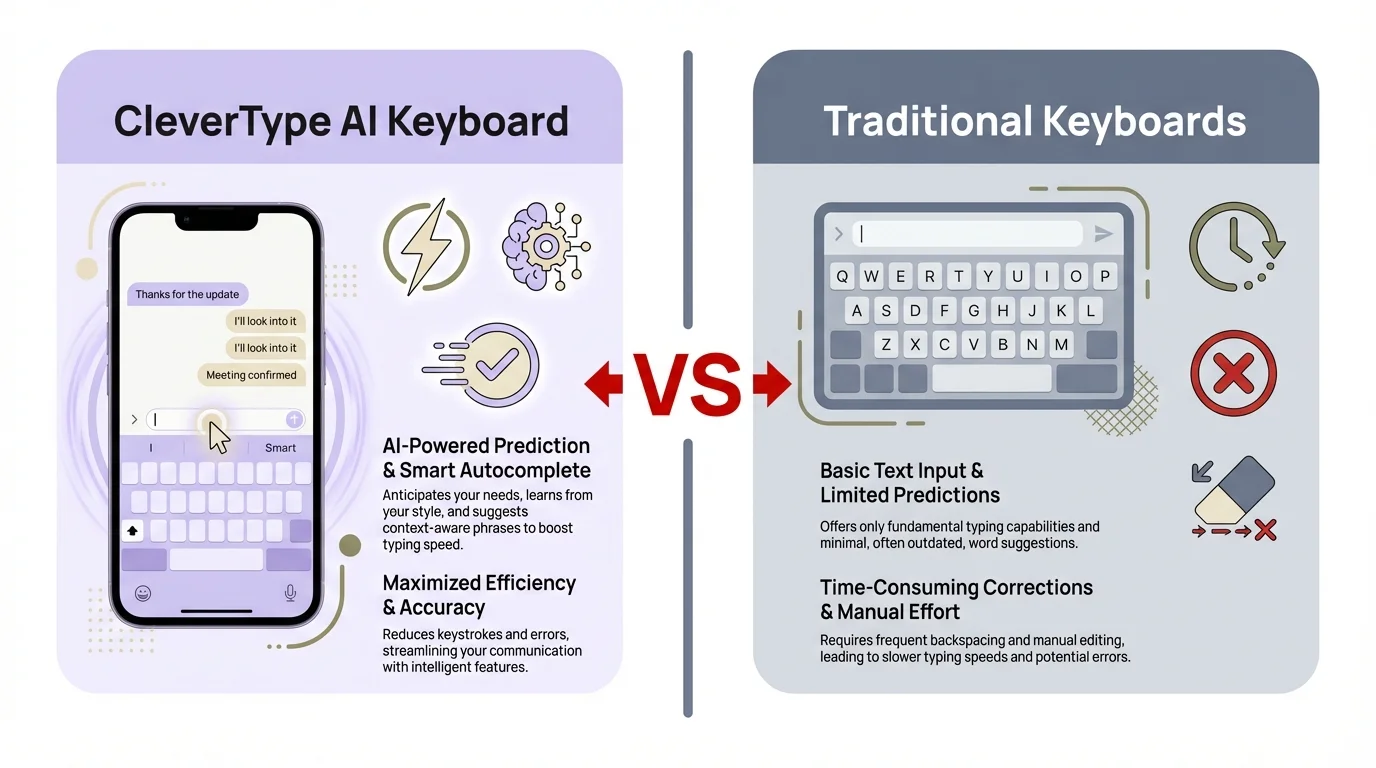
Visual comparison: How CleverType AI Keyboard's accessibility features surpass traditional keyboards for users with dyslexia
Setting Up and Optimizing Your AI Keyboard for Accessibility
Got your new AI keyboard? Great! Now let's make sure you're getting the most out of it. Setting up an accessibility-focused keyboard properly can make a huge difference in your experience.
First things first—installation is usually straightforward from your device's app store, but the real magic happens in the customization. Don't skip this step! Most users who report disappointment with AI keyboards haven't taken the time to properly configure them for their specific needs.
Here's a step-by-step guide to optimizing your keyboard:
- Explore the accessibility settings: Most AI keyboards have a dedicated accessibility section in their settings. Spend time exploring all options—you might discover helpful features you didn't know existed.
- Adjust the visual interface: If you have dyslexia, try different fonts (OpenDyslexic is popular), adjust text size and spacing, and experiment with color schemes. The right visual setup can dramatically reduce reading fatigue.
- Calibrate voice typing: Take time to train the voice recognition if your keyboard offers this option. Speaking a few test paragraphs can help the AI learn your speech patterns and accent.
- Customize grammar support: Set the level of grammar assistance that works for you. Too many suggestions can be distracting, while too few might leave errors uncorrected.
- Create personal shortcuts: Many AI keyboards allow you to create shortcuts for frequently used phrases or words you find difficult to spell. This can be a huge time-saver.
- Sync your personal dictionary: Import your contacts and custom terms to ensure the keyboard recognizes names and specialized vocabulary you use regularly.
- Set up backup and sync: If available, enable cloud backup of your settings so you don't lose your customizations if you change devices.
Remember, there's a learning curve with any new technology. "I was frustrated for the first few days," admits Taylor, a college student with dyslexia. "But after a week, I couldn't imagine typing without it. Stick with it—it gets better quickly."
Common pitfalls to avoid? Don't overwhelm yourself by enabling every feature at once. Start with the basics and gradually add more as you get comfortable. Also, be patient with prediction accuracy—it improves as the AI learns your writing style over time.
For parents setting up keyboards for children with dyslexia, consider involving them in the process. Let them choose colors and test different settings to find what feels most comfortable. This ownership increases the likelihood they'll actually use the tools.
Finally, don't forget to periodically check for updates. Accessibility features are constantly improving, and software updates often bring new tools that might address challenges you're facing.
As Rachel, a teacher with dyslexia, puts it: "Spending an hour setting up my keyboard properly saved me countless hours of frustration later. It's worth the initial investment of time."
The Future of AI Accessibility in Keyboards
What exciting developments are on the horizon for AI keyboards and accessibility? The technology is evolving rapidly in 2026, with innovations that are fundamentally changing how people with dyslexia and other accessibility needs interact with text.
Emotional intelligence has already arrived in top-tier keyboards. These systems can now detect not just what you're trying to say, but the emotional tone you're aiming for. Your keyboard can suggest adjustments to make messages sound more empathetic, confident, or professional—a genuine lifeline for users who struggle with conveying tone in writing. Some keyboards even provide "tone preview" features that show how your message might be interpreted emotionally.
Multimodal input is becoming mainstream rather than experimental. Current keyboards combine typing, voice, gestures, and even predictive eye-tracking to create truly flexible input methods that adapt to your changing needs throughout the day. Had a long day and your dyslexia symptoms are more pronounced? The keyboard automatically detects increased error rates and shifts to rely more heavily on voice input and autocorrection.
Brain-computer interface integration is no longer science fiction. Early pilot programs are testing keyboards that can detect cognitive load through wearable sensors. When your brain shows signs of fatigue or cognitive overload, the keyboard automatically adjusts its assistance level—providing more support when you need it most and stepping back when you're in a flow state.
Real-time translation has become remarkably seamless in 2026. For multilingual users with dyslexia, you can now type in your strongest language and have the text instantly converted to another language with proper cultural context and idioms intact. This removes multiple barriers simultaneously, opening up global communication in ways that seemed impossible just a few years ago.
Personalization has reached new sophistication with AI that can distinguish between different types of dyslexia and learning differences. Rather than a one-size-fits-all "dyslexia mode," today's keyboards offer tailored assistance based on whether you struggle more with phonological processing, visual processing, or other specific challenges. The system creates a unique support profile for each user, continuously refined through machine learning.
The integration with other assistive technologies is also improving. "I'm excited about how my keyboard now works with my screen reader and dictation software," says Miguel, a technology consultant with dyslexia. "It's becoming a comprehensive ecosystem rather than isolated tools."
Privacy-focused processing is addressing concerns about sensitive data. More AI functions are moving to on-device processing rather than cloud-based solutions, meaning your personal writing patterns and corrections stay on your device.
The future of AI in grammar checking looks particularly bright. Beyond just identifying errors, next-generation tools will offer more nuanced writing assistance, helping users develop their skills rather than simply correcting mistakes.
Accessibility is improving on the cost front too. As technology matures, prices have trended downward, with several high-quality options now available at lower price points or even free tiers with robust features. Non-profit initiatives and government programs in multiple countries now subsidize or fully cover accessibility keyboards for students and low-income users with diagnosed learning differences.
The research community's involvement has intensified. Collaborations between AI developers, accessibility experts, and dyslexia researchers are yielding keyboards that are rigorously evidence-based. As Dr. Sarah Chen, a leading dyslexia researcher, notes: "We've moved from keyboards designed for dyslexic users by well-meaning engineers to truly co-designed tools created with dyslexic developers and researchers at the table from day one."
Perhaps most exciting is how these technologies are shifting from assistive to augmentative—they're not just helping people overcome challenges but enhancing everyone's communication abilities. This mainstreaming effect reduces stigma and drives further innovation.
Frequently Asked Questions
Q: How do AI keyboards differ from standard predictive text?
A: AI keyboards go far beyond standard predictive text by using context-aware algorithms that understand the meaning of your sentences, not just individual words. While basic predictive text might suggest "good" after you type "have a," an AI keyboard might suggest "have a wonderful day" or "have a quick question" based on your previous patterns and the context of your conversation. For dyslexic users, this deeper understanding means the keyboard can often predict exactly what you're trying to say, even if your initial typing contains errors.
Q: Can AI keyboards help with languages other than English?
A: Yes! Many AI keyboards support multiple languages and can even assist with multilingual typing. The quality of support varies by language, with major languages typically having more robust features. For dyslexic users who are bilingual or learning new languages, these keyboards can be particularly helpful as they provide support across languages. Some keyboards even allow simultaneous use of multiple languages without manual switching, which is ideal for multilingual environments.
Q: Are AI keyboards secure for typing sensitive information?
A: Security varies by keyboard provider. The best AI keyboards in 2026 offer local processing options that keep sensitive data on your device rather than sending it to cloud servers. Look for keyboards that clearly state their privacy policies and offer options to disable cloud features when typing sensitive information like passwords or financial details. Many reputable keyboards now use end-to-end encryption for data that does need to be processed remotely.
Q: How much do accessibility-focused AI keyboards typically cost?
A: Pricing varies widely. Basic AI keyboard features are often available for free, while more advanced accessibility features may require a subscription, typically ranging from $3-10 per month. Some keyboards offer tiered pricing with more sophisticated features in premium plans. For students and individuals with diagnosed learning disabilities, some companies offer discounted rates or free access. It's worth checking if your school, workplace, or insurance might cover these tools as assistive technology.
Q: Can children with dyslexia benefit from AI keyboards?
A: Absolutely! Many children with dyslexia show significant improvements in writing confidence and quality when using AI keyboards. The immediate feedback helps them learn from mistakes in real-time, while the reduced cognitive load allows them to focus on expressing their ideas rather than struggling with spelling. For school-age children, look for keyboards with age-appropriate interfaces and strong privacy features. Some even offer specific educational modes that balance assistance with learning opportunities.
Q: Do AI keyboards work with all apps and websites?
A: Most AI keyboards work across all applications on your device, replacing the system keyboard. However, some advanced features might work better in certain apps than others. Occasionally, highly specialized applications might have compatibility issues with third-party keyboards. The good news is that compatibility continues to improve with each update, and major AI keyboards in 2026 typically work seamlessly with popular apps like messaging, email, and social media platforms.
Q: How long does it take to get comfortable using an AI keyboard?
A: Most users report an adjustment period of 1-2 weeks before feeling fully comfortable with an AI keyboard. The learning curve involves getting used to new features and customizing settings to your preferences. Some users experience a temporary slowdown in typing speed when first switching, but this typically resolves as you become familiar with the keyboard. Patience during this initial period pays off—long-term users consistently report significant improvements in both typing speed and accuracy.