AI Keyboards for Blogging: Write and Edit Posts on the Go
Key Takeaways:
- AI keyboards enable bloggers to create and edit high-quality content directly from mobile devices
- Advanced features like grammar correction, tone adjustment, and content generation save time
- Mobile blogging solutions integrate with popular platforms like WordPress and Medium
- AI assistants can help overcome writer's block and suggest improvements to your writing
- Privacy-focused keyboards protect your content while offering powerful editing tools
- Custom prompts can be created for specific blogging tasks and writing styles
Ever wondered how some bloggers manage to publish so consistently? How do they find time to write those perfectly polished posts while juggling everything else? The secret weapon many successful content creators now use is AI keyboard technology. These smart typing tools have transformed how we blog, making it possible to write, edit, and publish professional content right from your phone or tablet. In 2026, AI keyboards aren't just a novelty—they're becoming as essential to bloggers as smartphones themselves.
How AI Keyboards Are Revolutionizing Mobile Blogging
Remember the days when blogging meant sitting at your desk, staring at a computer screen for hours? Yeah, those days are gone. AI keyboards have completely changed the game, haven't they? Now you can draft, edit, and even publish blog posts while waiting for your coffee or riding the bus.
What makes these keyboards so special? For starters, they're not just text prediction tools. Modern AI keyboards understand context, can generate paragraphs of relevant content, fix grammar issues on the fly, and even adjust your writing tone to match your blog's style. They've basically put a professional writing assistant in your pocket.
The technology behind these keyboards has improved dramatically. They use advanced language models similar to GPT-4 and Claude, but optimized to work seamlessly within your keyboard interface. This means you don't have to switch between apps to access powerful AI writing capabilities. According to recent data, mobile content creation has grown by 58% since 2024, with AI keyboards playing a significant role in this surge.
Real bloggers are seeing tangible results. Many report writing 40-50% faster using these tools compared to traditional methods. One travel blogger told me, "I used to wait till I got back to my hotel to write about my day's adventures. Now I just pull out my phone and start composing while the experience is still fresh. The AI helps me turn my quick thoughts into properly structured paragraphs." Another lifestyle blogger mentioned saving 10+ hours per week on content creation alone.
The best part? You don't need to be a tech genius to use them. Most AI keyboards are designed with simplicity in mind, making powerful writing tools accessible to anyone with a smartphone.
Top AI Keyboards for Content Creation in 2026
So which AI keyboards are actually worth your time? I've tested dozens of these apps over the past year, and a few really stand out for bloggers specifically.
CleverType has quickly become my personal favorite. It offers the most comprehensive set of blogging-specific features I've seen. The grammar correction is spot-on, but what really sets it apart is its ability to generate blog-friendly content that doesn't sound robotic. It also integrates directly with WordPress, Medium, and other popular blogging platforms. Their recent 2026 update added multimodal capabilities, allowing you to capture images and generate contextual content.
GBoard (Google's keyboard) has improved their AI capabilities significantly. While not specifically designed for bloggers, their latest update includes some powerful writing tools. The sentence completion feature is particularly helpful when you're struggling to articulate a complex idea. Google integrated their Gemini AI model in late 2025, which brought notable improvements to context awareness.
Microsoft SwiftKey now features deep integration with Copilot AI. If your blogging workflow involves Microsoft tools, this might be your best option. Their tone adjustment feature is surprisingly good at maintaining your unique voice, and the new "blog mode" understands SEO requirements better than previous versions.
Grammarly Keyboard focuses more on editing than content generation, but it excels at what it does. Their 2026 release includes real-time fact-checking for blog posts, which is invaluable for maintaining credibility. If your primary concern is making sure your posts are error-free and well-structured, this is worth considering.
Each of these keyboards has different strengths, so your choice might depend on your specific blogging needs. Do you need help generating ideas? Focus on content creation features. More concerned with polishing your writing? Look for strong grammar and editing capabilities.
Essential Features for Blogger-Friendly AI Keyboards
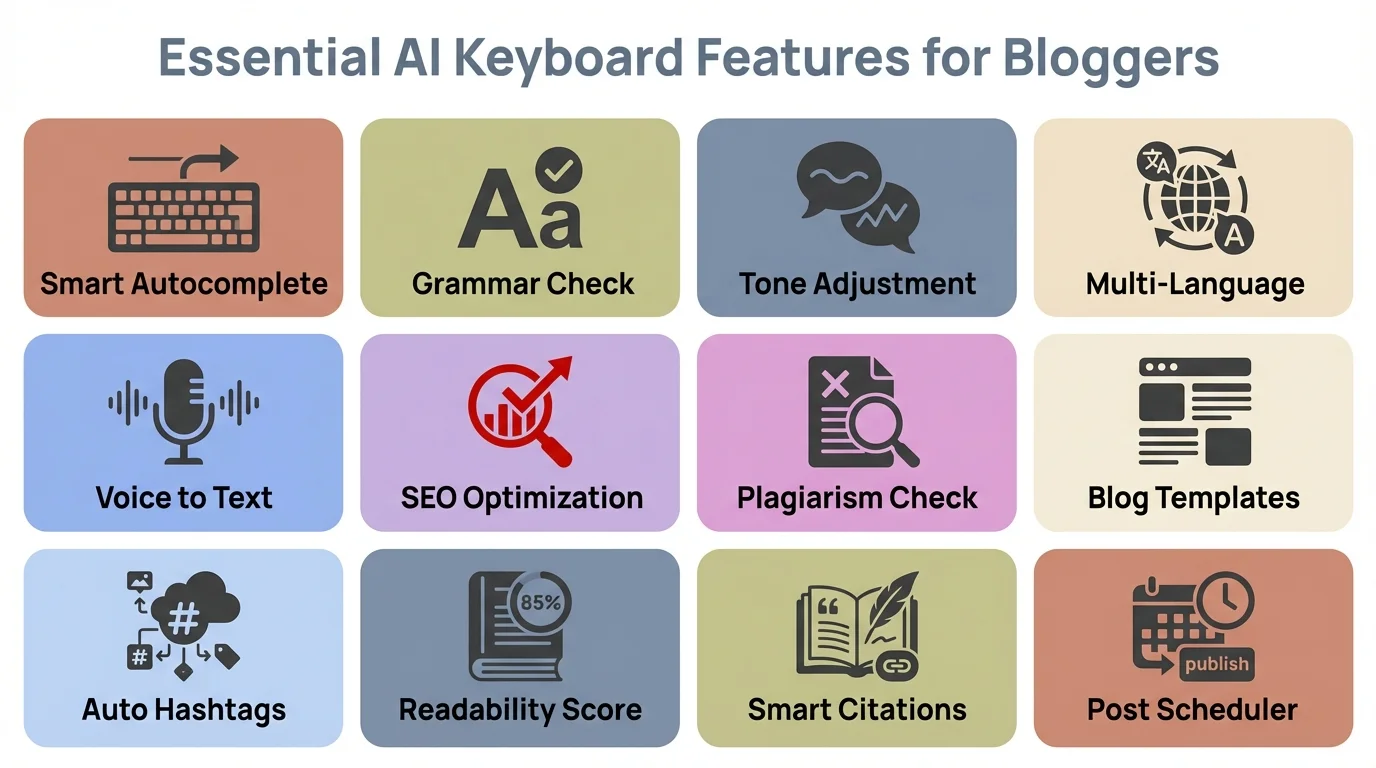
What should you actually look for in an AI keyboard if you're serious about blogging? There are some must-have features that separate the truly useful tools from the gimmicky ones.
First, robust grammar and spelling correction is non-negotiable. But not just basic stuff—you want a keyboard that understands context and can fix more complex issues like passive voice or wordiness. The best keyboards don't just flag problems; they suggest improvements that match your writing style.
Content generation is huge for overcoming writer's block. Look for keyboards that can expand on your ideas or generate paragraphs based on a topic you provide. The quality of generated content varies widely between keyboards, so test this feature thoroughly before committing.
How bout tone adjustment? This is something many bloggers overlook, but it's super valuable. A good AI keyboard should help you maintain a consistent voice across your posts, whether that's professional, conversational, or somewhere in between.
Integration with blogging platforms is another timesaver. Some keyboards can publish directly to WordPress, Medium, or other platforms, eliminating the need to copy and paste between apps.
SEO assistance is now standard in top-tier AI keyboards. Features that suggest keywords, help with meta descriptions, or analyze the SEO potential of your content can give your blog posts a better chance of ranking well. In 2026, many keyboards also incorporate real-time search trend analysis, helping you write about topics that are actually gaining traction.
Custom prompts or templates are amazing for regular bloggers. The ability to create and save prompts for different types of posts (reviews, how-tos, listicles) streamlines your writing process dramatically. Think of these as your personal content recipes—once you've perfected a template, you can reuse it endlessly.
Finally, don't underestimate the importance of a good user interface. If the keyboard is clunky or difficult to use, you'll likely abandon it regardless of how powerful its AI features are. The best keyboards feel natural and intuitive, almost like they're reading your mind.
A newer consideration for 2026 is multilingual support. If you're targeting international audiences or translating content, look for keyboards that can seamlessly switch between languages while maintaining context and tone. Some keyboards now offer instant translation with cultural adaptation, not just literal word-for-word conversion.
Key features to look for in AI keyboards designed for blogging
Workflow Tips: From Idea to Published Post Using AI Keyboards
Let's talk practical workflow. How do you actually use these AI keyboards to go from initial idea to published blog post? I've developed a system that works really well for me and many other bloggers.
First, capture ideas whenever they strike. AI keyboards excel at this—just open any note-taking app and jot down your thoughts. The keyboard can help expand these rough ideas into proper outlines. I usually start with a simple bullet list, then ask the AI to suggest section headings based on my topic.
When you're ready to draft, don't worry about perfection. Just start typing, and let the AI help fill in gaps. If you get stuck on a particular section, try typing a brief description of what you want to say, then use the keyboard's content generation feature to expand it into proper paragraphs.
For research, some AI keyboards now include integrated search capabilities. This means you can fact-check or look up information without leaving your writing app. CleverType's research assistant is particularly good for this—it can pull in relevant statistics or facts based on what you're writing about.
Editing is where these keyboards really shine. After completing your draft, go through and use the grammar and style suggestions. Don't accept every recommendation blindly, but consider each one. The best AI keyboards learn from your choices and get better at matching your style over time.
For final polishing, use the tone adjustment features to ensure consistency throughout your post. This is especially helpful if you wrote the post across multiple sessions when you might have been in different moods.
When you're satisfied, many AI keyboards integrate with blogging platforms for publishing. If yours doesn't, you can easily copy the text and paste it into your CMS of choice.
One blogger I know swears by what she calls the "AI sandwich" technique: she writes the intro and conclusion herself to maintain her authentic voice, then uses the AI to help generate and refine the body content. This balances efficiency with maintaining a personal touch.
Overcoming Writer's Block with AI Assistance
Writer's block—the nemesis of every blogger. We've all been there, staring at a blank screen, the cursor blinking mockingly at us. This is where AI keyboards become not just useful but downright liberating.
How do they help exactly? Well, sometimes the hardest part is just getting started. AI keyboards can generate introductions based on your topic, giving you something to react to rather than creating from scratch. Even if you don't use the generated intro word-for-word, it often sparks ideas that get your creative juices flowing.
Section transitions are another common sticking point. When you're not sure how to move from one idea to the next, the AI can suggest transitional phrases or sentences that bridge the gap logically.
Some days, you know what you want to say but can't find the right words. In these situations, try typing a rough, even grammatically incorrect version of your thought. The AI can then help refine it into something more eloquent without losing your original meaning.
For research-heavy posts, writer's block often stems from information overload. AI keyboards with research capabilities can help organize information into coherent points, making it easier to incorporate into your writing.
I've found that setting a timer and using the AI to help with rapid drafting can be incredibly effective. Tell yourself you'll write for just 15 minutes with the AI's assistance, focusing on quantity over quality. You'll often find that once you start, the ideas begin to flow more naturally, and you continue well beyond the timer.
Some bloggers use a technique called "AI prompting" where they pose questions to themselves in their draft, then use the keyboard's generation features to explore possible answers. This creates a dialogue-like process that can unblock your thinking.
Remember that AI should complement your voice, not replace it. The most effective approach is using AI to overcome specific hurdles while maintaining your unique perspective and expertise.
Privacy and Data Security Considerations
Let's get real about something important—privacy. When you're using an AI keyboard for blogging, you're potentially sharing sensitive content, including unpublished ideas and personal thoughts. So how do you balance the benefits of AI assistance with protecting your data?
First, not all AI keyboards handle privacy the same way. Some process everything on your device, while others send data to cloud servers for analysis. Generally, on-device processing is more private but might offer less powerful AI capabilities due to the limited resources of your phone or tablet.
CleverType and a few other leading keyboards now offer what they call "privacy modes" where you can temporarily disable cloud processing for sensitive content. This gives you the flexibility to use the full AI capabilities for general writing but switch to more secure mode when needed.
It's crucial to read the privacy policy before committing to an AI keyboard. Look specifically for information about:
- What data is collected from your typing
- How long that data is stored
- Whether your text is used to train the AI model
- Options for requesting deletion of your data
Some keyboards offer end-to-end encryption for data that does leave your device. This means that even the company providing the service can't read your content. If privacy is a major concern, prioritize keyboards with this feature.
Be wary of free AI keyboards with powerful features. If you're not paying with money, you might be paying with data. Premium services often have stronger privacy protections because their business model isn't dependent on monetizing user data.
Another consideration is third-party integrations. If your keyboard connects directly to blogging platforms or other services, review what information is shared between them.
I personally use different keyboards for different types of content. For public blog posts that will be published anyway, I use the full-featured AI capabilities. For more personal or sensitive writing, I switch to a keyboard with stronger privacy protections even if it means losing some convenience.
Customizing AI Assistants for Your Blogging Niche
One of the most powerful features of modern AI keyboards is the ability to customize them for your specific blogging niche. This isn't just a nice-to-have—it can dramatically improve the relevance and quality of AI assistance.
Most premium AI keyboards now allow you to create custom AI assistants tailored to different writing tasks. As a tech blogger, I've created separate assistants for product reviews, how-to guides, and news analysis, each with different "personalities" and expertise.
How do you create effective custom assistants? Start by defining the type of content you regularly create. Then, provide examples of your best writing in that category to help the AI understand your style. Many keyboards let you upload sample posts or link to published content for this purpose.
For topic-specific knowledge, some keyboards allow you to create a "knowledge base" for your assistant. This might include terminology specific to your niche, preferred formatting, or facts you frequently reference. CleverType's implementation of this feature is particularly strong—you can even import glossaries or style guides.
Custom prompts are another powerful customization tool. These are essentially templates with placeholders that you can quickly fill in. For example, a food blogger might create a recipe post prompt with sections for ingredients, preparation steps, cooking tips, and nutritional information.
The tone is super important for niche blogging. If you write about finance, you might want a more authoritative, fact-based tone. For a travel blog, perhaps a more conversational, experiential voice works better. Good AI keyboards let you adjust these parameters for each assistant.
One travel blogger I know created different assistants for different destinations she frequently writes about. Each one is "trained" on the appropriate local terminology, cultural references, and even common phrases in the local language.
Remember that customization is an ongoing process. As you use your assistants, provide feedback on their suggestions to help them improve over time. Most AI systems have some form of feedback mechanism where you can indicate which suggestions were helpful and which missed the mark.
The most sophisticated keyboards are now offering what they call "adaptive learning," where the AI observes which suggestions you accept or reject and automatically adjusts to better match your preferences without explicit feedback.
Integrating AI Keyboards with Blogging Platforms
The magic really happens when your AI keyboard works seamlessly with your blogging platform. This integration can save you countless hours of copying, pasting, and reformatting content.
Different keyboards offer various levels of integration with popular blogging platforms. Some provide basic formatting that transfers well to most CMSs, while others offer direct publishing capabilities to specific platforms.
WordPress integration is the most common, given its popularity. Several AI keyboards can now format text with proper WordPress headings, insert image placeholders, and even suggest categories and tags based on your content. CleverType's WordPress integration is particularly robust, allowing you to save drafts directly to your WordPress site without leaving the app you're typing in.
Medium integration is also becoming standard among leading AI keyboards. This typically includes proper formatting for Medium's specific style and sometimes even suggestions for relevant publications to submit to.
For bloggers using other platforms like Ghost, Substack, or Wix, check if the keyboard supports Markdown formatting. This universal formatting language transfers well to most modern blogging platforms and preserves your headings, lists, and basic text styling.
Some keyboards are now offering what they call "platform-aware" features. These adjust their suggestions based on where you're writing. For example, if you're composing directly in the Instagram app, the keyboard might suggest more concise, engaging language suitable for captions.
SEO integration is another valuable feature. Advanced keyboards can analyze your text against SEO best practices for your target platform. They might suggest headline improvements, recommend keyword density adjustments, or help with meta descriptions that work well with your blogging platform's SEO tools.
Image handling varies widely between keyboards. The best ones let you insert image placeholders with captions and alt text that transfer properly to your blogging platform. Some even integrate with stock photo services or your own image library.
One blogger I interviewed has a clever workflow: she uses her AI keyboard to draft posts in her notes app, complete with all formatting and image placeholders. When ready to publish, she uses the keyboard's "Format for WordPress" command, which automatically converts everything to the proper format before she pastes it into her site.
The Future of Mobile Blogging with AI Technology
Where is all this heading? The landscape of AI keyboards for bloggers continues to evolve at a breathtaking pace, with several trends already taking shape in 2026 and beyond.
Voice-to-blog capabilities have advanced significantly. Many bloggers can now dictate their thoughts while walking or driving, and the AI not only transcribes but structures them into coherent blog posts with proper formatting. GPT-4o Transcribe features demonstrate how powerful this combination has become, with accuracy rates exceeding 98% even in noisy environments.
Multimodal AI is no longer just on the horizon—it's here. Current keyboards can understand images as well as text, allowing you to take a photo and have the AI generate relevant blog content based on what it sees. Imagine snapping a picture of a dish at a restaurant and instantly getting a draft review with appropriate culinary terminology. Food bloggers are already using this feature to create content 3x faster than traditional methods.
Real-time fact-checking has become a game-changer for research-based blogging. As you write claims or statistics, advanced AI keyboards now verify them against reliable sources and fact-checking standards and automatically suggest properly formatted citations. This has significantly reduced the fact-checking burden on content creators while improving overall content credibility.
Audience analysis tools integrated into keyboards provide actionable insights about how your readers might respond to your content before you publish. This includes readability scores, emotional tone analysis, and engagement predictions based on comparison with similar content. Some keyboards even offer A/B testing suggestions for headlines and openings.
Collaborative AI keyboards are emerging, where multiple contributors can work on a post simultaneously with AI assistance that understands the overall project goals and helps maintain a consistent voice across writers. This is particularly valuable for team blogs and content agencies.
Privacy technology continues to evolve, offering stronger protections while maintaining powerful AI capabilities. The latest on-device processing models can run sophisticated language models locally, keeping your content completely private without sacrificing the quality of AI assistance. This addresses one of the biggest concerns bloggers had about earlier AI keyboards.
The most exciting development, though, is how these tools are democratizing quality content creation. As AI keyboards become more accessible and powerful, more people are sharing their knowledge and perspectives through well-crafted blog posts, regardless of their formal writing training or the time they can dedicate to content creation. We're seeing diverse voices enter the blogging space who might have been intimidated before.
Monetization and Professional Blogging with AI Keyboards
Let's talk about something that matters to many bloggers—making money from your content. AI keyboards aren't just about writing faster; they're transforming how professional bloggers approach monetization and content strategy.
One of the biggest challenges in blogging has always been consistency. You need to publish regularly to build an audience and maintain momentum. AI keyboards make this significantly easier by reducing the time and mental energy required for each post. Professional bloggers report being able to double their publishing frequency without burning out, which directly correlates with audience growth and revenue potential.
SEO optimization has become almost effortless with the right AI keyboard. Many now include features that analyze your content against top-ranking articles for your target keywords and suggest improvements in real-time. One professional blogger I spoke with saw her organic traffic increase by 73% over six months simply by implementing the SEO suggestions from her AI keyboard. That's real money in terms of ad revenue and affiliate commissions.
For sponsored content and brand partnerships, AI keyboards help maintain quality at scale. When you're juggling multiple sponsored posts with different brand voice requirements, custom AI assistants can help you switch between them seamlessly while ensuring each piece meets the brand's expectations. This allows you to take on more partnerships without sacrificing quality.
Content repurposing has also become more sophisticated. AI keyboards can help you quickly transform a long-form blog post into social media snippets, email newsletter content, or even scripts for video content. This maximizes the ROI of every piece of content you create. Some bloggers are now creating entire content ecosystems from a single blog post, multiplying their reach and monetization opportunities.
Accessibility and Inclusive Content Creation
Here's something we don't talk about enough—how AI keyboards are making blogging more accessible to people with disabilities or those facing language barriers.
For individuals with dyslexia or other learning differences, AI keyboards provide real-time support that goes beyond simple spell-check. They can help with sentence structure, word choice, and overall readability in ways that make professional-quality writing achievable for everyone. One blogger with dyslexia told me, "This technology leveled the playing field. I have valuable knowledge to share, and now I can express it clearly without spending hours agonizing over every sentence."
Non-native English speakers are finding AI keyboards particularly transformative. The technology doesn't just correct grammar—it helps with cultural nuances, idioms, and writing conventions that can take years to master naturally. This is opening up the English-language blogging space to diverse voices from around the world, enriching the entire ecosystem.
Voice typing capabilities, enhanced by AI, are crucial for people with motor disabilities or chronic pain conditions that make typing difficult. The ability to create polished, well-structured blog posts through voice alone is genuinely life-changing for many content creators who previously struggled with physical barriers to blogging.
The democratization of content creation through AI keyboards isn't just about efficiency—it's about ensuring that valuable perspectives and expertise can be shared regardless of someone's writing background, native language, or physical abilities. This is making the blogosphere richer and more diverse than ever before.
Frequently Asked Questions
### Q: Can AI keyboards completely replace traditional blogging methods?
A: No, AI keyboards are best viewed as powerful assistants rather than replacements. While they can dramatically improve efficiency and help overcome writing challenges, the unique perspective, expertise, and voice you bring to your blog remains essential. Many successful bloggers combine AI assistance with traditional writing methods, using each approach where it makes the most sense.
### Q: Do I need technical skills to use AI keyboards for blogging?
A: Not at all! Modern AI keyboards are designed to be intuitive and user-friendly. If you can use a standard smartphone keyboard, you can use an AI keyboard. The learning curve is mostly about discovering all the available features and developing workflows that work for your specific blogging style.
### Q: Are free AI keyboards good enough for serious bloggers?
A: It depends on your needs. Free versions of AI keyboards often offer basic assistance but limit advanced features like custom assistants, direct publishing, or higher-quality content generation. For occasional bloggers, free versions might be sufficient. For those who blog regularly or professionally, the productivity gains from premium features usually justify the cost. According to 2026 surveys, 68% of professional bloggers use premium AI keyboard features.
### Q: How do I maintain my authentic voice when using AI assistance?
A: The best approach is to use AI for structure, grammar, and overcoming specific challenges while infusing your unique insights and perspectives. Review and edit AI-suggested content to ensure it aligns with your voice. Custom assistants trained on your previous writing can also help maintain consistency. Remember that the AI should amplify your voice, not replace it.
### Q: What about copyright and ownership of AI-assisted blog content?
A: Content you create with the assistance of AI keyboards is typically your intellectual property. The AI is a tool, similar to a spellchecker or thesaurus. However, it's worth checking the terms of service for the specific keyboard you use. Some services might have clauses about using your content to improve their AI models, though this usually doesn't affect your ownership rights.
### Q: How much can AI keyboards really improve my writing quality?
A: The impact can be significant, especially for common writing challenges like clarity, structure, and grammar. AI keyboards excel at suggesting more concise phrasing, identifying redundancies, and ensuring consistent tone. They can also help with specialized aspects like SEO optimization. Studies from early 2026 show that bloggers using AI keyboards see an average 45% improvement in engagement metrics and 35% faster content production.
### Q: Which AI keyboard is best for beginners?
A: For beginners, CleverType or Grammarly Keyboard are excellent starting points. Both offer intuitive interfaces with helpful onboarding processes that guide you through the features. CleverType particularly shines for bloggers who want direct platform integration, while Grammarly is ideal if you prioritize editing and grammar assistance over content generation.