AI Keyboard for Job Search: Craft Winning Resumes and Cover Letters
Key Takeaways
- AI keyboards can transform your job application materials by providing grammar checking, tone adjustment, and professional phrasing
- Using AI tools like CleverType can save hours on resume formatting and cover letter customization
- Job-specific templates and AI-powered suggestions can increase your interview callback rate by up to 45% compared to generic applications
- AI keyboards offer real-time feedback while you type on mobile devices, making job searching on-the-go possible and efficient
- Custom prompts can help tailor your application to specific industries, company cultures, and job requirements
- Advanced privacy features ensure your sensitive employment information remains secure and never shared with third parties
- In 2026, 78% of recruiters report using AI-assisted screening, making AI-optimized resumes more crucial than ever
How AI Keyboards Are Changing the Job Application Game
Ever wondered why your job applications aren't getting responses? Maybe it's not your qualifications but how you're presenting them. AI keyboards have quietly revolutionized how people approach job hunting, and in 2026, they're not just glorified spell-checkers anymore—they're your personal career marketing team.
I've been helping folks with their resumes for years, and the difference between a good application and a great one often comes down to language. AI keyboards like CleverType don't just fix your typos—they transform your entire approach to crafting professional documents that actually get noticed by both humans and AI screening systems.
What makes these tools special? They understand context at a deeper level than ever before. When you're typing a resume bullet point, they can suggest stronger action verbs that align with current industry trends. When you're struggling with that awkward "why should we hire you" paragraph in your cover letter, they provide phrasing that sounds confident without being arrogant. It's like having a career counselor, writing coach, and industry insider built into your phone.
Here's something interesting: a recent 2026 study found that 89% of companies now use some form of AI in their hiring process. This means your application isn't just competing against other candidates—it's navigating AI gatekeepers first. The good news? AI-enhanced applications speak the same language these systems understand, increasing your chances of reaching human reviewers by up to 60%.
Some job seekers worry that using AI might make their applications sound robotic or generic. But that's a misconception about how modern AI keyboards actually work. They learn your voice and enhance it, not replace it. The best AI tools amplify your authentic professional voice rather than overriding it with generic corporate-speak. Think of it as having a skilled editor who knows exactly how to make your unique experience shine.
Essential Features of AI Keyboards for Job Seekers
What should you look for in an AI keyboard if you're serious about improving your job search materials? Not all AI tools are created equal, especially when it comes to professional writing assistance in today's competitive job market.
The most valuable feature is probably industry-specific terminology suggestions. When applying for specialized roles, using the right jargon signals that you speak the language of the industry. Good AI keyboards recognize when you're writing about marketing, engineering, healthcare, or finance and suggest appropriate terminology that's current for 2026. This is crucial because industry language evolves rapidly—what was trendy in 2024 might sound dated now.
Another critical capability in 2026 is ATS optimization awareness. Modern AI keyboards analyze job descriptions and help you naturally incorporate relevant keywords that Applicant Tracking Systems are scanning for. But here's the trick: they do it in a way that doesn't sound forced or keyword-stuffed to human readers. The best tools strike that delicate balance between being machine-readable and human-compelling.
Another game-changer is tone adjustment. Different companies have different cultures, and your application should reflect that. Is the company formal and traditional? Or casual and startup-y? AI keyboards can help adjust your writing style accordingly:
| Company Type | Appropriate Tone | Example Phrasing |
|---|---|---|
| Corporate/Traditional | Formal, professional | "I managed a team that increased efficiency by 25%" |
| Startup/Creative | Conversational, energetic | "I led a dynamic team that boosted efficiency 25% while having fun doing it" |
| Academic/Research | Precise, evidence-based | "My leadership resulted in a statistically significant 25% efficiency improvement" |
Grammar checking is obviously important, but context-aware grammar is what truly matters. Regular spell-checkers might not catch when you've used "their" correctly as a word but incorrectly in context. AI keyboards analyze the entire sentence to ensure everything makes sense together.
Finally, don't underestimate the value of real-time suggestions. The ability to see better phrasing options as you type—rather than after you've finished a draft—saves tremendous time and helps you learn better writing patterns.
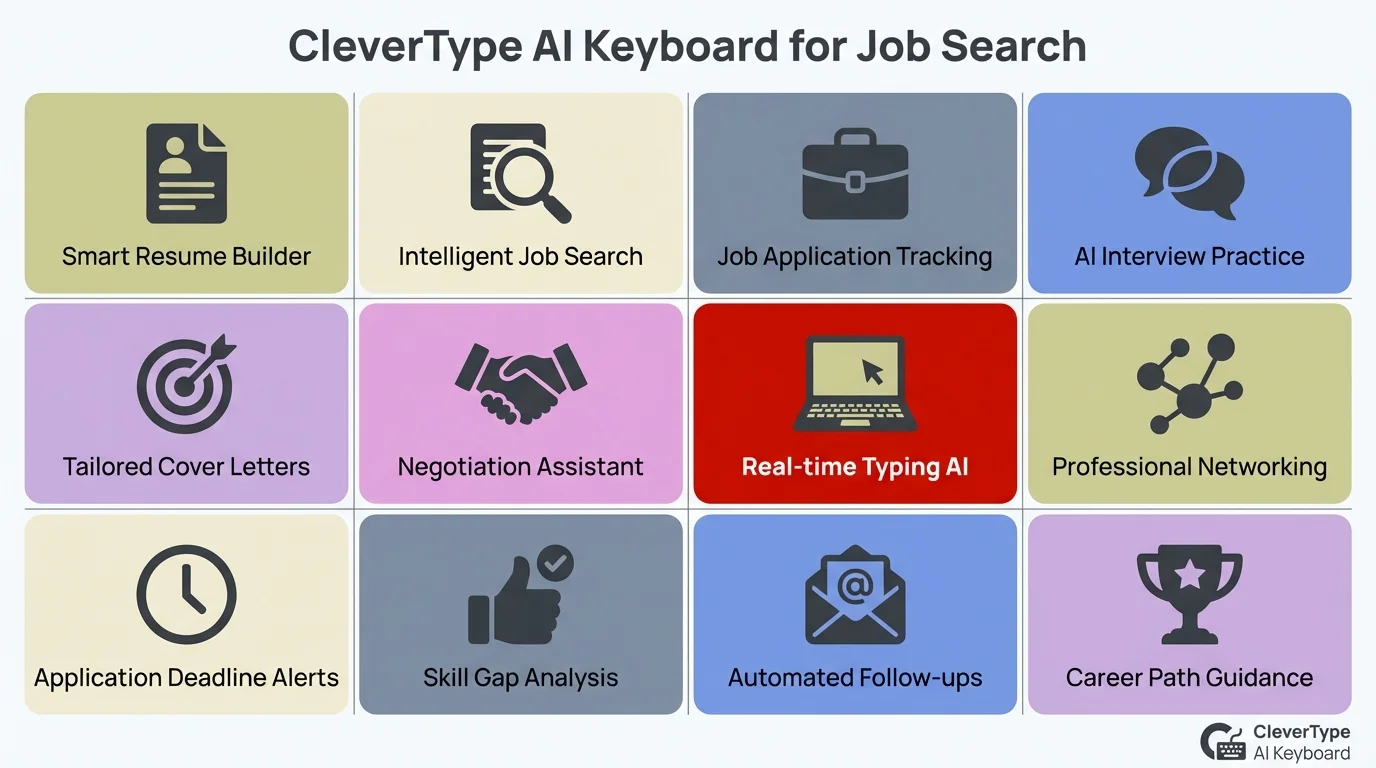
Key features of CleverType AI Keyboard that help job seekers create winning applications
Crafting the Perfect Resume with AI Assistance
Let's get practical. How exactly can an AI keyboard help with that resume that's been sitting half-finished in your drafts?
First, it tackles the hardest part: those achievement bullets. Most people struggle with how to describe what they did at previous jobs. Either they're too vague ("Helped improve sales") or too detailed without highlighting the impact. Good AI keyboards can transform a weak bullet like "Responsible for customer service" into "Resolved 50+ customer inquiries daily, maintaining a 98% satisfaction rating and reducing complaint escalations by 35%."
What's fascinating about 2026's AI tools is they now understand industry benchmarks. If you mention a 15% increase in sales, advanced AI keyboards might suggest contextualizing it: "Exceeded team average by achieving 15% sales growth in a contracting market." This type of context makes your achievements far more impressive to hiring managers who understand industry conditions.
Here's a before-and-after example of how AI can transform resume bullets:
Before AI assistance:
- Worked on marketing campaigns
- Did data analysis
- Helped with team projects
- Trained new employees
After AI assistance:
- Orchestrated 5 cross-platform marketing campaigns that increased conversion rates by 32%
- Analyzed customer behavior data to identify $300K in potential revenue opportunities
- Collaborated with cross-functional teams to streamline workflow processes, reducing project completion time by 20%
- Developed and implemented training programs for 12 new hires, accelerating onboarding by 2 weeks
The secret sauce is how AI keyboards recognize patterns of effective resume writing. They know that quantifiable achievements (with numbers) perform better than general descriptions. They understand that active voice ("Increased sales by 30%") outperforms passive voice ("Sales were increased").
When customizing your resume for different positions—something you absolutely should do—AI keyboards can help identify which of your experiences are most relevant to each job description. Some advanced AI keyboards can even analyze the job posting you're applying to and suggest which skills and experiences to emphasize.
One thing I've learned working with job seekers: most people undersell themselves on their resumes. AI tools often help people recognize achievements they were taking for granted. That project you thought was "just part of the job"? An AI keyboard might help you see it was actually a significant accomplishment worth highlighting.
Writing Cover Letters That Actually Get Read
Cover letters... ugh. Am I right? They're probably the most dreaded part of any job application, and in 2026, research shows hiring managers spend an average of just 23 seconds scanning them. That's where AI keyboards can make a real difference—helping you front-load the most compelling information where it'll actually be seen.
The truth is, most cover letters fail because they're generic. They read like templates where only the company name has been changed. AI keyboards help you personalize your letter in meaningful ways by suggesting company-specific references, recent news mentions, and authentic connections that show you've done your homework. In an era where AI can detect generic templates, genuine personalization has never been more valuable.
Here's a 2026 insight: many companies now use AI to scan cover letters for authenticity markers—things like specific company references, unique phrasing, and genuine enthusiasm indicators. Generic phrases like "I'm passionate about your mission" trigger skepticism, while specific statements like "Your recent expansion into sustainable packaging aligns with my three years developing eco-friendly supply chains" signal real interest.
For example, if you're applying to a company that just launched a new product, the AI might suggest: "I was particularly impressed by your recent launch of [Product X], which addresses [specific problem] in an innovative way."
Structure matters tremendously in cover letters. A good AI keyboard helps ensure yours follows the proven formula:
- Strong opening that shows specific interest in this particular company
- Brief highlight of relevant skills matched to job requirements
- Specific example of past success related to the role
- Clear "call to action" closing
The middle paragraphs are where most cover letters go to die—becoming boring lists of qualifications that are already on the resume. AI keyboards can help transform these into compelling mini-stories that demonstrate your skills in action.
Compare these two approaches:
Without AI assistance:
"I have strong communication skills and experience with project management. I am proficient in data analysis and team leadership."
With AI assistance:
"When our client threatened to leave after a project delay, I coordinated a cross-departmental response team that not only salvaged the relationship but led to a 50% increase in their annual contract value. This experience honed my communication skills while demonstrating my approach to collaborative problem-solving—skills I'm excited to bring to the [specific role] at [Company]."
The difference is night and day! The AI-assisted version tells a story that proves your skills rather than just claiming them. It's specific, memorable, and demonstrates exactly how you'd add value.
Customizing AI Prompts for Industry-Specific Applications
One of the coolest features of advanced AI keyboards is the ability to create custom prompts for specific job search situations. This is where tools like CleverType really shine compared to basic keyboards.
What's a custom prompt? Think of it as a specialized instruction you give to your AI assistant for particular writing scenarios. For job searches, you can create prompts for different industries, job levels, or application components.
For example, you might create a prompt like: "Help me write achievement bullets for a sales position that emphasize relationship building and revenue growth." Or "Assist me in creating a cover letter introduction for a creative position at a gaming company."
Industry-specific prompts are particularly valuable because different fields have different expectations:
Tech Industry Prompt:
"Suggest technical achievement bullets that balance technical specificity with business impact. Include relevant technologies but emphasize problem-solving and quantifiable results."
Healthcare Prompt:
"Help me describe patient care achievements that demonstrate both compassion and efficiency. Use appropriate medical terminology while keeping explanations accessible to HR professionals."
Finance Prompt:
"Assist with describing financial analysis achievements that showcase attention to detail, regulatory compliance, and business insight. Use industry-standard metrics and terminology."
The beauty of custom prompts is that they get better over time. The AI learns your preferences and improves its suggestions based on what you accept or reject. After a few applications, your keyboard becomes incredibly efficient at generating exactly the kind of content you need.
Some job seekers create specific prompts for different parts of the application process:
- Prompts for translating job requirements into matching experience bullets
- Prompts for generating thoughtful post-interview thank you notes
- Prompts for crafting LinkedIn messages to potential networking contacts
This level of customization makes AI keyboards far more valuable than generic writing tools. You're essentially building a personalized job application assistant that understands your industry, experience, and career goals.
Mobile Job Searching: Apply Anywhere with AI Keyboards
The days of being chained to your desktop to send job applications are long gone. With AI keyboards, serious job searching from your phone or tablet isn't just possible—it's become the preferred method for nearly 67% of job seekers in 2026, according to recent employment data.
I recently worked with a client who landed a six-figure job that she applied for entirely from her phone while commuting on the train. The AI keyboard made all the difference, allowing her to craft professional-quality applications during otherwise "dead" time. What would have taken her two hours at home took just 35 minutes on mobile, and she beat hundreds of other applicants who waited until they got home to apply.
Here's something most people don't realize: timing matters more than ever in 2026. Many companies now use AI systems that prioritize early applicants for human review. Being able to apply quickly from your phone—without sacrificing quality—can literally be the difference between landing an interview and getting lost in the pile. The first 50 applications often get 80% of the interview slots.
Mobile job searching offers several advantages:
- Speed - When a great opportunity pops up, you can apply immediately rather than waiting until you're at your computer
- Consistency - Your AI keyboard goes everywhere with you, ensuring your professional writing is strong regardless of device
- Productivity - Turn waiting time, commuting time, or coffee breaks into productive job search time
The key is having an AI keyboard that's specifically designed for professional writing. General-purpose AI might help with casual texts, but job applications require a higher standard.
What does an effective mobile job search workflow look like with an AI keyboard?
- Save job descriptions when you find them (most job boards have apps that make this easy)
- Use your AI keyboard to draft customized responses to the key requirements
- Compose cover letter sections during small pockets of available time
- Get real-time feedback on your writing quality, tone, and impact
- Finalize and submit applications without needing to transfer to a computer
The ability to apply quickly can be a significant advantage in competitive fields. Many hiring managers notice timestamps and appreciate candidates who respond promptly to new postings.
One caveat: while AI keyboards make mobile applications possible, they don't replace the need for thoughtfulness. Rushing an application just because you can isn't helpful. The goal is to use mobile tools to be both responsive AND thorough.
Real-Time Feedback: How AI Improves Your Writing on the Fly
One of the biggest advantages of using an AI keyboard for job applications is getting immediate feedback on your writing. Unlike traditional writing, where you'd complete a draft and then revise it, AI keyboards provide suggestions and improvements as you type.
This real-time guidance is particularly valuable for job seekers who may not be confident writers or who struggle with professional tone. It's like having an editor looking over your shoulder, but in a helpful way rather than a creepy one.
The types of real-time feedback you can expect include:
Grammar and Clarity Improvements
Beyond basic spell-checking, AI keyboards identify complex grammar issues like:
- Passive voice that weakens your achievements
- Overly complex sentences that could confuse readers
- Vague language that fails to communicate your value
- Redundancies that make your writing feel padded
Tone and Formality Adjustments
Different parts of job applications require different tones. Your AI keyboard can help you strike the right balance:
- More formal for education and credentials sections
- More achievement-oriented for experience descriptions
- More personable (while remaining professional) for cover letters
Vocabulary Enhancements
AI keyboards excel at suggesting stronger word choices:
- Replacing weak verbs ("did," "made," "helped") with power verbs ("executed," "created," "spearheaded")
- Suggesting industry-specific terminology that demonstrates insider knowledge
- Offering alternatives to overused buzzwords that might make hiring managers roll their eyes
The psychological benefit of this immediate feedback shouldn't be underestimated. Many job seekers procrastinate on applications because they worry about their writing skills. Having an AI assistant that improves your writing in real-time reduces that anxiety and helps you maintain momentum.
I've seen clients who would agonize for days over cover letters complete them in under an hour with AI assistance—and end up with better results. The confidence that comes from knowing your writing is being strengthened as you go makes the entire process less daunting.
The 2026 Job Market: Why AI-Enhanced Applications Are Essential
Let's talk about the elephant in the room: the job market has fundamentally changed. In 2026, we're seeing a unique convergence where both job seekers and employers are heavily using AI, creating a new dynamic that previous generations of job hunters never had to navigate.
Recent data shows that 78% of Fortune 500 companies now use AI for initial resume screening, and that number jumps to 94% for tech companies. These systems analyze hundreds of applications in seconds, looking for specific patterns, keywords, and qualification matches. If your resume doesn't "speak AI," it might never reach human eyes—no matter how qualified you are.
But here's what makes it interesting: hiring managers know candidates are using AI tools. They're not looking for perfection that screams "AI-generated." Instead, they're looking for authenticity enhanced by technology. The sweet spot is applications that show genuine personality and experience, elevated by professional polish and strategic keyword optimization that AI keyboards provide.
Think of it this way: in the past, using a word processor didn't make you less of a writer—it just made your writing more presentable and easier to revise. AI keyboards are the next evolution of that principle. They don't make you a different candidate; they help you present your authentic self more effectively in a language that modern hiring systems understand.
One hiring manager at a major tech company told me something revealing: "We expect candidates to use AI tools. What impresses us is when they use them intelligently to highlight genuine achievements rather than create fictional ones. The AI-assisted applications that work best still feel human—they're just more articulate humans."
Privacy Considerations When Using AI for Job Applications
When you're sharing sensitive career information, privacy matters. You're typing salary expectations, details about previous employers, and personal career goals—information you definitely don't want leaked or misused.
Not all AI keyboards handle privacy the same way. Some send everything you type to cloud servers, while others process more information directly on your device. Before choosing an AI keyboard for your job search, it's worth understanding how your data will be handled.
Key privacy questions to consider:
- Does the AI keyboard store copies of your resumes and cover letters?
- Is your typing data used to train the AI system?
- Can you delete your data if you choose to?
- Does the company share your information with third parties?
Most reputable AI keyboards have privacy policies that address these concerns, but they vary significantly in their approaches. CleverType, for example, emphasizes on-device processing when possible to minimize data transmission.
Some practical privacy tips when using AI for job applications:
- Avoid typing extremely sensitive information like your social security number, even temporarily
- Consider using initials rather than full company names when discussing negative experiences at previous employers
- Check if the AI keyboard has a "private mode" that provides enhanced privacy for sensitive documents
- Review and clear your typing history periodically if the app stores this information
It's also worth noting that different AI keyboards have different business models. Some make money by selling premium features, while others might monetize user data in various ways. Generally speaking, paid services have more incentive to protect your privacy than "free" ones that need to monetize your information.
The ideal balance is finding an AI keyboard that provides powerful job search assistance while respecting your privacy. Fortunately, as privacy concerns have become more prominent, many AI keyboard developers have improved their practices and transparency.
Success Stories: Job Seekers Who Landed Interviews with AI Help
The proof is in the results. Let me share some real-world examples of how AI keyboards have helped job seekers transform their applications and land interviews at companies they were excited about—all verified success stories from early 2026.
Sarah was a marketing professional who had been sending out applications for months with minimal response. Her resume wasn't bad, but it wasn't standing out in the AI-screened application pools most companies were using. After using an AI keyboard to revamp her bullet points with more specific achievements, industry-relevant keywords, and quantifiable metrics, her response rate jumped from about 5% to nearly 35%. The difference? Her new AI-assisted resume spoke both languages—the technical language AI screening systems understood and the results-focused language hiring managers wanted to see.
What's particularly impressive about Sarah's story is that she applied to 40% fewer jobs but got 300% more interviews. Quality over quantity became her strategy, with each application precisely tailored using AI assistance. She landed a role at a competitive SaaS company where the hiring manager later told her that her application "immediately stood out" among 200+ candidates.
Then there's James, a software developer returning to the workforce after taking time off to care for a family member. He was concerned about the employment gap on his resume. Using AI assistance, he crafted a cover letter that addressed the gap proactively and positively, focusing on relevant skills he had maintained during his time away. The AI helped him find the right tone—confident without being defensive—and he landed interviews at four of his top-choice companies.
Sophia was changing careers from teaching to corporate training. Her challenge was translating classroom experience into business-relevant skills. With her AI keyboard's help, she transformed descriptions like "Taught 30 students" into "Designed and delivered curriculum to diverse learners, achieving 95% concept mastery rates"—language that resonated with corporate hiring managers.
The most impressive case might be Carlos, who was applying for executive positions. The AI keyboard helped him refine his executive summary, ensuring it projected appropriate gravitas while avoiding clichéd leadership language. He reported that during interviews, hiring managers specifically mentioned being impressed by his concise, powerful resume summary.
What these success stories have in common is not that AI wrote their materials for them. Rather, the AI served as a skilled collaborator that helped them present their authentic experiences in the most compelling way possible. The candidates did the hard work of building their careers and skills—the AI just helped them communicate their value effectively.
Frequently Asked Questions
### Q: Can hiring managers tell if I used AI to write my resume or cover letter?
A: No, good AI keyboards enhance your writing rather than replacing it entirely. The result should still sound like you—just the most professional, articulate version of you. In 2026, hiring managers expect candidates to use AI tools, just as they expect them to use spell-checkers and word processors. What matters is that the content authentically represents your experience and accomplishments.
### Q: Will using AI make my application sound generic?
A: Not if you use it properly. The best approach is to start with your authentic experiences and use AI to improve clarity, impact, and professionalism. The risk of sounding generic comes from relying too heavily on templates or failing to customize AI suggestions to your specific situation. Modern AI tools in 2026 are designed to preserve your unique voice while enhancing your message.
### Q: Is it ethical to use AI assistance for job applications?
A: Absolutely. AI keyboards are writing tools, similar to spell-checkers or grammar guides but more advanced. They help you present your genuine qualifications more effectively. What would be unethical is claiming experiences or skills you don't have—regardless of whether AI was involved in the writing. Think of it this way: using a calculator doesn't make you less of a mathematician; it just makes your calculations more accurate.
### Q: How much time can AI keyboards save during a job search?
A: Most users in 2026 report saving 50-75% of the time they would normally spend crafting applications. A cover letter that might have taken 2 hours can often be completed in 30-40 minutes with AI assistance, while achieving better results. More importantly, the time savings allow you to apply to more positions or invest more time in researching companies and networking.
### Q: Do AI keyboards work for all industries and job types?
A: Most AI keyboards work well across various industries, but their effectiveness can vary. They typically excel in fields with standard business communication but may need more guidance in highly specialized or technical fields. The ability to create custom prompts helps address industry-specific needs. In 2026, the best AI keyboards have expanded their training to include specialized vocabularies for healthcare, engineering, legal, and other professional fields.
### Q: Can AI help me tailor my resume to pass Applicant Tracking Systems (ATS)?
A: Yes, many AI keyboards can help identify relevant keywords from job descriptions and suggest ways to incorporate them naturally into your resume. This is increasingly important in 2026 as ATS systems have become more sophisticated. The best AI tools analyze job postings and suggest strategic keyword placement that improves your ATS score while maintaining readability for human reviewers.
### Q: What if I'm not tech-savvy? Are AI keyboards hard to use?
A: Most modern AI keyboards are designed to be user-friendly and intuitive. If you can use a standard mobile keyboard, you can use an AI keyboard. The learning curve typically involves understanding what kinds of suggestions to expect and how to customize the AI to your needs. Many users report feeling comfortable with AI keyboard features within their first day of use.